A Practical Guide to Improve Email Deliverability
Discover how to improve email deliverability with our practical guide. Learn to master sender reputation, list hygiene, and content that lands in the inbox.
To land your emails in the primary inbox, you have to nail four things: technical authentication, sender reputation, list hygiene, and content quality. Get one of these wrong, and all your hard work crafting the perfect outreach campaign will end up in the spam folder, completely invisible to your prospects.
Why Your Emails Are Landing in Spam
Ever feel like your outbound campaigns are just shouting into a void? You're not alone. So many B2B teams get fixated on the "sent" count, but honestly, that metric is mostly noise. The only number that really moves the needle for your pipeline is how many of those emails actually reach the primary inbox.
The path from your outbox to a prospect's inbox is protected by some serious gatekeepers: Internet Service Providers (ISPs) like Google and Microsoft. Their algorithms are constantly scanning dozens of signals to decide if your message is a welcome guest or just more junk to be filtered out.
And that filtering process is getting more aggressive every year. Globally, only about 83–84% of emails even make it to an inbox. That means roughly one in every six messages you send might as well have never been written. Benchmark reports put the average deliverability at 83.1%, with 10.5% going straight to spam and another 6.4% failing to be delivered at all.
This is where having clean data becomes a non-negotiable. For teams using a tool like Add to CRM to verify emails in real-time, that better data quality directly boosts deliverability and leads to more booked meetings. If you want to go deeper, you can explore more email deliverability statistics to see the full scope of the challenge.
The Gatekeepers Deciding Your Email's Fate
Think of Gmail and Outlook as the discerning bouncers at an exclusive club. They aren't just looking for obvious, poorly-written spam; they're building a complete profile on you as a sender to decide if you deserve to get in. A few wrong moves can get you blacklisted for good.
These providers are looking at a few core areas to size you up:
- Technical Authentication: Can they prove you are who you say you are? This comes down to checking for specific digital signatures (like SPF, DKIM, and DMARC) that validate your domain's legitimacy. No signature, no entry.
- Sender Reputation: What's your track record? ISPs watch how recipients engage with your emails. Do they open them? Do they reply? Or do they hit that dreaded "mark as spam" button? A history of low engagement or high complaints is a huge red flag.
- List Quality: Who are you sending to? If you’re constantly hitting invalid, outdated, or unengaged contacts, it tells ISPs you have sloppy sending habits. This will tank your reputation faster than anything.
- Content and Cadence: What are you sending, and how often are you sending it? Pushy sales language, misleading subject lines, and unnatural sending spikes all set off alarm bells for spam filters.
This image paints a pretty clear picture of how ISPs act as a firewall, stopping a massive volume of junk before it ever gets a chance to land in front of a potential customer.
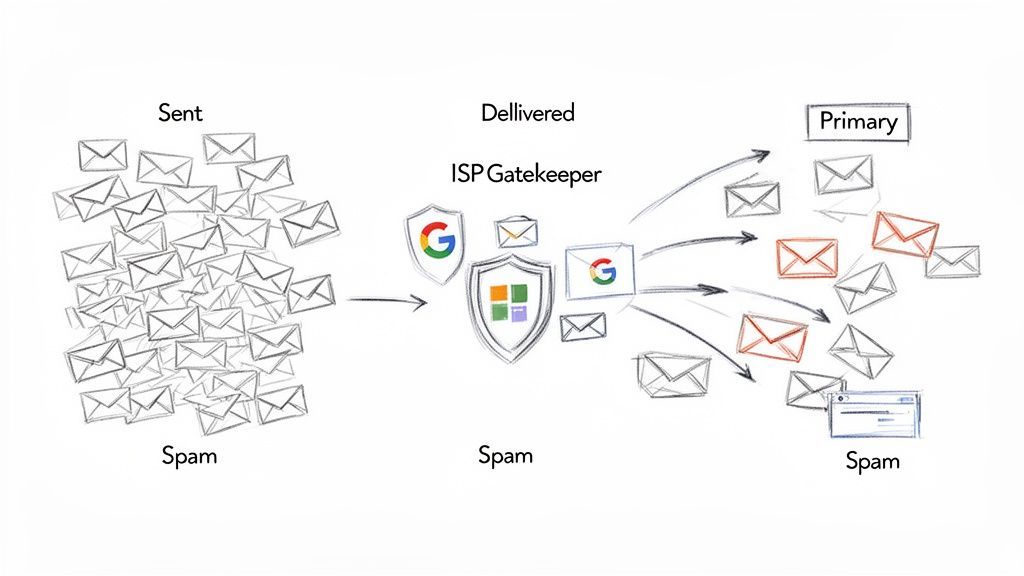
The big takeaway here is that most unsolicited emails are dead on arrival. Your outreach has to be nearly perfect just to make it through the first set of gates.
"Email deliverability is not a one-time fix; it's an ongoing practice of building and maintaining trust with mailbox providers. Every email you send either builds or erodes that trust."
Getting these foundational pillars right isn't just a technical chore—it's the difference between connecting with high-value prospects and having your messages vanish without a trace. The rest of this guide is an actionable playbook designed to tackle each of these areas, ensuring your outreach has the best possible chance of being seen, opened, and acted upon.
Building Your Technical Foundation for Trust
Before you even think about writing a killer subject line, you have to prove to mailbox providers like Gmail and Outlook that you are who you say you are. This isn’t about being friendly; it’s a technical handshake that stops fraudsters from impersonating your domain.
Getting this foundation right is a non-negotiable first step. It’s the difference between your emails landing in the inbox and getting flagged as suspicious from the jump.
This technical trust is built on three core authentication protocols: SPF, DKIM, and DMARC. Think of them as your domain's passport, signature, and security policy, all working together. Setting them up is a one-time task that pays dividends on every single email you send.
Demystifying the Authentication Trio
Let's cut through the jargon. While the acronyms sound complex, their roles are distinct and surprisingly straightforward. Each one adds another layer of verification that mailbox providers are actively looking for.
SPF (Sender Policy Framework): This is a public list of all the servers authorized to send email on your domain’s behalf. When an email arrives, the receiving server checks your SPF record. If the sender isn't on the approved list, it’s an immediate red flag.
DKIM (DomainKeys Identified Mail): This acts like a digital, tamper-proof seal. A unique, encrypted signature gets added to your email's header. The receiving server uses a public key from your DNS to verify that signature, confirming the message wasn't altered in transit.
DMARC (Domain-based Message Authentication, Reporting & Conformance): DMARC is the enforcer. It tells receiving servers what to do if an email fails the SPF or DKIM check. You can instruct them to quarantine the message, reject it outright, or do nothing. It also sends back valuable reports on who is trying to send email from your domain.
These protocols are the bedrock of modern email security. Here’s a quick breakdown of what they do and why you can’t afford to ignore them.
Understanding Email Authentication Protocols
This table breaks down the three essential technical records, their purpose, and what happens when they are missing.
| Protocol | What It Does | Impact If Missing |
|---|---|---|
| SPF | Verifies that the sending server is authorized to send emails for your domain. | Unapproved servers can send emails appearing to be from you, leading to spoofing and phishing attacks that damage your reputation. |
| DKIM | Adds a unique digital signature to your email, proving it hasn't been altered. | Your messages can be intercepted and changed without detection, and mailbox providers will view them with high suspicion. |
| DMARC | Instructs receiving servers on how to handle emails that fail SPF or DKIM checks. | You have no control over spoofed emails and no visibility into who is attempting to impersonate your domain. |
Without these records properly configured, you’re basically telling mailbox providers that you haven’t secured your domain, making it easy for them to route your legitimate emails straight to the spam folder.
Why a Custom Tracking Domain Matters
Once your authentication is solid, there's one more piece to the puzzle: the custom tracking domain.
Many email platforms use generic domains to track opens and clicks. The problem? Those shared domains are often used by spammers, too, creating guilt by association. Your domain’s reputation gets dragged down by someone else’s bad practices.
A custom tracking domain aligns your tracking links with your own brand (e.g., link.yourcompany.com instead of link.generictracker.com). This small change has a huge impact. It instantly builds more trust with ISPs and looks far more professional to your recipients, which can significantly boost click-through rates.
Managing these technical elements is a critical part of a successful outreach strategy. For those looking to streamline their workflows further, understanding the benefits of a robust CRM integration with Gmail can help connect your sales activities with your email efforts seamlessly.
Getting your technical house in order is the single most important thing you can do to influence your deliverability. It’s the bedrock upon which your entire email strategy is built. Without it, even the best content and cleanest lists will fail.
Mastering Sender Reputation and Domain Warmup
Think of your sender reputation as a credit score for your email domain. It's the first thing mailbox providers like Google and Microsoft check to decide if you're trustworthy. A great score gets you a direct flight into the primary inbox. A low score? You’re sent straight to spam, no questions asked.
This isn't a single number, either. It’s a complex picture painted by your domain's entire history and how you send emails.
If you’re firing up a brand-new domain or email account, you’re starting with a blank slate—zero reputation. Blasting out hundreds of emails on day one is like a stranger walking into a bank and demanding a massive loan. It’s an instant red flag that screams "spammer!" You have to build that trust, slowly and deliberately.
The Domain Warmup Playbook
That process of building initial trust is what we call domain warmup. It's all about gradually increasing your sending volume over several weeks, proving to the big Internet Service Providers (ISPs) that you’re a legitimate sender. Honestly, rushing this is the single biggest—and most costly—mistake new outbound teams make.
A proper warmup conditions your new domain and IP address, showing the algorithms that you engage in positive sending behavior. The goal is simple: generate as many positive signals as possible (opens, clicks, and especially replies) while keeping negative signals like bounces and spam complaints near zero.
Here’s a practical way to approach your domain warmup:
- Start Small and Slow: In the first week, send just 10-20 emails a day. These shouldn't be cold outreach. Send them to trusted colleagues, friends, or warm contacts you know will open and reply.
- Gradually Increase Volume: After week one, you can start upping your daily volume by about 20% each day. This slow, steady ramp-up looks natural and non-threatening to ISPs.
- Focus on Engagement: Your main goal during warmup isn't booking meetings; it's getting replies. Ask questions, send something genuinely valuable, and do whatever you can to spark a conversation. Positive engagement is the currency of reputation.
- Monitor Your Metrics: Keep a sharp eye on your open rates, reply rates, and bounce rates. If you see opens suddenly plummet or bounces spike, hit the brakes on your volume increase and figure out what’s wrong.
This slow-and-steady approach is non-negotiable. While it might feel like a drag, a solid 4-8 week warmup period lays the foundation for long-term deliverability and success for years to come.
This diagram shows how the technical pieces we covered earlier—SPF, DKIM, and DMARC—are the very first step in this trust-building exercise.
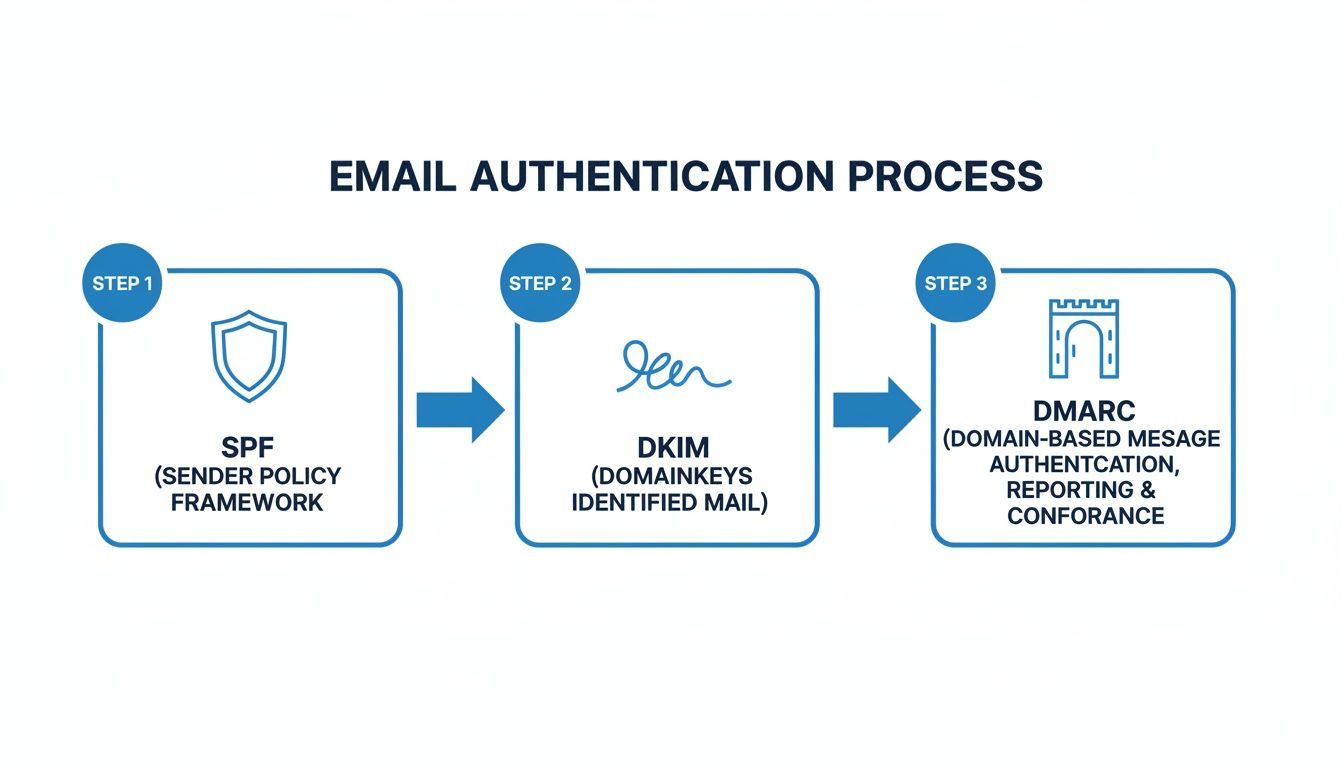
Each protocol acts as a checkpoint, validating your identity and securing your message. Without them, you can't even begin to build a positive sender reputation.
Protecting Your Hard-Earned Reputation
Once your domain is warmed up, the work isn't over. Not by a long shot. Maintaining a high sender reputation is an ongoing job. Mailbox providers are always watching, and just a couple of bad campaigns can destroy weeks of careful work.
Your reputation is actually tied to two different things: your IP reputation and your domain reputation. While they're linked, they aren't the same. Your IP reputation is connected to the server sending your mail, whereas your domain reputation is tied directly to your brand. Both are absolutely critical.
To keep your reputation in good standing, you have to monitor it. Tools like Google Postmaster Tools give you invaluable, direct feedback from Gmail about your domain’s health, including your spam rate, IP and domain reputation scores, and authentication status.
Think of your sender reputation as a garden. It takes time and effort to cultivate, but just a little neglect can let the weeds take over. Proactive monitoring and consistent best practices are the only way to keep it healthy.
If you find your reputation has taken a hit—maybe from a bad list or a campaign that just didn't land right—don't panic. Recovery means going back to basics. Drastically cut your sending volume, focus only on your most engaged contacts, and work on generating those positive signals again to rebuild trust with the ISPs.

Find verified contact data on LinkedIn®
Add to CRM finds verified emails, phone numbers, and job titles on LinkedIn® — then adds them to your CRM in one click.
Start Free Trial


 Trusted by 2,500+ users4.7
The Art of List Hygiene and Real-Time Verification
You can have perfect technical authentication and a stellar sender reputation, but one thing will still sabotage your deliverability: a dirty email list.
Your contact list is a living asset, but it decays surprisingly fast. Industry data shows that B2B data degrades at a rate of over 20% per year as people change jobs, abandon old emails, or opt-out.
Sending campaigns to invalid, outdated, or unengaged email addresses is the fastest way to wreck your sender score. High bounce rates and low engagement scream to mailbox providers that you aren't paying attention to your audience, which makes you look like a spammer. This is why proactive list hygiene isn't just a best practice; it's a foundational pillar of any successful outbound strategy.
Moving Beyond Occasional List Cleaning
Historically, teams would perform a "list cleaning" once or twice a year, running their entire database through a bulk verification service. While that’s better than nothing, this reactive approach means you’re still sending to bad contacts for months at a time, continuously chipping away at your reputation.
The modern solution is to shift from occasional purges to continuous, real-time verification.
This means checking every single email address at the point of capture—before it ever enters your CRM or your outreach sequence. By integrating a verification tool directly into your workflow, you prevent bad data from ever polluting your list in the first place.
This is exactly how a tool like Add to CRM operates, embedding verification and enrichment right where you work.
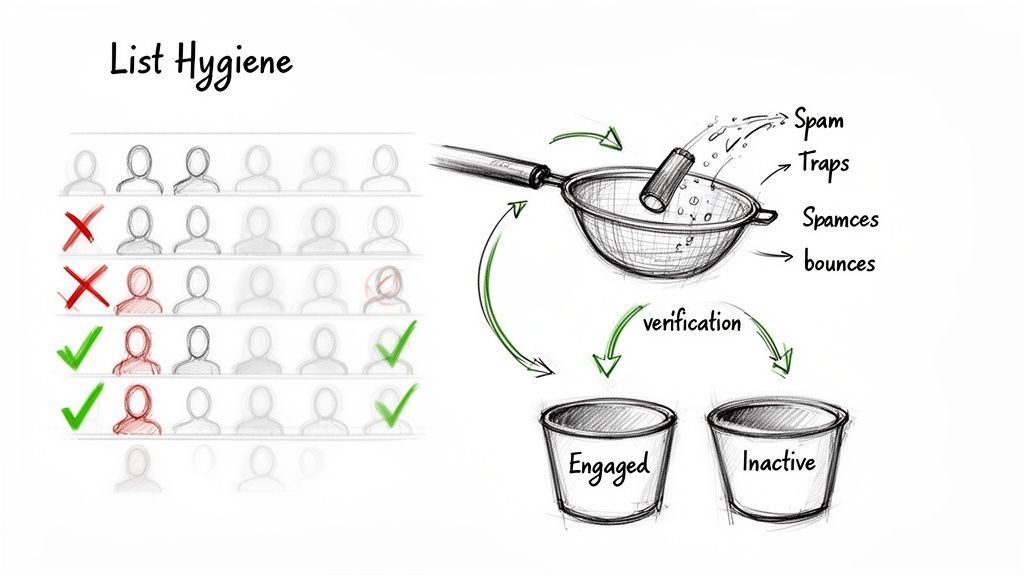
By building verification into your daily tools, you make list hygiene an automatic, proactive habit rather than a reactive chore.
Proactive Strategies for a Pristine List
Maintaining a clean list involves more than just checking for valid syntax. A truly healthy list is free of bounces, spam traps, and disengaged subscribers. If you need a deeper dive into the mechanics, our complete guide on how to verify email addresses covers various methods in detail.
Here are the key areas to focus on for continuous list hygiene:
Handle Bounces Immediately: Every bounce is a direct signal to ISPs. You must differentiate between hard and soft bounces and have a clear policy for both.
- Hard Bounces: These are permanent failures, usually from an invalid email address. Remove them from your list immediately and permanently. No exceptions.
- Soft Bounces: These are temporary failures, like a full inbox or a server issue. It's okay to retry a few times, but if an address consistently soft-bounces, it's time to let it go.
Watch Out for Spam Traps: These are email addresses used by anti-spam organizations to identify senders with poor list-building practices. Hitting even one can get you blacklisted.
- Pristine Traps: Email addresses that were never valid and were created solely to catch spammers.
- Recycled Traps: Old, abandoned email addresses that have been reactivated to monitor for unwanted mail.
A clean list isn't a one-time task; it's the engine of a healthy outbound strategy. The quality of who you send to matters far more than the quantity. Prioritizing data integrity ensures your messages are wanted, seen, and acted upon, directly impacting your ability to generate pipeline.
Segmenting Based on Engagement
Finally, not every valid email address is worth keeping on your primary sending list.
A large segment of unengaged subscribers—people who never open or click your emails—can slowly poison your sender reputation over time. ISPs see this lack of interaction as a negative signal.
Implement an engagement-based segmentation strategy. Create segments for your most active subscribers and prioritize sending to them. For those who haven't engaged in a set period (say, 90 days), move them to a re-engagement campaign or suppress them from regular mailings entirely. This simple practice keeps your engagement rates high and demonstrates to mailbox providers that you’re sending content people actually want.
Crafting Content That Avoids Spam Filters
You can have the most buttoned-up technical setup and the cleanest email list on the planet, but one thing can still torpedo your entire effort: your content.
The words you choose, your subject line, and even how you format your message are all under a microscope. Spam filters are incredibly sophisticated algorithms trained on billions of emails, and they've gotten very good at spotting the patterns of unsolicited or shady messages.
A single poor choice—an aggressive sales phrase, a misleading claim, a sloppy design—can undo all your hard work on authentication and list hygiene. The goal is to write something that's compelling to your reader but completely non-threatening to their mailbox provider. It’s a balancing act.
Ditch the Common Spam Trigger Words
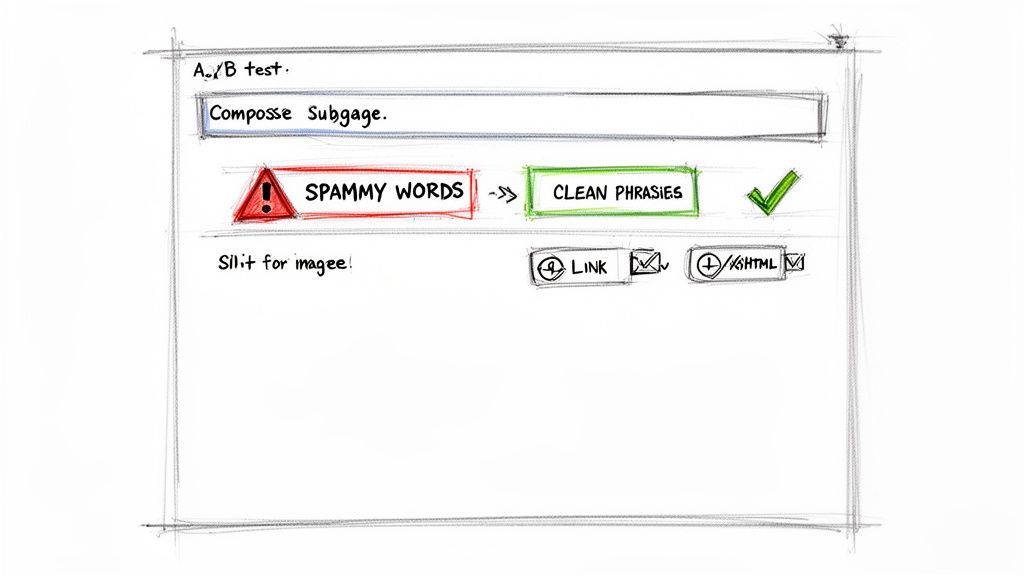
Certain words and phrases have been so abused by spammers that they now act like magnets for the junk folder. While context is everything, peppering your emails with these terms is like waving a giant red flag.
They usually fall into a few familiar buckets:
- False Urgency: Think "Act now," "Limited time," or "Don't delete." These phrases mimic common phishing tactics and put filters on high alert.
- Money & Gimmicks: Words like "Free," "Cash," "$$$," "Lowest price," and "No fees" are classic spam indicators, especially crammed into a subject line.
- Over-the-Top Promises: If it sounds too good to be true, it probably is. "Amazing," "Guaranteed," "Miracle," or "Risk-free" just scream spam.
- Sloppy Formatting: USING ALL CAPS, way too many exclamation points (!!!), or weird symbols (FRE*E) is the hallmark of an amateurish, spammy email.
The fix? Swap out that high-pressure language for clear, value-driven copy. Instead of shouting, "Buy now for a 50% discount," try a calmer approach like, "See how [Your Solution] helps teams like yours." Focus on solving their problem, not on making the sale.
Best Practices for Links, Images, and HTML
The structure of your email is just as important as the words inside it. A poorly coded or designed message not only looks bad but can also trigger filters and lead to a flood of spam complaints.
Your email's layout should scream "professional and trustworthy." A clean, balanced design with clear links and minimal images tells both readers and mailbox providers that you're legitimate. Anything that feels deceptive or clunky will raise suspicion.
Keep these simple formatting rules in mind:
- Watch the Text-to-Image Ratio: An email that's just one giant image is a massive spam red flag. There's no text for filters to read, so they assume you're hiding something. Aim for a healthy 80% text to 20% image ratio.
- Use Descriptive, Trustworthy Links: Avoid generic link shorteners. They’re a favorite tool of phishers. Link directly to your domain or a branded tracking domain so people know exactly where they’re going.
- Keep Your HTML Clean: Messy, bloated code can cause major rendering issues across different email clients and can get flagged. Stick to web-safe fonts and simple, responsive layouts.
- Always Include a Plain-Text Version: This is non-negotiable. Some clients or user settings block HTML, and not having a plain-text alternative is an old-school spam signal.
For a deeper dive into building campaigns that genuinely connect with prospects, check out our guide on using email marketing to generate leads.
A/B Test Your Way to the Inbox
When in doubt, test. A/B testing isn't just for CRO wizards trying to bump up conversions; it's one of the best tools you have for improving deliverability. By systematically testing different elements, you can discover what your audience responds to and what the spam filters will let through.
Just be sure to test one thing at a time. Pit a direct, no-nonsense subject line against a more creative one. Try an email with a GIF versus one that's text-only. Then, watch your open rates, clicks, and—most importantly—your inbox placement for each version. This data-driven approach takes the guesswork out of the equation, helping you find that sweet spot between compelling content and killer deliverability.
Works with 29+ CRMs
Add to CRM finds verified emails, phone numbers, and job titles on LinkedIn® — then adds them to your CRM in one click.
Start Free TrialTrusted by 2,500+ users4.7Monitoring and Troubleshooting for Long Term Success
Getting your email deliverability into a good place isn't a "set it and forget it" task. It’s an ongoing process that demands consistent monitoring and a bit of detective work when things go sideways.
Staying on top of your metrics allows you to spot trouble early, long before it can do any real damage to your sender reputation. This turns deliverability from a reactive headache into a strategic advantage, making sure your pipeline stays full and your outreach lands with impact.
Key Metrics to Track Constantly
To keep a pulse on your email health, you need a dashboard—even a simple one—that tracks a handful of critical metrics. Think of these numbers as the vital signs of your relationship with mailbox providers like Google and Microsoft. A sudden change is a clear signal that something needs your immediate attention.
You should be keeping a close eye on these core data points for every single campaign you send:
- Inbox Placement Rate: This is the ultimate measure of success. It tells you what percentage of your emails are actually landing in the primary inbox, not just getting "delivered" to a spam folder or promotions tab.
- Spam Complaint Rate: This is the most dangerous metric. A rate climbing above 0.1% is a massive red flag for ISPs and a fast track to getting your domain blacklisted.
- Hard Bounce Rate: A high hard bounce rate (anything over 2% is concerning) screams that your list hygiene needs work. As we've covered, these invalid addresses have to be removed immediately.
- Open and Reply Rates: While tons of factors can influence these, a sudden, sharp drop in open rates is often the very first sign of a budding deliverability problem.
"Your email metrics are a direct conversation with mailbox providers. A sudden drop in open rates or a spike in bounces isn't just data—it's feedback telling you that something in your strategy needs to change, fast."
A Quick Troubleshooting Framework
When you spot a problem in your dashboard, don't panic. Just work through a logical process to find the root cause. A sudden drop in performance is rarely random; it's almost always tied to something you recently changed.
Start by asking these questions to diagnose the issue:
- Did we change our content? As a quick test, send a simple, plain-text email with no links or images. If its deliverability is significantly better, you know your content is the likely culprit.
- Are we on a blacklist? Use a free tool to check if your sending domain or IP has been flagged. If you find yourself on a list, you'll need to follow that specific service's delisting process.
- Was a new list recently added? If you just uploaded a new batch of contacts and your bounce rate shot through the roof, you've found your problem. Stop sending to that list and re-verify it immediately before trying again.
By regularly monitoring these key areas, you can sustain the high deliverability you've worked so hard to build, ensuring your messages consistently reach the people they're meant for.
Frequently Asked Questions
Even with a solid playbook, questions always come up when you're working to improve email deliverability. Here are quick answers to some of the most common ones we hear from B2B teams.
How Long Does It Take to Warm Up a New Email Domain?
Warming up a new email domain is a marathon, not a sprint. You should budget anywhere from 4 to 8 weeks for the process. Patience is absolutely critical here.
The whole point is to build trust with mailbox providers, which means starting with a tiny sending volume—think 10-20 emails per day—and increasing it slowly and consistently. If you rush it, you'll get flagged as spam before you even get started. Speed is your enemy; consistency is your friend.
What Is the Difference Between a Hard Bounce and a Soft Bounce?
Getting your head around bounces is non-negotiable for keeping your sender reputation clean.
- A hard bounce means permanent failure. The email address is invalid, doesn't exist, or the server has flat-out blocked you. These need to be removed from your list immediately. No exceptions.
- A soft bounce is a temporary problem. The recipient's inbox might be full, or their server could be down for a moment. You can try sending again later, but if an address keeps soft bouncing, it's best to investigate or remove it.
Think of it this way: a hard bounce is a "return to sender, address unknown" message. It’s a dead end. A soft bounce is more like a "recipient is temporarily unavailable" notice—just a temporary roadblock.
Can Using Too Many Images in My Email Hurt Deliverability?
Yes, absolutely. An email with a high image-to-text ratio is a classic spam filter trigger. Spammers have a long history of hiding shady text inside a single large image to sneak past filters, so mailbox providers are naturally suspicious of image-heavy messages.
A good rule of thumb is to aim for a healthy balance, somewhere around 80% text and 20% images. And always, always include descriptive alt text for your images and make sure they're optimized to load quickly. This not only helps with deliverability but also makes your emails more accessible.
Ready to stop worrying about deliverability and start building a cleaner, more effective pipeline? Add to CRM offers real-time email verification and enrichment to ensure every contact you add is valid and valuable. Get started for free on addtocrm.com.
Start saving time and closing more deals.
Find verified contact info for your prospects on LinkedIn®, Gmail and Outlook — and add them to your CRM with 1-click.

 Loading...Trusted by 2,500+ founders, SDRs & more