A Practical Guide on How to Verify Email Addresses
Learn how to verify email addresses to boost deliverability and protect your sender reputation. A practical guide for cleaning your email lists effectively.
Let's get straight to the point—knowing how to verify email addresses is no longer a "nice-to-have." It's a fundamental part of any serious email strategy. The methods really boil down to three main buckets: quick manual checks, automated validation using SMTP and APIs, and just letting a dedicated third-party service handle it all for you. This isn't just about tidying up your data; it's about making sure your message actually gets seen.
Why Email Verification Is a Must-Have for Your Business
Sending an email into the void is more than just a wasted click. It actively damages your business. Every single "hard bounce" from an invalid address tells email providers like Gmail and Outlook that you aren't managing your lists well. This torpedoes your sender reputation, making it much more likely that your future campaigns land in the spam folder, even for your legitimate contacts.
This isn't some minor technicality. A poor sender score leads to lower open rates, fewer clicks, and ultimately, lost revenue. For sales teams, it means that critical proposal you sent might never even reach your prospect's inbox. For marketers, it means that newsletter you spent a week perfecting goes completely unread.
The Real Cost of a Dirty Email List
The damage from a messy email list goes way beyond just deliverability metrics. Think of a clean list as the foundation of your entire communication strategy.
An unverified list is almost always full of junk, including:
- Typos and Syntax Errors: Simple mistakes that we all make, like
jane.doe@gamil.cominstead of@gmail.com. - Disposable or Temporary Addresses: Used by people to grab a freebie or sign up for a trial without giving you a real way to follow up.
- Inactive or Abandoned Accounts: Addresses from folks who've switched jobs or simply don't use that email anymore.
- Spam Traps: These are the real killers. They're email addresses used by blacklist providers specifically to catch and block senders with poor list hygiene.
Hitting any of these not only tanks your credibility but also wastes time and money. Every email sent to a dead address costs you, whether it's through your email service provider's fees or the hours your team spends cleaning up bounce notifications.
A clean email list is the bedrock of successful digital communication. It ensures your message has the best possible chance of being delivered, seen, and acted upon, maximizing ROI and protecting your brand's reputation.
The Growing Importance of Verification Technology
The industry is waking up to this reality. The global market for email verification tools is exploding, which tells you just how seriously businesses are taking data quality. Projections show the email verification software market is expected to hit USD 1.07 billion by 2029, a huge jump driven by the need for better deliverability and tightening privacy regulations.
This trend is a clear signal: companies are investing in the right tools to protect their sender reputation and stay compliant. You can dig into the full email verification market report to see the data for yourself.
Ultimately, learning how to verify email addresses is a proactive move. It takes your email strategy from a game of chance to a calculated, data-driven operation. It's about making sure your efforts create real connections, not just a climbing bounce count. Get this first step right, and every campaign that follows will have a much better shot at success.
Your First Line of Defense with Manual Email Checks
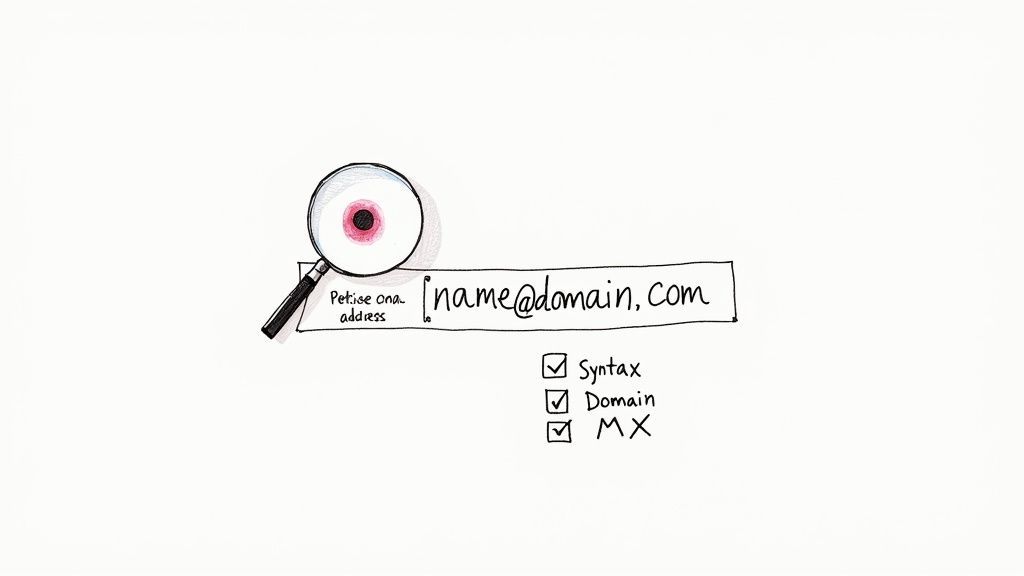
Before you even think about automated tools, you can catch a surprising number of bad emails with a quick eyeball test. Think of it as your essential first pass—a simple, free way to weed out the obvious errors that cause immediate hard bounces.
Getting good at these manual checks is a foundational skill. These first steps are surprisingly powerful, focusing on two things: the email's structure (its syntax) and whether the domain it belongs to is even real. Get these right, and you're already ahead.
Spotting Common Syntax Errors
At its core, every valid email address follows the local-part@domain format. The "local-part" is the username, and the "domain" is where the mailbox lives. But a ton of common typos and mistakes can break this simple structure.
You're looking for more than just a missing "@" symbol. Keep an eye out for subtle but frequent errors that will get an email rejected instantly.
Here are a few red flags I see all the time:
- Illegal Characters: Parentheses, commas, colons, and brackets
( ) , : ; < > [ ] \don't belong in an email. An address likejohn(doe)@example.comis a definite no-go. - Consecutive or Trailing Dots: An address like
jane..doe@example.comorjanedoe.@example.comis just not valid and will always fail. - Spaces Where They Shouldn't Be:
john doe@example.comis a classic copy-paste mistake. That single space makes the whole thing unusable. - Missing Top-Level Domain (TLD): An address like
contact@mybusinessis incomplete. It needs a.com,.org, or another valid TLD to work.
Spotting these is your first and easiest win. Correcting a simple typo like contact@gamil.com to contact@gmail.com can be the difference between a bounce and a conversation.
Confirming the Domain is Real and Ready
An email address with perfect syntax is completely useless if the domain doesn't exist or isn't set up to receive email. This is the second crucial part of your manual check, and it can save you from sending messages straight into a black hole.
First, just use your gut. Does the domain look legitimate? An address like sales@amaz0n-support.biz should immediately make you suspicious. A quick Google search for the domain can confirm if the company is real.
Beyond that, you need to know if the domain even has a mail server. This is where a Mail Exchange (MX) record check comes in. An MX record is a special DNS entry that tells the internet where to deliver emails for that specific domain. No MX record means no email delivery, period.
Key Takeaway: An email can have perfect syntax, but if its domain has no MX record, it's a dead end. Verifying the domain's mail server is just as important as checking for typos.
You don't need to be a network wizard to do this. Free online tools like MXToolbox or Google's Admin Toolbox let you pop in a domain and see if it has valid MX records. If the tool comes back with "No MX records found," you can be 99% sure that any email at that domain is invalid. This simple check takes seconds but prevents a guaranteed hard bounce, protecting your sender reputation.
To make this even easier, I've put together a quick checklist you can use.
Manual Verification Checklist
Here’s a quick reference table to help you remember what to look for when you're doing a quick visual inspection of an email list.
| Check Type | What to Look For | Example of an Error |
|---|---|---|
| Syntax Check | Illegal characters, misplaced dots, spaces, or missing components. | info..company@examplecom |
| Domain Validity | Obvious misspellings or unprofessional-looking domain names. | sales@microsft.com |
| MX Record Check | Using a free online tool to confirm the domain can receive email. | A domain with "No MX Records found." |
Running through these simple checks before you send a single email will drastically cut down on your initial bounce rate and set you up for much better deliverability down the line.

Find verified contact data on LinkedIn®
Add to CRM finds verified emails, phone numbers, and job titles on LinkedIn® — then adds them to your CRM in one click.
Start Free Trial


 Trusted by 2,500+ users4.5
How Automated Verification Works with APIs and SMTP
Once you move past manually spot-checking emails, your verification strategy can finally scale. When you’re staring down a list of hundreds or thousands of contacts, automation isn't just nice to have—it's the only way forward. This is where the real magic happens, using tools and protocols that work behind the scenes to give you a clear "yes" or "no" on an email's validity.
The whole process really boils down to two key pieces of tech: the Simple Mail Transfer Protocol (SMTP) and Email Verification APIs. When they work together, they can figure out if a mailbox actually exists without ever sending an email.
The SMTP Handshake Explained
At its core, automated verification mimics the very first steps of sending an email. We often call this an "SMTP handshake" or a "ping." Think of it like calling a company's main line to ask if a specific employee works there, but you hang up the moment you get a "yes" or "no," before the call is ever transferred.
Here's a quick rundown of how that works:
- First, the verification tool finds the right mail server for the email's domain by looking up its MX records.
- Next, it connects to that server and starts a "conversation," introducing itself just like your own email client would.
- Then comes the critical question: it asks the server, "Do you have a mailbox for
contact@example.com?" - Finally, it gets an answer. The server replies with a code. If the mailbox is real, it basically says, "Yep, I can accept a message for this user." If not, it returns an error like "User unknown."
The verification tool logs the response and immediately closes the connection without sending a thing. The entire exchange happens in milliseconds, giving you a direct answer from the one source that knows for sure—the server that would have received your email.
Using Email Verification APIs for Real-Time Checks
While the SMTP handshake is the engine, an Email Verification API is the dashboard that makes it all usable. An API (Application Programming Interface) is just a bridge that lets different software programs talk to one another. For our purposes, it lets you plug a powerful verification service directly into your own tools, like a website signup form or your CRM.
Honestly, integrating an API is the single most effective way to stop bad data before it even starts. When a new user types their email into a form on your site, the API instantly shoots that address over to the verification service. The service runs all its checks—syntax, domain, and the SMTP handshake—and sends back a result in a fraction of a second.
By placing an API at your primary entry points, you create a gatekeeper for your database. This proactive approach prevents invalid, misspelled, and disposable emails from ever being stored, ensuring your list stays clean from day one.
This real-time feedback loop is incredibly powerful. It lets you prompt a user immediately if they made a typo—for instance, suggesting gmail.com when they absentmindedly typed gamil.com. This simple interaction drastically improves both data quality and the user experience. To get this set up, you'll need a key from your verification provider. If you're new to APIs, our guide on how to find API keys will walk you through the basics.
Beyond a Simple Valid or Invalid Status
Modern verification APIs do a lot more than just give a thumbs-up or thumbs-down. They deliver a rich data profile for each email, helping you assess its quality and potential risk. With global email traffic blowing past 347 billion messages per day, even a tiny percentage of bad addresses can create huge deliverability headaches. Advanced verification gives you the nuance to manage this, and many services report bounce rate reductions between 50%–90%. You can dig into the economic impact by exploring the latest email verification tools market data.
These tools will often sort emails into several useful categories:
- Role-Based Accounts: These are your
info@,support@, orsales@addresses. They're usually valid, but they often have low engagement and can sometimes get flagged by marketing platforms. - Disposable Domains: The API sniffs out addresses from temporary email providers like Mailinator. These are used to avoid real signups and should almost always be blocked.
- Catch-All Servers: Some domains are configured to accept email for any address, which makes it impossible to confirm a specific mailbox with an SMTP check. The API will flag these as "risky" or "unverifiable," letting you decide whether to take the chance.
- Spam Traps: The best services maintain lists of known spam trap addresses. They'll alert you if one pops up on your list, helping you sidestep a catastrophic blow to your sender reputation.
Integrating Email Verification into Your Daily Workflow
Knowing how to verify an email is one thing. Actually putting that knowledge to work consistently is what separates a clean, high-performing list from a costly one. A powerful verification tool is only useful if it’s woven directly into your daily operations. The goal is to make data quality an automatic, background process, not a massive cleanup project you dread every quarter.
This is all about shifting from occasional spot-checks to building a self-sustaining system. When you automate verification at every touchpoint, you’re basically creating a protective layer around your most valuable asset—your contact database. It's about stopping bad data at the source and maintaining that list health for the long haul.
Block Bad Emails at the Source with Real-Time Verification
The single most effective way to keep your list clean is to prevent bad emails from ever getting on it in the first place. That’s where real-time verification on your website's signup forms, contact forms, and demo requests becomes completely non-negotiable.
By integrating a verification API, every email is checked instantly the moment someone hits "submit." If they make a common typo, like john.doe@gamil.com, the form can immediately prompt them with a suggestion: "Did you mean gmail.com?" This simple, helpful interaction doesn't just improve your data quality; it actually makes for a better, less frustrating user experience.
Behind the scenes, this real-time check is a sequence of lightning-fast, technical handshakes that figure out if an email is legit.
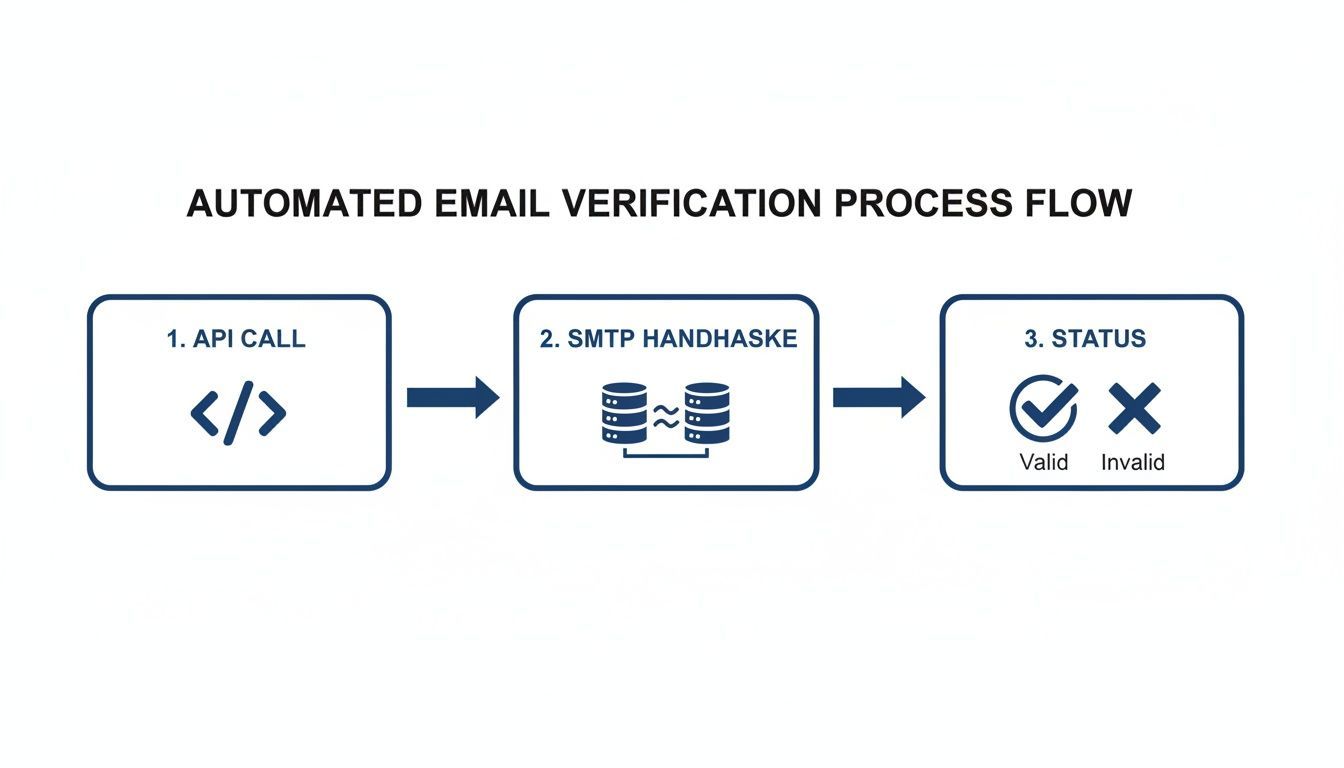
This flow shows how an API call triggers an SMTP handshake with the recipient's mail server to confirm the mailbox actually exists. It all happens in milliseconds, returning a clear "valid" or "invalid" status. This immediate feedback loop is what makes on-form verification so powerful—it validates contacts before they ever get saved.
The Importance of Regular Bulk List Cleaning
While real-time verification is your first line of defense for new signups, you still need a game plan for your existing database. Email lists aren't static; they decay naturally over time. In fact, B2B data degrades at a staggering rate of over 20% per year as people switch jobs, change roles, or just abandon old email accounts.
An email that was perfectly valid six months ago could easily be a hard bounce today. That’s why periodic bulk list cleaning is so critical for long-term list health.
Here’s a practical schedule most teams can stick to:
- Quarterly Cleaning: For most businesses, running your entire email list through a bulk verification service every three months is a solid best practice.
- Pre-Campaign Scrub: Always, always verify any list segment before you launch a major marketing or sales campaign. Sending to a freshly cleaned list maximizes your deliverability right when it matters most.
Think of bulk verification as preventative maintenance for your sender reputation. A single uncleaned list can lead to a high bounce rate, flagging your domain as a potential source of spam and putting all your future email sends at risk.
Automating Verification with CRM Integration
The final piece of the puzzle is connecting your verification service directly to your CRM or marketing automation platform. This closes the loop, ensuring that data quality is maintained across all your business systems, not just on your website.
Many verification services offer native integrations or can be hooked up with tools like Zapier. This kind of setup can trigger an automatic verification check whenever a new contact is added or updated in your CRM, no matter where it came from. For instance, a salesperson could add a new lead from a business card, and the system would instantly verify the email in the background without them lifting a finger.
This level of automation makes data hygiene a seamless, invisible part of your workflow. Instead of manually exporting and importing lists for cleaning, the process just happens on its own.
For teams looking to build more efficient prospecting workflows, our guide on CRM integration with Gmail offers practical tips for connecting your inbox directly to your contact database. This approach, combined with automated verification, ensures every single contact you add is accurate and ready for engagement from day one.
Digging into Advanced Verification and Staying Compliant
While most verification tools nail the easy stuff, you’ll quickly run into edge cases that need a smarter touch. Not every email address returns a simple “valid” or “invalid” verdict. The real expertise in email verification comes from knowing how to handle these gray areas—it's the key to keeping your list pristine without tossing out perfectly good leads.
Two of the biggest headaches you'll face are catch-all domains and disposable email addresses. Each one is a different kind of threat to your data quality and sender reputation. But with the right game plan, you can manage them instead of letting them derail your outreach. This is where you move from basic checks to advanced strategy.
The Catch-All Domain Dilemma
A catch-all server is set up to accept email for any address at a given domain, even if that specific mailbox doesn’t actually exist. This clever setup completely tricks a standard SMTP check. When a verification tool asks, "Hey, does this user exist?" the server always says yes, making it impossible to know for sure if the address is real.
So, sending to them feels like a gamble. Many are legitimate business emails, but a good chunk will bounce—just not right away. The server accepts the email initially and then sends a bounce notification hours or even days later, which can really hurt your sender score.
So, what’s the right way to handle them?
- Segment and Test. Don't just delete these contacts. The smart move is to tag them in your CRM as "risky" or "unverifiable." Then, when you do send to them, do it in small, isolated batches and watch the results closely.
- Trust Engagement Above All. The absolute best indicator of validity is user behavior. If someone with a catch-all address opens your email or clicks a link, that's your green light. You can now confidently mark that contact as valid.
- Lean on Risk Scoring. Most top-tier verification services provide a risk score for this very reason. An address from a well-known company's catch-all domain is a much safer bet than one from a sketchy-looking domain you’ve never heard of.
A catch-all address isn’t a dead end—it’s a signal to proceed with caution. Engagement data will always be more valuable than a simple verification status for determining if the lead is worth keeping.
Spotting and Blocking Disposable Emails
You know these—the temporary, throwaway accounts people use to grab a freebie or sign up for a trial without handing over their real email. They are pure list pollution. These addresses are often abandoned just moments after they're created, which means any email you send later is guaranteed to bounce.
Disposable emails add absolutely zero long-term value and just inflate your list with dead weight.
Luckily, this is one area where verification tools are incredibly effective. They maintain huge, constantly updated databases of domains that offer these throwaway services.
When your verification API flags an address as "disposable" on your signup form, your best move is to block it right there. Just display a friendly message asking the user for a permanent business or personal email instead. It’s a simple tactic that protects your list quality right at the source.
Keeping Your Data Clean and Compliant
Keeping your email list accurate isn’t just good for deliverability—it’s a fundamental part of data privacy and compliance. Regulations like the General Data Protection Regulation (GDPR) put a huge emphasis on data accuracy and respecting a user's consent.
Sending emails to invalid addresses could be interpreted as processing inaccurate personal data. Even more critically, when a user unsubscribes or asks you to delete their data, you have to be able to do it. A clean, verified list ensures you're only talking to people who want to hear from you, which is the foundation of ethical marketing.
Ultimately, maintaining an accurate database is a core responsibility. This means taking reasonable steps to get rid of or fix bad data, and email verification is a direct tool for that job. To learn more about these obligations, you can see how we approach it in our privacy policy. A commitment to verification is really a commitment to respecting your users.
Works with 29+ CRMs
Add to CRM finds verified emails, phone numbers, and job titles on LinkedIn® — then adds them to your CRM in one click.
Start Free TrialTrusted by 2,500+ users4.5Your Top Email Verification Questions, Answered
Jumping into email verification can feel like learning a new language. You'll run into terms like "hard bounce" and wonder just how often you really need to clean your list. We get it.
This section tackles the most common questions we hear. Think of it as your quick-reference guide to clearing up any confusion, so you can build your email strategy with confidence.
How Often Should I Verify My Email List?
The short answer? It depends on how fast your list is growing.
If you're getting new signups every day, the gold standard is real-time API verification. Slap it on every single form—newsletter signups, demo requests, you name it. This stops bad data from ever making it into your system in the first place.
For your existing database, a full scrub every three to six months is a smart move. Email addresses go stale faster than you'd think. Some studies show that over 20% of B2B contacts become invalid each year as people switch jobs or just abandon old inboxes. Regular cleanups are non-negotiable for keeping your sender reputation high and your emails out of the spam folder.
Can Email Verification Guarantee 100% Deliverability?
Nope. And you should run from any service that claims it can.
Email verification is incredibly effective at one crucial thing: slashing your hard bounce rate by weeding out invalid addresses. It’s a huge, essential piece of the deliverability puzzle.
But getting into the inbox involves a lot more than just a valid address. Other factors are always at play, including:
- The quality and relevance of your email content.
- Your domain's sending history and reputation.
- How engaged your recipients are (do they open, click, or reply?).
- The technical setup of your sending platform.
Think of verification as building a rock-solid foundation. It won't guarantee the house stands forever, but you can't build a sturdy one without it.
What Is the Difference Between a Hard Bounce and a Soft Bounce?
Knowing this difference is fundamental to good list hygiene.
A hard bounce is a permanent failure. The address is fake, misspelled, or the domain doesn't exist anymore. It’s a dead end. These emails need to be removed from your list immediately, no questions asked. Keeping them around will wreck your sender score.
A soft bounce is a temporary hiccup. Maybe the recipient's inbox is full, their company's server is down for maintenance, or your email file was too large. Most email platforms will try sending it again a few times. While a few soft bounces are normal, an address that keeps soft bouncing over several campaigns probably points to an abandoned account and should eventually be removed.
A hard bounce is a brick wall. A soft bounce is a temporary detour. Act decisively on the first and keep an eye on the second.
Is It Safe to Use an Email Verification Service with My Data?
With a reputable provider, absolutely. Data security should be their top priority.
When you're shopping around, look for clear signs they take your data privacy seriously. Check for a detailed privacy policy, explicit GDPR compliance, and specifics on how they handle and encrypt your information.
A trustworthy service will only use your list for the verification process—never sharing, selling, or renting your contacts. Before you upload anything, confirm they use secure, encrypted connections (like SSL/TLS) to protect your data while it's in transit. Your customer data is one of your most valuable assets; make sure you partner with a service that treats it that way.
Ready to stop guessing and start verifying? Add to CRM offers real-time email verification with 96% accuracy, ensuring every lead you capture is clean and deliverable. Turn any social profile into a verified CRM contact in one click and save hours every week. Try it for free at https://addtocrm.com.
Start saving time and closing more deals.
Find verified contact info for your prospects on LinkedIn®, Gmail and Outlook — and add them to your CRM with 1-click.

 Loading...Trusted by 2,500+ founders, SDRs & more