How to Find a Company Email Address With Proven Methods
Learn how to find a company email address with our guide. We cover proven methods, from manual searches to advanced tools, to help you connect with anyone.
Published on February 3, 2026
Finding a company email address boils down to two main paths: digging in manually with a bit of detective work, or letting automated tools do the heavy lifting for you. Both approaches work. But the real magic happens when you combine them—that’s how you turn cold prospects into warm conversations, fast.
Your Modern Playbook for Finding Company Emails
In B2B sales and marketing, a direct email is still the holy grail of outreach. It’s your ticket to bypass the social media noise and land your message right in front of the decision-makers you need to reach. While platforms like LinkedIn are fantastic for building a presence, email is where business actually gets done.
Think of this guide as your complete toolkit. We’re moving past the guessing games and into a repeatable process for confident outreach. I’ll walk you through the clever digital sleuthing and powerful software that top sales pros use every day to pinpoint the right contacts and start real business relationships.
Why Email Still Owns B2B Outreach
Despite all the new channels popping up, email isn't going anywhere. In fact, its grip on professional communication is only getting stronger. The global email user base is set to hit a staggering 4.6 billion users by 2025—that’s roughly 58% of the entire world's population.
This isn't just a vanity metric. It confirms that email is still the most direct and effective way to run B2B outreach, making verified contact data one of the most valuable assets any business can have.
To help you build that asset, we'll dive into a few core areas:
- Manual Search Techniques: How to use clever search operators and scan public sources for hidden contact info.
- Educated Guessing: A simple but effective trick for identifying common corporate email patterns to predict an address.
- Email Finder and Verification Tools: Using specialized software to automate the whole discovery and confirmation process. We actually have a whole guide on the best email finder tools you should check out.
- CRM Integration: Tying it all together by capturing and managing your contact data without the mind-numbing manual entry.
The most successful outreach campaigns begin long before you hit "send." They start with precise, diligent prospecting to ensure you're talking to the right person. Investing time in finding the correct email address dramatically increases your chances of getting a reply.
Let's start by looking at the different methods at your disposal. Some are quick and easy, while others require a bit more legwork.
Your Methods for Finding Company Emails at a Glance
Here’s a quick summary of the core techniques you'll learn in this guide, from manual sleuthing to automated tools.
| Method | Description | Best For |
|---|---|---|
| Manual Search | Using search operators and company websites to find publicly listed emails. | Finding emails for high-value targets when you have more time than budget. |
| Pattern Guessing | Deducing email formats (e.g., [email protected]) and testing them. | Quickly finding emails at companies with predictable naming conventions. |
| Email Finders | Automated tools that find and verify emails in seconds using vast databases. | Scaling your outreach and getting verified data with high accuracy, fast. |
| CRM Capture | One-click tools that grab contact data and sync it directly to your CRM. | Building clean, de-duplicated prospect lists directly into your workflow. |
By the end of this playbook, you'll have a repeatable process to stop wasting time on bounced messages and start building connections that actually move the needle for your business. Let's get started.
Mastering Manual Search Techniques
Before you spend a dime on fancy tools, it’s worth mastering the art of digital detective work. You’d be surprised how many email addresses are just sitting out in the open, waiting to be found—if you know how to look. Nailing these manual search skills is the bedrock of good prospecting; it makes every other method you use that much more effective.
Think of it like piecing together clues. A simple search can sometimes strike gold, but the real secret is using advanced search operators to cut through the noise. This is your first and most important step.
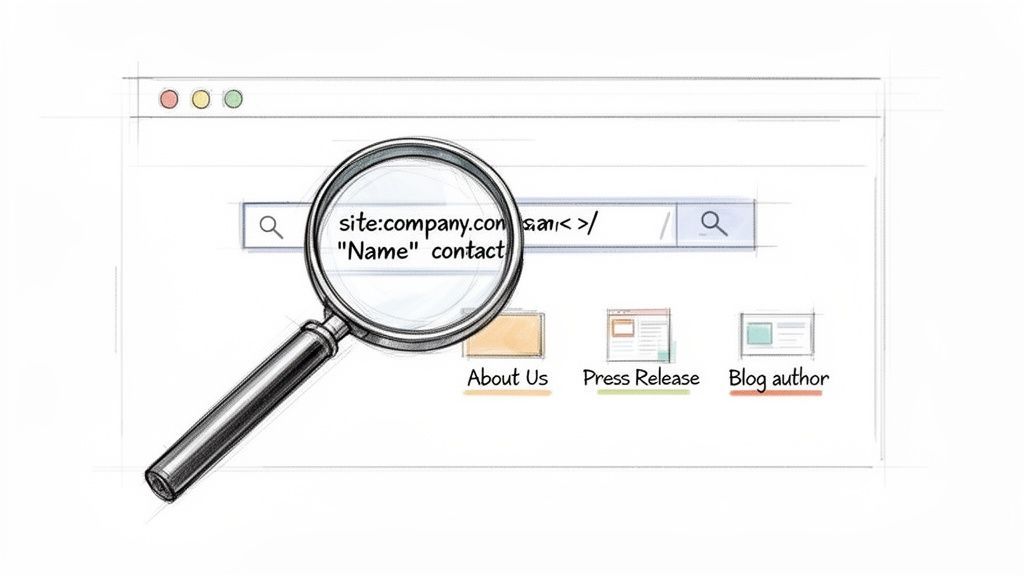
Uncovering Emails with Advanced Search Operators
Google is way more powerful than most people realize. With a few simple commands, called search operators, you can tell it exactly what to find and where to look, filtering out all the irrelevant junk.
For example, just putting a name in quotation marks (" ") tells Google to search for that exact phrase. When you combine that with the company’s name and keywords like “email” or “contact,” you often get an instant hit. You’re turning a broad search into a surgical strike.
Here are a few of my go-to search strings. Just swap out the bracketed info with your target’s details:
"[Name]" + "[Company]" + emailsite:[companydomain.com] + "[Name]" + contact"[Name]" + "press release""[Name]" + "author bio""[Company Name]" + "email format"
These queries tell the search engine to hunt for specific word combinations on a single website or across the web, seriously boosting your odds of finding the right contact info.
Pro Tip: Don't give up after the first page of results. I’ve found email addresses buried in old press releases, conference speaker bios from three years ago, and forgotten blog posts. A little extra digging almost always pays off.
Beyond the Search Engine
While search operators are a game-changer, your detective work doesn't stop there. Company websites are often treasure troves of information, though the gold isn't always in plain sight.
Of course, start with the obvious spots: the 'About Us,' 'Team,' or 'Contact' pages. Sometimes you get lucky. But if the direct email isn't listed, you need to start looking for clues that help you piece it together.
Think about other places contact details might be hiding:
- Press Releases: These often list a media relations contact. This gives you a confirmed, valid email and usually reveals the company’s standard email pattern.
- Blog Author Bios: If your prospect has ever written for the company blog, their bio might include their email address or social media handles.
- Case Studies or Whitepapers: Any downloadable content might list an author or contributor along with their contact info.
The goal here is to find just one valid email from the company. Once you have that—say, [email protected]—you can make a highly educated guess that your target's email is something like [email protected].
Ethically Scanning Social and Professional Networks
Professional networks are another fantastic resource. While you can always send a direct message, these platforms are also perfect for gathering intel. People frequently share their work, publications, and even links to personal blogs right in their profiles.
A profile might link out to a personal portfolio or website where an email address is listed publicly. Remember, you’re not digging for private information; you're just looking at what they’ve already decided to share. For a deeper dive, our guide on how to find someone on LinkedIn offers more strategies for ethical and effective research.
By combining these search techniques—advanced operators, website sleuthing, and profile scanning—you can build a rock-solid process for finding almost any company email address without spending any money.
The Art of the Educated Guess
So, your initial detective work came up empty. It happens. This is where you pivot from pure research to a bit of educated guesswork—a surprisingly powerful method when a company keeps its email addresses under wraps.
Most organizations use a standard formula for their emails. It keeps things tidy and predictable. If you can find just one valid email address from your target company, you've found the key to unlock their entire directory.
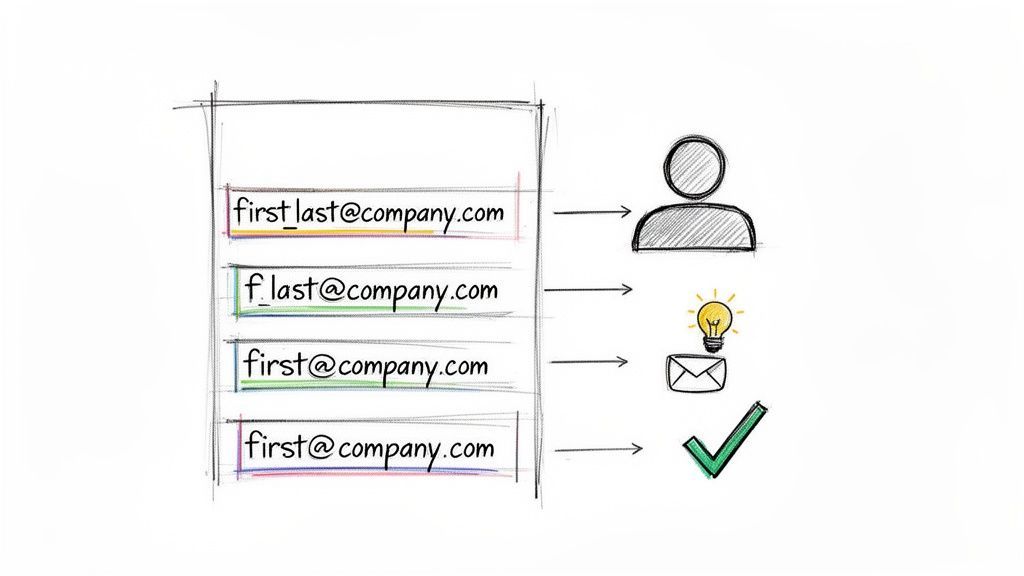
Uncovering the Common Patterns
Companies aren't trying to be cryptic; they just want a logical system. While there are tons of possible combinations, the vast majority stick to a handful of common patterns. Your job is to generate a shortlist of the most likely candidates.
Let's say you're looking for "Jane Smith" at acmecorp.com. Here are the formats you’ll see 90% of the time:
- First Name:
[email protected] - First Initial + Last Name:
[email protected] - First Name + Last Initial:
[email protected] - First Name . Last Name:
[email protected] - First Initial . Last Name:
[email protected]
The goal is to find one confirmed email from someone at the company. A generic address from a press release (
[email protected]) is a decent start, but an actual employee's email ([email protected]) is the real prize. It reveals the exact pattern they use for their people.
How to Generate and Test Your Guesses
Once you have a few potential patterns, you can build out a list for your specific contact. Imagine you're trying to reach John Doe at ExampleCorp, and you’ve already found a colleague’s email: [email protected].
Bingo. This strongly suggests the company uses the first initial . last name format.
Your best guess for John Doe is now [email protected]. Just to be safe, it's smart to generate a couple of other common alternatives, like [email protected] or [email protected].
But hold on. Do not fire off emails to all these addresses at once. This is called email blasting, and it's the fastest way to get your domain flagged as spam. Hitting multiple invalid addresses at the same company is a huge red flag for their mail server, torpedoing your sender reputation and ensuring nothing you send in the future will get through.
Why Email Verification Is Not Optional
This is precisely why email verification tools are so critical. These services check if an email address is valid without ever sending a message. It's a non-negotiable step that protects your reputation and keeps your outreach out of the spam folder.
Here’s what a verifier does behind the scenes:
- Syntax Check: First, it confirms the address is formatted correctly (
[email protected]). No typos. - Domain Check: Next, it makes sure the domain (
examplecorp.com) actually exists and is configured to receive email. - Server Ping: Finally, it communicates directly with the company's mail server and asks a simple question: "Does a user named
j.doeexist?" The server gives a simple yes or no, confirming the address without a single email being sent or delivered.
With a verification tool, you can safely test your list of guesses. You get a clear, definitive answer on which address is the right one, letting you move forward with total confidence. This simple check turns a shot in the dark into a confirmed contact and makes your entire outreach effort dramatically more effective.
When you’ve exhausted the manual search tricks and educated guesses, it’s time to call in the cavalry: email finder and verification tools. Let's be real—manual methods are fine when you're targeting a handful of VIPs, but they just don't scale. This is where the right software turns a tedious chore into a quick, automated win.
These tools do all the heavy lifting for you. Instead of you playing detective, they scour massive databases, connect the dots between data points, and often run live checks to hand you a confirmed email in seconds. For anyone serious about outreach, it’s not a question of if you should use them, but when.
Understanding Different Tool Types
The market is flooded with email finders, but they generally fall into a few camps. Each one is built for a slightly different workflow, whether you're a solo freelancer or a full-blown enterprise sales team.
- Browser Extensions: These are lightweight add-ons that live right in your browser. They often integrate directly with professional networking sites, letting you grab a contact's email with a single click while you’re on their profile. Perfect for quick, on-the-fly prospecting.
- Web Applications: Think of these as more robust platforms. You can upload entire lists of names and companies for bulk processing, making them ideal when you have a spreadsheet of leads that needs enriching.
- Sales Intelligence Platforms: These are the all-in-one powerhouses. They don't just find emails; they deliver a full dossier of company and contact data—phone numbers, tech stacks, org charts, you name it. Plus, they usually plug directly into your CRM.
The sheer volume of email is staggering. Projections show that 392.5 billion emails will be sent daily by 2026, which tells you just how noisy the average inbox has become. It's never been harder to get your message seen.
And when you do get through? Studies show the average person spends just 8 seconds scanning an email. Your accuracy and messaging have to be perfect from the get-go.
Data Enrichment vs. Real-Time Verification
This is a critical distinction every user needs to understand. Not all tools that spit out an email address are created equal, and knowing what's happening behind the curtain can save you from a sky-high bounce rate.
Data Enrichment is when a tool pulls an email from its own static database. It found and stored that information at some point in the past. While this is often fast, the data can get stale. People change jobs, and companies get acquired.
Real-Time Verification, on the other hand, is a live check. The moment you make a request, the tool pings the company's mail server to confirm that the address is active and can receive mail. This is the gold standard for accuracy.
The best tools actually do both. They’ll first check their database for a speedy result, then run a live verification to make sure the data is still good before handing it over. It’s a two-step process that gives you the best of both worlds: speed and reliability.
Before you invest in any tool, you have to get serious about protecting your sender reputation. A solid verification process is a non-negotiable part of modern outreach. You can dive deeper into how to verify email addresses to make sure your messages always land where they're supposed to.
Choosing Your Email Finder Tool
So, which tool is right for you? It really boils down to your specific needs, the volume you're working with, and your budget. A freelance consultant has completely different requirements than a 50-person sales team.
Here's a quick comparison to help you find the best fit for your workflow.
| Tool Type | Primary Function | Key Benefit | Example Use Case | | :--- | :--- | :--- | | Browser Extension | Finding single emails from social profiles. | Speed and convenience for on-the-fly prospecting. | An SDR finds a promising lead on a professional network and needs their email immediately. | | Bulk Finder | Processing lists of names and companies. | Efficiency for enriching existing lead lists at scale. | A marketing team preparing for an event needs emails for a list of 500 registered attendees. | | Sales Platform | Providing deep contact and company data. | Comprehensive insights and seamless CRM integration. | An Account Executive researching a key account to identify all decision-makers and their contact info. | | Verification Service | Confirming the validity of existing emails. | Protecting sender reputation by eliminating bounces. | A user cleans their existing email list before launching a major newsletter campaign. |
Ultimately, the smartest approach is an integrated one. A tool that finds an email, verifies it, and then seamlessly adds the new contact to your CRM—like Add to CRM—closes the loop perfectly. This simple step eliminates manual data entry errors and ensures your prospect data is always clean, accurate, and ready for outreach.
Integrating Email Finding into Your CRM Workflow
Finding a prospect's email address is just the first domino to fall. The real magic is what you do next. How you manage that new contact data is what separates a messy spreadsheet from a high-performance sales engine.
This is where your Customer Relationship Management (CRM) system becomes mission control. When you hook your email-finding process directly into your CRM, you eliminate mind-numbing manual work, sidestep costly data errors, and start to put your prospecting on autopilot.
This visual shows how it all connects—bridging the gap between spotting a lead on a professional network, enriching their data in your sales platform, and verifying their contact info.
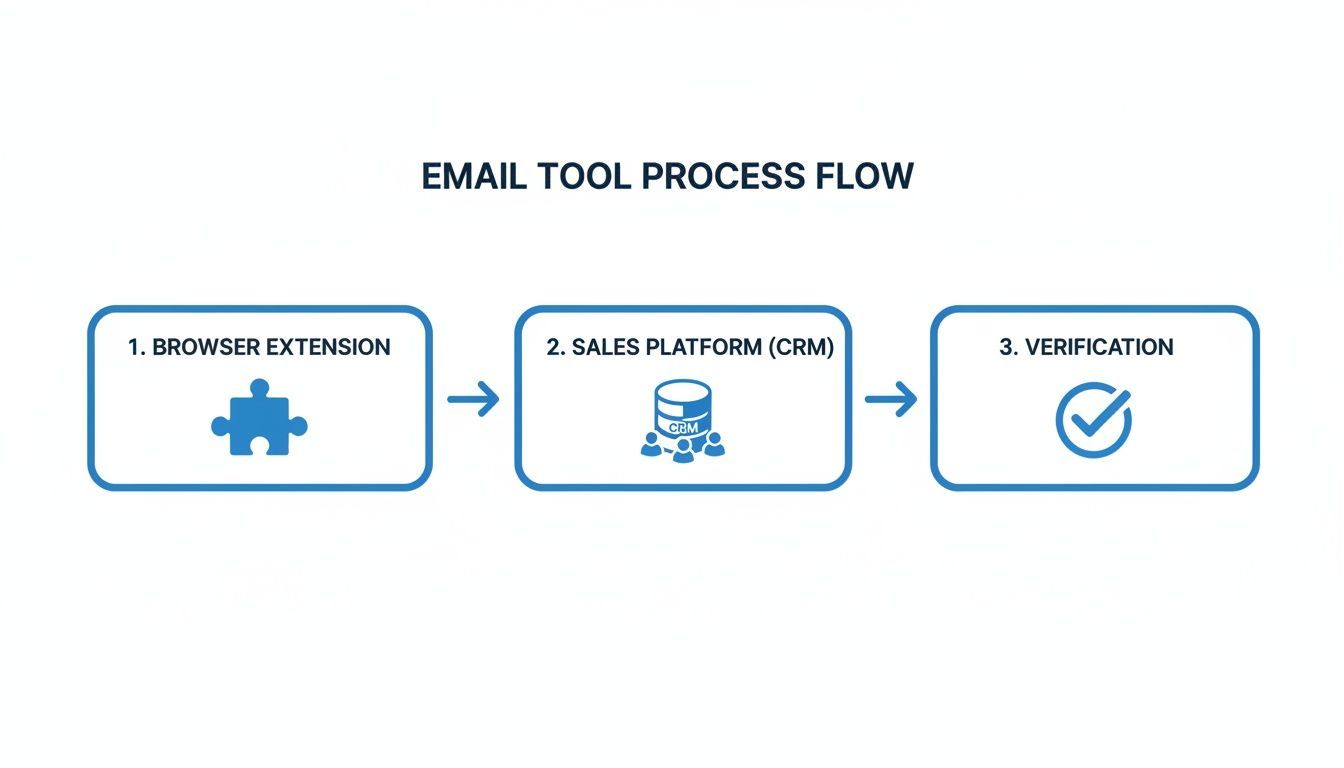
The key takeaway? A seamless flow from discovery to action. You automate the most time-consuming parts of prospecting so you can focus on building relationships.
Putting Your Prospecting on Autopilot
Picture the old-school way: you spot a perfect prospect on a networking site. First, you manually copy their name, title, and company. Then you paste it all into your CRM. Next, you swap tabs to your email finder, hunt for their address, verify it, and then copy-paste that back into the CRM record. It’s tedious.
This process isn't just slow and repetitive; it's a breeding ground for human error. A single typo in a domain name or a forgotten field can make a hot lead go cold.
Modern tools completely flip this script. With an integrated browser extension, you can turn that prospect's profile into a complete, enriched CRM record in one click. The system finds and verifies their email, grabs key data points, and saves it all to the right fields in your CRM. Instantly.
An integrated workflow transforms prospecting from a data entry chore into a strategic activity. When you can capture and enrich a lead in seconds, you free up hours each week to focus on what actually drives revenue—crafting personalized outreach and having meaningful conversations.
Best Practices for Maintaining Clean Data
The value of your CRM is directly tied to the quality of the data inside it. A database cluttered with duplicate records and stale information just creates confusion and wastes everyone's time. A properly integrated system helps maintain pristine data hygiene automatically.
Here are a few essential practices an integrated workflow can handle for you:
- Automatic Duplicate Checking: Before adding a new contact, the system should instantly check if they’re already in your CRM. This simple step stops multiple reps from unknowingly reaching out to the same person and keeps your records tidy.
- Custom Field Mapping: Your CRM is unique to your business. A good integration tool lets you map data points from a prospect's profile directly to your custom fields. This ensures consistency and makes your data much easier to segment and analyze later on.
- Scheduled Data Enrichment: People change jobs. It happens. Some advanced systems can periodically re-check your existing contacts and update their records with the latest information, keeping your database fresh and accurate over time.
A Real-World Workflow in Action
Let's walk through what this looks like for a sales development representative (SDR) using an integrated system like AddToCRM.
- Discovery: The SDR spots a promising Head of Marketing at a target company. Instead of opening new tabs, they click the extension right on the prospect's profile.
- Instant Check: The tool immediately shows if this person is already in their company's HubSpot or Salesforce CRM. In this case, they aren't.
- One-Click Capture & Verification: The SDR clicks "Add." The tool automatically finds the prospect's verified company email, phone number, and other key details. It then creates a new contact record in the CRM, populating all the mapped fields—name, title, company, industry, you name it.
- Immediate Action: With the contact now cleanly in the CRM, the SDR can instantly enroll them in a pre-built outreach sequence without ever leaving their browser.
What used to be a five- or ten-minute manual process is now done in under 30 seconds. This isn't just a small time-saver; it’s a massive productivity gain that lets sales teams connect with significantly more qualified leads, every single day.
Navigating Legal and Ethical Considerations
How you find and use someone's email address matters. A lot. Once you've mastered the art of tracking down company emails, you need to understand the rules of the road. This isn't just about sidestepping hefty fines; it's about building trust and protecting your brand's reputation from day one.
Staying compliant really boils down to respecting people’s privacy and being transparent when you reach out. Regulations like the CAN-SPAM Act in the U.S. and Europe's General Data Protection Regulation (GDPR) set the ground rules for how we all should be doing commercial outreach.
Key Compliance Rules for B2B Outreach
For B2B prospecting, these laws aren't designed to stop you. They're there to make sure you communicate responsibly. The core principles are surprisingly straightforward and just plain good business practice.
- Be Honest: Your subject lines and "from" names have to be accurate. No trickery.
- Provide an Opt-Out: Every single email needs a clear and easy way for someone to say "no thanks" to future messages.
- Identify Your Message: You have to clearly state your message is an ad and include a valid physical postal address for your business.
The best gut check is to ask yourself one simple question: "Does this email provide genuine, relevant value to the person receiving it?" If the answer is yes, you're already on the right ethical path.
Under GDPR, most B2B outreach falls under the concept of "legitimate interest." This means your communication should be directly relevant to the recipient's professional role. For instance, emailing a VP of Marketing about a new analytics tool that could make their job easier? That’s almost certainly a legitimate interest.
Ultimately, ethical prospecting is just about respect. Never, ever buy static email lists—they're a graveyard of bad data and spam traps. Always verify your contact information to ensure it's accurate, and above all, focus on providing real value.
When your outreach is genuinely helpful and relevant, staying compliant becomes a natural byproduct of building strong business relationships.
Got Questions? We’ve Got Answers
When you're digging for company emails, you'll inevitably hit a few common roadblocks. Let's tackle the questions that trip up most people, so you can keep your outreach moving forward.
Is It Actually Legal to Email Someone at Their Company Address?
Yes, in most B2B scenarios, it is. But you have to play by the rules.
In the U.S., the CAN-SPAM Act is your guide. It’s pretty straightforward: your message needs to be professional, include your physical address, have an obvious opt-out link, and avoid deceptive subject lines. No funny business.
If you're reaching out to folks in the European Union, you'll need to consider GDPR, which uses a standard called "legitimate interest." This just means your outreach has to be genuinely relevant to the person's job. A targeted, valuable message sent to the right contact usually clears this bar without any issue.
What's the Single Most Accurate Way to Find an Email?
Honestly? A high-quality, paid email finder tool is almost always your best bet. These platforms aren't just guessing; they combine huge databases with real-time verification to confirm an address is live right before they hand it over to you.
Manual searching and pattern guessing are great skills to have in your back pocket, but they just can't compete with the speed and accuracy of a dedicated tool. These services pull from dozens of data sources to deliver verified emails in seconds, saving you a ton of grunt work.
Don't underestimate the importance of accuracy. Every email you send to a dead address damages your sender reputation. A few too many bounces, and your legitimate emails will start landing in spam folders, even when you send them to the right people.
How Can I Check if an Email Is Real Without Actually Sending a Message?
This is where email verification tools work their magic. They run a quick, automated check that happens behind the scenes in a matter of seconds, all without sending anything to the person's inbox.
Here's a simplified look at how it works:
- Syntax Check: First, the tool makes sure the email format is correct (e.g.,
[email protected]). - Domain Check: Next, it confirms the domain (
company.com) is real and has a mail server set up to receive email. - Mailbox Ping: Finally, it sends a quick ping to the company's server, essentially asking, "Hey, do you have a user named 'jane.doe'?" The server gives a simple "yes" or "no" back, confirming the address is valid.
This whole process is completely automated and safe. It protects you from bounces and keeps your sender reputation clean.
Finding and verifying emails one by one is a slow, tedious grind. Add to CRM cuts out the manual work by finding verified contact data and syncing it straight to your CRM in one click. Stop wasting hours on prospecting and start building your pipeline faster. Get started for free on addtocrm.com.
Start saving time and closing more deals.
Find contact info for your prospects on the #1 business social network and add them to your CRM with 1-click.

 Loading...



Trusted by 1000s of founders, SDRs & more
