How to Use Fireberry CRM in 2026: Setup & Pipeline Guide
Learn how to set up Fireberry CRM, manage pipelines, and add LinkedIn leads instantly with LinkFire. No manual entry needed.
Sync leads from professional networks to Fireberry.
Save 4hrs per week on CRM data entry.
Learn more...Free Fireberry integration
As CRM experts at Add to CRM, we've seen countless sales teams struggle to get the most out of their software. A powerful CRM is the engine of any modern sales organization, but it's only effective if you know how to use it properly. That's why we created this guide. Fireberry is an incredibly powerful and customizable CRM, and we're here to walk you through how to harness its full potential. We'll cover everything from initial setup to advanced reporting. Plus, we'll share how to supercharge your prospecting efforts and fill your pipeline faster than ever.
Getting Started with Fireberry
Initial Setup and Configuration
Getting started with Fireberry is straightforward. First, you'll need to sign up for an account and choose a plan that fits your team's size and needs. Fireberry offers several tiers, including a free plan for individuals and tiered paid plans (Standard, Professional, Enterprise) for teams, which add features like pipeline management, automation, and advanced security.
Once your account is created, you can begin adding your team members. As an administrator, you can invite users and assign them specific roles and permissions, ensuring everyone has access to the information they need without compromising data security. We recommend starting with the core setup before diving into deep customization.
Customizing Your Dashboard
Fireberry's strength lies in its customizability. The first thing your team should do is personalize their dashboards. The dashboard provides a high-level, visual overview of your most important metrics. You can configure it to display key data points like:
- Sales progress and revenue goals
- Open tasks and upcoming meetings
- New leads and their sources
- Active deals in your pipeline
Encourage each team member to tailor their dashboard to focus on the metrics that matter most to their role. A well-organized dashboard keeps your team focused and informed at a glance.
Managing Contacts and Leads
Adding Contacts Manually
Your CRM is only as good as the data inside it. You can add contacts to Fireberry manually by navigating to the 'Contacts' section and clicking the 'Add Contact' button. From there, you'll fill in fields like name, email, phone number, and company. While this works for one-off additions, it's slow, tedious, and prone to human error, especially when you're trying to scale your prospecting efforts.
Importing Contacts Efficiently with LinkFire
There's a much better way to add prospects to Fireberry. Instead of wasting hours on manual data entry, you can use a tool like LinkFire. Our Chrome extension is designed to eliminate this exact pain point. When you find a promising prospect on LinkedIn, you can use LinkFire to find their verified email address and phone number, then add them to Fireberry as a new contact or lead in a single click. It's the fastest and most accurate way to build your contact list.
Organizing and Segmenting Contacts
Once contacts are in Fireberry, it's crucial to keep them organized. Use Fireberry's custom fields and tags to segment your contacts based on criteria like industry, company size, job title, or lead source. This allows you to create targeted lists for personalized email campaigns and focused follow-up sequences, making your outreach far more effective.
Fireberry CRM LinkedIn Integration
LinkFire is a Chrome extension that revolutionizes how sales teams add prospects to Fireberry. It bridges the gap between prospecting on LinkedIn and managing relationships in your CRM, turning a slow, manual process into an efficient, one-click workflow. It saves your team hours of tedious work, improves data accuracy, and ultimately helps you close more deals.
Getting Started with LinkFire
Getting started is incredibly simple:
- Install the LinkFire extension from the Chrome Web Store and connect your Fireberry account.
- Navigate to any prospect's profile on LinkedIn.
- Click the button to let LinkFire find their verified email address and phone number.
- Click 'Add to CRM' to instantly create a new, enriched contact in Fireberry.
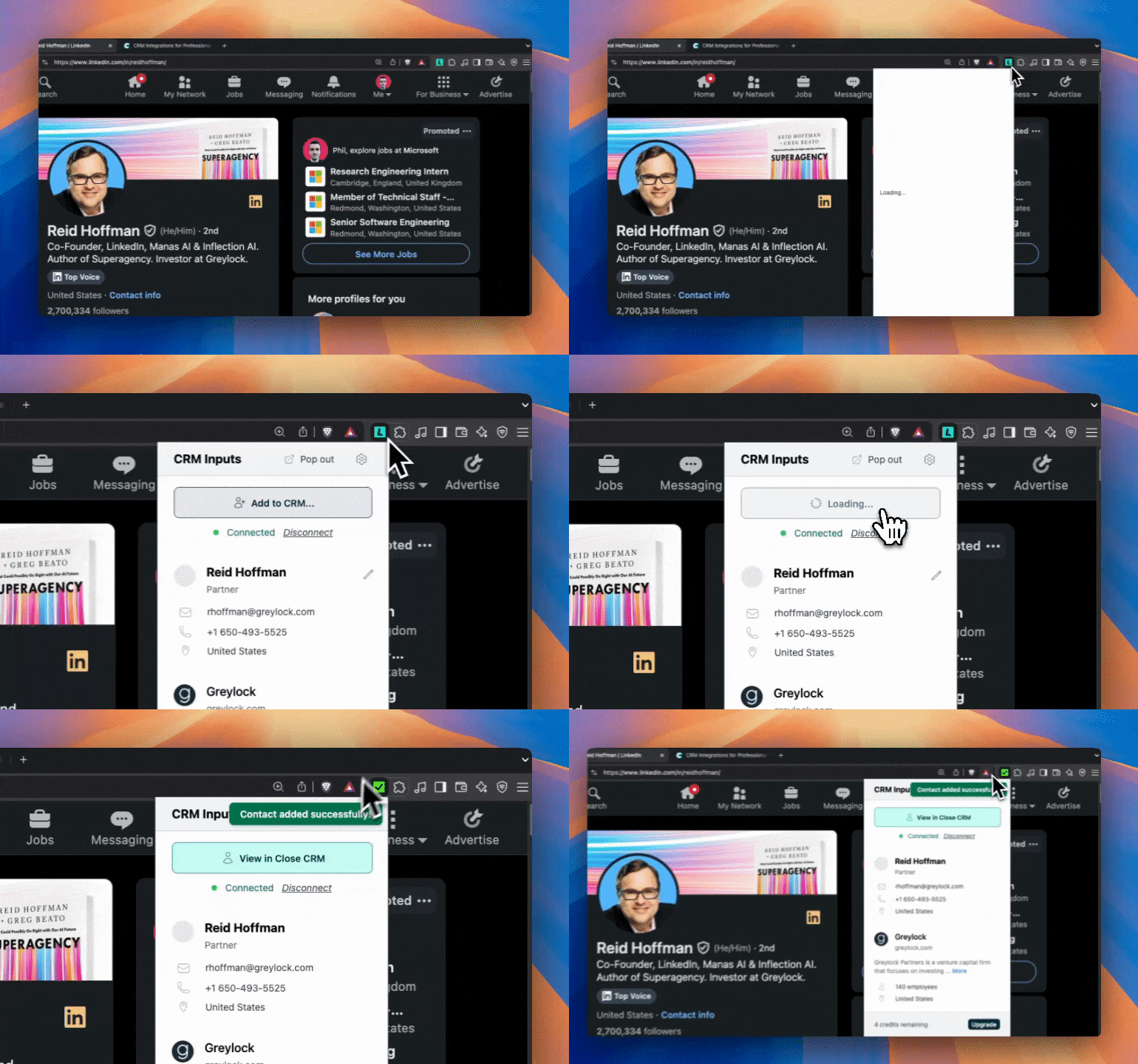
LinkFire vs Traditional Prospecting
The difference is night and day. A process that used to take 5-10 minutes per prospect now takes seconds. Instead of manually researching, copying, and pasting, your team can add dozens of high-quality, verified leads to Fireberry in the time it used to take to add just a few. This means more time spent engaging with prospects and less time on administrative tasks.
Sales Pipeline Management
Setting Up Your Sales Pipeline
Fireberry allows you to build a custom sales pipeline that mirrors your unique sales process. In the 'Deals' section, you can define the stages of your pipeline, such as:
- New Lead
- Contact Made
- Meeting Scheduled
- Proposal Sent
- Negotiation
- Closed Won / Closed Lost
Customize these stages to reflect the actual steps your team takes to close a deal. This clarity is essential for tracking progress and forecasting revenue.
Moving Deals Through Your Pipeline
As a deal progresses, your team can easily drag and drop it from one stage to the next in the board view. This visual representation makes it simple to see where every opportunity stands. It's important to establish clear criteria for moving a deal to the next stage to ensure your pipeline data is accurate and reliable.
Pipeline Reporting and Analysis
Fireberry's reporting features give you a powerful lens into your pipeline's health. You can analyze conversion rates between stages, identify bottlenecks where deals are stalling, and track the average time it takes to close a deal. Use this data to coach your team and refine your sales process for better results.

Find verified emails and enrich Fireberry contacts
Add to CRM finds verified emails, phone numbers, and job titles on LinkedIn® — then adds them to Fireberry in one click.
Start Free Trial


 Trusted by 2,500+ users4.7
Prospecting and Lead Generation
Traditional Prospecting Methods
Traditional prospecting is a grind. It involves manually searching for prospects on platforms like LinkedIn, trying to guess their email address, copying and pasting their information into your CRM, and then finally starting your outreach. This process is time-consuming, inefficient, and often leads to inaccurate data.
Modern Prospecting with LinkFire
Modern sales teams need a modern solution. LinkFire transforms LinkedIn into a powerful lead generation machine for Fireberry users. Instead of juggling multiple tabs and tools, you can do everything from one place. Find a prospect, use LinkFire to get their verified contact information, and add them directly to Fireberry without ever leaving their LinkedIn profile. This saves your team hours of prospecting time each week, allowing them to focus on what they do best: selling.
Communication and Follow-up
Email Integration and Management
Fireberry integrates with Google and Office 365, allowing you to sync your email and manage communication directly within the CRM. You can send emails from a contact's record, and all correspondence is automatically logged. This creates a complete, centralized history of every interaction, so any team member can quickly get up to speed on a relationship.
Task Management and Reminders
Never let a follow-up fall through the cracks again. Use Fireberry's 'Tasks' feature to create reminders for calls, emails, and meetings. You can associate tasks with specific contacts or deals and set due dates to keep yourself organized. Automations can even create follow-up tasks automatically when a deal moves to a new stage.
Call Logging and Communication History
In addition to emails, make it a team-wide practice to log every call and meeting in Fireberry. A brief note about the conversation provides crucial context for future interactions. This disciplined approach ensures that your contact records are always a reliable source of truth for your entire team.
Reporting and Analytics
Key Metrics to Track
To optimize your sales process, you need to track the right metrics. In Fireberry, you can build reports and dashboards to monitor key performance indicators (KPIs) like:
- Number of new leads generated
- Lead-to-opportunity conversion rate
- Sales cycle length
- Average deal size
- Win rate
Creating Custom Reports
Fireberry's reporting engine is highly flexible. You can build custom reports from the ground up to analyze virtually any data point in your CRM. Whether you want to see which lead source generates the most revenue or which sales rep has the shortest sales cycle, you can create a report to find the answer.
Using Data for Sales Optimization
Data should drive your decisions. Regularly review your reports to understand what's working and what isn't. Use insights from your data to refine your sales strategy, provide targeted coaching to your reps, and make more accurate revenue forecasts.
Team Collaboration Features
User Permissions and Access Control
Fireberry provides granular control over user permissions. You can create custom roles that define exactly what each user can see and do within the system. This is essential for maintaining data confidentiality and ensuring team members stay focused on their relevant accounts and tasks.
Sharing and Collaboration Tools
Features like the shared team inbox and the ability to allocate records to specific users make collaboration seamless. When a lead is assigned to a sales rep, they have all the historical context needed to take over the relationship smoothly. This unified approach prevents silos and improves the customer experience.
Save hours on Fireberry data entry
Add to CRM finds verified emails, phone numbers, and job titles on LinkedIn® — then adds them to Fireberry in one click.
Start Free TrialTrusted by 2,500+ users4.7Advanced Features and Integrations
Automation and Workflows
Automation is your secret weapon for efficiency. Use Fireberry's automation builder to handle repetitive tasks. For example, you can set up a workflow to automatically send a welcome email when a new lead is added, or create a follow-up task for a sales rep three days after they send a proposal.
Third-Party Integrations
Fireberry integrates with essential tools like Google Workspace, Office 365, and Facebook Lead Ads. For everything else, you can use its API to connect to other third-party applications, ensuring your CRM remains the central hub of your tech stack.
Mobile App Usage
Sales doesn't just happen at a desk. Fireberry's mobile app allows your team to access and update information on the go. They can log calls after a meeting, update a deal's status, or check a contact's details right from their phone, ensuring the CRM is always up to date.
Best Practices and Common Mistakes
Data Quality Best Practices
Maintaining clean data is the most important rule of CRM management. Garbage in, garbage out. The best way to ensure data quality is to get it right from the start. Using a tool like LinkFire to add contacts with verified information is the first and most critical step.
Common Mistakes to Avoid
We see teams make the same mistakes over and over. The most common are:
- Failing to customize: Using the CRM out-of-the-box without tailoring it to your process.
- Inconsistent data entry: Team members logging information differently, or not at all.
- Ignoring automation: Wasting time on manual tasks that could be automated.
- Poor adoption: Not providing proper training or demonstrating the value to the team.
Optimization Tips
To get the most out of Fireberry, make optimization a regular habit. Once a quarter, review your pipeline stages, audit your custom fields, and look for new automation opportunities. A CRM should evolve with your business.
Conclusion: Maximize Your Sales Success
Fireberry is a robust platform with the potential to transform your sales operations. By following this guide, you can set it up for success, manage your pipeline effectively, and use its data to make smarter decisions.
But to truly unlock its power for modern sales, you need to pair it with the right tools. The single biggest bottleneck for most sales teams is getting quality prospects into the CRM efficiently. LinkFire is the missing piece that solves this problem, making your prospecting efforts faster, more accurate, and infinitely more scalable. Install it today and start saving hours every week.
This app will save you hours using Fireberry

 Fireberry Integration
Add contacts to Fireberry from LinkedIn®
Enrich profiles with verified emails and phone numbers. Sync to Fireberry in one click.
Try Fireberry Extension7-day free trial · Cancel anytime
Save 4+ hrs / week on Fireberry data entry.
Find verified contact info for your prospects on LinkedIn®, Gmail, Outlook & company websites. Add them to your Fireberry with 1-click.
 Loading...Trusted by 2,500+ founders, SDRs & more