How to Merge Duplicates in Fireberry
Learn how to merge duplicates in Fireberry and stop messy data with LinkFire’s LinkedIn integration.
Sync leads from professional networks to Fireberry.
Save 4hrs per week on CRM data entry.
Learn more...Free Fireberry integration
Duplicate contacts in your CRM are more than just a minor annoyance; they're a significant drag on your sales and marketing efforts. They lead to wasted time, skewed analytics, and a disjointed experience for your prospects. At Add to CRM, we know that a clean CRM is a high-performing CRM. In this guide, we'll walk you through how to clean up existing duplicates in Fireberry and, more importantly, how to prevent them from ever being created.
Why Duplicates Hurt Your Sales Process
Duplicate records can quietly sabotage your sales pipeline. When multiple entries exist for the same person or company, your team wastes valuable time trying to figure out which record is correct. This leads to inaccurate reporting, embarrassing outreach where multiple reps contact the same lead, and a fragmented view of your customer interactions. Duplicates often stem from simple mistakes: manual data entry errors, inconsistent data formats, or importing lists from various sources without proper validation.
Identifying Duplicates in Fireberry
Fireberry includes a handy built-in tool to help you spot potential duplicates. By default, the Accounts and Contacts objects are already set up to detect duplicates based on the Phone or Email fields.
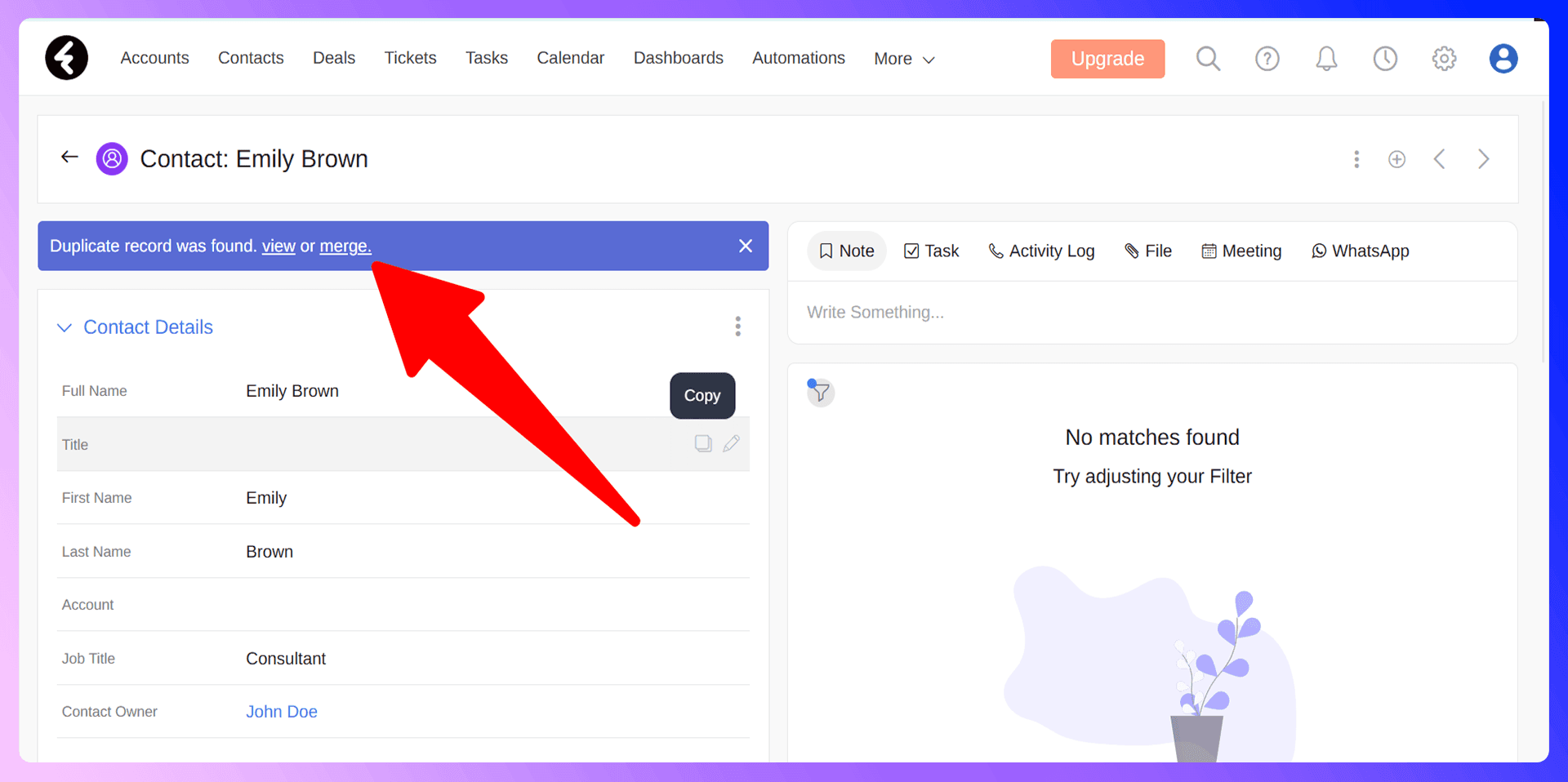
When Fireberry finds a record with the same information in one of your specified fields, a purple "Duplicate" component will appear on the record's page. You can also add this component to any page layout and customize which fields it monitors, such as "Mobile" or a custom text field, to match your data hygiene rules.
Step-by-Step Merging Process
Once Fireberry flags a duplicate, merging the records is straightforward. Follow these steps to combine them into a single, accurate master record:
- Navigate to a record that displays the purple Duplicate indicator bar.
- Click the View button on the bar to see a list of the records that share duplicate values.
- From the list, click the Merge button next to the record you wish to combine.
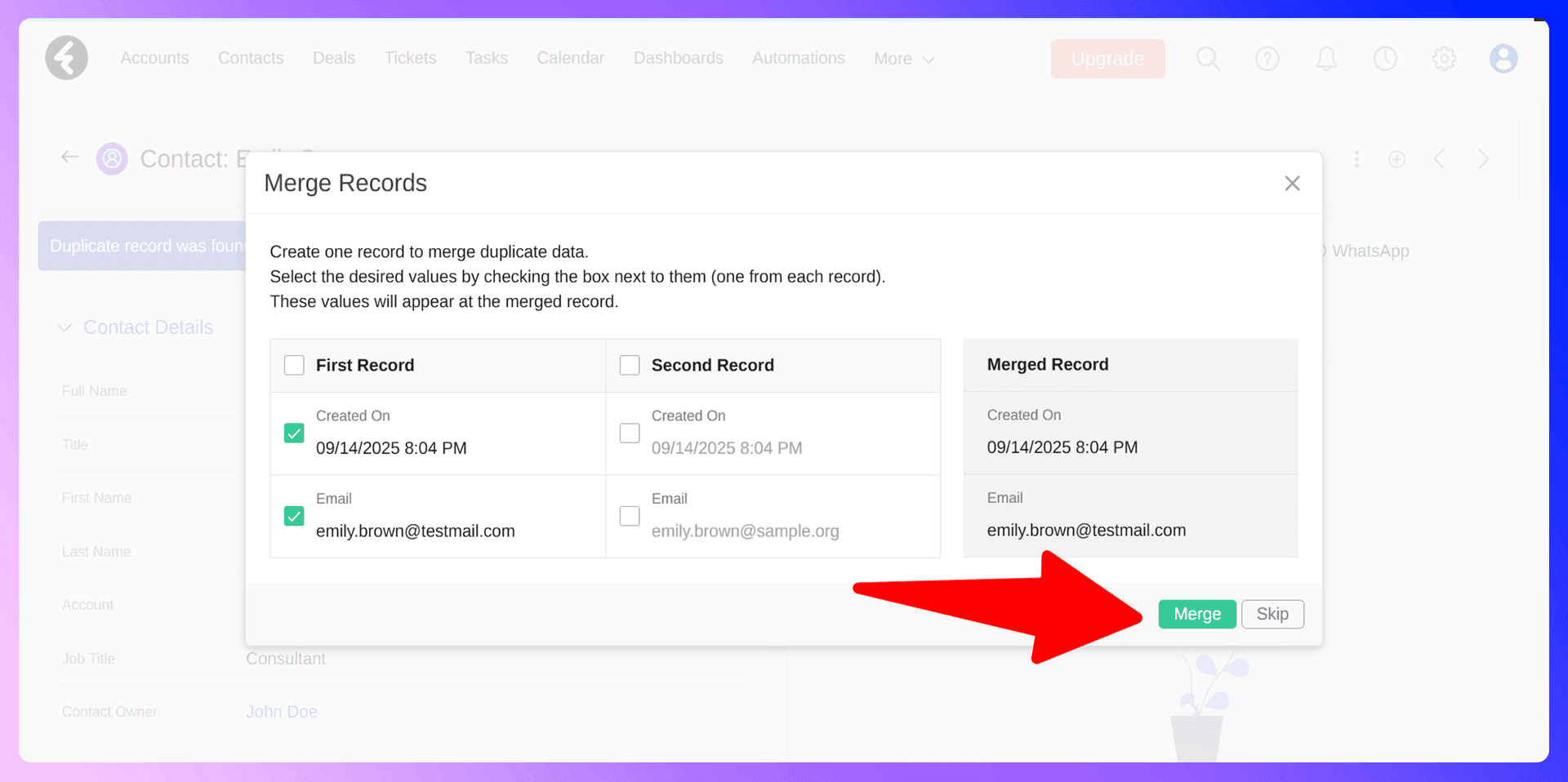
- A merge screen will appear, showing the data from both records side-by-side.
- For each field, choose which value you want to keep. This allows you to build the most complete and accurate master record from the available information.
- Once you've selected the data to keep, confirm the action. Fireberry will merge the two entries, leaving you with one clean record.
Bulk Duplicate Management
While Fireberry's merge tool is excellent for handling duplicates one by one, tackling a large number of them requires a systematic approach. There isn't a one-click bulk merge feature, which underscores the importance of preventing duplicates in the first place. To manage a large-scale cleanup, we recommend creating a filtered list view and methodically working through potential duplicates. However, a proactive strategy is far more efficient.

Keep Fireberry clean with verified contact data
Add to CRM enriches contacts with 95%+ accurate data before adding them — so Fireberry stays clean from day one.
Start Free Trial


 Trusted by 2,500+ users4.5
Preventing Duplicates with LinkFire
LinkFire is a Chrome extension that finds verified contact information from LinkedIn and adds standardized data to Fireberry. It's designed to be the first line of defense against duplicates by ensuring the data you import is clean, accurate, and consistently formatted from the very beginning. By automating data entry, you eliminate the typos and inconsistencies that cause most duplicate records.
Why Clean Data Beats Cleanup
Think about the time your team spends hunting down and merging duplicates. It's a reactive, never-ending task. In contrast, using a tool like LinkFire is a proactive step that takes seconds. Investing a moment to import verified data upfront saves hours of cleanup work down the road. Prevention is always more efficient than a cure.
Getting Started with LinkFire
It only takes a minute to start building a cleaner CRM:
- Install the LinkFire extension from the Chrome Web Store.
- Navigate to a prospect's profile on LinkedIn.
- Use the extension to instantly find their verified email and phone number.
- Click "Add to Fireberry" to send the clean, standardized contact data directly into your CRM with one click.
LinkedIn Integration for Fireberry: Avoid Duplicates Before They Happen
One of the most powerful features of LinkFire is its ability to check for existing contacts in real-time. When you're viewing a profile on LinkedIn, our extension automatically checks if that person is already in your Fireberry CRM. This simple, visual indicator on the LinkedIn page is your best defense against accidentally creating a duplicate record while prospecting.
Enriching Existing Contacts
If a prospect is already in your CRM, you don't need to create a new entry. Instead, LinkFire allows you to enrich the existing record. You can update their job title, add a new verified email address, or append other fresh data from their LinkedIn profile, ensuring your contact information is always current and complete.
Real-Time Duplicate Prevention
Seeing that a contact already exists in Fireberry while you're still on their LinkedIn page is the ultimate form of duplicate prevention. It happens at the very source of data acquisition, ensuring your CRM remains clean and your team can focus on building relationships, not on cleaning up data.
Accurate data means fewer Fireberry duplicates
Add to CRM enriches contacts with 95%+ accurate data before adding them — so Fireberry stays clean from day one.
Start Free TrialTrusted by 2,500+ users4.5Best Practices for Duplicate Prevention
Beyond using the right tools, a few team-wide practices can help maintain data integrity:
- Establish Data Standards: Create clear guidelines for how to format names, job titles, and company information.
- Train Your Team: Ensure everyone understands the importance of clean data and knows how to use both Fireberry's merge tool and LinkFire.
- Control Data Imports: Limit which team members can perform bulk data imports to prevent messy spreadsheets from polluting your CRM.
- Perform Regular Audits: Set aside time each quarter to review your data and catch any duplicates that may have slipped through.
Conclusion: Build Clean, Not Cleanup
Managing duplicates in Fireberry is a necessary skill, but preventing them is a superior strategy. While Fireberry provides the tools you need for cleanup, the real power lies in stopping messy data at the source. By integrating LinkFire into your workflow, you can ensure that every contact you add is clean, verified, and duplicate-free from the start.
Ready to stop cleaning up your CRM and start building a more effective sales engine? Try LinkFire for free today and see the difference clean data makes.
How to merge duplicate contacts in Fireberry

 Fireberry Integration
Add contacts to Fireberry from LinkedIn®
Enrich profiles with verified emails and phone numbers. Sync to Fireberry in one click.
Try Fireberry Extension7-day free trial · Cancel anytime
Save 4+ hrs / week on Fireberry data entry.
Find verified contact info for your prospects on LinkedIn®, Gmail, Outlook & company websites. Add them to your Fireberry with 1-click.
 Loading...Trusted by 2,500+ founders, SDRs & more