How to Merge Duplicates in Nimble CRM
Keep Nimble CRM clean: merge duplicates, prevent errors, and improve sales efficiency with verified data.
Sync leads from professional networks to Nimble CRM.
Save 4hrs per week on CRM data entry.
Learn more...Free Nimble CRM integration
Duplicate contacts are one of the most common frustrations for sales teams. They clutter your database, confuse your reps, and can lead to embarrassing outreach mistakes. A clean CRM is a powerful tool, but a messy one creates more work than it saves. At Add to CRM, we believe in working smarter, not harder. This guide will walk you through how to clean up existing duplicates in Nimble CRM and, more importantly, how to prevent them from ever being created in the first place.
Why Duplicates Hurt Your Sales Process
Duplicate records aren't just a minor annoyance; they actively undermine your sales efforts. When your team can't trust the data in your CRM, efficiency plummets. Common causes include manual entry errors, inconsistent data formats from various imports, or team members adding contacts without checking for existing records.
This leads to several problems:
- Wasted Time: Reps spend time searching for the right record instead of selling.
- Poor Customer Experience: Multiple reps might contact the same lead about the same thing, appearing disorganized.
- Inaccurate Reporting: Your sales forecasts and performance metrics become unreliable.
- Missed Opportunities: Important notes or activities might be logged on a duplicate record and missed by the primary contact owner.
Identifying Duplicates in Nimble CRM
Nimble CRM has some built-in features to help you find and manage duplicates. While the system attempts to merge contacts automatically during a CSV import based on email address, duplicates can still slip through.
You can identify duplicates in two main ways:
- Manual Search: Simply search for a contact's name in the Contacts tab. If you see multiple entries for the same person, you've found duplicates.
- Find/Merge Duplicates Feature: For a specific contact you suspect has a duplicate, you can use Nimble's dedicated tool. Navigate to the contact record, click the arrow next to the "Edit" button, and select Find/Merge Duplicates to see potential matches.
Step-by-Step Merging Process
Once you've identified duplicates, merging them in Nimble CRM is straightforward. You can merge up to five contacts at a time.
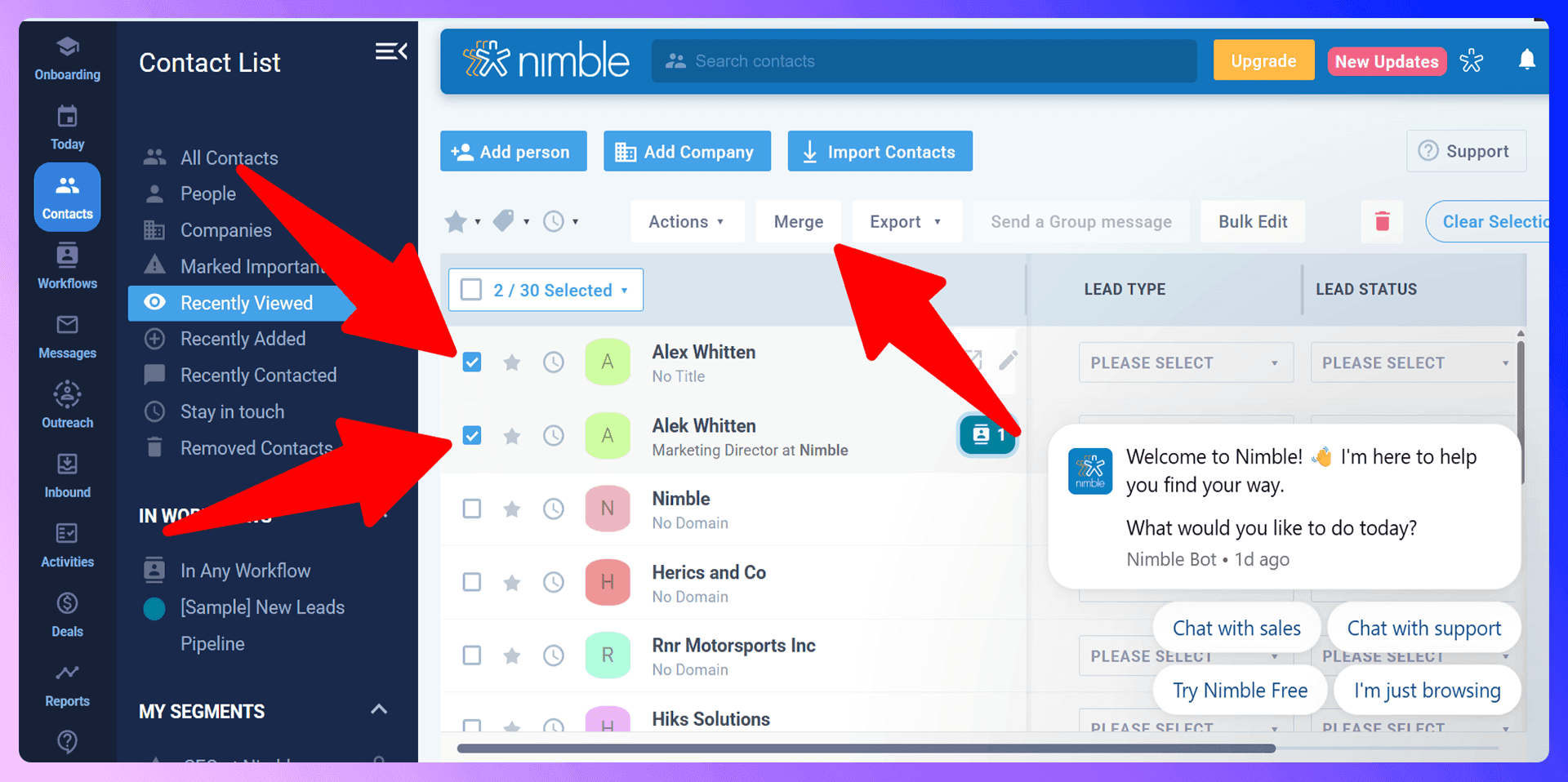
- Navigate to your Contacts tab.
- Use the checkboxes to select the 2-5 duplicate records you want to merge.
- A "Merge" button will appear at the top of the list. Click it.
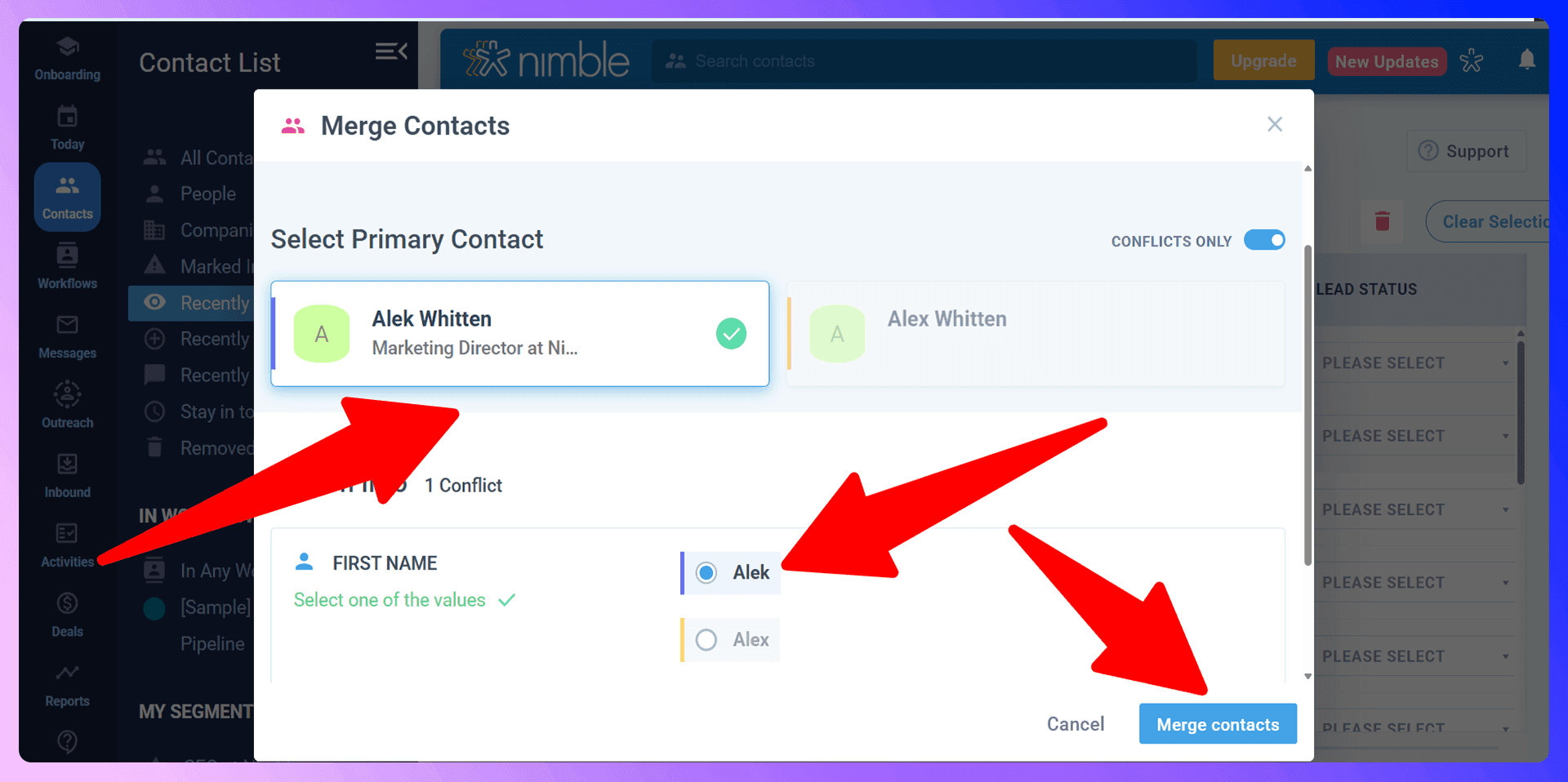
- A pop-up window will appear. Here, you can choose the primary contact and review all the data from the selected records.
- Nimble highlights conflicting data, allowing you to choose which information to keep for each field (e.g., the most up-to-date email or phone number).
- After reviewing and selecting the correct data, click "Merge Contacts" to combine the records into a single, accurate profile.
Bulk Duplicate Management
Nimble CRM does not offer a one-click bulk merge for your entire database. Instead, it allows you to manage duplicates in batches of up to five records at a time. While effective, cleaning up a large number of duplicates this way can be a time-consuming, manual process. This highlights why a preventative approach is so critical for long-term data hygiene.

Keep Nimble CRM clean with verified contact data
Add to CRM enriches contacts with 95%+ accurate data before adding them — so Nimble CRM stays clean from day one.
Start Free Trial


 Trusted by 2,500+ users4.7
Preventing Duplicates with LinkNimble
LinkNimble is a Chrome extension that finds verified contact information from LinkedIn and adds standardized data to Nimble CRM. Instead of reacting to duplicates, our tool helps you prevent them at the source: the moment of data entry. By automating the process of adding new leads, LinkNimble eliminates manual typos and ensures that every new contact is clean, verified, and correctly formatted before it even enters your CRM.
Why Clean Data Beats Cleanup
The time your team spends merging contacts is time they aren't spending on outreach and closing deals. The manual cleanup process we described is a recurring task that drains resources. In contrast, using a tool like LinkNimble takes just a few seconds to add a clean, verified contact. Investing in clean data from the start saves countless hours of cleanup down the road.
Getting Started with LinkNimble
Getting started is easy and takes only a couple of minutes:
- Install the LinkNimble extension from the Chrome Web Store.
- Navigate to a prospect's LinkedIn profile.
- Use the extension to find their verified email and phone number.
- Click "Add to CRM" to send the clean, standardized data directly into Nimble CRM with a single click.
LinkedIn Integration for Nimble CRM: Avoid Duplicates Before They Happen
One of the most powerful features of LinkNimble is its ability to check for duplicates in real-time, directly on LinkedIn. When you view a person's LinkedIn profile, our extension automatically checks if they already exist in your Nimble CRM. This simple, powerful check stops duplicates before they are ever created.
Enriching Existing Contacts
If a contact already exists in your CRM, LinkNimble allows you to enrich the existing record instead of creating a new one. You can update their job title, company, or other details with the latest information from their LinkedIn profile. This turns a potential duplicate entry into an opportunity to enhance your data quality.
Real-Time Duplicate Prevention
By seeing which contacts are already in your CRM while you prospect on LinkedIn, your team can work faster and with more confidence. This real-time visibility eliminates the guesswork and ensures that every team member is working from the same, up-to-date information, preventing duplicate creation at the most critical point.
Accurate data means fewer Nimble CRM duplicates
Add to CRM enriches contacts with 95%+ accurate data before adding them — so Nimble CRM stays clean from day one.
Start Free TrialTrusted by 2,500+ users4.7Best Practices for Duplicate Prevention
Beyond using the right tools, establishing good habits is key to maintaining a clean database.
- Set Data Entry Standards: Create a clear, simple guide for your team on how to format names, job titles, and company information.
- Train Your Team: Ensure everyone understands the importance of checking for an existing contact before adding a new one and knows how to use tools like LinkNimble to automate this process.
- Conduct Regular Audits: Set aside time each quarter to search for common duplicates that might have slipped through.
- Limit Mass Imports: Be cautious with large CSV imports. Assign this task to a specific person who can clean and format the data before it enters your CRM.
Conclusion: Build Clean, Not Cleanup
While Nimble CRM provides tools to merge duplicates, the process is reactive and time-consuming. The most effective strategy is to prevent duplicates from being created in the first place. By building your database with clean, verified, and standardized data from the start, you empower your sales team to focus on what they do best: building relationships and closing deals.
Stop spending hours on data cleanup. Start building a reliable CRM database today. Try LinkNimble for free and see the difference clean data makes.
How to merge duplicate contacts in Nimble CRM

 Nimble CRM Integration
Add contacts to Nimble CRM from LinkedIn®
Enrich profiles with verified emails and phone numbers. Sync to Nimble CRM in one click.
Try Nimble CRM Extension7-day free trial · Cancel anytime
Save 4+ hrs / week on Nimble CRM data entry.
Find verified contact info for your prospects on LinkedIn®, Gmail, Outlook & company websites. Add them to your Nimble CRM with 1-click.
 Loading...Trusted by 2,500+ founders, SDRs & more