How to Merge Duplicates in Capsule CRM
Merge and prevent duplicate contacts in Capsule CRM. Use LinkCapsule to add verified LinkedIn data and keep your CRM accurate.
Sync leads from professional networks to Capsule CRM.
Save 4hrs per week on CRM data entry.
Learn more...Free Capsule CRM integration
Duplicate contacts are one of the most common headaches in any CRM. They creep in silently, clutter your database, and can quietly sabotage your sales efforts. One contact, two records, and suddenly your team is wasting time, sending mixed messages, and working with skewed data. At Add to CRM, we believe in working smarter, not harder. This guide will walk you through exactly how to merge duplicates in Capsule CRM and, more importantly, how to prevent them from happening in the first place.
Why Duplicates Hurt Your Sales Process
Duplicate records are more than just a minor annoyance; they create real problems that impact your bottom line. When your sales team can't trust the data in your CRM, efficiency plummets.
Common causes include:
- Manual data entry errors: Simple typos like "Jon Smith" vs. "John Smith."
- Multiple data imports: Uploading lists from events, webinars, and other sources without proper cleaning.
- Inconsistent formats: Team members entering data differently over time.
This leads to fragmented contact histories, embarrassing double-outreach to the same prospect, and inaccurate sales reporting. Fixing this is crucial for a healthy sales pipeline.
Identifying Duplicates in Capsule CRM
Capsule CRM makes it straightforward to handle duplicates once you've spotted them. The process usually begins when you suspect a duplicate exists, perhaps by seeing two similar names in a list. You can use the main search bar to look for variations of a contact's name or company to confirm your suspicion. The real magic, however, happens during the merge process itself, where Capsule helps you pinpoint the right records to combine.
Step-by-Step Merging Process
Merging two contacts in Capsule CRM is a permanent action, so it's important to be sure before you proceed. Once merged, the action cannot be undone. Here’s how to do it correctly:
- Navigate to one of the duplicate contact records you wish to merge.
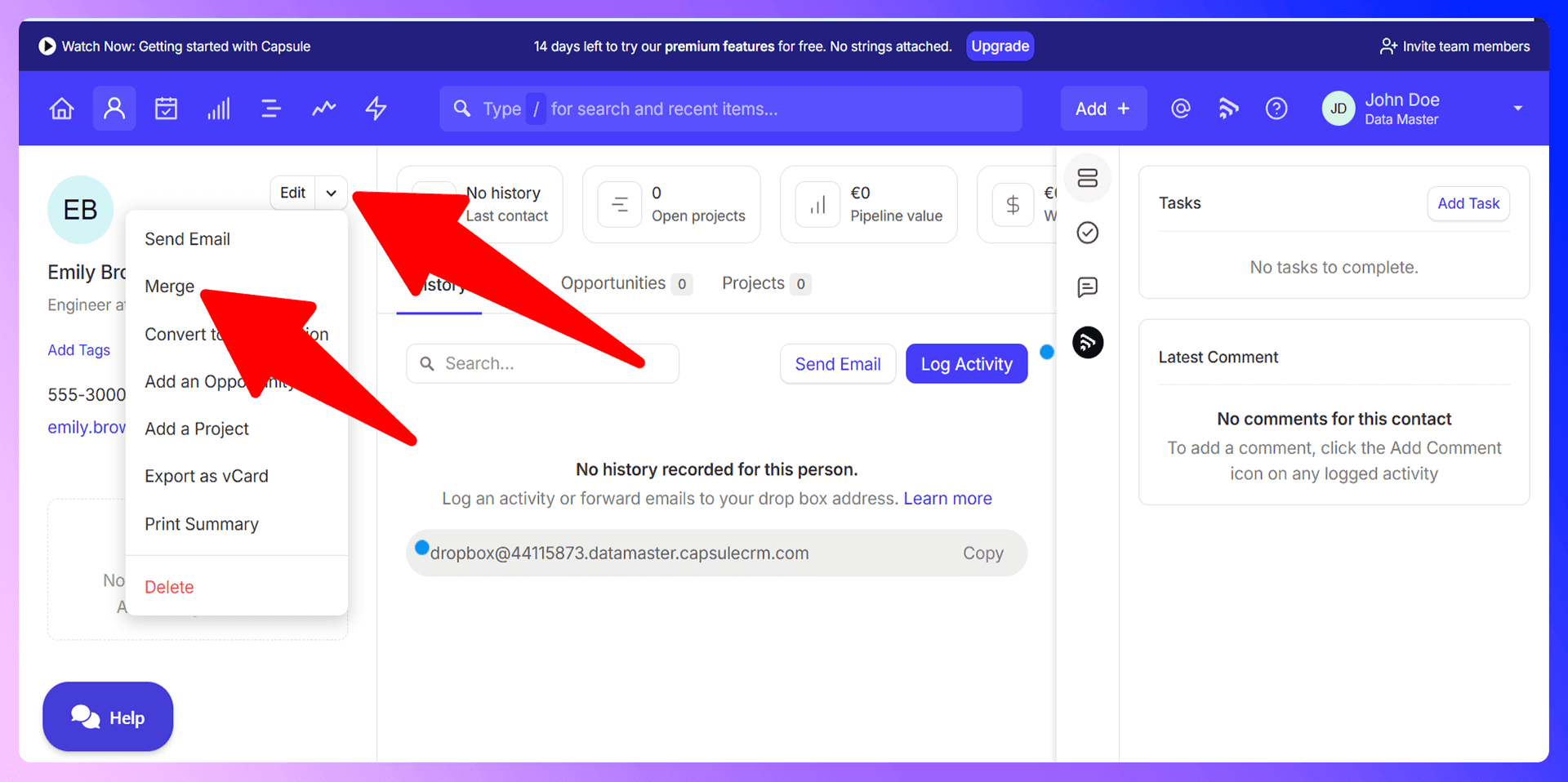
- Click the drop-down arrow located next to the Edit button.
- From the menu, select the Merge option.
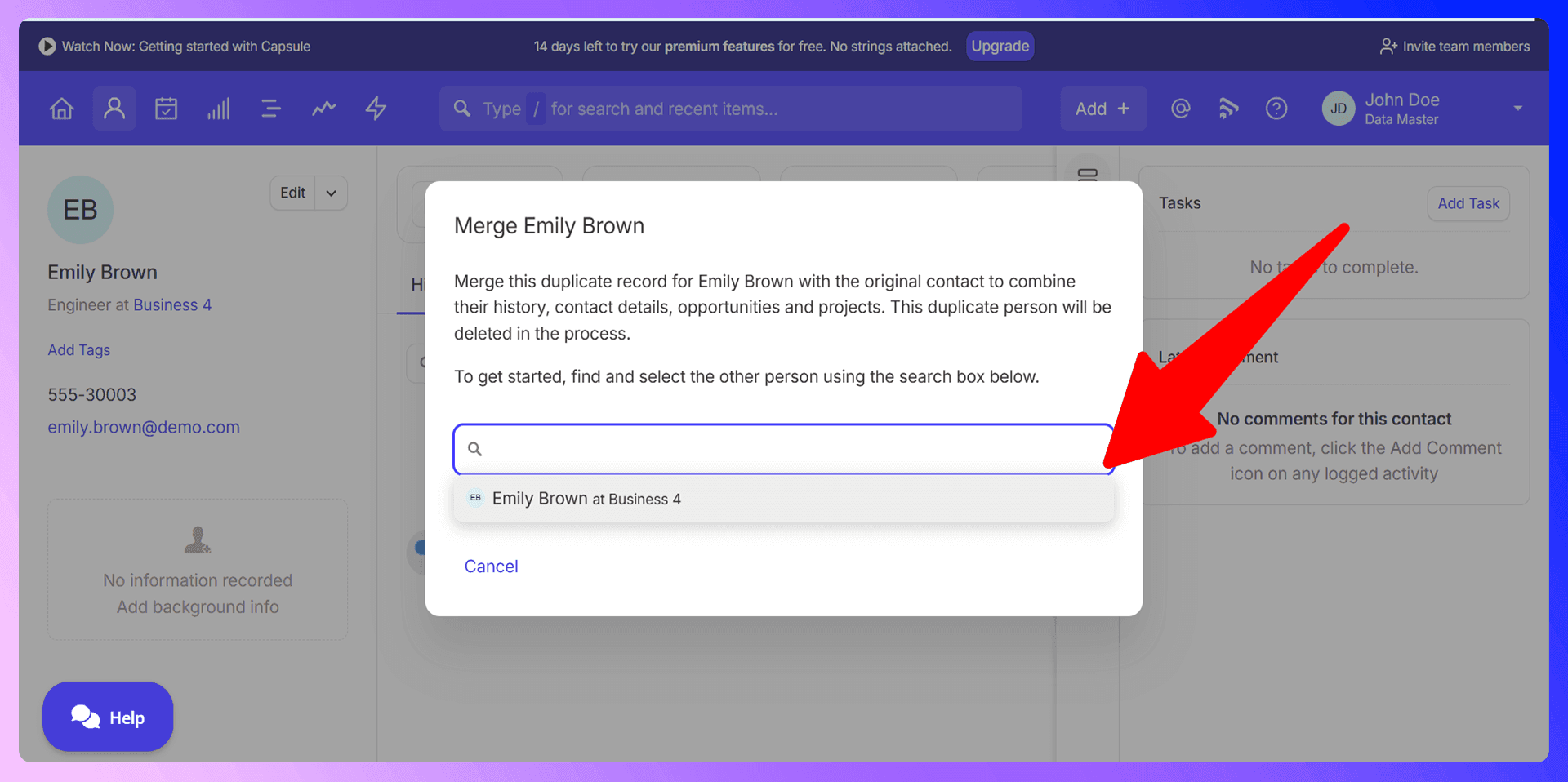
- Capsule will automatically suggest potential duplicates. You can either select one from the list or use the search field to find the other record by name.
- Click on the correct contact you want to merge into. Capsule will show you a preview of the newly merged record, which combines the history and details from both.
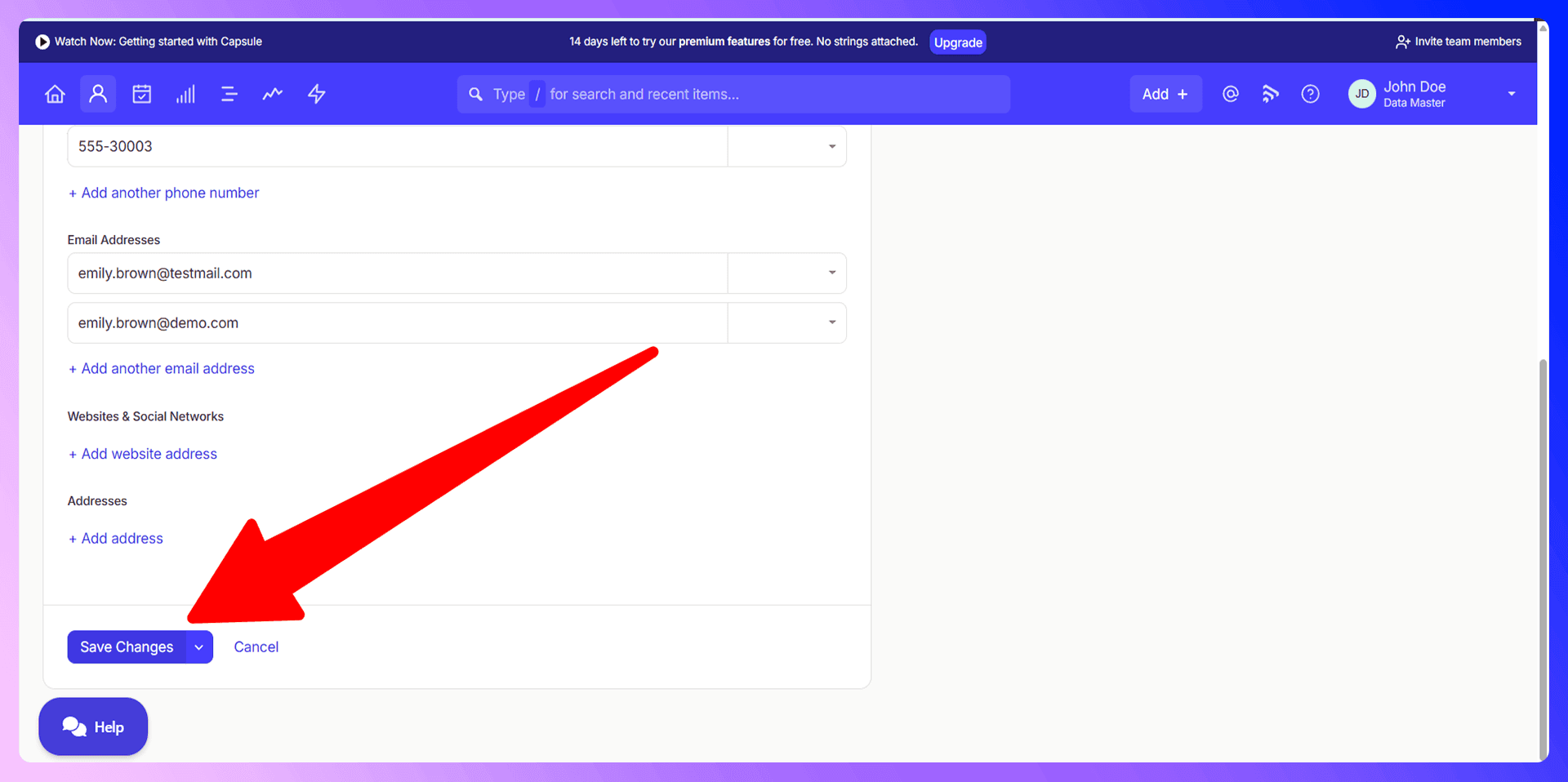
- Review the details carefully. If everything looks correct, click Save. The duplicate contact will be deleted, and all its history will be consolidated into the primary record. Remember, you can only merge contacts of the same type (e.g., a Person with another Person, or an Organization with another Organization).
Bulk Duplicate Management
While Capsule CRM doesn't have a one-click "bulk merge" feature, you can manage data consistency across many contacts by using its import/update functionality. This is an advanced method for cleaning data in bulk, which helps prevent duplicates down the line. The process involves exporting your contacts, cleaning the data in a spreadsheet to ensure consistency, and then re-importing the file using the "update duplicates" option. It's a powerful but time-consuming way to enforce data standards.

Keep Capsule CRM clean with verified contact data
Add to CRM enriches contacts with 95%+ accurate data before adding them — so Capsule CRM stays clean from day one.
Start Free Trial


 Trusted by 2,500+ users4.5
Preventing Duplicates with LinkCapsule
LinkCapsule is a Chrome extension that finds verified contact information from LinkedIn and adds standardized data to Capsule CRM. Instead of reacting to duplicates, we built a tool that helps you prevent them from ever being created. By automating data entry with verified information, you eliminate the typos, formatting errors, and manual mistakes that cause duplicates.
Why Clean Data Beats Cleanup
Think about the time your team spends searching for, verifying, and merging duplicate contacts. It's a reactive chore that drains productivity. A proactive approach is far more efficient. Starting with clean, verified, and properly formatted data from a tool like LinkCapsule means your team can trust the CRM from day one. This saves hours on data cleanup and allows your reps to focus on what they do best: selling.
Getting Started with LinkCapsule
It takes just a few minutes to get started:
- Install the LinkCapsule extension from the Chrome Web Store.
- Navigate to any prospect's LinkedIn profile.
- Use the extension to instantly find verified contact information.
- Click "Add to CRM" to send clean, standardized data directly into Capsule CRM with a single click.
LinkedIn Integration for Capsule CRM: Avoid Duplicates Before They Happen
Our most powerful feature for preventing duplicates is real-time detection directly on LinkedIn. LinkCapsule automatically checks if a person you're viewing on LinkedIn is already in your Capsule CRM. This simple check stops duplicate creation right at the source, during your prospecting workflow.
Enriching Existing Contacts
If a contact already exists in Capsule CRM, our tool doesn't just stop you from creating a duplicate—it helps you make the existing record better. You can use LinkCapsule to update the contact with fresh, accurate information from their LinkedIn profile, such as a new job title or company. This keeps your data current and valuable without cluttering your database.
Real-Time Duplicate Prevention
Imagine your sales reps prospecting on LinkedIn and seeing a clear indicator on every profile that's already in your CRM. That's what our integration does. It provides an immediate, in-workflow check that makes it virtually impossible to accidentally add a duplicate. It’s the simplest and most effective way to maintain a clean database.
Accurate data means fewer Capsule CRM duplicates
Add to CRM enriches contacts with 95%+ accurate data before adding them — so Capsule CRM stays clean from day one.
Start Free TrialTrusted by 2,500+ users4.5Best Practices for Duplicate Prevention
Beyond using the right tools, a few team-wide habits can make a huge difference:
- Standardize Data Entry: Create a simple rulebook for your team on how to enter names, job titles, and company information.
- Search Before You Add: Instill the habit of always performing a quick search in Capsule CRM before creating a new contact.
- Control Data Imports: Designate a specific person or process for cleaning and importing contact lists to ensure consistency.
- Schedule Regular Audits: Set aside time each quarter to review your data for potential issues and perform cleanups.
Conclusion: Build Clean, Not Cleanup
While knowing how to merge duplicates in Capsule CRM is a valuable skill, the ultimate goal is to not have to do it so often. Prevention is always better than a cure. Manual data entry is the biggest source of errors, but you can eliminate it from your process. By using a tool like LinkCapsule, you ensure that every contact you add is clean, verified, and standardized from the start.
Ready to stop cleaning up duplicates and start building a reliable database? Try LinkCapsule for free and see how much time you can save.
How to merge duplicate contacts in Capsule CRM

 Capsule CRM Integration
Add contacts to Capsule CRM from LinkedIn®
Enrich profiles with verified emails and phone numbers. Sync to Capsule CRM in one click.
Try Capsule CRM Extension7-day free trial · Cancel anytime
Save 4+ hrs / week on Capsule CRM data entry.
Find verified contact info for your prospects on LinkedIn®, Gmail, Outlook & company websites. Add them to your Capsule CRM with 1-click.
 Loading...Trusted by 2,500+ founders, SDRs & more