Finding the Best CRM for Sales Teams A Practical Comparison
Discover the best CRM for sales teams with our in-depth comparison. We analyze features, real-world use cases, and pricing to help you choose wisely.
Published on February 23, 2026
- Why Your Choice Of Sales CRM Matters
- The Core Pillars Of A High-Performing Sales CRM
- A Detailed CRM Comparison For Modern Sales Teams
- Matching The Right CRM To Your Team And Use Case
- The Universal CRM Problem: Manual Data Entry
- Implementing Your CRM For Maximum Sales Impact
- Frequently Asked Questions About Sales CRMs
Choosing the best CRM for sales teams isn't about picking the most popular name. It's about finding the tool that mirrors your sales process, fits your team's size, and can keep up with your growth. The big players like Salesforce, HubSpot, and Zoho all have their strengths—Salesforce for its endless customization, HubSpot for its user-friendliness, and Zoho for its sheer value. But making the right call is a critical decision that has a direct line to your revenue.
Why Your Choice Of Sales CRM Matters
Picking a Customer Relationship Management (CRM) system is far more than just an IT project. It’s a strategic move that can make or break your sales team’s success. A good CRM is the central nervous system of your entire revenue engine, built to solve those nagging problems like messy lead tracking, shaky forecasting, and the soul-crushing admin work of manual data entry. Without one, reps burn precious hours on tasks that don't actually close deals.
This guide is designed to cut through the noise and help you make a smart, informed decision. We’ll look at the top contenders and weigh them against four core criteria that truly matter:
- Pipeline Management: How well does the CRM let you see and manage deals from the first "hello" to the final "closed-won"?
- Sales Automation: Can it automate the repetitive stuff—like follow-up emails and task reminders—that bog down your team?
- Reporting and Analytics: How deep can you dig into performance data? Are the forecasts and insights clear and actionable?
- Integration Ecosystem: Does it play nice with the other tools you already rely on in your tech stack?
The Challenge Of Manual Data Entry
Even the most powerful CRM is worthless if the data inside it is garbage. The global CRM market is ballooning—projected to hit $320.99 billion by 2034—yet sales teams everywhere are still stuck fighting the same old war. Manually punching in data from professional networks or email threads can eat up more than four hours of a single rep's week, leading to costly errors and deals that slip through the cracks.
A CRM is only as powerful as the information it contains. Inaccurate or incomplete data leads to flawed sales forecasts, missed follow-ups, and ultimately, lost revenue. The goal is to make data capture effortless for the sales team.
Maximizing Your CRM Investment
This is exactly where modern productivity tools come in. By automating the grunt work of data capture, they ensure clean, enriched information flows directly into your system. Suddenly, your CRM starts delivering on its promise, and you get a real return on your investment.
The right tools don't just clean up your data—they free up your team's most valuable asset: their time. Instead of doing administrative chores, they can focus on what they were hired to do: build relationships and close deals.
The Core Pillars Of A High-Performing Sales CRM
Before we get into specific tools, let’s agree on what a great sales CRM actually does. The best CRM isn't just a digital rolodex or a glorified spreadsheet; it’s the engine of your sales floor, built on four critical pillars. Get these right, and you're not just storing data—you're actively helping your team sell smarter.
Think of it like building a house. If one of these foundational pillars is weak, the whole structure feels shaky. A solid CRM needs to nail all four to support your revenue goals.
Visual Pipeline Management
Your sales pipeline is the lifeblood of your entire operation, and a top-tier CRM brings it to life. This means going way beyond a simple list of deals. You need a system that’s visual, intuitive, and gives your reps clear signals on what to do next.
Here’s what really matters:
- A Drag-and-Drop View: A Kanban-style board is non-negotiable. It gives reps an at-a-glance overview of their entire pipeline, makes it easy to advance deals, and helps managers spot bottlenecks before they turn into revenue problems.
- Zero-Effort Activity Logging: The CRM should be smart enough to automatically log emails, calls, and meetings tied to a deal. This kills manual data entry and builds a perfect, time-stamped history of every interaction without making reps do the busywork.
- Smart Lead Scoring: Not all leads are created equal. A great CRM uses data—both demographic and behavioral—to score prospects, showing your team exactly which leads are hot and where to focus their time for the biggest impact.
Powerful Sales Automation
What’s the single biggest time-suck for any salesperson? Admin work. A high-performing CRM attacks this problem head-on with automations that handle the repetitive stuff, freeing your team to focus on what they were hired to do: build relationships and close deals.
A study by Innoppl Technologies found that 65% of sales reps using a mobile CRM achieved their sales quotas. In contrast, 78% of those who didn't use one failed to meet their targets. Automation is what fuels that efficiency.
This means you need a workflow builder that doesn't require a developer to figure out. You should be able to easily create rules that, for instance, automatically assign a new lead to the right rep, kick off a personalized follow-up email sequence after a demo, or create a task to call a prospect who just revisited your pricing page. These small, automated actions add up fast, delivering huge productivity gains over time.
Insightful Reporting and Analytics
You can't fix what you can't see. Your CRM should be the single source of truth for sales performance, but only if it can turn mountains of raw data into clean, actionable insights. Generic, out-of-the-box reports just don't cut it anymore.
Look for a CRM that offers:
- Customizable Dashboards: Your SDRs, AEs, and VP of Sales all need to see different things. A great CRM lets you build role-specific dashboards that surface the key performance indicators (KPIs) that matter most to each person.
- Reliable Sales Forecasting: The system should look at your current pipeline, historical win rates, and deal velocity to produce forecasts you can actually trust. This is critical for planning resources, setting realistic goals, and making smart strategic bets.
- Deep Performance Metrics: Go beyond just "deals won." The best systems let you track metrics like sales cycle length, conversion rates between stages, and rep activity levels. This helps you pinpoint exactly where your sales process is crushing it and where it's falling apart.
A Seamless Integration Ecosystem
A sales CRM doesn't live on an island. It has to play nice with the other tools your team relies on every single day. A clunky or limited integration ecosystem creates data silos and forces your team into frustrating, manual workarounds.
At a minimum, your CRM needs native, two-way syncs with essentials like your email client (Gmail, Outlook), calendar, and marketing automation platform. This ensures that when data gets updated in one place, it's reflected everywhere else, giving you one clean, consistent view of the customer. A strong integration ecosystem transforms your CRM from just another tool into the central hub of your entire revenue operation.
A Detailed CRM Comparison For Modern Sales Teams
Choosing the best CRM for your sales team means cutting through the marketing noise and putting the top contenders head-to-head. This isn't about feature lists; it's about how platforms like Salesforce, HubSpot, Zoho, and Microsoft Dynamics actually perform when the pressure is on.
The CRM market is a battleground dominated by a few giants. Salesforce still holds a massive 20% market share, but HubSpot, Microsoft, and Zoho are all serious players. Together, the top five vendors control somewhere between 40-60% of the entire global market.
With tech, finance, and retail driving adoption, the North American market alone is worth a staggering $35.75 billion. It’s crowded, and every vendor claims to be the best.
So, let's pit these platforms against each other in real-world scenarios and see which one truly delivers for your sales team.
This diagram breaks down the four pillars that every great sales CRM is built on. Get these right, and you're on the path to serious revenue growth.
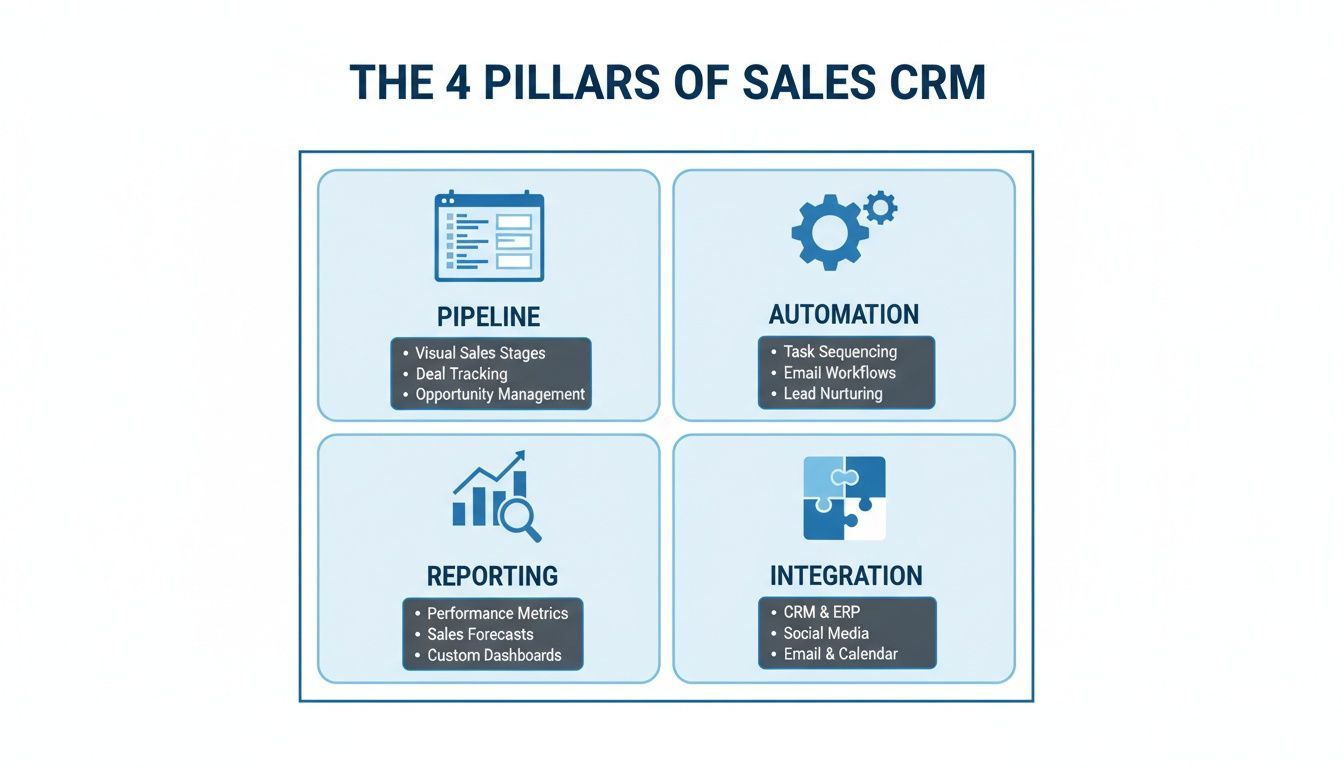
Think of it this way: a powerful CRM isn’t just a tool, it’s a balanced system where your pipeline, automation, reporting, and integrations all work in perfect harmony.
Pipeline And Deal Management
This is where deals are won or lost. The best CRMs give reps total clarity and control over their pipeline, showing them a clear path to hitting quota.
When it comes to customization, Salesforce Sales Cloud is in a league of its own. You can build incredibly detailed, multi-stage sales processes with custom fields, objects, and validation rules that map perfectly to a complex sales motion. It’s the go-to for enterprise teams managing long, multi-stakeholder sales cycles. The trade-off? That power brings complexity, and you’ll likely need a dedicated admin to keep it running smoothly.
HubSpot Sales Hub takes the opposite approach, obsessing over user experience. Its visual, Kanban-style pipeline is so intuitive that reps can drag and drop deals between stages right away. It doesn’t have the endless customization of Salesforce, but it wins on simplicity and adoption. A new SDR can be productive in HubSpot in hours, not weeks.
Key Differentiator: Salesforce gives you the surgical precision needed for complex, enterprise sales motions. HubSpot delivers elegant simplicity that drives immediate user adoption and value for faster-moving teams.
Zoho CRM strikes a nice balance. It offers more customization than HubSpot but sidesteps the steep learning curve of Salesforce. Its pipeline management is flexible and powerful, making it a great choice for mid-market teams that have outgrown basic CRMs but aren't quite ready for a full-blown enterprise system.
Sales Automation And Workflow Efficiency
Automation is the engine of a modern sales team. It eliminates the soul-crushing repetitive tasks, freeing up your reps to do what they do best: talk to customers.
HubSpot's Sequences feature is a game-changer for outbound sales. It lets SDRs build personalized, multi-step email and task sequences to enroll contacts in. For a startup trying to scale outreach, this is huge. An SDR can create a five-step sequence with three automated emails and two manual call reminders, guaranteeing no lead ever slips through the cracks.
Salesforce's Sales Engagement (formerly High Velocity Sales) is the enterprise-grade version, built for massive teams running highly structured outbound campaigns. It packs more advanced features like Einstein Lead Scoring and cadence branching, which can automatically change the outreach sequence based on a prospect's behavior. This is ideal for a company with hundreds of reps executing a data-driven sales playbook at scale.
Zoho CRM's workflow automation is its killer feature. It gives you a powerful set of "if-this-then-that" rules to automate just about anything. For example, you can set a rule to automatically assign a new lead based on territory, send a welcome email, and create a follow-up task—all without a single click.
Meanwhile, Microsoft Dynamics 365 Sales truly excels in organizations already running on the Microsoft stack. Its native integration with Outlook, Teams, and Power Automate creates a seamless workflow across the entire suite. Just imagine a rep getting an email in Outlook, qualifying the lead, and converting it to an opportunity in Dynamics without ever switching windows.
Reporting And Sales Forecasting
You can't improve what you don't measure. A great CRM transforms raw sales data into actionable insights that shape your entire strategy.
Salesforce's reporting and dashboards are incredibly powerful. You can build almost any report you can dream up, from simple rep activity leaderboards to complex historical trend analysis. For a sales leader at a large company, this depth is non-negotiable for slicing and dicing data to make strategic calls. The forecasting tools are just as robust, supporting territory, product, and overlay forecasts.
HubSpot prioritizes accessibility. Its out-of-the-box reports are clean, easy to grasp, and cover all the core metrics most sales teams need to track. While it can’t match the infinite customization of Salesforce, it delivers 90% of what most teams actually need with 10% of the effort. For a manager at a fast-growing company, this means getting critical insights quickly, without needing a data analyst on speed dial.
Key Differentiator: Salesforce is a massive analytics toolkit for deep-dive analysis and complex forecasting. HubSpot delivers the essential, easy-to-digest insights you need right out of the box, making it perfect for teams who value speed and clarity.
Of course, these big players aren't your only options. If you're looking for something different, check out our guide on CRM alternatives and competitors.
Integration Ecosystem
A CRM becomes exponentially more valuable when it connects seamlessly with the other tools your team lives in every day.
The Salesforce AppExchange is the largest, most mature B2B app marketplace on the planet, with thousands of integrations for virtually any business need. This massive ecosystem ensures Salesforce can act as the central hub for any enterprise tech stack, no matter how complex.
HubSpot's App Marketplace is growing fast and is packed with deep, well-built integrations for key sales and marketing tools. Its biggest strength, however, is the native integration with its own products (Marketing Hub, Service Hub), creating a truly unified platform that covers the entire customer lifecycle.
Matching The Right CRM To Your Team And Use Case
Choosing the right CRM for your sales team is less about a feature-for-feature showdown and more about fit. The right platform has to align with your team’s size, your sales motion, and, of course, your budget. What works for a five-person startup will absolutely cripple a global enterprise, and vice versa.
This decision is only getting more critical. The CRM market is on track to blow past $112 billion globally in 2025, and it's no surprise when you see that 91% of companies with over 10 employees are already using one. With North America making up 45% of that market and 52% of users wanting mobile access, your CRM has to be ready to scale and work wherever your team is.
The trick is to match the tool to the job. A platform that’s a beast for high-volume, transactional sales might feel clumsy and shallow when you’re navigating complex, multi-stakeholder deals. Let's break down the best options for different scenarios.
For Startups and Small Businesses
For smaller teams, the priorities are crystal clear: affordability, ease of use, and getting started fast. Complicated setups and months-long implementation cycles are deal-breakers. You need a CRM that delivers value on day one without needing a dedicated admin to run it.
- HubSpot Sales Hub: This is often the go-to for a reason. HubSpot is famous for its clean, intuitive interface and a surprisingly powerful free tier. A new sales rep can get their head around the visual pipeline and start building automated email sequences in a single afternoon—a huge win for teams that can’t afford to slow down.
- Zoho CRM: Zoho packs a serious punch for its price. It offers more customization options than HubSpot out of the box and includes some seriously robust workflow automation, making it a fantastic choice for small businesses with slightly more complex processes who are already planning their next stage of growth.
A classic startup mistake is over-investing in a CRM with features they won't touch for years. The goal isn't to buy your "forever" CRM. It's to find a system that solves today's problems brilliantly while offering a clear, affordable path to scale when you need it.
For Mid-Market and Enterprise Teams
As you grow, your needs change. Mid-market and enterprise teams demand a CRM with deep customization, advanced security, and the muscle to integrate with a sprawling tech stack. Here, scalability isn't just a "nice-to-have"—it's a non-negotiable for handling hundreds of thousands of contacts and complex sales hierarchies.
- Salesforce Sales Cloud: It’s the undisputed heavyweight champ for large organizations. Salesforce can be bent and molded to fit any sales process, no matter how intricate. Its massive reporting capabilities and the sprawling AppExchange ecosystem make it the true central nervous system for enterprise revenue operations.
- Microsoft Dynamics 365 Sales: For companies already living in the Microsoft world, Dynamics is a no-brainer. The native integrations with Outlook, Teams, and Power BI create an incredibly seamless experience. It just works, reducing friction and improving data flow between the tools your team already uses all day.
Best for High-Velocity Outbound Sales
Teams hammering the phones and sending hundreds of emails a day need a CRM built for speed and efficiency. Their entire game depends on powerful automation that can manage a massive volume of touchpoints without letting a single lead slip through the cracks.
This is where a platform like HubSpot Sales Hub really shines. Its "Sequences" feature is dead simple to use but incredibly effective. An SDR can enroll a list of prospects into a multi-step outreach cadence that mixes automated emails with manual task reminders, guaranteeing consistent follow-up at scale.
Best for Complex Enterprise Sales
On the flip side, teams managing long, complex sales cycles need a totally different set of tools. These deals often involve a dozen decision-makers, custom proposals, and a deep understanding of political and relational dynamics within an account.
This is Salesforce Sales Cloud's home turf. Its power lies in its ability to create custom objects, map out intricate account hierarchies, and track every single interaction across a large buying committee. It gives you the 360-degree view you absolutely need to navigate these high-stakes, high-value deals.
The Universal CRM Problem: Manual Data Entry
No matter which platform you choose, one massive challenge is always the same. A CRM is only as good as the data you put into it, and getting clean, accurate information into the system is often a soul-crushing, manual process.
Sales reps are forced to waste hours toggling between browser tabs, meticulously copying contact details from online professional networks and pasting them into CRM fields. This isn't just slow; it’s a recipe for errors, duplicates, and incomplete records that undermine your entire sales operation.
The True Cost Of Bad Data
Bad data isn't just an inconvenience. It’s a direct hit to your revenue engine, creating a cascade of problems that ripple through the entire sales team.
- For SDRs and BDRs: Time spent on manual data entry is time not spent prospecting. This administrative burden can steal 4+ hours per week from each rep, killing productivity and morale.
- For Sales Managers: When the CRM is filled with junk, sales forecasts become unreliable guesses. It’s impossible to confidently predict revenue or spot pipeline issues when you can't trust the underlying data.
- For RevOps Teams: Their whole mission is to ensure data integrity and process efficiency. Manual entry makes this nearly impossible, forcing them to spend countless hours on tedious data cleanup projects instead of strategic work.
This is where productivity tools come in, integrating with top CRMs to kill manual data entry for good.
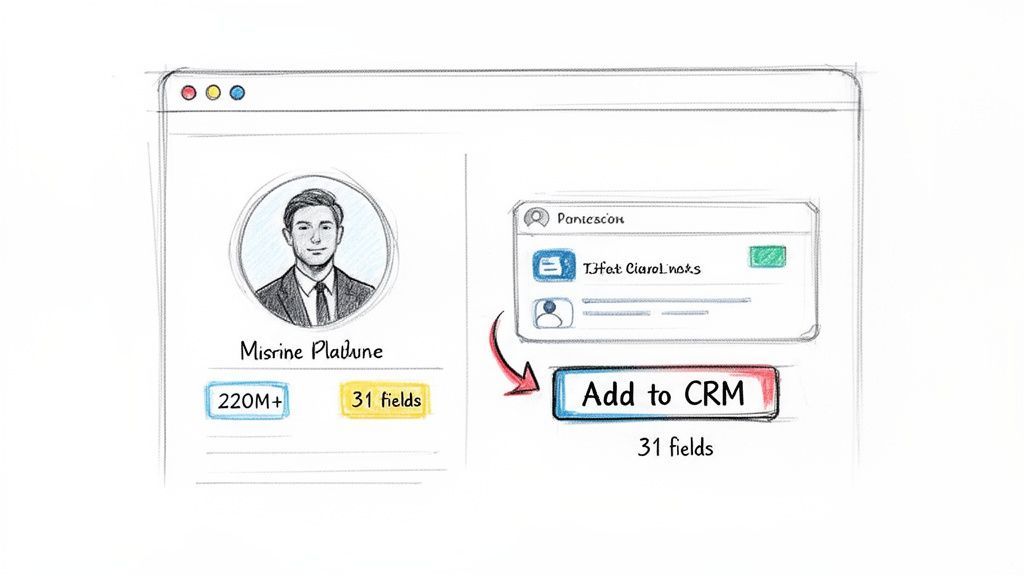
The image illustrates a simple but powerful workflow: a single click captures and enriches a contact, bypassing all the manual work.
Turning Any CRM Into a Smarter System
This is where a tool like Add to CRM becomes essential. It’s a browser extension designed to solve this universal problem by integrating directly with professional networks, turning any online profile into an enriched CRM record with a single click. Instead of copy-pasting, your team can instantly capture verified contact information and send it straight to your CRM.
The platform provides access to a database of over 220 million professionals, each with up to 31 enrichment points—including verified emails, direct dials, company revenue, and more. This transforms any CRM from a passive database into an active, intelligent prospecting tool.
The greatest barrier to CRM adoption is friction. If updating the CRM is harder than not updating it, your team will always choose the path of least resistance. The key is to make data entry so effortless that it becomes an invisible, natural part of their workflow.
By solving the manual data entry problem, you don't just get cleaner data; you get a more effective sales team. Reps regain valuable selling time, managers get forecasts they can trust, and your entire revenue operation runs on a foundation of accurate, reliable information. To dig deeper, you can learn more about how to automate data entry in our detailed guide.
Implementing Your CRM For Maximum Sales Impact
Picking the best crm for sales teams is only half the battle. The real value—the ROI everyone talks about—comes from a smart, strategic implementation that turns the software into something your team actually wants to use. If you rush it, you'll end up with low adoption, messy data, and a very expensive, glorified spreadsheet.
The entire game hinges on getting your team's buy-in from day one. That means showing them immediate, tangible value. You have to frame the CRM not as another administrative chore, but as the tool that will kill their most tedious tasks and help them close deals faster.
Starting With Clean Data
A CRM is only as good as the information you put into it. This makes data migration the most critical first step you can take. Shoving incomplete or flat-out wrong records from old spreadsheets into your shiny new system undermines its value before anyone even logs in. You need a clean slate.
This is where a data enrichment tool is a lifesaver. Using a solution like Add to CRM lets you populate the system with verified, accurate contact information right from the start. It guarantees your team is working with high-quality data they can trust for prospecting and outreach, which builds confidence in the system immediately.
The success of a CRM rollout is directly tied to user adoption. If the tool makes a salesperson's job harder, they won't use it. If it saves them time and helps them hit their quota, they'll embrace it.
Configuration and Training
Once your data is clean, the next move is to configure the CRM to mirror your actual sales process. Don't force your team to adapt to the software; make the software adapt to them. Customize your deal stages, pipelines, and required fields to match the language and workflow your team already uses. A system that feels familiar is a system that gets used.
Of course, even the most intuitive setup needs solid training. Forget generic feature walkthroughs. Focus on practical, role-specific workflows that show each person on your team exactly how the CRM will make their daily grind easier. You can learn more about how systems connect in our guide to CRM integration software.
Here are the key steps for a rollout that actually sticks:
- Data Cleansing: Audit and scrub every piece of contact and deal information before you even think about migrating it.
- Process Mapping: Clearly define your sales stages and build them out inside the CRM. Make it a perfect reflection of your process.
- User Training: Run hands-on, scenario-based training sessions that tackle real-world tasks your reps face every day.
- Dashboard Setup: Create and display the most important dashboards from day one. When reps can see key performance indicators (KPIs) moving in the right direction, it proves the tool’s value instantly.
Frequently Asked Questions About Sales CRMs
Rolling out a new CRM can feel overwhelming. In my experience guiding teams through this process, a handful of questions always surface. Tackling them early sets you up for a smoother launch and quicker wins.
Below, you’ll find concise answers to the FAQs I hear most often.
How Long Does It Take To Implement A New Sales CRM
Timelines depend on scope. For a small team focused on core features—contacts and pipeline stages—you can often go live in under a week.
Larger organizations face more moving parts. When you’re migrating hefty data sets, building custom workflows and training dozens of users, plan for several weeks to a few months. Clear roadmaps and dedicated training sessions are your best allies.
What Is The Biggest Mistake To Avoid When Adopting A CRM
The number-one trap? Skipping data hygiene checks. Importing duplicates or stale records means your dashboards lie, and reps lose faith fast.
“Without consistent data standards or automated capture, you end up with inaccurate forecasts and frustrated salespeople.”
Investing time upfront to clean and dedupe your data pays dividends in reporting accuracy and team morale.
How Do I Get My Sales Team To Actually Use The CRM
Adoption hinges on making the CRM feel like a shortcut, not extra work. Show reps how it integrates into—and speeds up—their day.
- Integrate With Existing Tools: Connect email, calendars and other apps they already use.
- Automate Routine Tasks: Log calls, set follow-up reminders and handle data syncing automatically.
- Eliminate Manual Entry: Leverage browser extensions or AI capture tools to pull in contact details with one click.
When reps see the CRM literally saving hours and helping them close deals, logging in becomes an obvious choice.
Stop wasting hours on manual data entry and start building a pipeline you can trust. Add to CRM integrates seamlessly with your favorite CRM, turning any online profile into an enriched contact in a single click. Get started for free today.
Start saving time and closing more deals.
Find contact info for your prospects on the #1 business social network and add them to your CRM with 1-click.

 Loading...



Trusted by 1000s of founders, SDRs & more
