How to Automate Data Entry and Win Back Your Week
Learn how to automate data entry with our guide to the best tools and workflows. Stop manual work, boost productivity, and focus on what truly matters.
When you hear "automating data entry," it just means using software to grab, process, and move information between systems without anyone having to lift a finger. Think of it as retiring the copy-paste function for good. This is usually done with tools like browser extensions, built-in integrations, workflow platforms, or even Robotic Process Automation (RPA)—all designed to slash errors and give you back a ton of time.
The Real Cost of Manual Data Entry
Let’s be honest, manual data entry feels like a necessary evil. It’s that tedious grunt work everyone puts up with, but it's quietly poisoning your team's potential and dragging your entire business down. The cost isn't just about wasted hours; it creates a nasty ripple effect that hits morale, messes with your decision-making, and stalls growth.

The Hidden Drain on Productivity and Morale
Picture this: one of your sales reps finds a fantastic lead online. What happens next? They spend the next ten minutes meticulously copying and pasting a name, job title, company, and contact details from a social media profile into your CRM. Every single field is a tiny landmine—a potential typo, a misplaced entry, or a missed detail.
Now, multiply those ten minutes by your entire team, every single day. It adds up to a staggering amount of lost productivity. Worse, this kind of repetitive, mind-numbing work is a known morale killer. You're forcing smart, talented people to act like robots, pulling them away from the work that actually matters—building relationships, closing deals, and solving real customer problems.
The High Price of Human Error
Manual entry isn't just slow; it's a magnet for mistakes. A single misplaced decimal in a financial report can throw off your entire strategy. A misspelled name in a customer record can sour a relationship before it even starts. When your leadership team is making critical decisions based on data riddled with human errors, the consequences can be brutal.
The problem is way bigger than most teams realize. Office-based professionals can waste more than 50% of their time just searching for files and information manually. Automating these tasks can boost productivity by 25-30% and drop error rates by up to 75%. If you're curious, you can dive deeper into automation statistics and see how it completely reshapes workflows.
At the end of the day, clinging to manual processes means you’re choosing to operate at a slower, less accurate, and more expensive pace than your competitors. Recognizing these hidden costs is the first critical step toward building a smarter system. This guide will show you exactly how to automate data entry and reclaim all that lost potential.
Choosing the Right Automation Approach for Your Team
Once you’ve stared the true cost of manual data entry in the face, the next move is picking the right tool for the job. Not all automation is built the same, and the best method really boils down to your team's needs, tech-savviness, and of course, budget.
Knowing how to automate data entry starts with understanding the four main paths you can take. Each one strikes a different balance between power, price, and complexity. Making a smart choice here saves a ton of headaches down the road and pretty much guarantees your team will actually use the new system.
Browser Extensions For Quick Wins
For sales and ops teams that practically live on social media or in their email, browser extensions are often the perfect first step. These are simple add-ons that plug right into your web browser, letting you grab and send data over to your CRM with a single click.
Picture a sales rep who just found a hot prospect online. Instead of the old, tedious copy-and-paste routine for their name, title, and company, an extension like Add to CRM can snatch all that info in an instant and create a perfect new contact record. It’s a low-friction, high-impact fix that delivers immediate time savings without needing a user manual.
Native Integrations For Seamless Connections
Lots of modern SaaS platforms come with their own built-in, or native, integrations. These are direct, pre-built bridges between two apps, created by the software developers themselves. For instance, your marketing platform might have a native integration that automatically funnels new leads straight into Salesforce or HubSpot.
These connections are usually rock-solid and a breeze to set up because they're officially supported. If your most important tools already talk to each other this way, it’s almost always the most straightforward path.
Pro Tip: Before you go looking for complex solutions, always check the "app marketplace" or "integrations" page of your core software. You might find that a powerful, ready-to-use connection is already waiting for you, saving you a ton of effort.
Workflow Automation Tools For Ultimate Flexibility
But what if you need to string multiple apps together in a more complex chain of events? This is where workflow automation platforms like Zapier or Make (which used to be Integromat) really shine. Think of them as the digital glue for your tech stack.
These tools let you build custom "if this, then that" recipes that connect thousands of different applications. You could, for example, build a workflow where a new row in a Google Sheet automatically creates a customer in QuickBooks, shoots them a welcome email via Mailchimp, and adds a follow-up task in Asana. They offer incredible flexibility but do require a bit more tinkering to get just right.
Robotic Process Automation For Legacy Systems
Sometimes you're stuck working with older, on-premise software or clunky internal systems that don’t have modern APIs to connect to. This is a job for the heavy machinery: Robotic Process Automation (RPA).
RPA bots are designed to mimic human actions by interacting directly with a user interface—they literally click buttons, fill out forms, and copy-paste data just like a person would, only way faster. While incredibly powerful, RPA is generally the most complex and expensive option. It's best saved for big, enterprise-level problems where nothing else will do the trick.
Comparison of Data Entry Automation Methods
To help you visualize where each approach fits, here’s a quick breakdown. Think about where your biggest data entry bottlenecks are and which tool feels like the right fit for your team's skills and budget.
| Method | Best For | Ease of Use | Typical Cost |
|---|---|---|---|
| Browser Extension | Individual reps capturing leads from the web | Very Easy | Low (Free to $-$$) |
| Native Integration | Connecting two core business applications seamlessly | Easy | Included or $-$$ |
| Workflow Tool | Multi-step, multi-app custom automations | Moderate | $-$$$ |
| RPA | Automating tasks in legacy or closed systems | Complex | High ($$$$) |
Choosing the right method isn't about finding the most powerful tool—it's about finding the one that solves your specific problem with the least amount of friction. Start simple, get a quick win, and build from there.

Find verified contact data on LinkedIn®
Add to CRM finds verified emails, phone numbers, and job titles on LinkedIn® — then adds them to your CRM in one click.
Start Free Trial


 Trusted by 2,500+ users4.7
Building Your First Automated Data Entry Workflow
Alright, let's move from theory to practice. This is where the rubber meets the road—we’re going to build your first automated workflow and see just how simple it is to kill manual data entry for good.
We'll tackle a classic scenario that sales and ops teams burn hours on every single day: creating a new, accurate CRM contact directly from a prospect's online profile.
First things first, we need a clear, measurable goal. "Save time" is too vague. A much better goal is something like, "add a new lead to the CRM in under 5 seconds." This gives you a concrete target, making it way easier to design the right workflow and know if it's actually working. Nailing this small, tangible win proves to your team that anyone can get the hang of automation.
Defining Your Trigger and Action
Every single automated workflow, no matter how complex, boils down to two things: a trigger and an action.
- The Trigger: This is the starting pistol. It's the event that kicks everything off. In our example, the trigger is you clicking a button in a browser extension while looking at a prospect's profile.
- The Action: This is what you want to happen next. Here, the action is creating a new, fully populated contact record in your CRM.
Just think of it as a simple "if this, then that" command. If I click "Add to CRM," then create a new contact. This simple logic is the bedrock of automation, making it the perfect place to start.
Mapping Your Data Fields Correctly
Once your trigger is set, you've hit the most critical step: field mapping. This is where you connect the dots, telling the automation exactly where to put each piece of information. For example, you need to map the "Job Title" field from the online profile to the "Position" field in your CRM. Simple as that.
This process flow shows the different paths your data can take, from a simple browser tool all the way to more heavy-duty Robotic Process Automation (RPA).
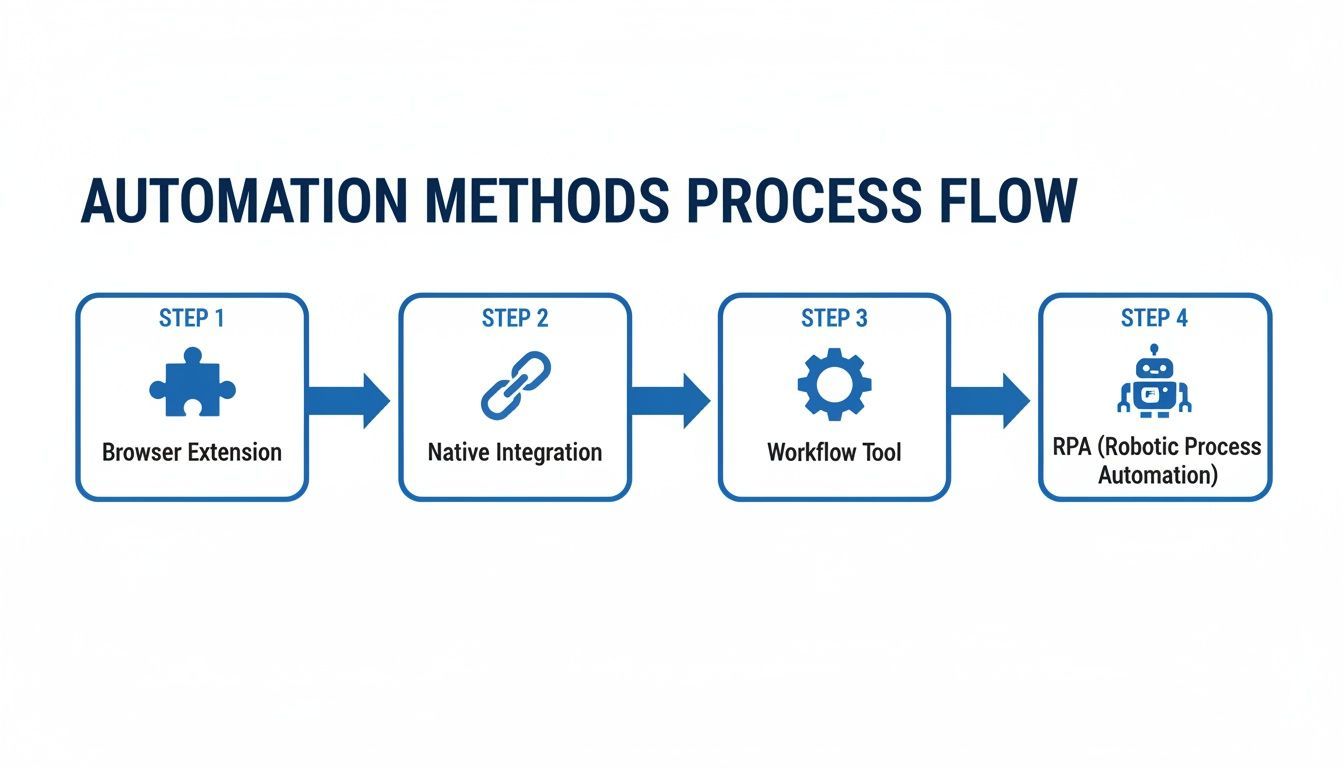
What this really highlights is that no matter which tool you pick, the core idea is the same: get data from a source and map it to a destination.
Inaccurate mapping is the number one rookie mistake. If you accidentally map "Company Name" to your CRM's "First Name" field, you'll end up with a database full of garbage. Take a minute to carefully line up each data point with its proper home in the CRM. Most modern tools have a simple drag-and-drop interface for this, so it’s pretty intuitive.
Key Takeaway: Correct field mapping is non-negotiable for clean data. Get this right, and you'll prevent 90% of common automation errors. A few minutes of careful setup here will save you hours of cleanup later.
Some tools will ask for an API key to create a secure handshake between the software and your CRM. Think of it like a password that gives the tool permission to add and update records for you. If you're not sure where to find yours, we've got a guide on how to find API keys for your software that can help.
The demand for this kind of efficiency is exploding. Data entry is consistently the most automated task, at 38%, as companies race to get rid of these manual slogs. In fact, a salesperson can claw back about 2 hours and 15 minutes every day just by automating data entry. That's time they can spend on high-value activities instead of grunt work. By building this one simple workflow, you're tapping into a massive productivity boost.
From Simple Automation to Smart Data Enrichment
Good automation moves information from point A to point B. Great automation makes that information more valuable along the way. Once you’ve nailed a basic workflow that pipes contact details into your CRM, the next step is to layer in data enrichment and real-time verification.
This is where things get really interesting. It’s the difference between a simple time-saver and a genuine strategic advantage.

Picture this: your sales rep adds a new prospect from a professional social network. Before they can even switch tabs, your system has already appended the company’s estimated revenue, industry, employee count, and headquarters. At the same time, it’s pinged a server to confirm their email address is active and deliverable.
That’s what smart data enrichment feels like in practice. It transforms a flat, basic contact record into a rich, actionable profile, giving your team the context they need for a killer first conversation.
Why Data Enrichment Is a Game-Changer
Let’s be honest: without enrichment, your CRM data starts to go stale almost immediately. People switch jobs, companies get acquired, and email addresses die. This data decay sabotages your marketing campaigns and burns your sales team’s time.
Enrichment is your defense against that decay. It keeps records fresh, but more importantly, it arms your team with the B2B intelligence needed to qualify, segment, and prioritize leads far more effectively.
Here’s what that looks like on the ground:
- For Sales Teams: Reps can instantly spot high-value prospects by filtering for company size or industry. No more guesswork, just targeted outreach.
- For Marketing Teams: Forget generic email blasts. Now they can build hyper-segmented campaigns based on real firmographic data, driving up engagement.
- For Operations Teams: Clean, enriched data means forecasting and reporting you can actually trust, leading to much smarter business decisions.
By combining automation with enrichment, you're not just saving time on manual entry; you're building a more valuable and reliable database. This proactive approach ensures your team is always working with the best possible information.
Choosing the Right Tools and Implementing Your Strategy
Many modern automation platforms have caught on and now offer built-in enrichment features or clean integrations with specialized services. When you’re figuring out how to automate data entry, it’s smart to look for tools that offer this from the jump. You can also check out our guide on the best data enrichment tools to see what’s out there.
Putting this into action is often as simple as adding another step to your workflow. Right after the initial data capture, you trigger an enrichment "action" that queries a third-party database. It then pulls relevant info back into your CRM and maps it to the right fields.
The impact is huge. Organizations have seen 70% cost savings from slashing manual entry and can process 73% of documents in seconds. Add in real-time verification with 95%+ accuracy and enrichment that appends 20+ data points per contact, and you can see a return on your investment in under a year.
This one step elevates your entire process from a simple time-saving trick to true strategic intelligence.
You’ve built a brilliant automation workflow. The fields map perfectly, the data is clean, and you’re ready to save your team a mountain of time. But here's the hard truth: the technical setup is only half the battle.
A flawless system is completely useless if your team doesn't actually use it. Real success hinges on the human side of the equation. Here’s how to nail the rollout and get everyone on board.
Pressure-Test Everything First
Before you even think about announcing the new process, you need to try and break it. A buggy, unreliable rollout will kill adoption on day one, and you’ll never recover that trust.
Go beyond the "happy path" where everything works perfectly. You need to simulate the messy, real-world scenarios your reps deal with every day.
Create a short, focused checklist for this stress-testing phase:
- Incomplete Profiles: What happens when a prospect’s online profile is missing a job title or company name? Does the automation fail gracefully, or does it create a garbage record in your CRM?
- Custom Fields: If you rely on custom fields like "Lead Source" or "Key Contact," does the workflow map to them correctly every single time? No exceptions.
- Duplicate Contacts: This one's critical. Test what happens when you try to add a contact who is already in the system. The automation must flag the duplicate, not blindly create a second record.
Getting Your Team On Board
Once you're confident the workflow is solid, it's time to focus on adoption. The key is to stop thinking like an engineer and start thinking like a salesperson.
Don't just announce a new tool—sell the benefit. Your team couldn’t care less about APIs or field mapping. They care about what's in it for them.
Frame the entire change around one powerful idea: more time for selling, less time for admin. Show them exactly how this new process eliminates their most hated data entry tasks. When you can prove you’re giving them back hours in their week, you’ll get buy-in instead of eye-rolls.
The Goal Isn't Just Implementation—It's Habit Change. Position the automation as a personal assistant that handles the grunt work. This frees up your team to focus on what they do best: building relationships and closing deals.
Create Champions and Simple Guides
Nobody wants to read a 50-page training manual. Keep it simple.
A one-page guide with clear screenshots walking through the new process is perfect. Even better? Record a quick Loom video showing it in action. Then, run a brief, 15-minute training session that’s all hands-on—no boring slide decks.
Finally, find an automation "champion" on your team. This is your go-to person, someone who's genuinely excited about the new system and can help their colleagues with quick questions. They also become your eyes and ears, gathering feedback on what’s working and what could be even better.
This approach turns a top-down mandate into a collaborative team effort, paving the way for a change that actually sticks.
How to Measure and Optimize Your Automation ROI
Okay, your new automation workflow is live. Pop the champagne, right? Almost.
Building the workflow is half the battle. Now you have to prove it was worth the effort. Getting this right is what separates a neat side project from a genuine operational upgrade that gets everyone bought-in for the long haul.
The most obvious win to track is time saved. You need a simple "before and after" picture. How long did it take a rep to manually add a new lead from a professional social network before? An honest guess is fine—say, 3 minutes. Multiply that by the number of leads your team adds each week. Now, time the new process. The difference is pure, tangible time handed back to your team, which you can easily convert into payroll hours saved.
Building Your Automation Dashboard
Time is the headline, but other KPIs tell the full story. Tracking these helps you celebrate the wins and quickly spot what needs tweaking.
Here's what I'd put on my dashboard:
- Error Rate Reduction: Tally up the number of data entry mistakes (typos, wrong fields, missing info) from the week before you went live. Compare it to the week after. A nosedive in errors is a massive, undeniable win for data quality.
- Duplicate Record Count: How many duplicate contacts or companies were created last month? Good automation should get this number close to zero, keeping your CRM from turning into a messy garage sale of data.
- Team Adoption Rate: It’s simple—are people actually using it? Track how many reps are pushing leads through the new workflow. If adoption is low, it’s not a failure. It’s a sign you need to offer more training or adjust the process to remove friction.
Don't just keep these numbers in a spreadsheet for yourself. Build a dead-simple, visual dashboard in Google Sheets or your BI tool of choice. A chart showing “Hours Saved Per Week” ticking upwards is a thousand times more powerful than just saying things are better.
This is how you change the conversation from, "Yeah, I think we're more efficient," to, "We've reclaimed 20 hours of prime selling time this month alone." That's the kind of data that gets you budget and buy-in for your next project.
Keep the Feedback Loop Open
Your first version is never the final version. The best way to keep improving is to talk to the people who live in the workflow every single day: your reps.
Schedule short, regular check-ins. Ask them what’s working, what feels clunky, and what other mind-numbing task they wish they could get off their plate.
This feedback is absolute gold. It not only helps you polish your existing automation but also uncovers the next big opportunity you might have completely missed.
If you want to put hard numbers to their suggestions, a CRM ROI calculator can help you model the financial impact. This turns qualitative feedback into a rock-solid business case, ensuring your automation efforts keep paying dividends long after the launch party.
Works with 29+ CRMs
Add to CRM finds verified emails, phone numbers, and job titles on LinkedIn® — then adds them to your CRM in one click.
Start Free TrialTrusted by 2,500+ users4.7Common Questions About Automating Data Entry
Jumping into automation for the first time? It’s normal to have a few questions. Let's tackle some of the most common ones we hear from teams who are tired of manual data entry.
First up is always the cost. People hear "automation" and immediately think of expensive, enterprise-level RPA software. The good news is that many of the most effective tools are surprisingly affordable. Browser extensions and workflow platforms like Zapier usually run on a simple subscription, often with free or low-cost plans that make them a no-brainer for even the smallest teams.
The real question isn't the price tag—it's the ROI. Once you calculate the cost against the hours your team gets back, the value is usually obvious within the first year.
What About All My Different Data Sources and Formats?
This is a big one. Your team is probably grabbing info from everywhere: PDFs, emails, scanned docs, and a dozen different websites. It feels like no single system could possibly handle it all.
And you're right—it usually takes a combination of tools. The trick is to build a small, connected toolkit instead of searching for one magic solution.
- For websites and social profiles: A good browser extension is built for this. It can grab structured data with one click, saving you the copy-paste nightmare.
- For documents and PDFs: You’ll want a tool with Optical Character Recognition (OCR). This tech scans the document, pulls out the text, and turns it into something your CRM can actually use.
- For emails: This is where workflow platforms shine. A simple Zap can be set up to watch for incoming emails, parse out the key details, and fire them straight into your CRM.
Don't try to solve everything at once. Start with your highest-volume, most annoying data source and build out your automation toolkit from there.
And what about keeping all this data secure? It’s a valid concern. Reputable automation tools rely on secure API connections and encryption to keep your data safe in transit and at rest. In many ways, automation actually boosts security. It cuts down on the number of times a human has to handle sensitive information, which means fewer chances for error or accidental leaks. Automation doesn't just make you faster; it makes your data processes safer.
Ready to kill manual data entry for good? Add to CRM is a simple Chrome extension that turns any online profile into a clean, enriched CRM record in one click. Start your 7-day free trial and save your team hours every week.
Start saving time and closing more deals.
Find verified contact info for your prospects on LinkedIn®, Gmail and Outlook — and add them to your CRM with 1-click.

 Loading...Trusted by 2,500+ founders, SDRs & more