How to Use Nutshell CRM in 2026: Setup & Sales Guide
Master Nutshell CRM—setup, pipelines, and reporting. Use LinkNutshell to add verified LinkedIn leads in one click. No manual entry.
Sync leads from professional networks to Nutshell CRM.
Save 4hrs per week on CRM data entry.
Learn more...Free Nutshell CRM integration
Nutshell is an incredibly flexible, user-friendly CRM (Customer Relationship Management) solution that helps businesses of all sizes—especially small and midrange—to manage contacts, automate sales tasks, and nurture customer relationships. Whether you’re just starting out or aiming to streamline complex sales workflows, Nutshell can handle it all. In this guide, we’ll walk through the essentials: setting up your Nutshell account, importing contacts, creating tasks and leads, and leveraging powerful features like forms, email marketing, and drip sequences.
1. Why Choose Nutshell CRM?
Nutshell CRM is favored by many startups and mid-sized businesses for its:
- Intuitive Interface: Easy-to-navigate dashboards and a straightforward menu make it beginner-friendly.
- Feature-Rich Functionality: Sales automation, pipeline management, built-in email marketing, task creation, and more.
- Affordability & Free Trial: A 14-day free trial with no credit card required, letting you test the platform risk-free.
- Reliable Customer Support: Knowledge base articles, video tutorials, and quick support to ensure smooth onboarding.
From tracking customer relationships to scheduling meetings, Nutshell simplifies the entire sales cycle. If you want a sleek, user-friendly CRM that grows with your business, Nutshell is a great option.
2. Getting Started & Setting Up
Ready to jump in? Follow these steps:
- Sign up for a free trial. Go to LinkNut and click Start Free Trial (or equivalent). You’ll be prompted to create an account and enter basic business info.
- Familiarize yourself with the Dashboard. After logging in, you’ll land on Nutshell’s main dashboard. Here you’ll see an overview of pending tasks, leads, and key metrics. Use the top-left Add New button to quickly add tasks, leads, contacts, or forms.
- Explore the main menu. On the left-hand navigation bar, you’ll find items like Dashboard, People, Leads, Calendar, and more. This menu is your anchor point for all CRM actions.
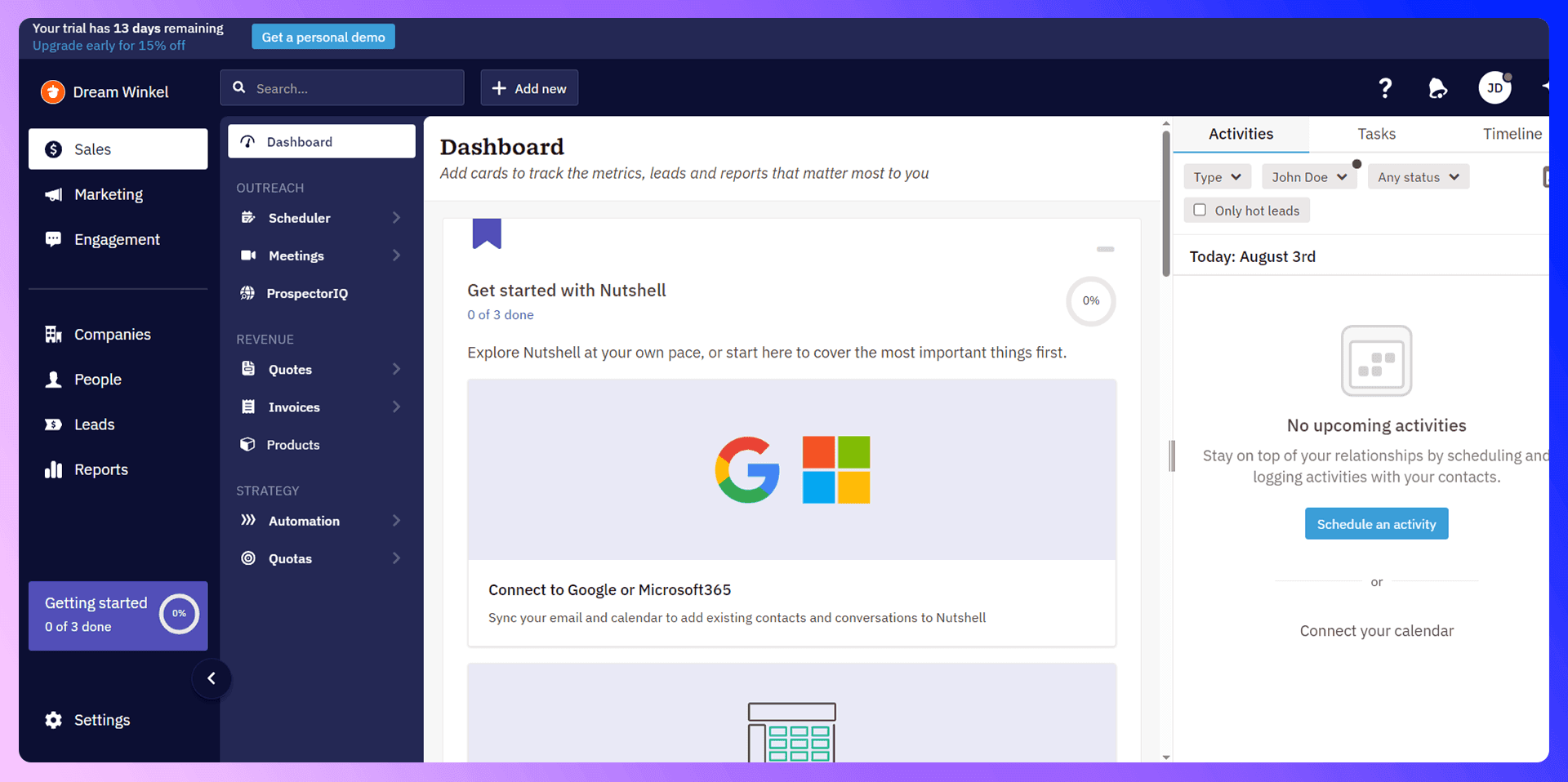
Tip: Nutshell’s interface is designed to minimize clutter. Feel free to click around—most features are intuitive, and you won’t “break” anything. You can also access tutorials under the Resources or Help section in your account.
3. Importing Contacts
Your CRM is only as good as the data in it. So, the first major step is importing your existing contacts.
CSV Import
- Go to People: From the left-hand menu, click People.
- Add New Person or Import: In the top-left, you can choose Add New Person for manual entry, or Import to bulk-upload via CSV.
- Upload File: Choose your CSV file. Nutshell will match spreadsheet columns to CRM fields (like Name, Email, Phone). Confirm or adjust field mappings.
- Finalize: Click Import to move data into Nutshell. Within seconds, your contacts will appear in the People tab.
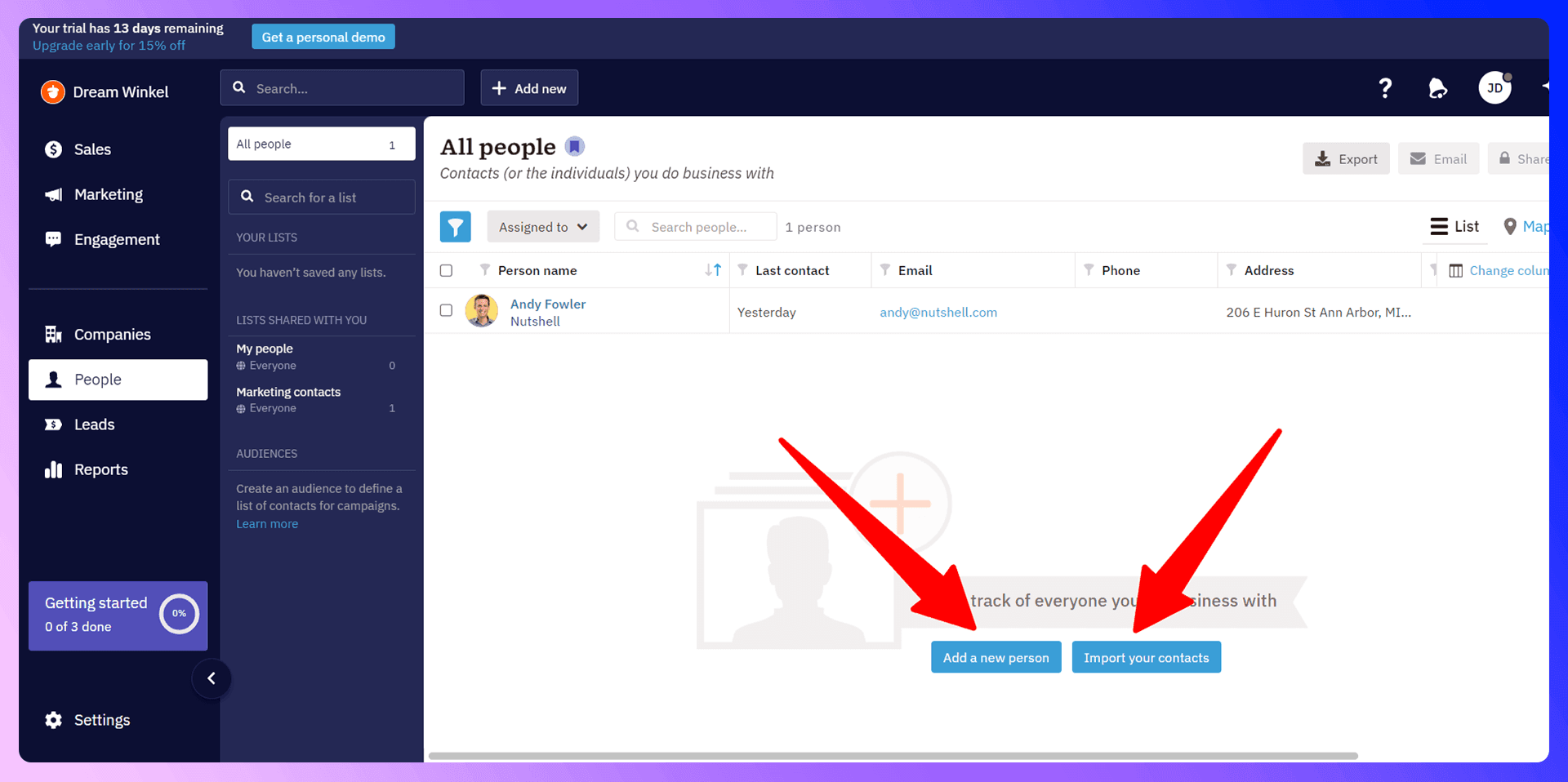
Address Book Integration
If you keep contacts in Google Contacts, Apple Contacts, or LinkedIn, Nutshell can sync those directly. Simply:
- Click “Import.”
- Choose “Address Book.”
- Select the platform (Google, Apple, LinkedIn).
- Authenticate & Sync: Allow Nutshell to access your contacts.
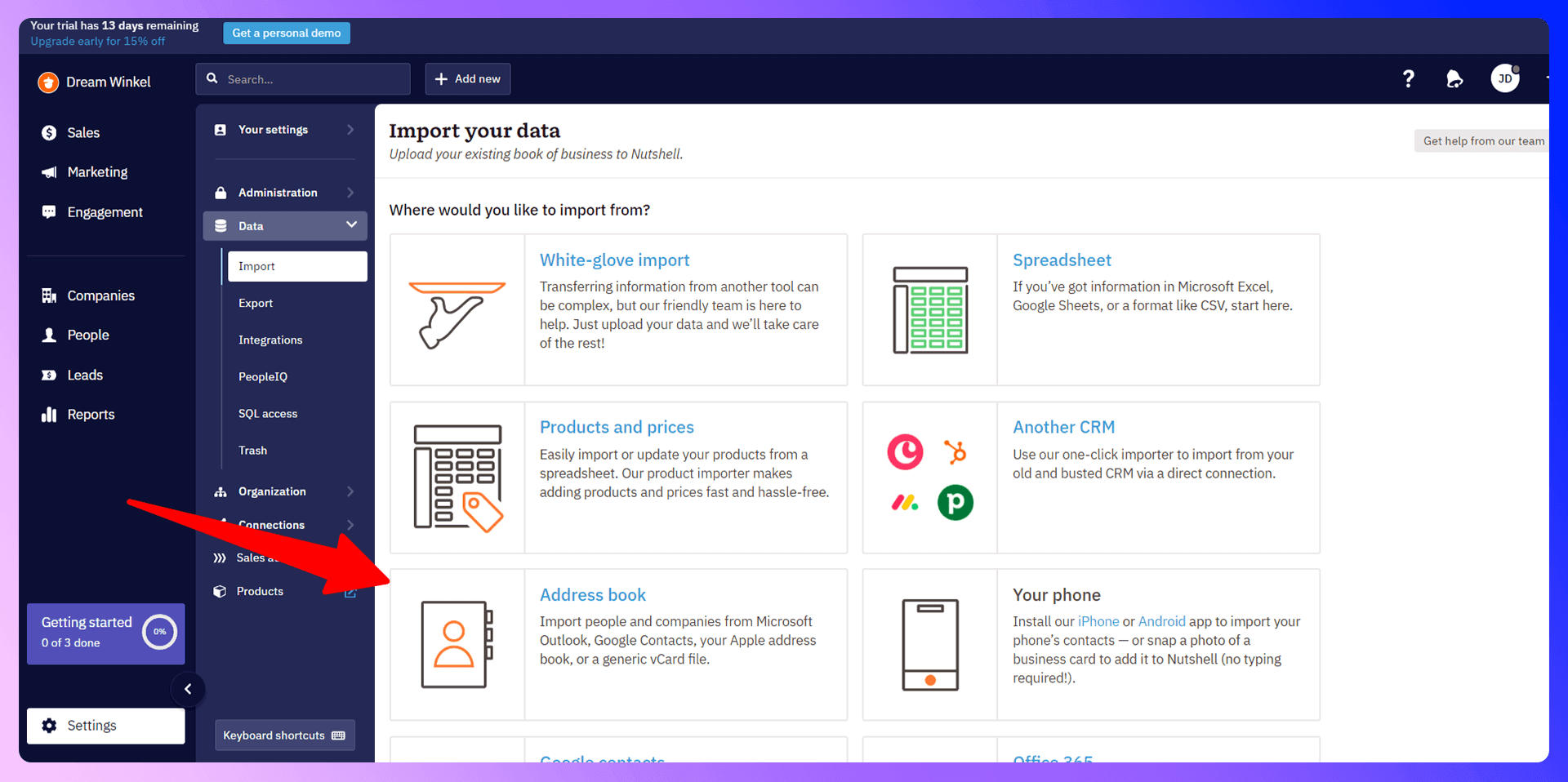
Within moments, your CRM is populated with all relevant info. Quick and efficient!
4. Nutshell CRM LinkedIn Integration
LinkNut is a powerful Chrome extension that makes prospecting from LinkedIn effortless. Instead of copying and pasting contact information into Nutshell, LinkNut lets you import verified emails, phone numbers, and job details with just one click.
It’s the fastest, most reliable way to feed high-quality leads into your CRM—directly from LinkedIn.
How LinkNut Works
Install the Chrome Extension Head to the Chrome Web Store and install LinkNut.
Visit a LinkedIn Profile Open the profile of a prospect you want to add to Nutshell.
Click the LinkNut Button LinkNut instantly finds verified contact info—email, phone, and company details.
Add to Nutshell CRM With one click, all the info is transferred directly into your CRM—no switching tabs, no manual typing.
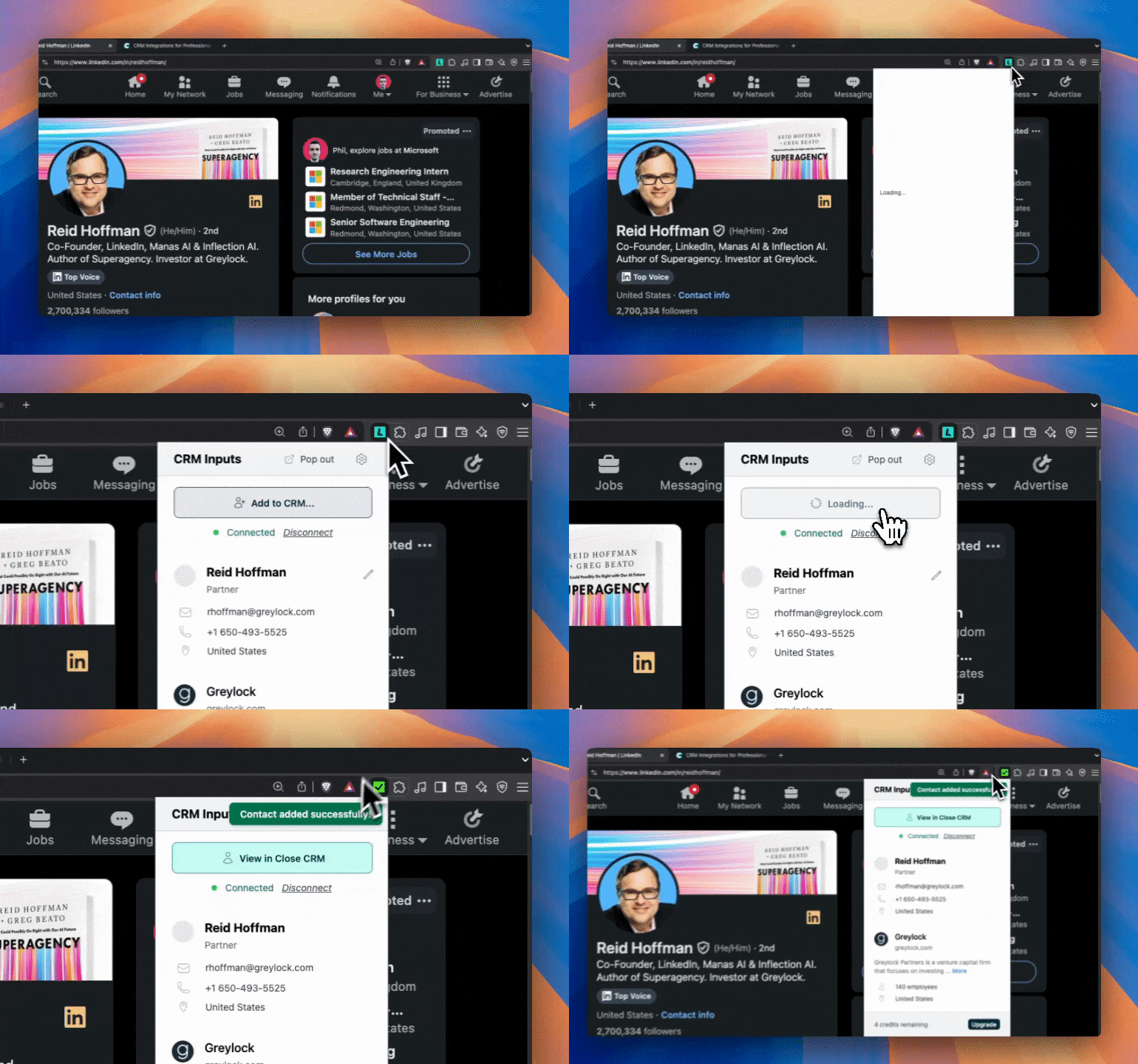
LinkNut vs Traditional Prospecting
Time: Traditional prospecting takes 5–10 minutes per contact. LinkNut takes less than 30 seconds.
Accuracy: Manual entry is prone to typos and missing fields. LinkNut delivers 96% accurate, verified data.
Efficiency: Traditional methods are repetitive and time-consuming. LinkNut automates the workflow for faster, consistent results.
Workflow: Manual copy-pasting requires tab switching and manual form filling. LinkNut offers 1-click sync into Nutshell CRM—zero interruptions.
Why Use LinkNut with Nutshell?
- Build your prospect list 10x faster
- Eliminate copy-paste errors
- Focus more on selling, less on data entry
- Works natively with Nutshell—no Zapier or third-party mapping needed
Whether you're a solo rep or a full sales team, LinkNut enhances your CRM strategy by filling your pipeline faster and more accurately.

Find verified emails and enrich Nutshell CRM contacts
Add to CRM finds verified emails, phone numbers, and job titles on LinkedIn® — then adds them to Nutshell CRM in one click.
Start Free Trial


 Trusted by 2,500+ users4.7
5. Creating & Managing Tasks
Tasks help ensure nothing falls through the cracks. Whether you’re following up after a call, reminding yourself to check a lead’s email response, or setting a meeting, tasks keep your workflow organized.
- Click “Add New” > Task: A modal opens where you fill in the details.
- Set Due Date & Time: e.g., end of the week, or a specific day/time.
- Assign to a User: If you have teammates, choose who handles this task.
- Add Notes: Include context like “Call John about the updated proposal.”
- Create Task: It appears in your main dashboard and your assigned user’s queue.
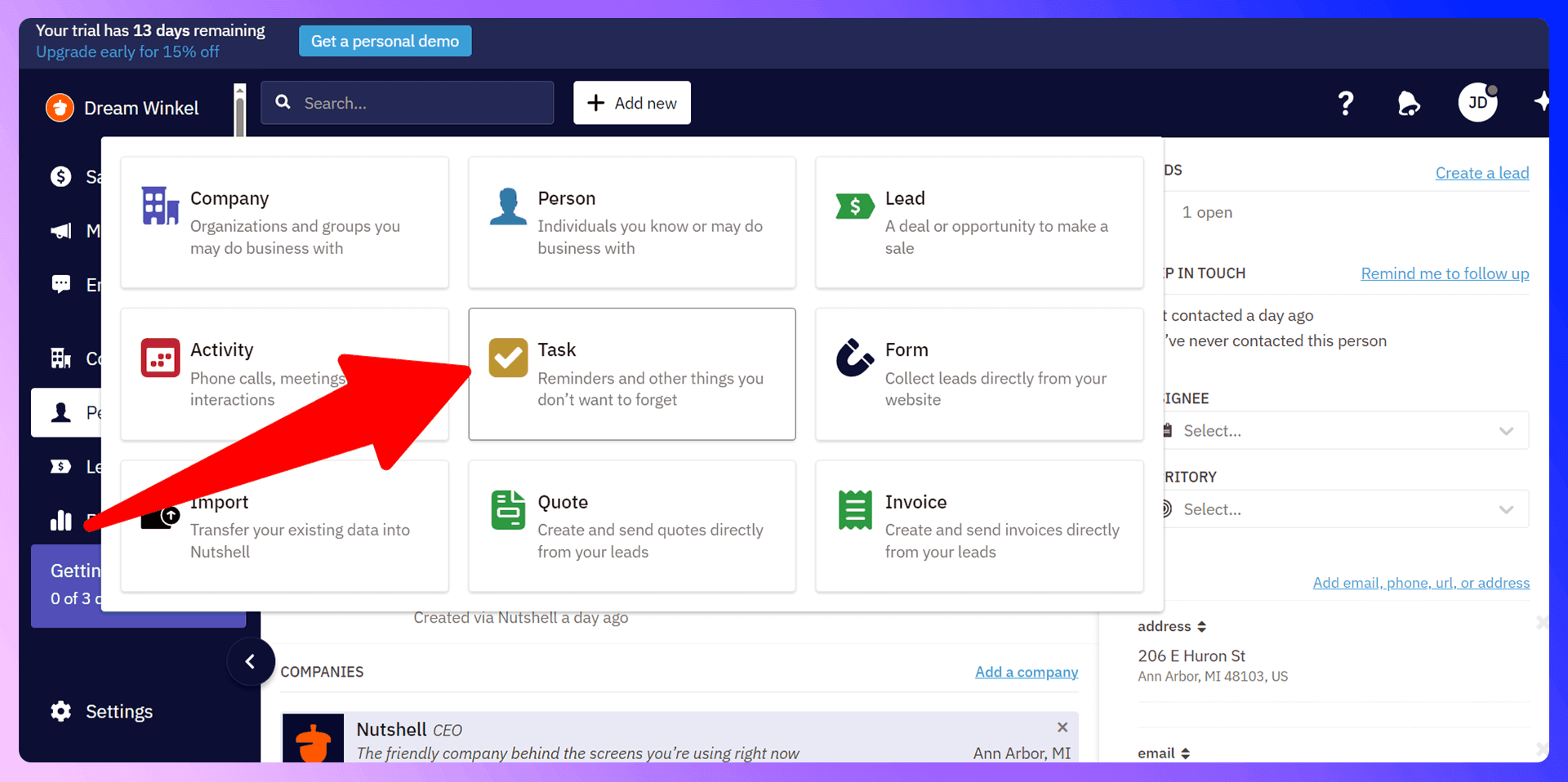
These tasks will appear in the Calendar and Tasks sections, ensuring you never miss a deadline.
6. Leads & Pipelines
Nutshell’s core is Lead Management—tracking potential deals from initial contact to won or lost. Creating a lead is easy:
- Click “Add New” > Lead.
- Give it a Name: e.g., “Acme Inc. Web Project.”
- Choose an Anticipated Close Date: e.g., next month.
- Select a Product or Pipeline: You can manage multiple pipelines (e.g., “Product A,” “Product B,” “Consulting Services”).
- Set Price: The estimated value or quote.
- Save: The lead will appear in the “Leads” tab and your pipeline view.
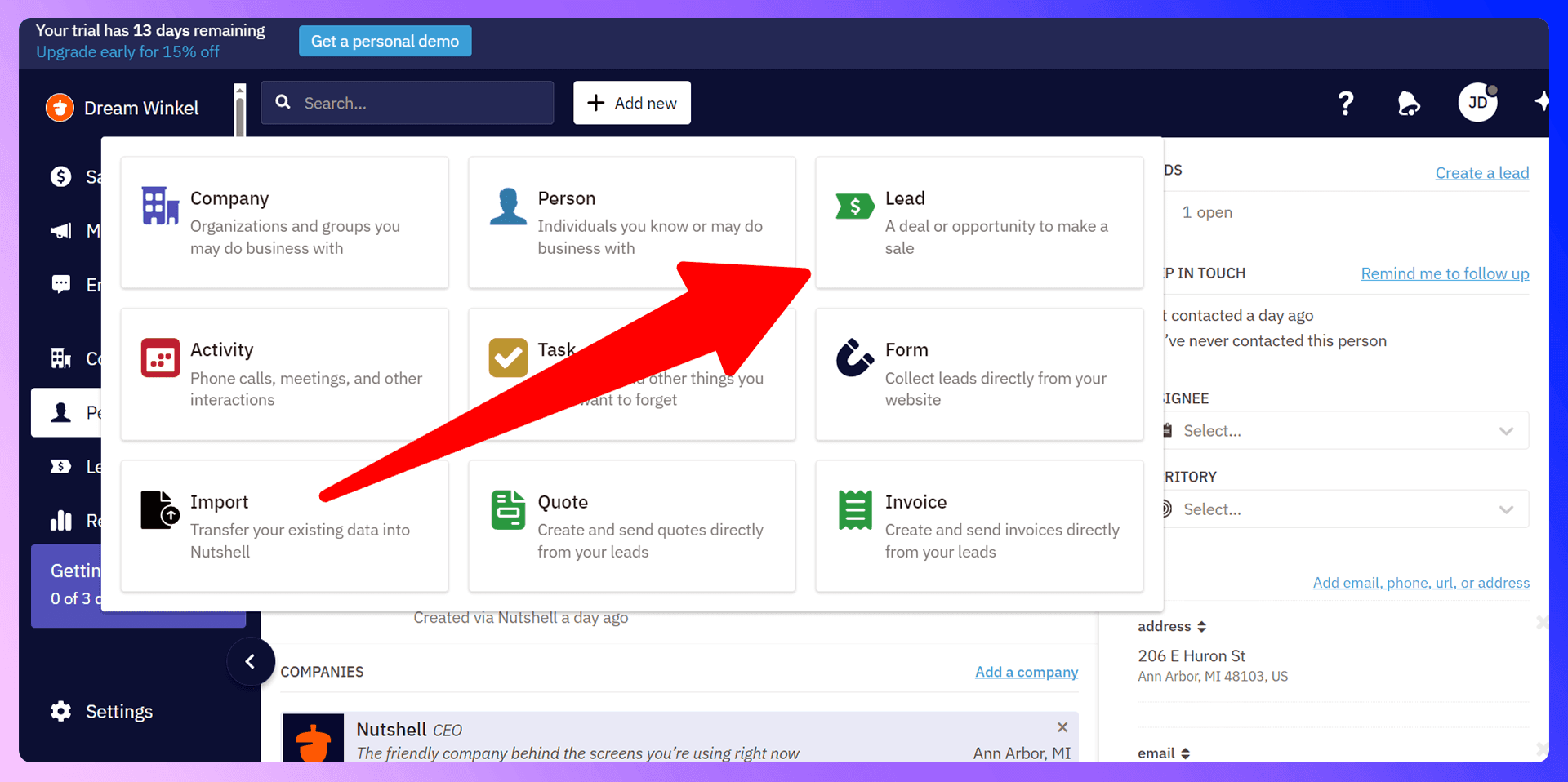
Pipeline Visualization
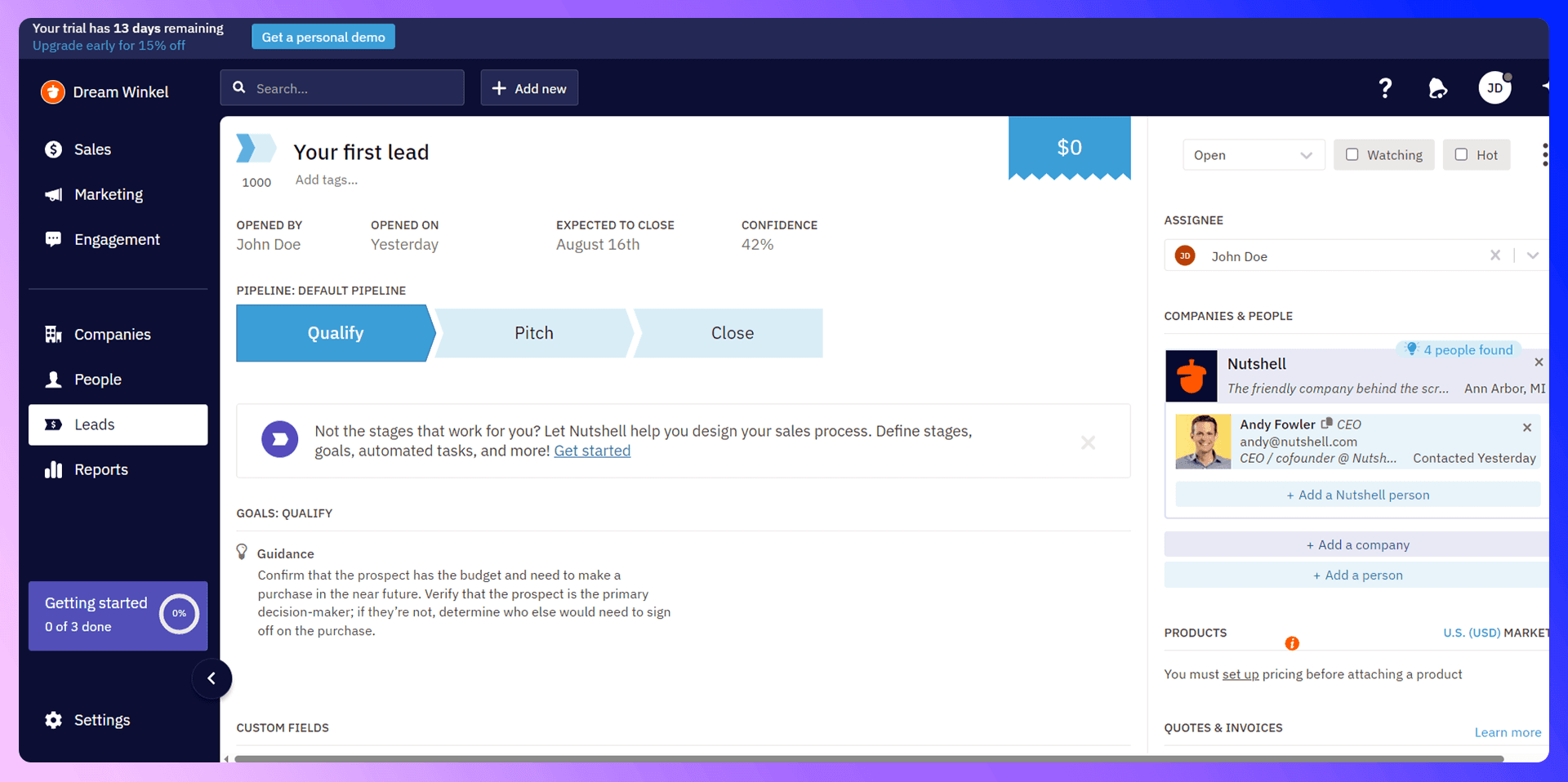
- Stages: By default, you might have stages like New, Contacted, Proposal, and Closed. You can rename or add custom stages to reflect your actual sales process.
- Move Leads: Drag-and-drop leads across stages. Or open a lead and select the next stage. This ensures a visual, at-a-glance sense of your pipeline’s health.
- Reporting: Nutshell can generate analytics, showing how many leads are in each stage, your conversion rate, and total forecasted revenue. Great for planning and adjusting your approach!
7. Forms & Web Lead Collection
Instead of manually entering every lead, let Nutshell Forms do the work for you. Create embeddable contact forms, sales request forms, or “Join Our Mailing List” forms to capture data directly into Nutshell.
- Click “Add New” > Form: Then choose a template (e.g., “Contact Us,” “Sales Request,” or a custom form).
- Customize Fields & Branding: Edit color schemes, add your logo, or rearrange form fields.
- Preview & Save: Make sure the form looks good on desktop/mobile.
- Embed or Share Link: Copy the HTML embed code for your site or use the direct URL to share on social media.
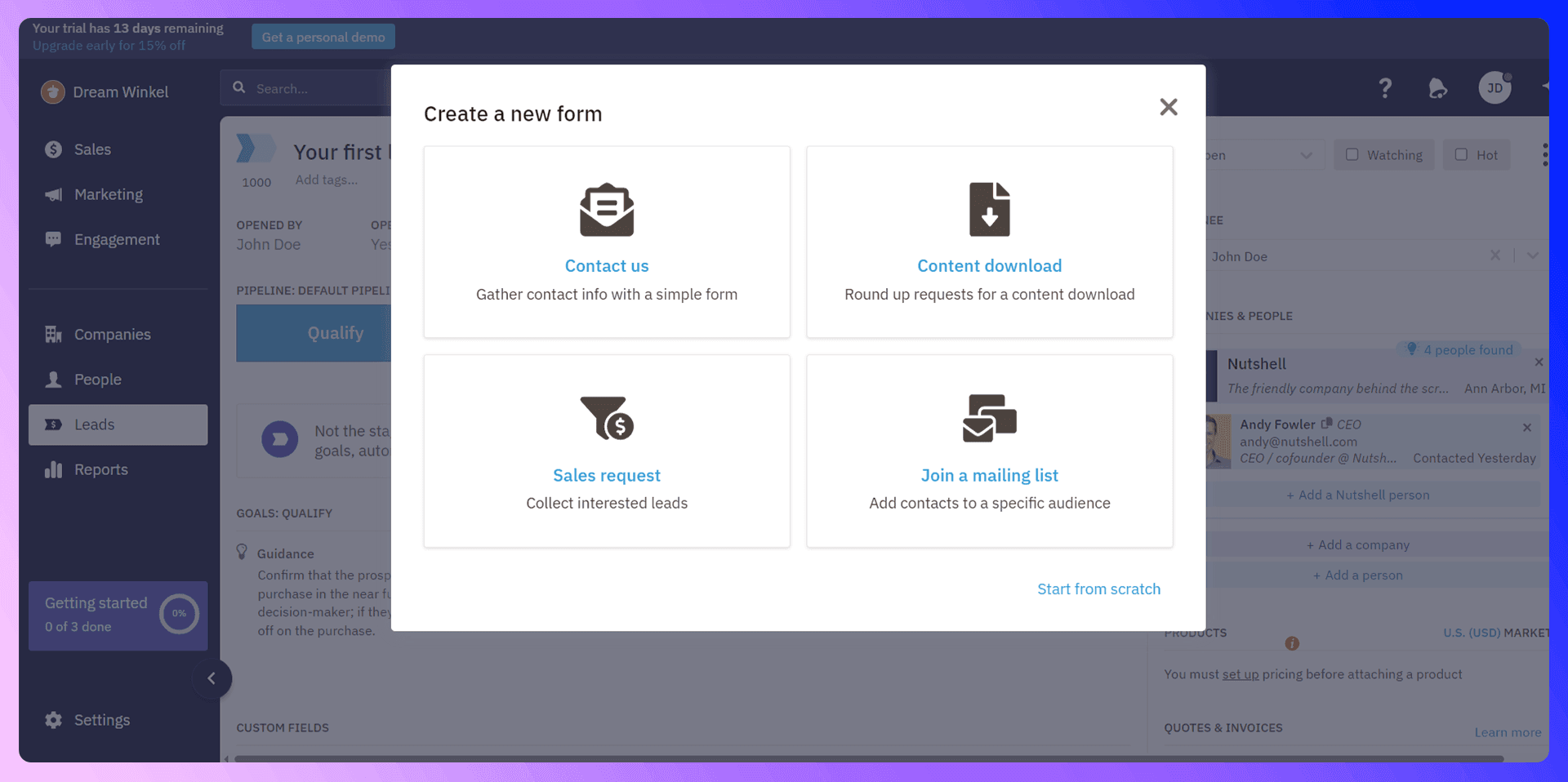
When visitors submit the form, those leads flow into Nutshell automatically—complete with name, email, notes, and any additional form fields you created. This is the easiest way to capture fresh leads without retyping data!
8. Newsletters & Drip Sequences
Nutshell CRM includes built-in email marketing features. No need for a separate tool!
Newsletters
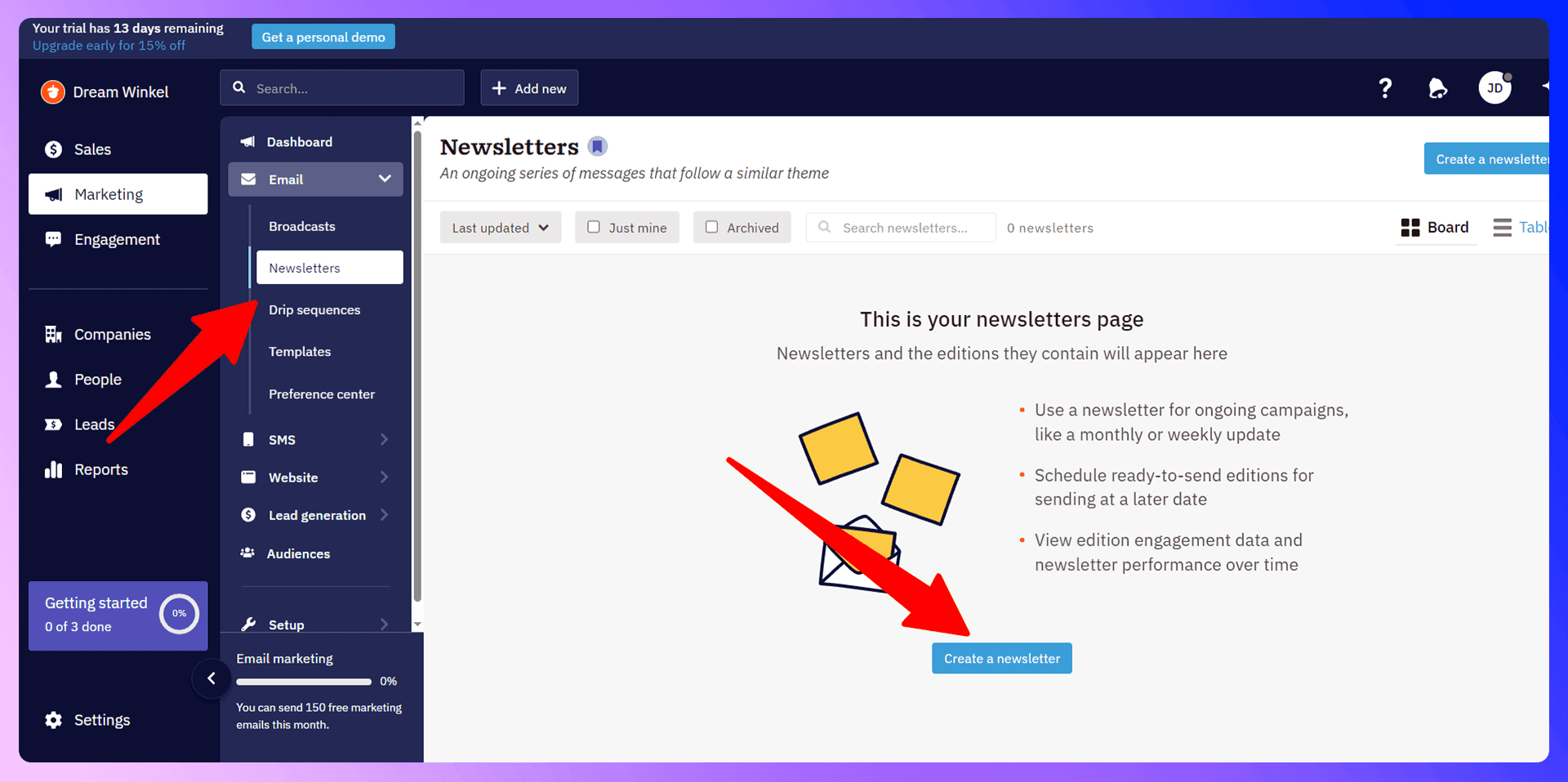
- Create a Newsletter: Under “Newsletters,” click “Create a newsletter.” Give it a name.
- Design the Edition: Nutshell provides ready-made templates. Simply replace text/images. Add buttons and links as needed.
- Schedule or Send Now: You can send a test email first, or schedule the broadcast for a future date/time.
Drip Sequences
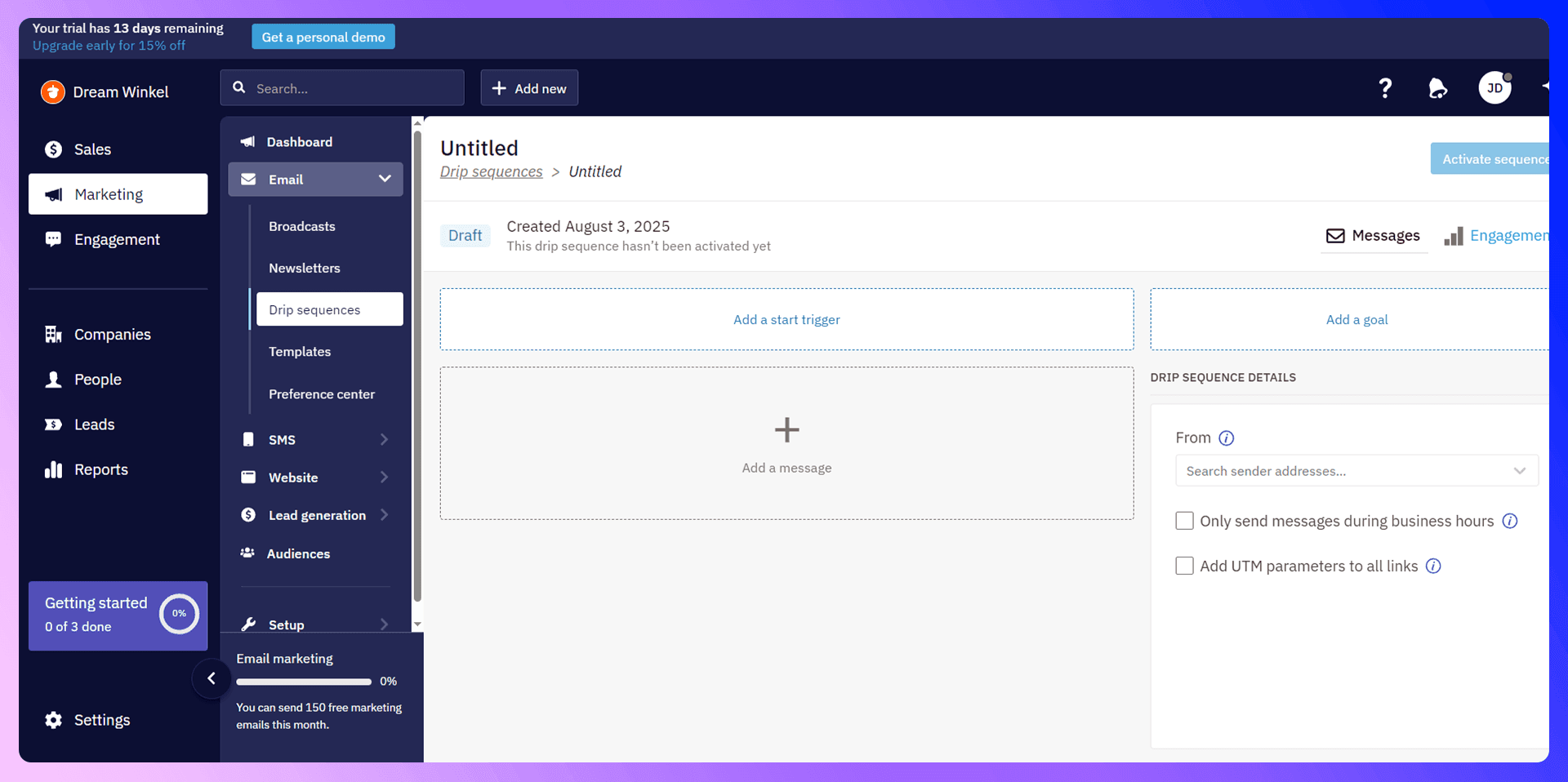
- Go to “Drip Sequences”: Here you can automate a series of timed emails.
- Create Steps: e.g., “Send Day 1 welcome,” “Send Day 3 follow-up,” “Send Day 7 check-in.”
- Customize Content: Each step can have unique messaging. For instance, Thanks for joining—here’s a free ebook, etc.
- Activate & Track: Once turned on, new subscribers or leads enter the sequence automatically. View open rates, link clicks, and unsubscribes for each stage.
This merges CRM + marketing automation, so you can manage sales contacts, email campaigns, and funnel nurturing in one place.
Save hours on Nutshell CRM data entry
Add to CRM finds verified emails, phone numbers, and job titles on LinkedIn® — then adds them to Nutshell CRM in one click.
Start Free TrialTrusted by 2,500+ users4.79. Calendar Integration & Meeting Scheduler
Staying on top of appointments is crucial. Nutshell integrates with major calendars like Google or Outlook to sync your events and tasks.
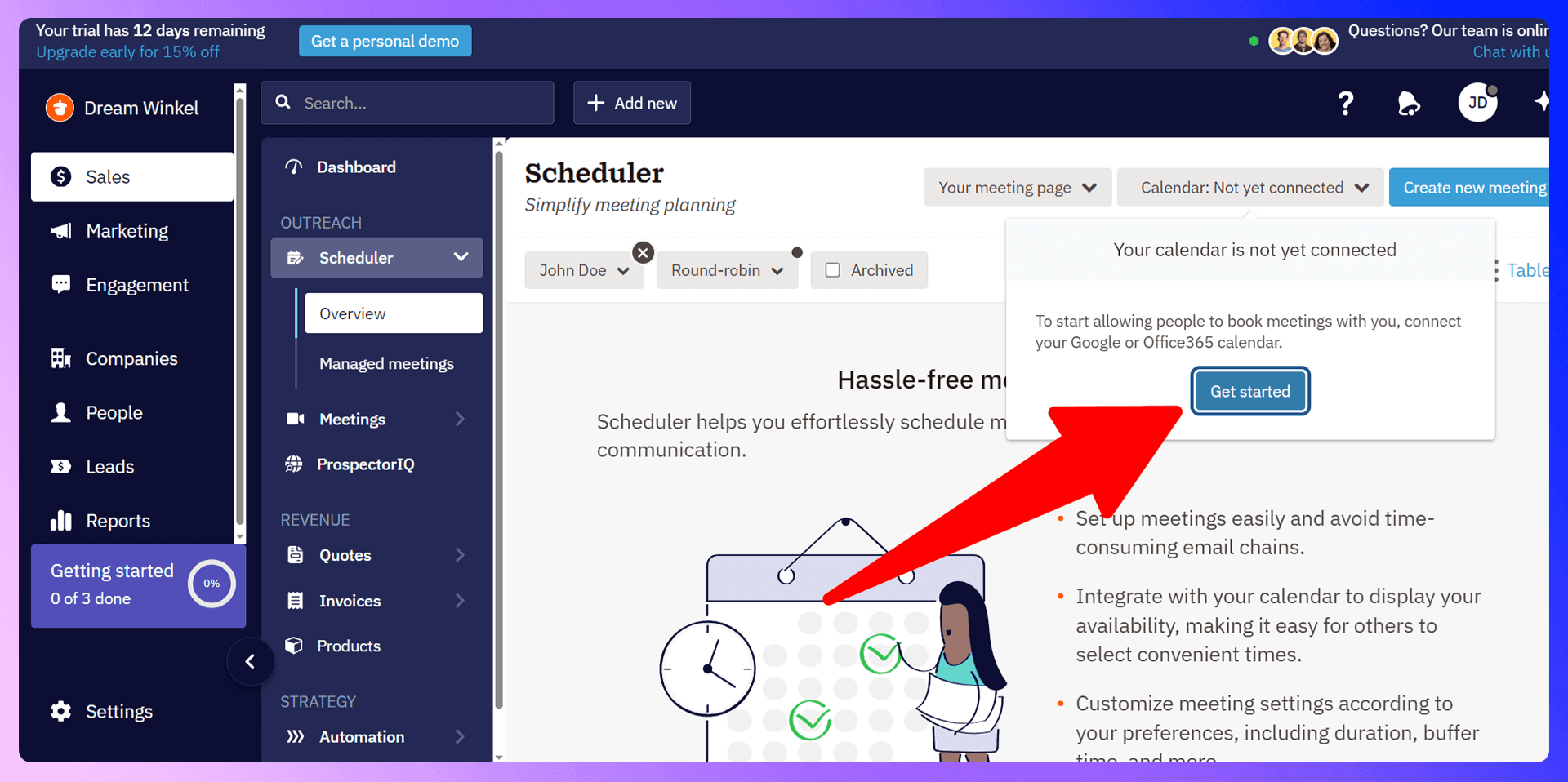
- Connect Your Calendar: In Settings, find “Calendar” and link your Google/Outlook account.
- Meetings (Scheduler): Nutshell also has a Scheduler feature. You can create “meeting slots” so leads or clients can book time with you. This generates a booking link to share.
- Auto-Sync: Once linked, tasks or scheduled calls in Nutshell appear on your external calendar, ensuring you never double-book or miss an event.
10. Best Practices & Helpful Tips
1) Keep Data Clean & Updated:
Always add fresh info promptly, remove duplicates, and update statuses so your pipeline reflects reality.
2) Check Your Pipeline Daily:
Spend a few minutes each day reviewing new leads, tasks, or stalled deals.
3) Collaborate with the Team:
Assign tasks to the right colleague, share notes, and keep everyone in sync.
4) Use Tags & Custom Fields:
Segment contacts and leads by region, product interest, etc. This helps target communications effectively.
5) Automate where Possible:
Drip sequences, meeting scheduler, lead forms—these free you from repetitive tasks, giving you time to focus on nurturing big deals.
11. Conclusion
Nutshell CRM offers a perfect blend of simplicity and advanced features—ideal for new users but also capable of handling complex pipelines. From contact management to marketing automation, Nutshell centralizes your sales processes under one user-friendly roof. By following this guide, you’ll be ready to import contacts, set up tasks, manage leads, and deploy marketing campaigns in no time.
Now that you’re armed with the basics, explore further! Tweak your pipeline stages, experiment with drip sequences, and keep refining your approach to maximize sales. With Nutshell at the core of your workflow, your sales and marketing teams gain a single source of truth, delivering a smoother experience for you and your clients.
Ready to give it a spin?
Head over to LinkNut and sign up for the free trial. Bring your contacts, tasks, or marketing campaigns. The sooner you get started, the faster you’ll build stronger, more profitable customer relationships—without the chaos!
Frequently Asked Questions
- Is Nutshell CRM good for small businesses or only mid-sized companies?
Nutshell scales well for both. It’s intuitive for small teams and robust enough for mid-sized or growing businesses. - Can I import contacts from Gmail or Outlook directly?
Yes! In Import > Address Book, choose your mail service and follow the prompts. No manual CSV required. - Does Nutshell handle email marketing, or do I need a separate tool?
Nutshell includes newsletter broadcasts, drip sequences, and basic marketing automation built right in. It’s an all-in-one CRM + marketing solution. - Can I track email opens and clicks?
Absolutely. Once your email account is connected, Nutshell can show you open rates, link clicks, and unsubscribes for newsletters or drip campaigns. - What about pipeline reports and analytics?
Nutshell generates graphs and forecasts showing deal progress, revenue potential, and performance metrics to help you plan and optimize your sales approach.
We hope this guide helps you get the most from Nutshell CRM. Go forth and conquer your sales goals!
This app will save you hours using Nutshell CRM

 Nutshell CRM Integration
Add contacts to Nutshell CRM from LinkedIn®
Enrich profiles with verified emails and phone numbers. Sync to Nutshell CRM in one click.
Try Nutshell CRM Extension7-day free trial · Cancel anytime
Save 4+ hrs / week on Nutshell CRM data entry.
Find verified contact info for your prospects on LinkedIn®, Gmail, Outlook & company websites. Add them to your Nutshell CRM with 1-click.
 Loading...Trusted by 2,500+ founders, SDRs & more