How to Merge Duplicates in Nutshell CRM
Keep Nutshell CRM clutter-free: merge duplicate contacts, prevent errors, and improve your sales process.
Sync leads from professional networks to Nutshell CRM.
Save 4hrs per week on CRM data entry.
Learn more...Free Nutshell CRM integration
Duplicate contacts are one of the most common and frustrating problems in any CRM. They clutter your database, skew your reports, and can lead to embarrassing mix-ups, like having two different sales reps contact the same prospect. At Add to CRM, we know that clean data is the foundation of an efficient sales process. In this guide, we'll walk you through how to clean up existing duplicates in Nutshell CRM and, more importantly, how to prevent them from ever being created.
Why Duplicates Hurt Your Sales Process
Messy data isn't just an annoyance; it actively undermines your sales efforts. Duplicate records can lead to:
- Wasted Time: Reps spend valuable time searching for the right record or cleaning up data instead of selling.
- Inaccurate Reporting: Your sales forecasts and performance metrics become unreliable when based on inflated contact numbers.
- Poor Customer Experience: A prospect might get contacted by multiple reps about the same thing, making your team look disorganized.
- Ineffective Marketing: Marketing campaigns can't be properly personalized or segmented with inconsistent data.
Duplicates often stem from simple mistakes: manual entry errors, multiple data imports, or inconsistent formatting. Luckily, Nutshell CRM provides tools to fix this.
Identifying Duplicates in Nutshell CRM
Nutshell CRM has built-in features to help you spot potential duplicates before they get out of hand.
- Automatic Duplicate Flags: When viewing a Company or Person page, Nutshell may display a "Duplicate?" button. The system automatically flags records that have the same or a phonetically similar name, prompting you to review them.
- The Duplicates Filter: For a broader view, you can go to your Companies or People list and use the built-in filter. Simply click the filter icon and select "Duplicates" at the bottom of the list. Nutshell will then display all records it believes are potential duplicates.
Step-by-Step Merging Process
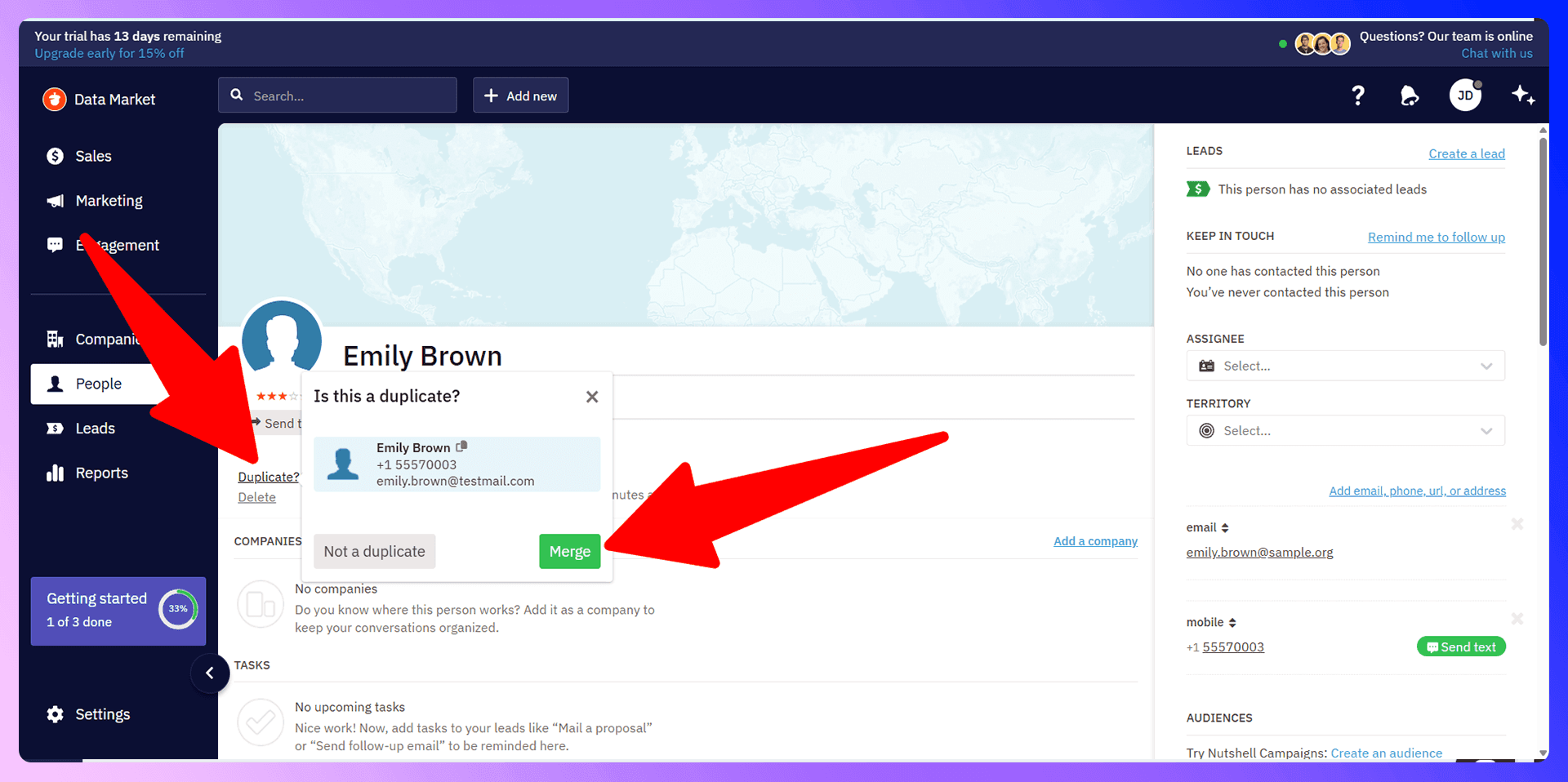
Once you've identified a duplicate, merging it is straightforward. Here’s how to merge two records from a contact's page:
- Navigate to the Company or Person page that has the "Duplicate?" flag.
- Click the "Duplicate?" button.
- A window will pop up showing the potential duplicate record.
- Review the information to confirm it's the same entity.
- Click "Merge" to combine the records. The record you are currently viewing will be kept as the master, and all information from the other record—including timeline activities, notes, and contact details—will be combined into it.
Bulk Duplicate Management
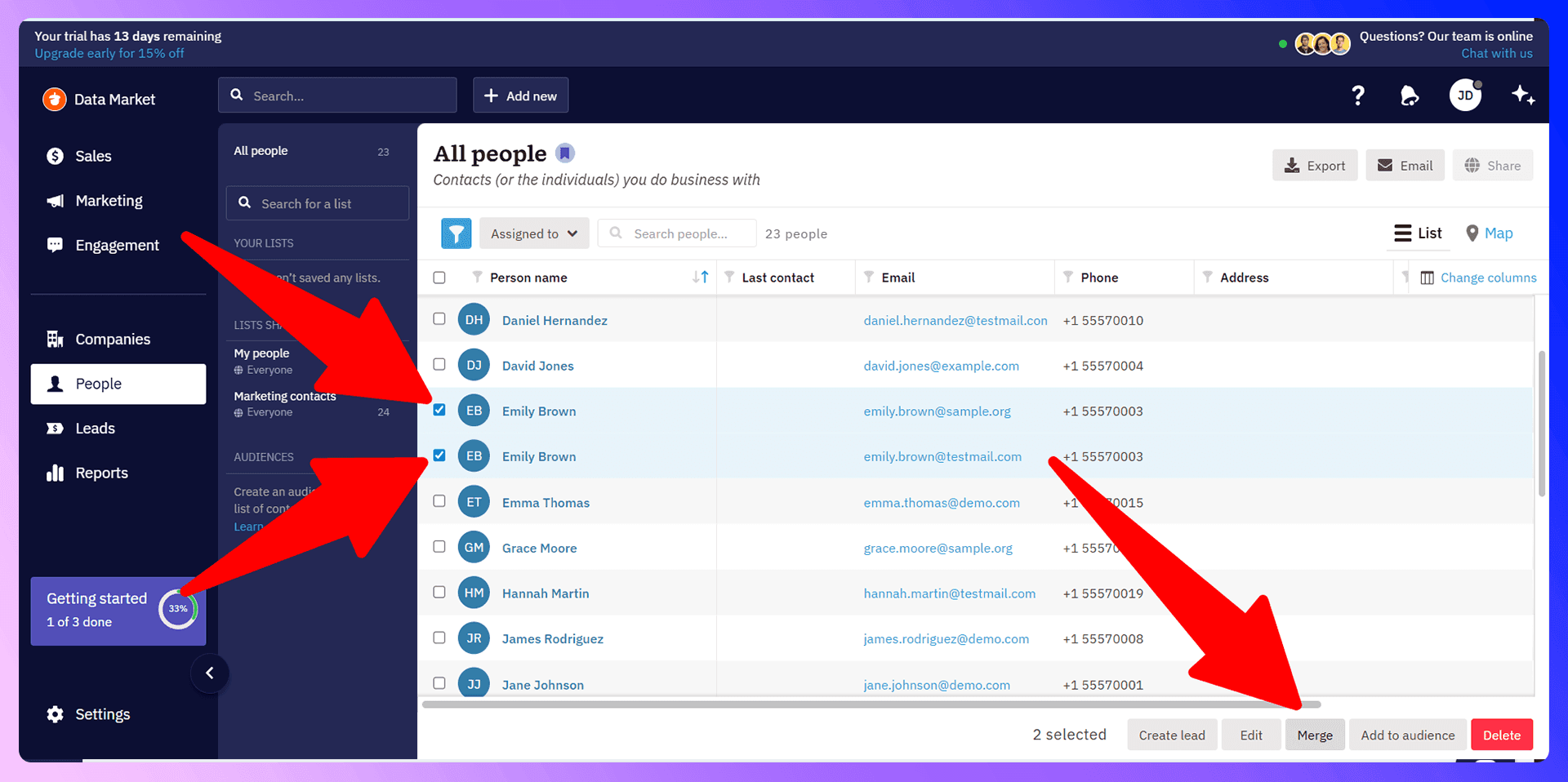
If you have a larger cleanup project, you can merge records in bulk directly from the list view.
- Go to the Companies, People, or Leads list.
- Select the records you want to merge by checking the boxes next to their names. You can also use the "Duplicates" filter first to narrow down the list.
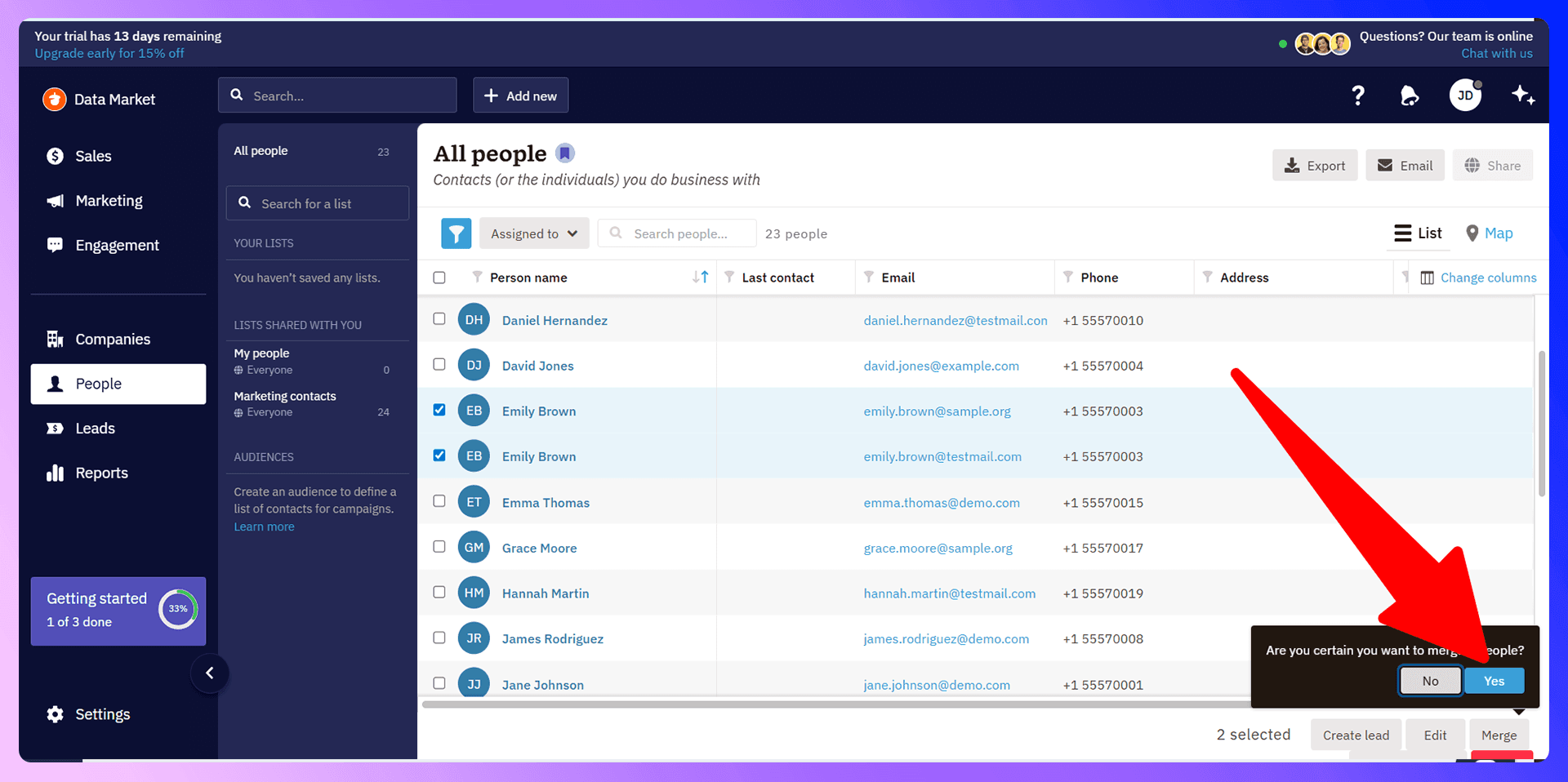
- Click the "Merge" button that appears at the bottom of the screen.
- Nutshell will ask you to choose which record to keep as the master. The information from the other records will be merged into this master record.
For leads, you can merge up to three at a time. The merged leads will be marked with a "cancelled-merged" status, and all their associated information will be consolidated into the master lead.

Keep Nutshell CRM clean with verified contact data
Add to CRM enriches contacts with 95%+ accurate data before adding them — so Nutshell CRM stays clean from day one.
Start Free Trial


 Trusted by 2,500+ users4.7
Preventing Duplicates with LinkNut
LinkNut is a Chrome extension that finds verified contact information from LinkedIn and adds standardized data to Nutshell CRM. While Nutshell's merging tools are great for cleanup, the best strategy is prevention. Our tool helps you stop duplicates before they start by ensuring the data you add to your CRM is clean, verified, and consistently formatted from the very beginning. It eliminates the manual data entry errors that cause most duplicate issues.
Why Clean Data Beats Cleanup
Think about the time your team spends dealing with data issues. Merging duplicates is a reactive process that takes you away from revenue-generating activities. By starting with clean data, you avoid this cleanup cycle entirely. Using a tool like LinkNut is a proactive measure that saves countless hours down the road, ensuring your CRM remains a reliable source of truth.
Getting Started with LinkNut
It only takes a minute to get started:
- Install the LinkNut extension from the Google Chrome Web Store.
- Navigate to any prospect's profile on LinkedIn.
- Use the extension to find their verified email and phone number.
- Click "Add to CRM" to import the clean, standardized contact data directly into Nutshell CRM with a single click.
LinkedIn Integration for Nutshell CRM: Avoid Duplicates Before They Happen
One of the most powerful features of LinkNut is its ability to check for existing contacts in real-time. While you're browsing LinkedIn, our extension automatically cross-references the profile with your Nutshell CRM database. If the person is already in your CRM, we'll let you know. This simple check is your first line of defense against creating an accidental duplicate.
Enriching Existing Contacts
When LinkNut identifies that a contact already exists, it gives you an opportunity to enrich the record instead of creating a new one. You can easily update the existing contact in Nutshell CRM with the latest information from their LinkedIn profile, such as a new job title or company. This keeps your data fresh, accurate, and complete.
Real-Time Duplicate Prevention
This real-time check transforms your prospecting workflow. You no longer have to switch tabs to see if a contact exists. You can see it directly on LinkedIn, preventing duplicates at the source and ensuring your team is always working with the most current information.
Accurate data means fewer Nutshell CRM duplicates
Add to CRM enriches contacts with 95%+ accurate data before adding them — so Nutshell CRM stays clean from day one.
Start Free TrialTrusted by 2,500+ users4.7Best Practices for Duplicate Prevention
Beyond using the right tools, establishing good habits is key to maintaining a clean CRM.
- Set Data Entry Standards: Create a simple, team-wide guide for how to format names, job titles, and company names.
- Train Your Team: Ensure everyone understands the importance of data hygiene and knows the correct process for adding new contacts.
- Conduct Regular Audits: Set aside time each quarter to use Nutshell's "Duplicates" filter to catch any records that may have slipped through.
- Limit Bulk Imports: Be cautious when importing large lists. Assign one person to manage and clean spreadsheets before they are uploaded to your CRM.
Conclusion: Build Clean, Not Cleanup
While Nutshell CRM offers solid tools for merging duplicates, the most effective strategy is to prevent them from being created in the first place. A clean CRM is an efficient CRM. By adopting a proactive approach with tools like LinkNut, you can stop wasting time on data cleanup and focus on what truly matters: building relationships and closing deals.
Ready to build a cleaner, more powerful CRM? Try LinkNut for free today and stop duplicates before they start.
How to merge duplicate contacts in Nutshell CRM

 Nutshell CRM Integration
Add contacts to Nutshell CRM from LinkedIn®
Enrich profiles with verified emails and phone numbers. Sync to Nutshell CRM in one click.
Try Nutshell CRM Extension7-day free trial · Cancel anytime
Save 4+ hrs / week on Nutshell CRM data entry.
Find verified contact info for your prospects on LinkedIn®, Gmail, Outlook & company websites. Add them to your Nutshell CRM with 1-click.
 Loading...Trusted by 2,500+ founders, SDRs & more