How to Merge Duplicates in Pipeline CRM
Clean up Pipeline CRM fast. Merge duplicate contacts and stop clutter with LinkPipeline’s verified LinkedIn data integration.
Sync leads from professional networks to Pipeline CRM.
Save 4hrs per week on CRM data entry.
Learn more...Free Pipeline CRM integration
Duplicate contacts in your CRM are more than just a minor annoyance; they're a significant drag on your sales operations. A cluttered database leads to wasted time, skewed analytics, and a disjointed experience for your prospects. At Add to CRM, we know that a clean CRM is the foundation of an efficient sales process. This guide will walk you through exactly how to find and merge duplicates in Pipeline CRM, and more importantly, how to prevent them from happening in the first place.
Why Duplicates Hurt Your Sales Process
Duplicate records quietly sabotage your sales efforts. When your team can't trust the data, efficiency plummets. Multiple reps might contact the same lead, creating confusion and damaging your brand's reputation. Reporting becomes unreliable, making it impossible to get a clear picture of your pipeline's health.
Common causes include:
- Manual data entry errors
- Multiple team members importing the same lists
- Inconsistent naming conventions (e.g., "ABC Inc." vs. "ABC, Inc.")
- Lack of a standardized data entry process
Identifying Duplicates in Pipeline CRM
Pipeline CRM includes a built-in tool to help you find duplicate People and Company records. Before you start, it's important to know that this feature is available on the Grow plan and requires merge permissions, which Admins and Executives have by default.
To find duplicates, simply navigate to your People or Company list. From there, you can initiate a check to scan the list for records that share identical information in a specific field, like an email address or company name. This tool is your first line of defense in the cleanup process.
Step-by-Step Merging Process
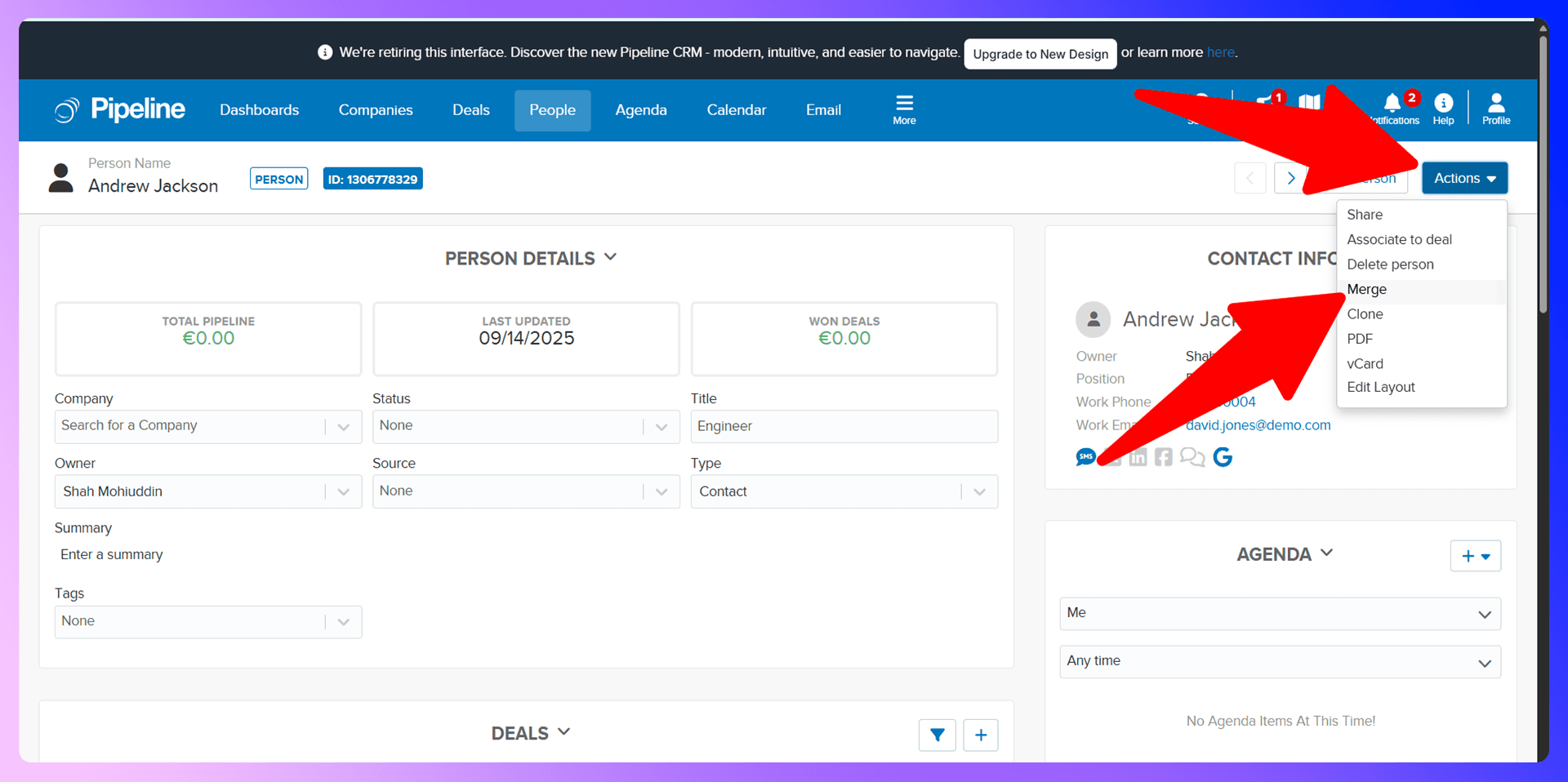
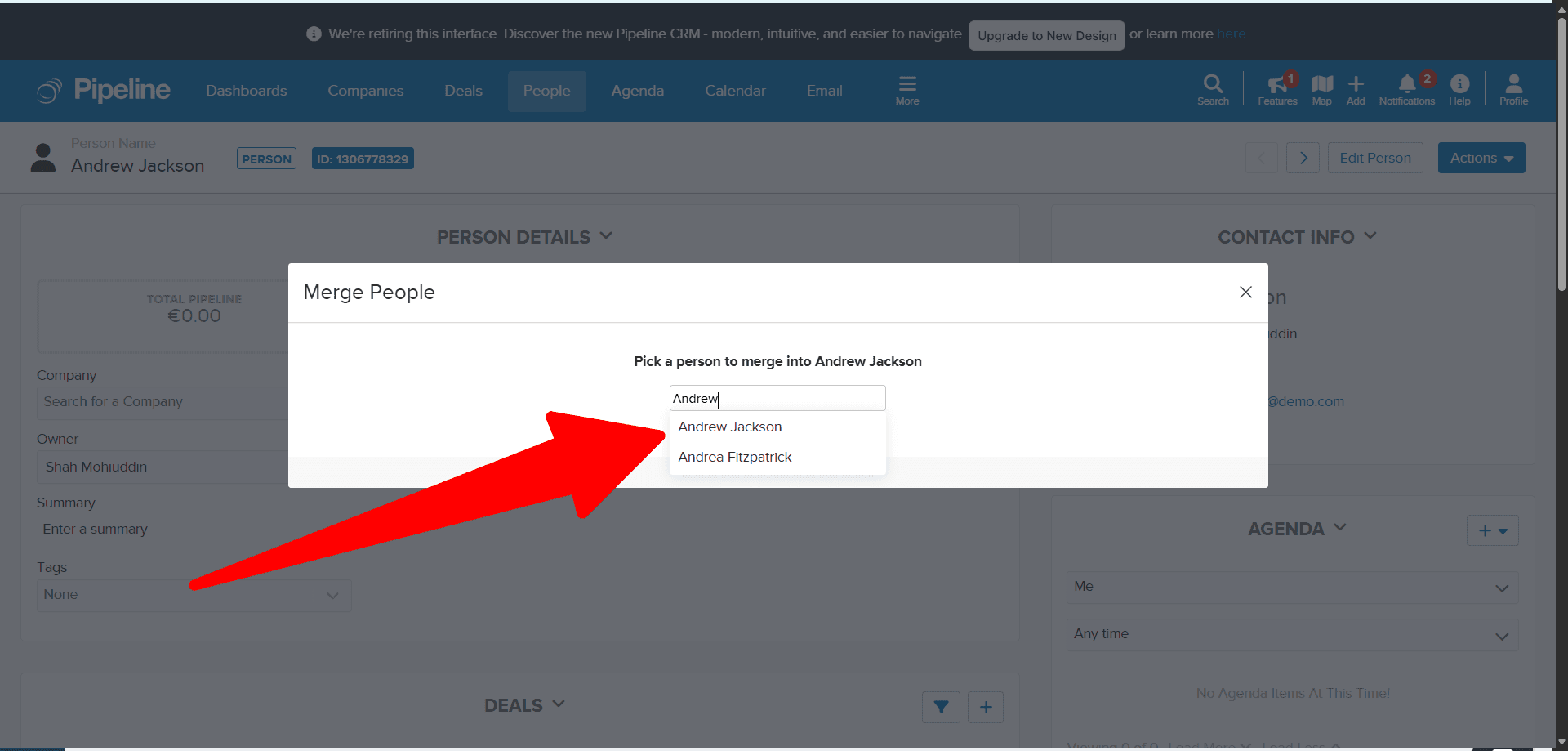
Once Pipeline CRM identifies potential duplicates, merging them is a straightforward process. Here’s how to do it:
- Navigate to the People or Company tab and open the list you want to clean.
- Click the three-dots menu in the top right corner.
- Select Check List for Duplicates from the dropdown.
- Give your check a name and choose the field you want to scan for duplicates (e.g., Email).
- The system will present you with groups of potential duplicates.
- Review each group and select two records you want to merge.
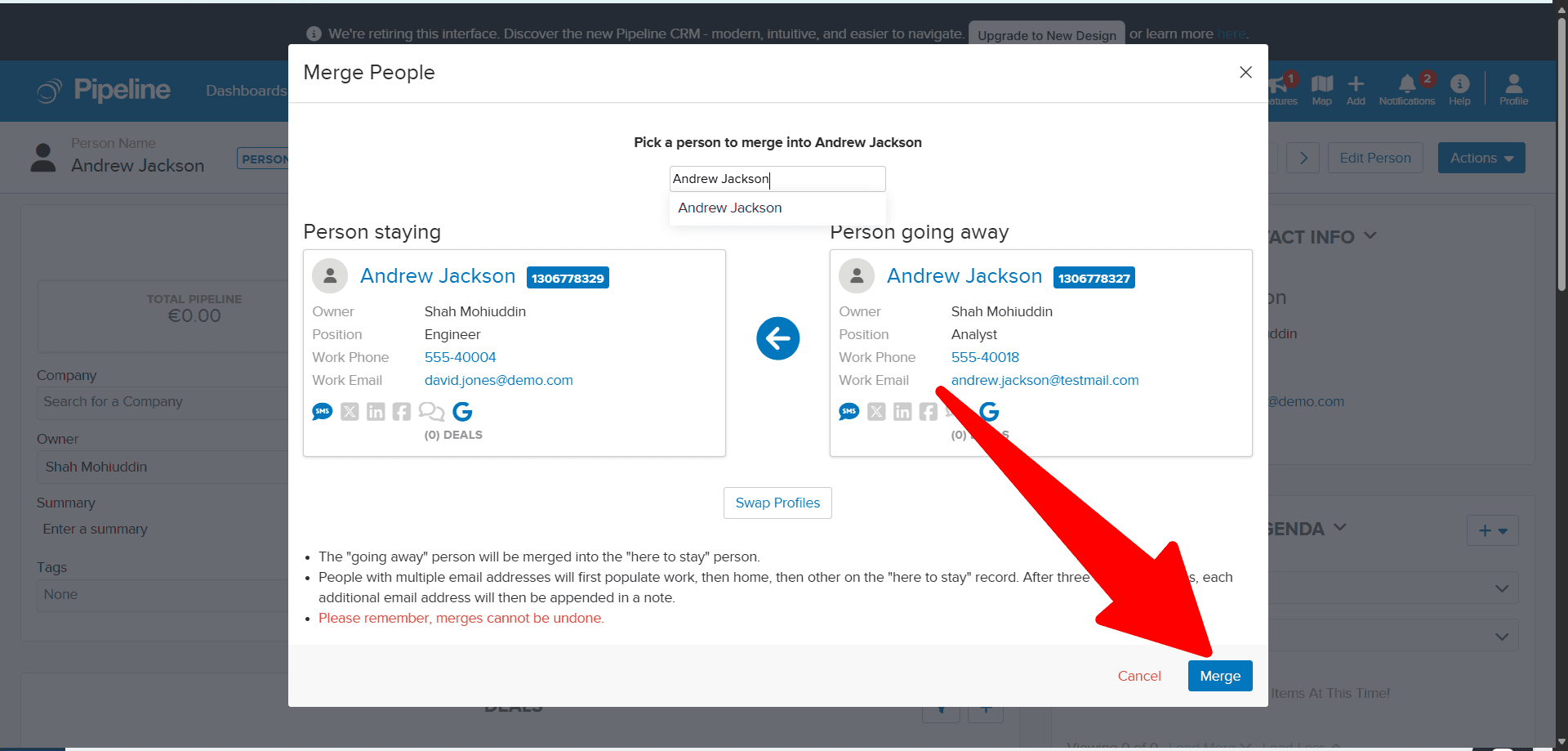
- A merge window will appear. Here, you'll select one record as the primary one to keep. You can then choose which information to retain from each record (for example, keeping the phone number from one and the job title from the other).
- Confirm the merge. The non-primary record will be removed, and its data will be combined into the primary record.
Bulk Duplicate Management
Pipeline CRM's duplicate checker processes merges in pairs. If you have a large number of duplicates, this can feel time-consuming. A good strategy is to use filters to create smaller, more manageable lists before running a duplicate check. For instance, you could filter by creation date or lead source. Also, keep in mind the system works best with lists under 50,000 records, so filtering is key for larger databases.

Keep Pipeline CRM clean with verified contact data
Add to CRM enriches contacts with 95%+ accurate data before adding them — so Pipeline CRM stays clean from day one.
Start Free Trial


 Trusted by 2,500+ users4.5
Preventing Duplicates with LinkPipeline
LinkPipeline is a Chrome extension that finds verified contact information from LinkedIn and adds standardized data to Pipeline CRM. While cleaning duplicates is a necessary task, preventing them is a far better strategy. The number one cause of duplicates is manual data entry. Our tool helps you bypass this problem entirely by automating the process with clean, verified data from the start.
Why Clean Data Beats Cleanup
Think about the time your team spends hunting down and merging duplicates. It's a reactive, manual process that takes them away from selling. Now, compare that to a proactive approach where every new contact is added with verified, standardized information. Using LinkPipeline means you spend less time on data janitorial work and more time building relationships and closing deals. Prevention is always more efficient than a cure.
Getting Started with LinkPipeline
It only takes a few minutes to set up a proactive defense against duplicates:
- Install the extension from the LinkPipeline page.
- Navigate to a prospect's LinkedIn profile.
- Use the extension to find their verified email and phone number.
- Click "Add to CRM" to send clean, standardized data directly into Pipeline CRM with one click.
LinkedIn Integration for Pipeline CRM: Avoid Duplicates Before They Happen
One of the most powerful features of LinkPipeline is its ability to show you which prospects are already in your Pipeline CRM—directly on their LinkedIn profile. Before you even think about adding a new contact, our tool flags existing records, preventing you from creating a duplicate before it can happen. This simple, real-time check is your best defense against clutter.
Enriching Existing Contacts
What if a contact is already in your CRM? Instead of creating a new, duplicate entry, LinkPipeline allows you to enrich the existing record. You can update their job title, company, or other details with the latest information from their LinkedIn profile. This ensures your data is not only clean but also current and accurate.
Real-Time Duplicate Prevention
By highlighting existing contacts directly within your prospecting workflow on LinkedIn, our tool enforces data hygiene without any extra effort from your team. It shifts duplicate management from a reactive cleanup project to a proactive, real-time habit that happens automatically.
Accurate data means fewer Pipeline CRM duplicates
Add to CRM enriches contacts with 95%+ accurate data before adding them — so Pipeline CRM stays clean from day one.
Start Free TrialTrusted by 2,500+ users4.5Best Practices for Duplicate Prevention
Beyond using the right tools, a few team-wide habits can keep your CRM pristine:
- Establish Data Standards: Create and enforce a clear policy for data entry. For example, decide on a consistent format for names, titles, and company names.
- Train Your Team: Regularly train your team on your data standards and the tools available, including Pipeline CRM's duplicate checker and LinkPipeline.
- Manage Imports Carefully: Before performing a bulk import, use a spreadsheet tool to clean and de-duplicate your list.
- Automate Data Entry: Minimize manual entry wherever possible. Tools that automate this process are your best bet for reducing human error.
Conclusion: Build Clean, Not Cleanup
Knowing how to merge duplicates in Pipeline CRM is an essential skill for any sales team. However, the most effective strategy is to build a clean database from the very beginning. By focusing on prevention, you save countless hours and empower your team with data they can trust. The combination of our LinkPipeline extension and its real-time LinkedIn integration provides a powerful, proactive solution to stop duplicate problems before they start.
Ready to stop cleaning up messes and start building a clean pipeline? Try LinkPipeline for free today!
How to merge duplicate contacts in Pipeline CRM

 Pipeline CRM Integration
Add contacts to Pipeline CRM from LinkedIn®
Enrich profiles with verified emails and phone numbers. Sync to Pipeline CRM in one click.
Try Pipeline CRM Extension7-day free trial · Cancel anytime
Save 4+ hrs / week on Pipeline CRM data entry.
Find verified contact info for your prospects on LinkedIn®, Gmail, Outlook & company websites. Add them to your Pipeline CRM with 1-click.
 Loading...Trusted by 2,500+ founders, SDRs & more