How to Write a Cold Mail That Gets Genuine Replies
Tired of being ignored? Learn how to write a cold mail that sparks real conversations. Get actionable tips on subject lines, personalization, and follow-ups.
To write a cold email that actually works, you need to nail three things: deep personalization, a clear value proposition, and a low-friction call to action. The secret is to stop thinking in terms of high-volume blasts and start treating each email as a strategic, one-to-one conversation.
It has to feel genuine. It has to prove you’ve done your homework.
Why Most Cold Emails Fail (and How Yours Will Succeed)
Let's be honest—the average inbox is a battlefield. Most cold emails are deleted on sight, not because the channel is broken, but because the approach is. The internet is littered with generic templates that promise the world but only deliver a bruised sender reputation.
The real problem? A relentless focus on quantity over quality. Sales teams get stuck in a "spray and pray" mindset, blasting out thousands of identical messages and hoping something sticks. This is precisely why so many people hate cold outreach. It’s impersonal, self-serving, and completely ignores the recipient’s world.
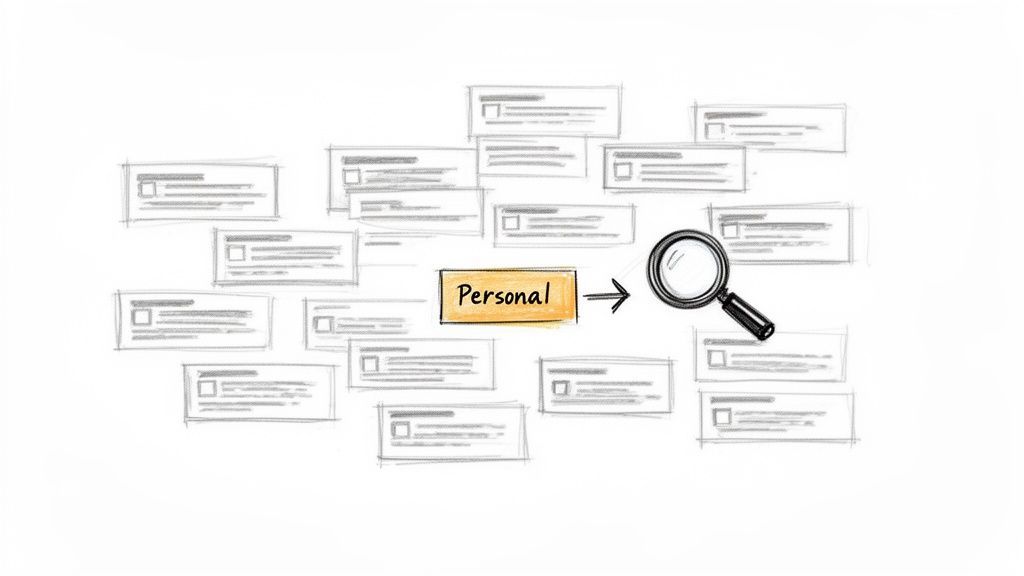
The Real Cost of Bad Outreach
The damage from a poor strategy goes way beyond just a lack of replies. Imagine firing off hundreds of emails only to hear crickets. That's the reality for most B2B campaigns, where a staggering 95% of cold emails fail to generate any reply. For the average sender, response rates hover between a dismal 1% and 5%.
This guide is designed to flip that script. We’ll show you how to write an email that people actually want to read by focusing on a simple, repeatable framework. Success isn’t about finding some magic template; it's about mastering a process built on three key pillars:
- Genuine Personalization: Going beyond
{{first_name}}. We're talking about referencing specific company news, a recent social media post, or a shared connection. - Clear Value: Answering the recipient's unspoken question: "What's in it for me?" And answering it fast.
- Low-Friction Asks: Making it incredibly easy for them to say "yes" to whatever the next step is.
The goal of a great cold email isn't to close a deal on the spot. It's to start a meaningful conversation. By showing you understand your prospect's world, you earn their attention and the right to continue the dialogue.
This shift in mindset is everything. Of course, none of this matters if your emails land in spam. Ensuring your messages actually get delivered is the first, most critical step. For a deeper dive into the technical side, check out our guide on how to improve email deliverability.
Throughout this article, we’ll break down each component with actionable steps, turning your cold outreach from a chore into a reliable engine for growth.
Cold Email Performance At a Glance
The gap between average and excellent cold outreach is huge. Here’s a quick look at what separates the noise from the replies.
| Metric | Average Performance | Top Performer |
|---|---|---|
| Open Rate | 20% - 40% | 70% - 90%+ |
| Reply Rate | 1% - 5% | 15% - 30%+ |
| Meeting Booked Rate | <1% | 5% - 10% |
| Bounce Rate | 5% - 10% | <2% |
These numbers tell a clear story: a thoughtful, personalized approach doesn't just get slightly better results—it performs in a completely different league.
Crafting Subject Lines and Openers That Demand Attention
Your subject line is the gatekeeper. It’s the first—and often only—thing your prospect sees. If it fails, the brilliant email you wrote might as well not exist.
The first sentence is your second gatekeeper. It's what they read in the preview pane, and it determines if they'll keep reading or hit delete. Winning here isn't about clickbait; it’s about earning a few seconds of their attention with relevance.
And that's getting harder. Today's inbox is a battlefield. Cold email open rates have dropped to an average of 27.7%, thanks to smarter spam filters and stricter privacy rules. In fact, a staggering 17% of all cold emails never even make it to the inbox.
But here’s the good news: a subject line that’s genuinely tailored to the recipient can boost opens by 50%. Even better, hyper-personalized campaigns can see reply rates jump by as much as 140%. For a deeper dive into these numbers, check out the latest stats on cold email response rates from Mailforge.ai.
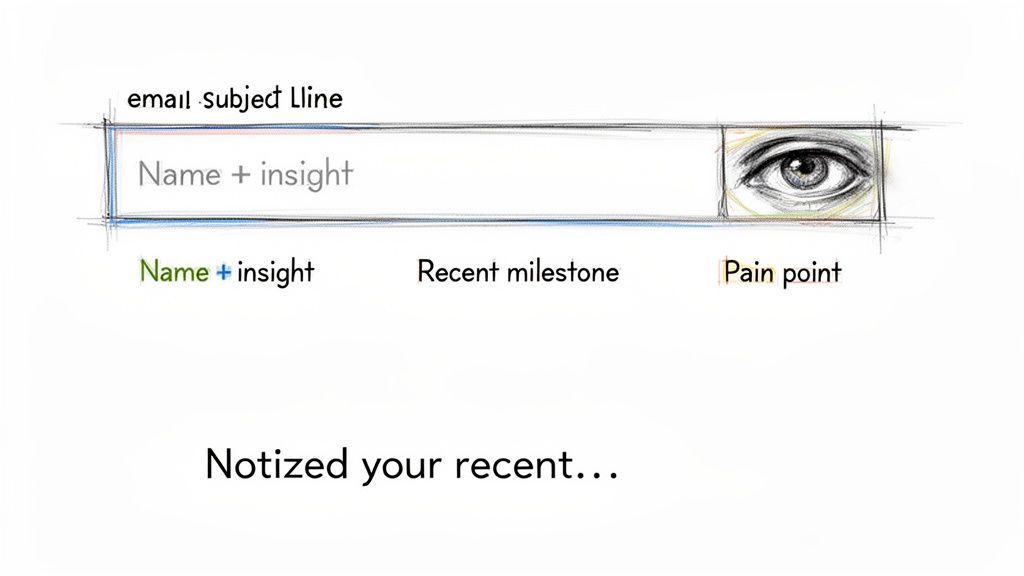
This is why mastering the subject line is non-negotiable. Forget generic fluff like "Quick Question" or "Checking In." Those get deleted on sight because they scream "sales pitch." A truly effective subject line needs to do one of three things.
Three Pillars of an Unbeatable Subject Line
To cut through the noise, your subject line has to connect with your prospect's world immediately. Here are three battle-tested approaches that work.
- Relevance: Reference something specific to them. Did they just secure a new funding round, launch a product, or hire a key executive? Mention it. It proves you’ve done your homework.
- Curiosity: Hint at a valuable insight or a solution to a problem without giving it all away. Frame it in a way that makes them need to know more.
- Personal Connection: Drop the name of a mutual connection, mention a shared interest, or reference an event you both attended. This builds instant rapport.
A great example of relevance could be: "Your new AI feature is impressive." It’s specific and complimentary, a world away from a generic sales email. Or, you could pique curiosity with something like: "Idea for [Their Company's] Q3 goal." What manager could resist opening that?
From Open to Engagement: The First Sentence
They opened your email. Success! Now the clock is ticking. Your opening line has one job: prove the email is for them and them alone.
The biggest mistake I see people make is starting with "My name is..." or "I work for..." Honestly, your prospect doesn't care about you yet. They care about themselves and their problems. Your opening line needs to bridge the gap from your subject line straight to their world.
The most effective cold emails make the recipient the hero of the story. Your opening line is the first step in showing them you understand their world, their challenges, and their recent wins.
Here's how to craft an opener that hooks them instantly.
Proven Strategies for Your Opening Line
Instead of introducing yourself, build on the observation you made in your subject line. This small tweak makes a huge difference in how your message lands.
| Opener Type | Good Example | Why It Works |
|---|---|---|
| Reference a Recent Win | "Congrats on the recent launch of your new platform—the UI looks incredibly clean and intuitive." | It's a genuine compliment that shows you've done your research and actually understand their product. |
| Mention Shared Content | "Just read your article on scaling sales teams. Your point about data hygiene really stood out." | This proves you engage with their thought leadership and share a professional interest. |
| Highlight a Company Need | "Saw your recent job posting for a new VP of Marketing; it looks like you're scaling fast." | This observation connects directly to a pain point (growth challenges) that your solution might fix. |
| Leverage a Mutual Link | "Jane Doe mentioned you were the person to talk to about improving SDR workflows at [Company]." | A referral is the warmest opening possible. It instantly builds trust and credibility. |
Each of these examples makes the email about the recipient from the very first word. They show genuine interest and establish a connection before you ever get to your pitch.
This approach transforms a cold email from a generic blast into the start of a valuable professional conversation. When you earn their attention with a thoughtful subject line and a personalized opener, you set the stage for your value prop to land with maximum impact.
Building a Compelling Value Proposition in Three Sentences
Once your clever subject line and personalized opener have earned you a few precious seconds, the clock is ticking. You have to deliver value, and you have to do it fast. This is where the body of your email either grabs their interest or sends them straight to the trash.
The best way to communicate value is to stop talking about yourself—your product, your features, your company—and start talking about them and their problems. The goal isn't to list everything you do but to connect a single thing you do to a specific challenge they're almost certainly facing.
You can build a powerful value prop in just three simple sentences.
The Problem-Solution-Proof Framework
Think of your email's body as a quick, three-act play. Each part builds on the last, creating a tight narrative that resonates with your prospect’s actual business needs.
The structure is dead simple: problem, solution, proof.
- State Their Problem: Kick off with a common challenge or pain point relevant to their role, industry, or a recent company move. This immediately shows you get their world.
- Present Your Solution: Briefly introduce how your product or service solves that specific problem. Keep it high-level and focused on the outcome, not the nitty-gritty features.
- Provide Clear Proof: Back it all up with a concrete piece of social proof. This is your knockout punch—a powerful statistic, a mini-case study, or a mention of a similar company you've helped.
This framework flips the script from "Here's what we do" to "Here's how we solve a problem you probably have." It’s a subtle but critical shift that makes your message instantly more relevant.
How to Find and Articulate Their Problem
Before you can state their problem, you have to know what it is. This is where the research you did for personalization really pays off. You're looking for clues that point to specific challenges.
- Company News: Did they just close a new funding round? Their problem is likely scaling operations without everything falling apart.
- Job Postings: Are they hiring a ton of new SDRs? Their pain point is probably inefficient prospecting or a desperate need for better lead data.
- Their Content: Did their CMO just publish a blog post about boosting conversion rates? You know exactly what's on their mind.
Once you have an educated guess, state it clearly. Don't be vague; be specific.
Generic: "Lots of companies struggle with sales." Specific: "I noticed you're expanding your sales team, which often creates headaches with keeping CRM data clean and up-to-date across all the new reps."
The specific version shows you’ve connected the dots. It feels less like a shot in the dark and more like an informed observation.
This hand-drawn sketch breaks it down perfectly: identify a problem (signups dropping), propose a solution (an A/B testing tool that delivered a 20% lift), and show the proof.
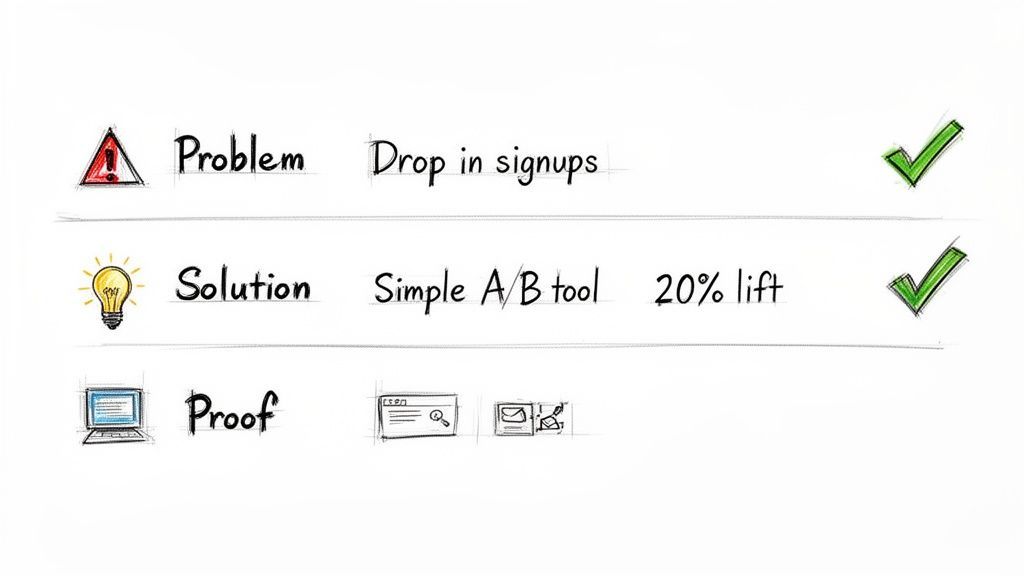
The real insight here is how a simple workflow improvement can solve a major productivity bottleneck. That's a powerful angle for any outreach.
Weaving in Social Proof for Instant Credibility
That third sentence—the proof—is what makes your claim believable. Without it, you're just another vendor making empty promises. Social proof turns your abstract solution into a real, trustworthy outcome.
A value proposition without proof is just a claim. A value proposition with proof is a compelling reason to reply. It shows you don't just understand their problem—you have a track record of solving it.
There are a few ways to bake proof into your email without adding a lot of fluff.
- A Mini Case Study: "We recently helped [Similar Company] cut their prospecting time by 4 hours per week." Name-dropping a competitor or a well-known company in their space works wonders.
- A Powerful Statistic: "Our customers see an average 20% increase in reply rates by using more accurate contact data."
- An Impressive Result: "We helped a team just like yours book 15 more meetings last month."
The key is to be specific. Numbers and names are far more convincing than generic statements like "we help companies succeed."
By combining a clear problem, a direct solution, and concrete proof, your value proposition becomes incredibly hard to ignore. This three-sentence structure keeps your cold email short, scannable, and focused on what really matters to your recipient.

Find verified contact data on LinkedIn®
Add to CRM finds verified emails, phone numbers, and job titles on LinkedIn® — then adds them to your CRM in one click.
Start Free Trial


 Trusted by 2,500+ users4.7
Writing a Call to Action That Starts a Conversation
The last sentence of your email can make or break your entire effort. After pouring all that work into a killer subject line, a personalized opener, and a compelling value prop, a weak or demanding call to action (CTA) will kill your momentum instantly.So many cold emails trip at the finish line because they ask for too much, too soon. A request like, “Are you free for a 30-minute demo next Tuesday?” is a huge ask. It demands a serious time commitment from a total stranger who, just a minute ago, didn't even know you existed.
Here’s the thing: the goal of your first cold email isn't to book a meeting or close a deal. It’s much simpler—just get a reply. To do that, your CTA needs to be the easiest question in the world for them to answer.
The Power of Low-Friction Asks
Instead of asking for their time, switch to an interest-based question. These are simple, low-commitment questions designed to do one thing: see if they're even a little bit curious.
Think about the psychology at play. Agreeing to a 30-minute demo requires them to open their calendar, find a slot, and mentally prepare for a sales pitch. But answering a simple question? That takes almost zero effort.
This simple shift turns your CTA from a roadblock into an easy next step.
Your call to action should feel less like a demand and more like an invitation. The best CTAs are framed as simple questions that a busy exec can answer with one or two words from their phone.
Examples of Conversation-Starting CTAs
The right CTA always depends on the context of your email, but the principle is universal: keep it light and easy.
Here are a few low-friction CTAs that consistently get replies:
- For sharing a resource: "Mind if I send over the full case study?"
- For a general inquiry: "Is improving [outcome] a priority for you right now?"
- For a direct value prop: "Worth exploring for your team in Q4?"
- For a simple idea: "Open to seeing how it works?"
Each of these can be answered with a quick "yes," "sure," or "send it over." That tiny positive response is all you need to get the conversation started and earn the right to ask for more later on.
Optimizing Your Email Signature for Credibility
Don't sleep on your email signature. It's more than just your contact info; it's prime real estate for reinforcing your credibility right at the end of your message.
A cluttered signature with huge logos and a dozen social media links is just noise. A clean, strategic one, however, can do some serious heavy lifting for you.
Think of your signature as the final, subtle piece of social proof.
- Add a One-Line Value Prop: A concise tagline under your name reminds them exactly why you're in their inbox (e.g., "Helping B2B teams find accurate contact data").
- Link to a Relevant Asset: Include a single, powerful link. Skip the generic homepage and point them to a relevant case study, a customer testimonial video, or a helpful blog post.
- Keep It Clean: Less is more. Your name, title, company, and one key link are usually all you need.
A well-crafted signature works passively to build trust. When a prospect sees a link to a case study featuring a company just like theirs, it validates your entire email without you having to write another word.
Streamline Your Workflow Without Ditching the Human Touch
Scaling personalized outreach feels like a paradox, right? How do you keep that genuine, human connection when you’re trying to send dozens—or even hundreds—of emails? The secret isn't about working harder. It’s about building a smarter workflow that handles the grunt work, freeing you up to focus on the actual message.
The bedrock of any great cold email is clean, accurate data. Without it, personalization at scale is just a fantasy. The real time-suck in sales isn't writing the email; it's the soul-crushing process of finding prospects, verifying their contact info, and manually punching it all into your CRM. In fact, sales reps can burn up to 20% of their time just on these admin tasks.
Bridging Manual Research and Efficient Outreach
Picture this all-too-common scenario. You’re on a professional networking site and you find a perfect-fit lead. The old way is a painful, multi-step dance: open a new tab, search for their company, hunt for an email format, guess their address, copy their name, paste it into your CRM, copy their title, paste it again… you get the idea.
This manual marathon is not just slow; it’s a minefield for human error. One typo and your email bounces. A duplicate entry creates chaos in your CRM, leading to that embarrassing moment when two reps contact the same person. This is where a tight workflow becomes your competitive edge.
Your workflow's goal is simple: automate the repetitive tasks you hate so you can spend more time on the creative, strategic work you're actually good at. It’s about crushing the friction between finding a lead and starting a real conversation.
A tool like the Add to CRM Chrome extension completely flips the script. Instead of that copy-paste nightmare, you can capture a lead’s profile, enrich it with verified contact details, and sync it to your CRM in a single click—all without ever leaving their profile page.
The Power of a One-Click Workflow
This one-click approach does more than save time. It improves the quality of your outreach from the very first step. It instantly checks for duplicates to keep your CRM clean and, more importantly, enriches the contact record with verified information. That’s a critical piece for both personalization and deliverability.
Knowing how to find email addresses for a company is a great skill, but automating the verification and capture process is what lets you scale that effort without losing your mind. A solid workflow ensures the data you're building on is actually reliable.
To see the real-world impact, let's put the two approaches head-to-head.
Manual Prospecting vs. An Automated Workflow
The table below breaks down the time and effort involved in adding a single new lead to your CRM. The difference isn't just a few minutes—it's a fundamental shift in how you spend your day.
| Task | Manual Process (Time & Effort) | Automated with Add to CRM |
|---|---|---|
| Lead Capture | Open CRM, copy/paste name, title, company, etc. (2-3 minutes) | One click to capture all profile data. (5 seconds) |
| Contact Enrichment | Search for email/phone, guess formats, use verifiers. (3-5 minutes) | Automatically finds and verifies contact info. (Instant) |
| CRM Syncing | Manually create new contact, fill out fields, check for duplicates. (2-4 minutes) | Automatically syncs to CRM with correct field mapping and duplicate checks. (Instant) |
| Total Time per Lead | 7-12 minutes | ~5 seconds |
The difference is stark. By eliminating hours of manual data entry each week, teams can reinvest that time into what truly drives results: crafting a message that connects. The foundation of accurate, enriched data is what makes it possible to write a truly personalized cold email at scale, turning a high-effort task into a smooth, repeatable process.
Don't Give Up: Mastering the Follow-Up to Get Replies
If you think your job is done after hitting "send" on that first cold email, you're leaving a ton of replies on the table. Seriously. Most conversations don't start until the second, third, or even fourth touchpoint.
But I get it. Nobody wants to be that person—the one clogging up an inbox. The fear of being annoying stops most people from ever following up. It's time to kill that mindset for good.
A professional follow-up isn't nagging; it's a chance to offer a fresh perspective. Instead of just "bumping this up," every message you send should add new value. Share a different resource, reframe your pitch, or highlight another pain point you can solve. This shows persistence and a genuine interest in helping, not just a desperate attempt to sell.
A solid follow-up strategy is built on a foundation of good prospecting. Before you even think about writing a sequence, you need to have a clean, efficient workflow for finding and managing contacts.
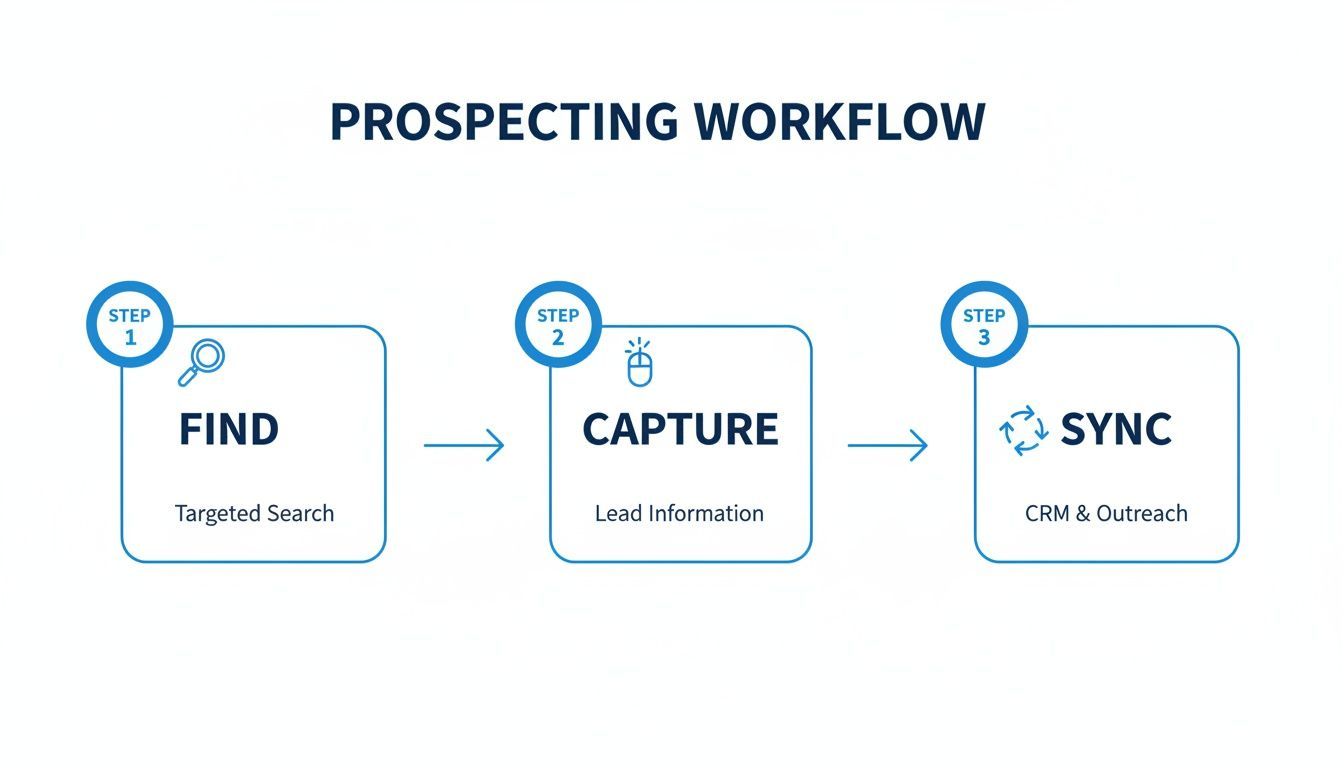
Nailing these first few steps—finding the right people, capturing their info, and syncing it to your CRM—is what makes a thoughtful, multi-step cadence possible.
Building a Follow-Up Cadence That Actually Adds Value
Your follow-up sequence is your secret weapon. While the average B2B cold email reply rate limps along at 3-5.1%, top performers consistently hit 15-25%. How? Smart sequencing.
According to global benchmarks, just sending a second email can boost replies by a staggering 60%, though you'll see diminishing returns after the third message. You can find more data on these reply rate benchmarks from The Digital Bloom.
Here's a simple, value-driven cadence you can steal:
- Email 1: Your initial, highly personalized outreach with the core value prop.
- Email 2 (Wait 3 days): Offer something genuinely useful. Think a link to a relevant case study, a helpful blog post, or a quick tip that relates to the problem you solve.
- Email 3 (Wait 5 days): Switch up the angle. Maybe your first email focused on saving time. This time, focus on cutting costs or reducing risk.
- Email 4 (Wait 7 days): Send a polite "break-up" email. Let them know this is your last attempt and you're closing the loop. It's professional and often gets a response.
Measuring What Really Matters (Hint: It’s Not Opens)
To turn cold emailing from a guessing game into a predictable growth engine, you have to track the right stuff. Forget vanity metrics like open rates—they're notoriously unreliable these days. Focus on the KPIs that actually move the needle.
The ultimate goal of learning how to write a cold mail isn't just getting opens; it's starting conversations that lead to opportunities. Focus your energy on metrics that measure engagement and intent.
Keep your eyes on these three KPIs:
- Reply Rate: The percentage of people who actually hit "reply." This is your North Star for measuring whether your message is landing.
- Positive Reply Rate: Not all replies are created equal. This metric filters for the good stuff—responses that show interest or agree to a next step.
- Meetings Booked: For most B2B campaigns, this is the ultimate conversion. How many of your conversations turned into a real meeting on the calendar?
From there, you can A/B test everything: your subject lines, your value propositions, your CTAs. A data-driven approach is the key to mastering outbound lead generation strategies and making cold email a reliable channel you can count on.
Works with 29+ CRMs
Add to CRM finds verified emails, phone numbers, and job titles on LinkedIn® — then adds them to your CRM in one click.
Start Free TrialTrusted by 2,500+ users4.7Your Top Cold Email Questions, Answered
Even with the perfect framework, you're going to hit a few snags when you start sending emails at scale. Let's tackle the most common questions I hear with some straight-to-the-point, practical advice.
How Many Follow-Up Emails Should I Send?
The sweet spot is usually a sequence of 3 to 5 emails spaced out over a few weeks. But honestly, the number is less important than the content. Your goal isn't just to "check in" or "bump this to the top of your inbox." That's just annoying.
Each follow-up is a fresh opportunity. Offer a new insight, share a different case study, or frame their problem from another angle. If you get radio silence after the full sequence, don't keep hammering their inbox. Just move them over to a long-term nurture list and try again in a few months.
What's the Best Time and Day to Send?
You'll read a million studies that point to mid-week mornings—something like Tuesday or Wednesday around 10 AM. And sure, that's a decent starting point. But the real answer? It depends entirely on your audience.
A killer message sent at a "bad" time will always, always beat a generic message sent at the "perfect" time.
Start with the industry benchmark, but then immediately start testing. Your own data is the only truth that matters here. Pay attention to what your specific audience does.
How Do I Keep My Emails Out of the Spam Folder?
First things first, make sure your email domain is properly authenticated. That’s table stakes. Beyond that, avoid the obvious spam triggers: words like "free" or "guarantee," a ton of links, or screaming in ALL CAPS.
A low bounce rate is the single most important factor for your sender reputation. It's everything. That’s why using a tool for high-accuracy email verification isn't just a nice-to-have—it's non-negotiable if you're serious about your outreach actually landing.
A clean list is a deliverable list. Period.
Ready to stop wasting time on manual data entry and start sending emails that actually get replies? With Add to CRM, you can capture leads from professional networks, enrich them with verified contact data, and sync everything to your CRM in one click. Start your 7-day free trial.
Start saving time and closing more deals.
Find verified contact info for your prospects on LinkedIn®, Gmail and Outlook — and add them to your CRM with 1-click.

 Loading...Trusted by 2,500+ founders, SDRs & more