A Modern Guide to Automatic Lead Generation
Discover how automatic lead generation transforms sales. Learn to capture, enrich, and convert leads seamlessly without the manual work.
Published on February 25, 2026
Automatic lead generation isn't some futuristic concept; it's simply using smart software to capture, qualify, and nurture potential customers without a human having to copy and paste every detail. Think of it as a system designed to kill tedious tasks, enrich lead data on the fly, and build a predictable sales pipeline so your team can actually sell.
Why Your Sales Team Is Drowning in Data Entry
Let’s be real for a second. Your best salespeople are almost certainly wasting countless hours on mind-numbing data entry instead of doing what they were hired to do: close deals.
Imagine the typical day for a sales development rep (SDR). They're bouncing between professional social networks, their inbox, and the company CRM, manually typing in contact details, job titles, and company info. It's not just inefficient; it's a direct bottleneck to revenue. Every minute spent on admin is a minute not spent building relationships or following up on a hot lead.
An opportunity you spotted in the morning can go completely cold by the afternoon, all because your rep was stuck doing data entry.
The Real Cost of Manual Prospecting
The hidden cost of this grind is massive. It clogs your pipeline with incomplete CRM records, inconsistent data, and a sales team that feels more like data clerks than strategic sellers. This is exactly where automatic lead generation becomes a game-changer.
A well-designed system bridges the gap between where you find prospects and your CRM, creating a single, unified workflow. It eliminates the soul-crushing administrative work that burns out top performers and frees them up to build rapport and close deals.
Modern tools are built to solve this exact problem. They work by:
- Instantly capturing lead data from places like email signatures or social profiles.
- Automatically enriching each new contact with verified phone numbers, emails, and company details.
- Seamlessly syncing that clean, complete data directly into your CRM.
In the fast-paced world of B2B sales, this isn't a luxury—it's essential. In fact, 80% of marketers who use automation see a significant boost in the number of leads they generate. It transforms their outreach from a guessing game into a precision operation. You can learn more about how to automate data entry in our detailed guide.
This shift doesn't just save time; it builds a more predictable and scalable sales pipeline, which is the foundation for any real growth.
Building Your Lead Capture System
A solid lead capture system is the absolute foundation of any automatic lead generation strategy. I'm not just talking about collecting names here. It's about instantly grabbing high-intent prospects from the exact places your team already works—social profiles, websites, and especially their email inboxes.
The whole point is to build a multi-channel system that consistently feeds your sales funnel with quality prospects. Get this right, and you eliminate the soul-crushing copy-paste work that bogs reps down, freeing them up to focus on the conversations that actually drive revenue.
From Social Profiles to Structured Contacts
We all know prospecting on professional networking sites is standard practice. But the manual slog of transferring that data into a CRM? It's a massive time sink and a major source of friction for any sales team.
An effective capture system transforms this multi-step chore into a single click. Imagine a sales rep viewing a prospect's profile, clicking one button, and instantly creating a perfectly structured contact in the CRM.
This one action pulls all the key info—name, job title, company, location—and completely bypasses the error-prone manual entry that leads to messy data and wasted hours. This might seem like a small win, but when you multiply it across an entire sales team, you're saving dozens of hours every single week.
Turning Email Signatures into Opportunities
Your team's inbox is a goldmine. It’s overflowing with potential leads, all hidden in plain sight within email signatures. Every single reply and forwarded message contains contact gold: names, titles, phone numbers, and company details. But manually digging this out is slow, tedious, and, let's be honest, often gets skipped.
An automated capture tool changes the game. It intelligently scans an email signature in Gmail or Outlook and lets your team create a new, clean CRM record without ever leaving their inbox. This simple workflow makes sure every valuable person you interact with gets captured, stopping leads from slipping through the cracks.
The diagram below shows the slow, disjointed manual process that so many teams are stuck with.
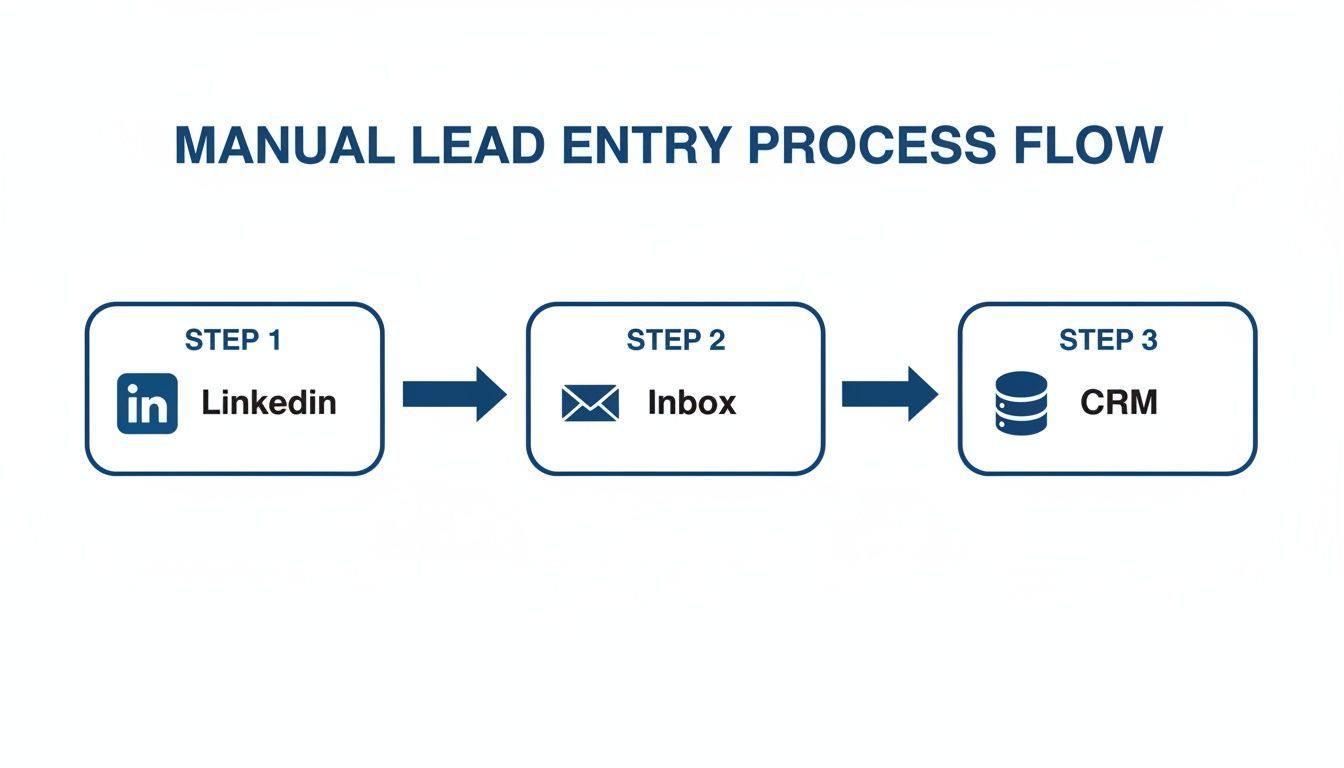
This flow really highlights how disconnected platforms force reps to waste time toggling between tools, which just creates friction and opens the door for errors.
By integrating lead capture directly into the tools your team uses daily, you remove the barriers between prospecting and selling. The best systems don't force reps to change their behavior; they enhance the workflows they already have.
If you're evaluating your options, our guide on the best lead generation software provides a detailed comparison of tools designed to streamline this exact process. Trust me, choosing the right platform is critical for building a system that can actually scale with your team.
Unifying Your Capture Channels
A truly powerful automatic lead generation system unifies all these capture points. It shouldn't matter if a lead is found on a company website, a social profile, or deep in an email thread. The process for adding them to your CRM has to be identical: fast, simple, and consistent.
- Consistency: Every rep uses the same one-click process. No more guesswork, just uniform data entry.
- Speed: Leads get added in seconds. This allows for immediate follow-up when their interest is at its peak.
- Accuracy: Automation pulls data directly from the source, drastically cutting down on typos and human error.
This unified approach ensures that no matter where your team finds a promising lead, they can act on it instantly. The result is a reliable and predictable flow of high-quality prospects straight into your sales pipeline.
How to Enrich and Verify Leads Instantly
Once you’ve captured a lead, the clock is officially ticking. A name and a company are a start, but the real power comes from understanding the person behind the title and the business they represent. This is where real-time data enrichment and verification come in, acting as the engine for your entire lead generation machine.
Forget asking your reps to spend precious minutes—or even hours—manually digging for data online. Modern automation instantly bolts on over 30 essential data points to every new contact you capture. In a single moment, a basic lead becomes a rich, actionable profile.
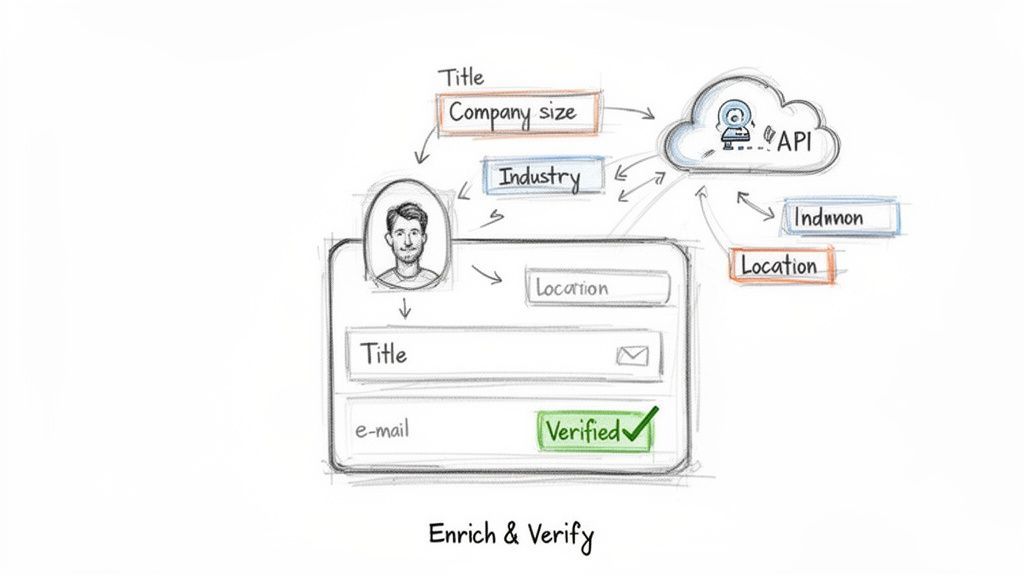
This split-second process ensures that the moment a lead lands in your CRM, your team has everything they need for a genuinely personalized and effective first touch.
From Basic Contact to Complete Profile
Let's get practical. Imagine you add a contact from an email signature. Doing it by hand, you’d get a name and maybe a job title. With automated enrichment, the system immediately cross-references databases to append the critical details that fuel intelligent sales conversations.
Key data points added automatically include:
- Detailed Demographics: Job title, seniority level, and location.
- Firmographic Data: Company size, industry, annual revenue, and founding year.
- Verified Contact Info: Corporate phone numbers and, crucially, a verified email address.
This immediate flood of data gives you the context to tailor your outreach. Knowing a lead is a VP at a 500-person tech company completely changes the conversation compared to approaching a manager at a 20-person startup. Our guide on the best data enrichment tools dives deeper into how the top platforms pull this off.
The Non-Negotiable Step: Email Verification
Enrichment is only half the story. Real-time email verification is just as critical.
Firing off emails to invalid addresses isn’t just a waste of time—it actively poisons your sender reputation. A high bounce rate is a huge red flag for email providers, making it more likely that all your future messages land in the spam folder.
Automated verification is your first line of defense against high bounce rates. It confirms an email address is valid and deliverable before it's ever used, protecting your domain and ensuring your outreach actually hits the inbox.
This step isn't optional for any serious sales team. Without it, you’re flying blind and actively damaging your ability to connect with future prospects.
Manual vs Automated Lead Enrichment
The difference between a manual process and an automated one isn't just about speed; it's about opportunity cost. Let's break down the real-world impact.
| Attribute | Manual Process | Automated Process (with Add to CRM) |
|---|---|---|
| Time per Lead | 5-10 minutes of research | < 2 seconds |
| Data Points | 3-5 (whatever is public) | 30+ (including revenue, tech stack, etc.) |
| Data Quality | Prone to human error, quickly outdated | Sourced from multiple B2B databases, verified in real time |
| Sales Rep Focus | Data entry and research | Crafting personalized outreach |
| Cost | High (rep's salary/time) | Low (pennies per lead) |
As the table shows, automation doesn't just save time—it produces higher-quality data and frees up your team to focus on revenue-generating activities. The old way of doing things is a massive bottleneck.
The contrast with manual processes is stark. The chance of converting a lead plummets by a staggering 80% if you don't follow up within 5 minutes, yet manual research forces you to let most hot prospects go cold. You can explore more on how speed impacts B2B sales in this insightful report on lead generation trends. Instant enrichment and verification bridge this critical gap, ensuring every lead is primed for immediate, personalized outreach.
A clean, actionable CRM is the bedrock of any successful sales operation. You can capture and enrich all the leads in the world, but if your database is a mess, you're just creating chaos.
A messy CRM doesn't just look bad—it actively kills sales momentum. It causes reps to trip over each other, leads to embarrassing mistakes, and completely undermines the efficiency you’re trying to build with automatic lead generation. This is where the real work happens, on the backend.
The biggest culprit? Data duplication.
It’s a constant battle in a manual world. A rep adds a contact from a trade show, totally unaware that an SDR is already prospecting the same person on a professional network. This isn't a small problem. It leads to wasted effort, pipeline conflicts, and a disjointed experience for the prospect who suddenly gets two calls from your company.
When reps can't trust the CRM as their single source of truth, they stop using it. And once that happens, your entire sales process starts to crumble.
Stop Duplicates Before They Start
The only way to win this fight is with intelligent, automated deduplication that kicks in the moment a new contact is captured. Before any new entry is created, your system should automatically scan the existing CRM to see if that person or company is already in there.
For instance, when a rep uses a tool like Add to CRM to save a profile, the system instantly cross-references the email address and company domain against your live database. If it finds a match, it immediately alerts the user, stopping a duplicate from ever being created.
This single, automated check prevents countless headaches down the line and ensures your team is always working from a clean, unified dataset.
Why Custom Field Mapping is Non-Negotiable
Beyond just preventing duplicates, keeping your CRM clean means making sure the right data goes into the right fields, every single time. Every CRM is set up a little differently. Your company might use the standard "Job Title" field, but another might have a custom field called "Role" or "Seniority Level."
This is where custom field mapping is a lifesaver for RevOps admins and sales leaders. It lets you create a permanent set of rules that dictates exactly where captured information goes.
Here’s how it plays out in the real world:
- Your CRM has a custom field called "Lead Vertical" to segment prospects by industry.
- Your lead capture tool automatically enriches new contacts with an "Industry" data point.
- With custom field mapping, you simply create a rule: "Always map the Industry data point to the Lead Vertical field in our CRM."
Once you set that rule, it applies to every lead captured by every person on your team. No manual work, no guesswork—just perfect consistency. This level of standardization is absolutely critical for accurate reporting, effective lead routing, and any automation you want to build.
A well-structured CRM isn't a passive database; it's an active, strategic asset. By automating deduplication and field mapping, you ensure the data flowing into it is clean, consistent, and immediately actionable, forming a reliable foundation for your entire sales strategy.
Without these backend guardrails, even the most sophisticated lead capture and enrichment efforts will eventually lead to a cluttered, untrustworthy system. Investing a little time to set up these rules is one of the highest-leverage things you can do to support a truly scalable lead generation process.
Designing Intelligent Automation Workflows
You’ve built the foundation—a clean, consistently updated CRM. Now for the fun part: building the engine that runs on top of it. This is where your system stops being a simple data-saving tool and starts actively driving your sales process forward.
The goal here is to move beyond just passively collecting contacts and start triggering smart, automated actions the moment a new lead hits your CRM. A well-designed workflow makes sure the right lead gets to the right person for the right follow-up, every single time. And nobody has to lift a finger.
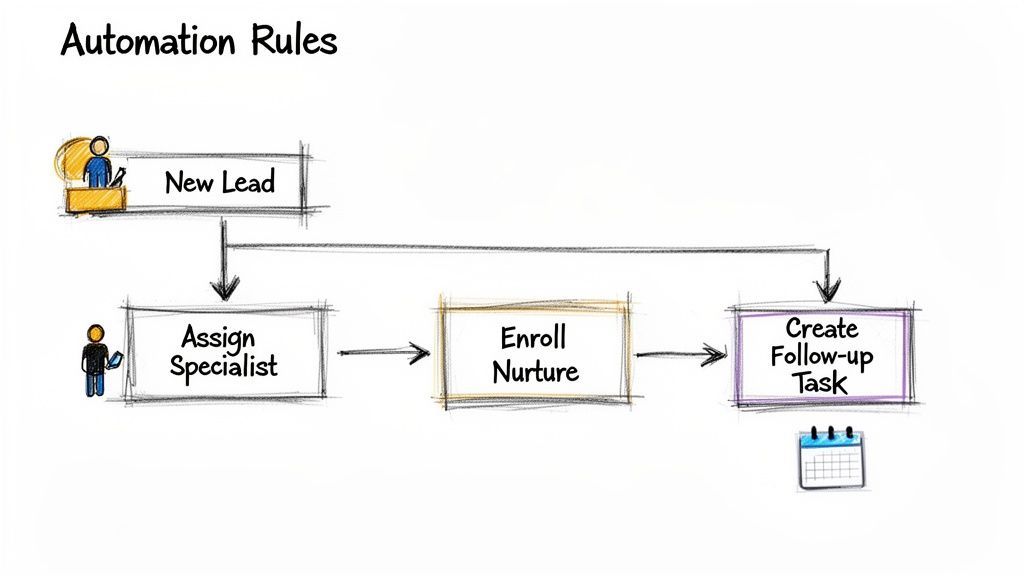
This is the kind of automation that separates the high-performers from everyone else. It’s not just about saving time; it’s about enforcing your sales strategy with perfect consistency.
Creating Smart Lead Assignment Rules
One of the first—and most powerful—automations to build is intelligent lead routing. Instead of a sales manager manually divvying up every new lead that comes in, you can create rules that do it instantly based on the data you’ve captured and enriched.
Let's walk through a real-world scenario. Your team just captured a new lead: a "VP of Engineering" at a SaaS company in California. Instead of letting that lead sit in a general queue, your workflow can instantly fire.
- Trigger: New contact created with
Industry = SaaS. - Condition:
Seniority = VPandState = California. - Action: Assign contact owner to your West Coast enterprise specialist.
Just like that, your most valuable leads are immediately sent to the rep best equipped to handle them. Your speed-to-lead time gets slashed dramatically.
Automating Nurture and Follow-up Sequences
Let's be real: not every lead is ready for a sales call the second you find them. This is where automated nurture sequences come into play. Your workflows can segment new leads and enroll them in the right campaigns based on their profile.
For instance, a new "Director-level" contact can be automatically added to a specific nurture track in your marketing platform, like HubSpot or Marketo. This sequence can start dripping them targeted case studies and content that actually speaks to their challenges.
At the same time, you can create an instant follow-up task for your sales rep right inside the CRM.
Imagine a lead from a key target account is added. Your system can immediately create a high-priority task for the account owner, due "today," with a note that says, "New high-value contact from Target Account XYZ added. Personal outreach required within 2 hours."
This creates a powerful two-pronged attack. While the lead is being warmed up with automated marketing, the sales rep is prompted to take immediate, personalized action. It’s a system designed to ensure high-value prospects never fall through the cracks.
This focus on quality and immediate, relevant follow-up is everything. Lead quality beats quantity every time, and the data proves it. SEO-driven automated leads convert at 14.6%, while old-school outbound cold calls barely scratch 1.7%. You can dig into more stats on how automation drives revenue on GIGcmo.com.
By designing these intelligent workflows, you're building an engine that doesn't just make you more efficient—it systematically improves your odds of conversion at every single step.
Got Questions About Automating Your Lead Gen?
Stepping into an automated lead generation system is a big move, and it's totally normal to have questions. You're probably wondering what it really takes to get it running and what kind of results you can actually expect.
Let's cut through the noise and tackle the most common concerns we hear from teams before they make the jump.
How Technical Do I Need to Be to Set This Up?
Good news: you need pretty much zero technical skills.
Modern automation tools are built for sales and marketing folks, not developers. The setup is usually just a simple browser extension. Connecting to your CRM, whether it’s Salesforce, HubSpot, or something else, is just a secure, one-time login.
After that, you're just mapping fields and setting up rules in a visual, point-and-click interface. No code, no headaches. The entire point is to remove technical hurdles, not add them.
Will This Just Clog My Pipeline With Junk Leads?
This is a big one, and it's a fair question. But a well-built system actually improves the quality of your pipeline.
Think about it: you're still the one in charge. You're still the one identifying interesting prospects on professional networks or spotting a key contact in your inbox. The automation simply takes over the mind-numbing admin work.
It handles the copy-pasting, the data enrichment, and the email verification. This frees you up to be more strategic and picky about who even gets into your pipeline in the first place. By making sure the data for every lead you do choose is clean and complete from the start, the system makes them more valuable from day one.
The biggest misconception about automation is that you lose control. The reality is the exact opposite. It gives you back the time you need to focus on strategy and qualification, so only the best-fit prospects ever make it into your funnel.
How Do I Make Sure Our Automated System Is GDPR Compliant?
Compliance isn't just a box to check—it's critical. Any reputable automation provider builds its entire platform around regulations like GDPR.
This means they're upfront about their data sources, sticking to publicly available business contact information and using secure, transparent methods for processing it.
Before you commit to a tool, spend five minutes checking out its privacy policy and compliance page. It’s a quick sanity check to make sure their practices align with the legal and ethical standards you need to uphold.
What KPIs Should I Track to See if It's Working?
To gauge the real impact, you have to look past the vanity metric of "number of leads generated." The true ROI of an automatic lead generation system shows up in your team's efficiency and conversion rates.
Focus on these Key Performance Indicators (KPIs):
- Time Saved Per Rep: How many hours a week is your team getting back now that they're not buried in manual data entry?
- Lead-to-Opportunity Conversion Rate: Are the automatically enriched and verified leads converting into real opportunities at a higher clip?
- Data Accuracy: Keep a sharp eye on your email bounce rate. If it drops, you know you're working with higher-quality, verified data.
- Speed-to-Lead: How quickly are you making that first contact after a lead is captured? Automation should shrink this window dramatically.
These are the numbers that will paint a clear picture of the impact on your team's productivity and, ultimately, your company's bottom line.
Ready to stop wasting hours on data entry and start building a predictable pipeline? Add to CRM eliminates copy-paste by turning any social profile or email signature into a clean, enriched CRM record in one click. Try it for free and see how much time you can save.
Start saving time and closing more deals.
Find contact info for your prospects on the #1 business social network and add them to your CRM with 1-click.

 Loading...



Trusted by 1000s of founders, SDRs & more
