How to Import Contacts into Pipedrive
Learn how to import contacts into Pipedrive from CRMs, spreadsheets, LinkedIn prospects & other sources with this complete guide.
Sync leads from professional networks to Pipedrive.
Save 4hrs per week on CRM data entry.
Learn more...Free Pipedrive integration
Are you setting up your sales pipeline in Pipedrive and looking for an efficient way to bring all your lead data together? Whether your leads are stored in spreadsheets, collected from web forms, or spread across different platforms, Pipedrive makes it easy to centralize and manage them within a streamlined pipeline view.
In this guide, we’ll walk you through the different ways to import leads directly into your Pipedrive pipeline, explain how to map and organize your data effectively, and introduce useful third-party tools to help automate and enhance your import process.
Preparing Contacts for Import
Before you start importing, it’s crucial to organize your data properly. Pipedrive supports importing data from Excel (.xls, .xlsx) and CSV files. Here are some steps to ensure your import goes smoothly:
- Ensure data cleanliness: Remove duplicates and empty rows from your spreadsheet.
- Use proper headers: Make sure each column in your file has clear headers that match Pipedrive’s sample import spreadsheets (e.g., “First Name,” “Last Name,” “Email”).
- Mandatory fields: Include all mandatory fields such as “Person Name” and “Organization Name” if applicable.
- Custom fields: If you have data that doesn’t fit into Pipedrive’s default fields, create custom fields in Pipedrive before importing.

Importing Contacts from a CSV or Spreadsheet
Pipedrive makes it easy to import contacts from a CSV or Excel file. Here’s how:
- Navigate to the Import page:
- Go to the “…” menu and select Import Data.
- Select your file:
- Choose “From a spreadsheet” and upload your CSV or Excel file. Ensure the file size is under 50MB.
- Map fields:
- Pipedrive provides a drag-and-drop feature to match columns in your file to Pipedrive fields. Ensure mandatory fields like ‘Person Name’ and ‘Email’ are mapped correctly. Ensure mandatory fields like ‘Person Name’ and ‘Email’ are mapped correctly. If you have custom fields in your file, create them in Pipedrive before starting the import.
- Handle duplicates:
- Pipedrive allows merging or creating duplicates. It identifies duplicates based on fields like email and phone number.
- Set date format:
- Choose the appropriate date format (e.g., DD/MM/YYYY) to match your data.
- Finish import:
- Review the summary, handle any errors, and click “Start Import”. You’ll receive an email once the process is complete.
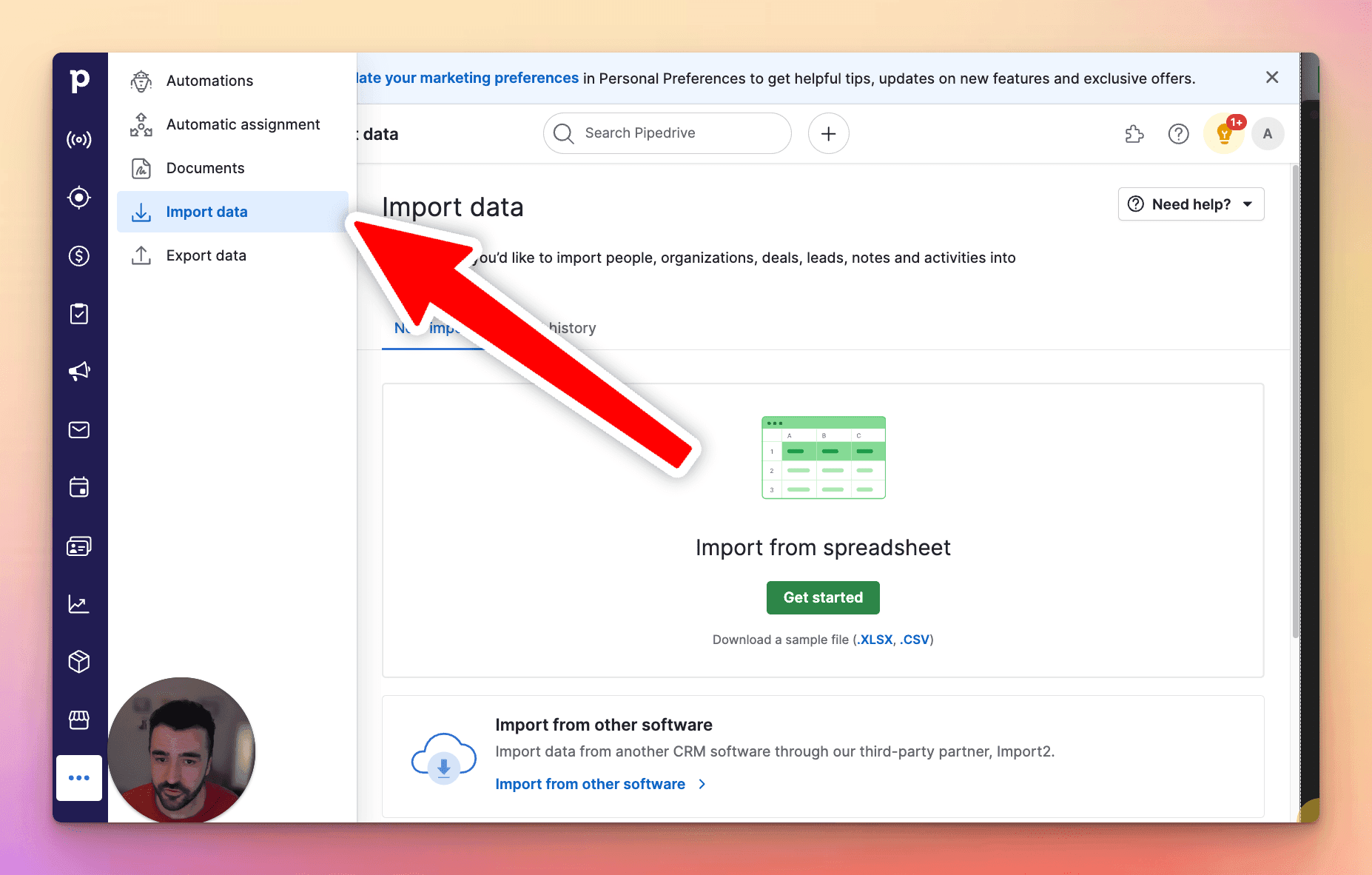
If there are any issues during import, Pipedrive will generate a skip file, highlighting errors for rows that couldn’t be imported. You can correct these issues and re-upload the skip file.
Migrating from Other CRMs
Pipedrive offers easy migration from other CRMs such as Salesforce, Zoho, HubSpot, and Freshworks. You can either:
- Use the native import feature:
- Export your data from the other CRM into a CSV file and follow the import steps above.
- Use third-party migration tools:
- Tools like Import2 can facilitate a seamless migration by directly connecting your previous CRM with Pipedrive.
Pipedrive ensures data integrity during migration by handling duplicates and providing error logs for incomplete records.

Skip the CSV. Import contacts to Pipedrive from LinkedIn®
Add to CRM enriches LinkedIn® profiles with verified emails and phone numbers, then syncs them to Pipedrive instantly.
Start Free Trial


 Trusted by 2,500+ users4.7
Importing from LinkedIn
Another option is to use a third-party tool to import contacts directly from LinkedIn. Tools such as Add to CRM allow you to:
- Get verified email addresses directly from LinkedIn profiles.
- Add contacts to Pipedrive in one click:
- When you visit a LinkedIn profile, an “Add to CRM” button appears below the profile photo.
- Click the button, and a pop-up will display the contact’s details (name, email, company, etc.).
- With one more click, the contact is saved in Pipedrive.

Add to CRM streamlines the process by reducing manual data entry and ensuring contact details are accurate.
Adding Contacts Manually
Sometimes, it’s faster to manually add a few contacts rather than importing a file. Here’s how to do it:
- Go to the Contacts tab in Pipedrive.
- Click Add Person.
- Fill in the contact details, including name, email, phone number, and organization.
- Save the contact.
Manual addition is best for one-off contacts or small batches that don’t warrant an entire import.
Verified emails, straight into Pipedrive
Add to CRM enriches LinkedIn® profiles with verified emails and phone numbers, then syncs them to Pipedrive instantly.
Start Free TrialTrusted by 2,500+ users4.7Troubleshooting Import Issues
If you encounter issues during the import process, here are some common solutions:
- Duplicate contacts: Ensure that your import settings are configured to merge or skip duplicates based on email addresses.
- Missing mandatory fields: Double-check that your file includes all required fields.
- Incorrect data mapping: Verify that each column is correctly mapped to a Pipedrive field.
- File format issues: Ensure your file is in CSV or Excel format and doesn’t exceed Pipedrive’s size limits.
If you still face problems, Pipedrive’s support team can assist with more complex issues. You can find step-by-step assistance on Pipedrive’s support page.
Conclusion and Next Steps
Importing contacts into Pipedrive doesn’t have to be a hssle. Whether you’re working with lots of data or manually adding a few contacts, there are multiple ways to get your data into Pipedrive.
If you frequently source leads from LinkedIn, our tool, Add to CRM, can help save time and streamline your workflow. With real-time email verification and one-click contact syncing, it’s a powerful solution to enhance your sales productivity.
Happy importing!
How to import contacts into Pipedrive directly from LinkedIn®, Gmail and Outlook

 Pipedrive Integration
Add contacts to Pipedrive from LinkedIn®
Enrich profiles with verified emails and phone numbers. Sync to Pipedrive in one click.
Try Pipedrive Extension7-day free trial · Cancel anytime
Save 4+ hrs / week on Pipedrive data entry.
Find verified contact info for your prospects on LinkedIn®, Gmail, Outlook & company websites. Add them to your Pipedrive with 1-click.
 Loading...Trusted by 2,500+ founders, SDRs & more