A Modern Guide to Automated Lead Generation
Learn to build a powerful automated lead generation system. This guide offers practical strategies for capturing, enriching, and converting leads at scale.
Automated lead generation is simply using smart software to find, qualify, and talk to potential customers without you having to do it all by hand. It’s about building a system that works in the background, constantly feeding your sales team a pipeline of people who are actually ready to talk.
Moving Beyond Manual Lead Generation
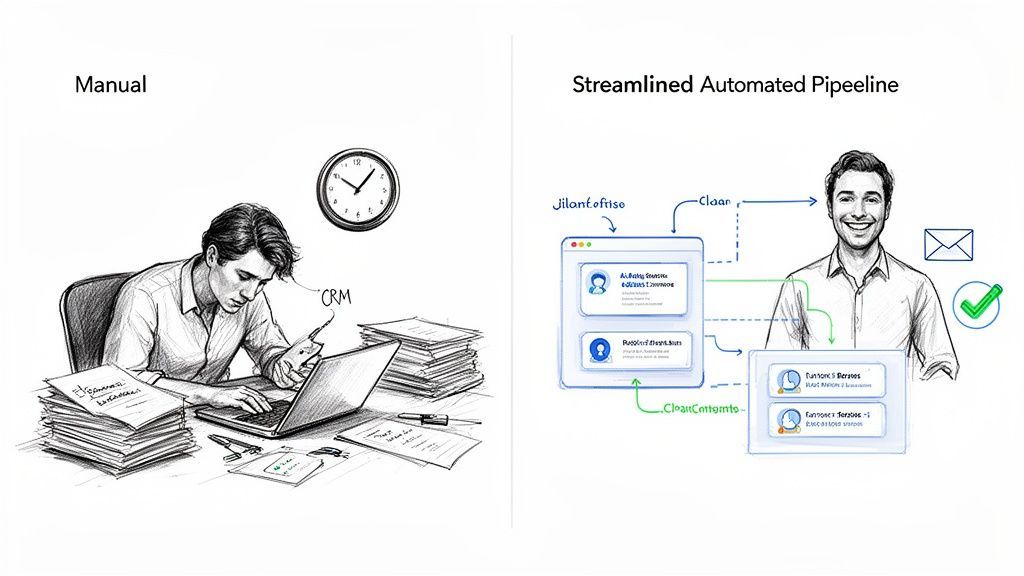
Let's be real: manual prospecting is a soul-crushing grind. We've all been there—spending hours copying and pasting data from professional networking sites into a CRM, knowing that time would be much better spent actually selling. This chronic inefficiency is the silent killer of growth for so many businesses.
This mind-numbing data entry doesn't just waste your day; it creates a leaky pipeline. Data gets stale the second you enter it, and simple human error leads to duplicate records and a database you just can't trust. For founders, SDRs, and RevOps leaders, it feels like you're constantly fighting a system that's designed to fail.
The True Cost of Inefficiency
The biggest problem with manual lead generation isn't the boredom—it's the opportunity cost. Every single hour an SDR spends on administrative grunt work is an hour they aren't building relationships or closing deals. This hits your revenue and your team's morale right where it hurts.
The goal of automation isn't to replace salespeople; it's to empower them. By removing repetitive tasks, you free up your team's most valuable asset: their time to connect with customers and solve real problems.
True automated lead generation is the modern solution to this old problem. It establishes a reliable, hands-off system that delivers a consistent flow of high-quality leads. This guide is your practical walkthrough for building that exact system from the ground up.
What Real Automation Looks Like
Look, effective automation is so much more than just buying another tool; it’s about designing a complete workflow. A well-built system can handle a ton of critical functions without any human input, giving you speed and accuracy at every step.
Here’s what a modern automation engine should be doing for you:
- Instant Capture: Grab prospect data from any source—like an email signature or an online profile—in a single click. No more copy-paste.
- Intelligent Enrichment: Automatically add the crucial data points you actually need, like verified emails, direct-dial phone numbers, and company details.
- Seamless Integration: Sync clean, organized data directly into your CRM, automatically checking for duplicates so your database stays pristine.
- Triggered Actions: Instantly kickstart a follow-up sequence in your sales engagement tool or assign a task in the CRM based on the new lead's profile.
If you're tired of wrestling with a broken prospecting process, you're in the right place. We're going to break down how to build an automation engine that doesn’t just save time but actually fuels predictable, scalable growth.
Laying the Groundwork for Scalable Automation
Before you start wiring up any complex lead generation machine, you need a solid blueprint. True scalability doesn't come from just buying a new piece of software; it comes from a deep, almost obsessive understanding of who you're targeting and how your tools will actually work together.
If you skip this step, you’re just automating chaos.
Remember this core principle: automation only magnifies the quality of what you put in. A fuzzy Ideal Customer Profile (ICP) won’t magically produce great leads—it will just get you a ton of bad leads, much, much faster. Let's build this foundation the right way from day one, so you're not rebuilding your entire process six months down the line.
Nailing Your Ideal Customer Profile with Precision
Your ICP is way more than a vague description of your target market. It's a highly specific, data-driven definition of the exact type of company—and the specific person within it—who gets the most value from your product. Think of it as a filter. Generic attributes like "tech companies" are useless here.
To build a powerful ICP, you need to get granular with attributes your automation tools can actually identify and act on.
Here’s what a high-precision ICP should include:
- Company Size & Revenue: Don't just say "SMB." Define a specific range, like 50-200 employees or $10M-$50M in annual revenue. This immediately focuses your efforts on businesses that can actually afford your solution.
- Technology Stack: What other software do your best customers use? Knowing they run on Salesforce, HubSpot, or specific project management tools is a massive buying signal.
- Key Personnel & Roles: Stop targeting "managers." Specify exact titles like "Director of Sales Operations" or "VP of Demand Generation." These are the people with the budget and the specific pain points you solve.
- Buying Signals & Triggers: Look for indicators that show a need right now. This could be a recent funding round, a hiring surge for specific roles (like SDRs), or even mentions of certain keywords in their job descriptions.
A well-defined ICP is the North Star for your entire system. Every lead capture, enrichment, and outreach decision gets measured against it. If a prospect doesn't fit, they don't get into the automated workflow. Period.
This level of detail isn't just a thought exercise. It's what allows you to build hyper-targeted lists and write outreach that actually resonates. Teams that nail their ICP definition see significantly higher conversion rates because every single conversation is with a perfect-fit prospect.
Assembling Your Must-Have Tech Stack
Once you know exactly who you're targeting, it's time to pick the tools to find and manage them. Your tech stack is the engine of your lead generation system, and a clunky or disconnected set of tools will create friction and data silos—undermining the very efficiency you’re trying to build.
There are two non-negotiable pieces of your stack you need from the get-go: a flexible CRM and an efficient way to capture data.
1. A Flexible and Centralized CRM Your Customer Relationship Management (CRM) platform is your single source of truth. It’s where every piece of prospect and customer data lives, so it has to be clean, organized, and easy to connect to. When you're picking a CRM, prioritize flexibility and its ability to integrate with other tools. A system with a robust API and lots of native connections will save you a world of hurt later.
2. A Bridge for Data Capture This is the critical link between where you find prospects—like their inbox or a professional networking profile—and your CRM. A simple browser extension that can grab contact details with one click closes this gap perfectly. It kills manual data entry, slashes human error, and ensures the information flowing into your CRM is accurate from the very start.
This one simple tool can easily save your team 4+ hours per week on mind-numbing, repetitive tasks.

Find verified contact data on LinkedIn®
Add to CRM finds verified emails, phone numbers, and job titles on LinkedIn® — then adds them to your CRM in one click.
Start Free Trial


 Trusted by 2,500+ users4.7
Designing Your Lead Capture and Enrichment Workflow
Okay, you’ve nailed down your Ideal Customer Profile and picked your tech. Now for the fun part: building the engine that actually generates your leads. This is where we get practical and design the end-to-end workflow that turns a name on a screen into a sales-ready opportunity in your CRM.
Getting this flow right is the difference between a sputtering, unreliable process and a high-performance machine that consistently fuels your pipeline. The whole thing breaks down into three core phases: capturing the initial data, enriching it with context, and verifying it in real time.
This isn't just about tools; it's about strategy. A solid workflow is built on a strong foundation.
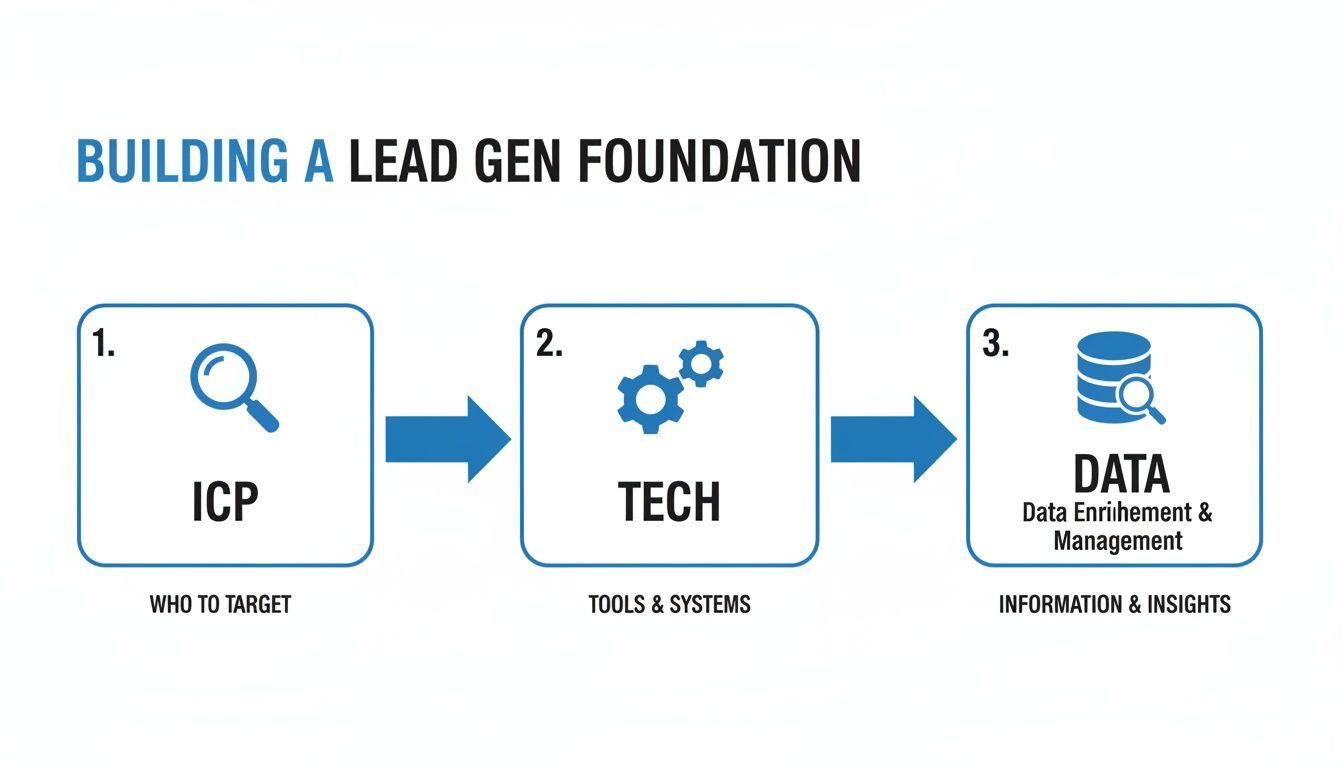
As you can see, each step logically feeds the next. It’s a cohesive system, not just a bunch of disconnected actions.
From Manual Drudgery to Automated Precision
Let’s be honest, the old way of doing this was a nightmare. A manual workflow is a time-sucking, error-prone mess that kills productivity. An automated one? It’s a model of efficiency.
Think about this everyday scenario: an SDR finds a promising prospect on a professional networking site.
The manual process is painful. They copy the prospect's name, title, and company, then paste it into the CRM. They open a new tab to hunt for an email, another for a phone number, and maybe another for company details. After 5-10 minutes of digital scavenger hunting, they finally create the contact, hoping they didn’t just make a duplicate.
The automated workflow is a different world. The rep clicks one button. In seconds, the system grabs the data, finds a verified email and direct-dial phone number, checks the CRM for duplicates, and syncs a perfect, clean record with all the fields mapped correctly.
The difference isn't just a few minutes saved—it’s a fundamental shift in how your team operates. The market agrees. 44% of companies are already using marketing automation for lead gen, and that number jumps to 55% for B2B businesses.
To really see the contrast, let's break down the return on investment.
Manual Prospecting vs Automated Enrichment Workflow
| Metric | Manual Process | Automated Workflow (with Add to CRM) |
|---|---|---|
| Time per lead | 5-10 minutes | ~10 seconds |
| Data accuracy | Prone to typos & copy/paste errors | 95%+ verified & consistent |
| Duplicate records | High risk; requires manual checks | Automatically detected & prevented |
| Cost per hour | SDR salary (e.g., $30/hr) wasted on data entry | Minimal; SDRs focus on selling |
| Productivity | Low; reps bogged down in admin tasks | High; reps spend more time in conversations |
The table makes it obvious: automation isn't a luxury; it's a competitive necessity. You're not just saving time; you're buying back selling hours for your team and ensuring the data they work with is actually reliable.
Mastering Instant Lead Capture
The first step is simply getting the raw data into your system. Modern tools completely eliminate the soul-crushing task of copy-pasting. They act as a bridge, letting you instantly grab prospect information from wherever you find them.
This could be from:
- An email signature in Gmail or Outlook.
- A professional profile on a networking site.
- A company's "About Us" page.
One click captures the basics—name, title, company—without you ever leaving the page. This is the gateway to the entire automated process, saving countless hours and preventing bad data from entering your system in the first place.
For a deeper look at this, check out our guide on how to automate data entry for your business.
The Power of Automated Data Enrichment
A name and a title are a start, but they aren't enough to build a meaningful conversation around. This is where automated data enrichment comes in, programmatically adding layers of crucial context to that initial record.
Enrichment transforms a basic contact into an actionable sales asset. It gives your sales team the intel they need to have personalized conversations that actually convert.
A good enrichment engine will automatically find and append key information like:
- Verified Corporate Email: Not a guess, but a confirmed, deliverable address.
- Direct-Dial Phone Number: So you can bypass gatekeepers and switchboards.
- Company Firmographics: Industry, employee count, and annual revenue.
- Individual Seniority: To understand their place in the org chart.
This step ensures every lead landing in your CRM is complete, accurate, and ready for outreach.
Real-Time Verification: The Non-Negotiable Final Check
The final—and arguably most critical—step is real-time verification. Firing off emails to unverified addresses is the fastest way to wreck your sender reputation and get your domain blacklisted. Bad data doesn't just waste time; it actively hurts your ability to reach anyone.
Real-time verification is an automated check that happens just before the data is saved. The system confirms that the email address is valid and deliverable at that exact moment. It’s a simple but powerful safety net.
This ensures three things:
- Your outreach emails actually hit the inbox.
- Your bounce rates stay low, protecting your domain health.
- Your sales team focuses their energy on contacts they can actually reach.
By designing a workflow that seamlessly integrates capture, enrichment, and verification, you create a powerful, self-cleaning system. It doesn't just save time—it fundamentally improves the quality and value of every single lead in your pipeline.
Connecting Your Tools for Seamless Outreach
Capturing and enriching a lead is a huge win, but its value vanishes if you don't act on it. Fast. This is where we close the loop, plumbing your new lead data directly into your CRM and sales engagement platforms to kick off immediate, effective outreach. A great lead deserves a great follow-up, and automation makes sure it happens in minutes, not hours.
The whole point is to build a cohesive, hands-off system. A prospect gets captured, enriched, verified, and enrolled in a tailored outreach campaign before they’ve even had a chance to check their inbox. This connection is the final bridge between collecting data and generating revenue, making your entire automated lead generation workflow truly hum.
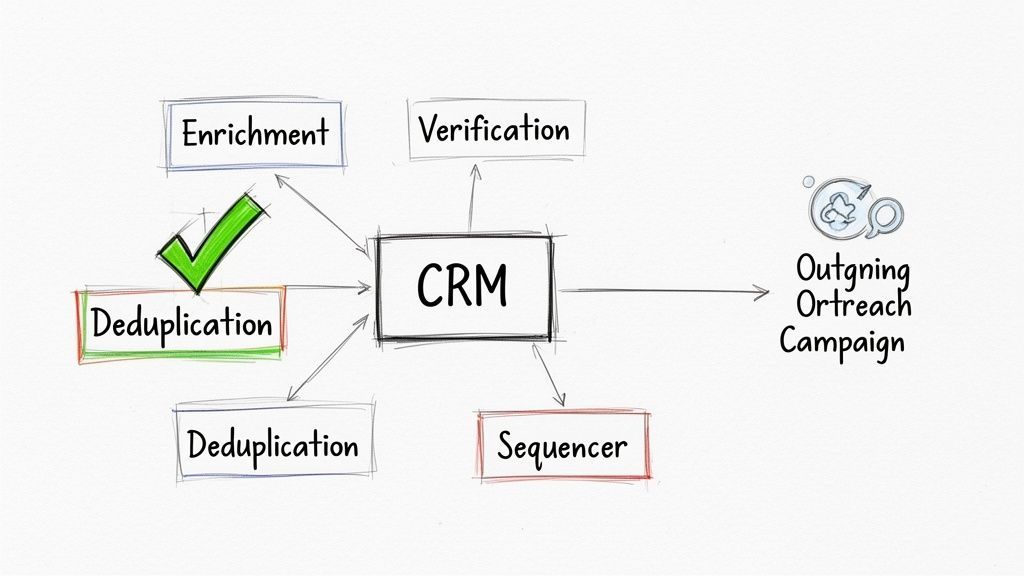
This isn’t just about speed, either. It’s about keeping your data clean. Without the right connections, your CRM can quickly turn into a chaotic mess of duplicate records and conflicting info, rendering all your hard-won data useless.
The Critical Role of Automated Deduplication
Nothing poisons a sales database faster than duplicate contacts. They lead to embarrassing mistakes—like two reps hitting up the same person—and create a reporting nightmare that makes it impossible to track a prospect's real journey. Trying to clean this up manually is a losing battle. It’s tedious, time-consuming, and almost always too late.
That's why automated deduplication is non-negotiable for any modern lead gen system. Before a new contact ever gets created, the system must run an instant check against your existing CRM records.
It works by matching a few key identifiers:
- Email Address: The gold standard for a unique identifier.
- Name and Company: A combined check to catch slight variations.
- Professional Profile URL: A unique link to their online professional profile or social presence.
If it finds a match, the system doesn't just create a new record. Instead, it can be set up to update the existing contact with any fresh, valuable information you just found. This keeps your database pristine and gives you a single, unified view of every interaction you've had with a prospect.
By stopping duplicate entries at the source, you protect the integrity of your CRM and ensure your sales team is always working from a single source of truth. It's a simple, automated step that becomes the bedrock of any scalable sales operation.
Building Automated Outreach Playbooks
With clean, enriched, and verified data flowing into your CRM, you can now build some seriously powerful outreach playbooks. These are automated sequences that fire the moment a new, qualified lead hits your system. The speed here is a complete game-changer.
Think about it: instead of a new lead sitting idle in a queue, your system can instantly kickstart the sales process. This isn't just a "nice to have" anymore; it's table stakes. In fact, research shows that leads contacted within five minutes of showing interest convert at three times the rate of those who have to wait just thirty minutes.
Practical Playbook Examples
Let's walk through a couple of real-world scenarios to see how this plays out.
Playbook 1: The High-Intent Demo Request
A hot prospect fills out a "Request a Demo" form on your website. This is a five-alarm fire—a lead that demands an immediate response.
- Trigger: The form submission is captured.
- Enrichment: The system instantly adds their company size, industry, and direct phone number.
- Deduplication: It runs a check to confirm they aren't an existing customer or open opportunity.
- CRM Action: A new "Lead" record is created in the CRM with "Lead Source" tagged as "Demo Request."
- Automated Action: The lead gets assigned to the right account executive based on territory rules, and an email sequence fires from their account suggesting a few meeting times.
Playbook 2: The Proactive Outbound Prospect
An SDR finds a perfect-fit prospect on a professional networking site who matches your ICP to a T.
- Capture: The SDR uses a browser extension to grab the prospect's data with one click. For anyone looking to streamline this, exploring tools for LinkedIn outreach automation can be a massive advantage.
- Enrichment & Verification: The system finds and verifies their corporate email and direct dial number.
- Deduplication: A quick check confirms no one else on the team is already working this account.
- CRM Action: A new "Contact" and "Account" are created and properly mapped.
- Automated Action: The contact is automatically enrolled in a multi-touch "Cold Outbound" sequence that mixes personalized emails with tasks for the SDR to make a call.
These connected workflows turn your lead generation from a series of manual tasks into a seamless, efficient engine. By integrating your tools and automating the handoffs, you kill the friction, guarantee lightning-fast follow-ups, and free up your sales team to focus on what they do best: building relationships and closing deals.
Measuring and Optimizing Your Automation Engine
Building your automated lead generation system is a huge win, but it's definitely not a "set it and forget it" kind of deal. Think of it less like a finished product and more like a high-performance engine. It needs regular check-ups, fine-tuning, and the right fuel to keep running at its peak.
The real magic of automation isn’t just the speed; it's the data it kicks out. This data creates a constant feedback loop that shows you exactly what’s working, what’s broken, and where your biggest growth opportunities are hiding. This is how you turn a good system into a revenue-generating machine.
Without this step, you’re flying blind. Sure, you might be filling your pipeline, but are they the right leads? And are your reps converting them efficiently? Let's get into the metrics that actually matter and how to keep your system firing on all cylinders.
Key Metrics You Must Track
Vague metrics lead to vague results. If you really want to know how your lead gen engine is doing, you have to move past vanity numbers like the total number of leads. The pros focus on a handful of key performance indicators (KPIs) that directly measure efficiency, quality, and momentum.
These three give you a complete picture of your system's health:
- Lead Velocity Rate (LVR): This is your month-over-month growth in qualified leads. It’s a powerful predictor of your pipeline's momentum and future revenue. A consistently high LVR means your growth is speeding up, not just staying flat.
- Cost Per Lead (CPL): A simple but essential metric. Just divide your total spend on lead generation (tools, ads, etc.) by the number of qualified leads you brought in. It tells you exactly how much it costs to get a potential customer in the door.
- Lead-to-Opportunity Conversion Rate: This is the ultimate test of lead quality. It tracks the percentage of your leads that actually turn into a legitimate sales opportunity. If this number is low, it’s a massive red flag that you’re either targeting the wrong people or your initial outreach is falling flat.
Tracking these core metrics is non-negotiable. They are the dashboard for your automation engine, giving you the real-time insights needed to spot problems before they completely derail your pipeline.
Turning Insights into Action
Data is useless if you don't do anything with it. The whole point isn't just to watch these numbers go up or down, but to use them to make smart, strategic tweaks. When a metric starts trending the wrong way, you need a playbook to course-correct.
A low Lead-to-Opportunity Conversion Rate, for instance, is a classic sign of a mismatch between who you're prospecting and who you're actually selling to. Instead of just cranking up the volume, it’s time to get smarter about your inputs.
Here’s a practical way to respond:
- Revisit Your ICP: Get your top sales reps in a room. Pull up your last ten closed-won deals and find the common threads—company size, tech stack, job titles, pain points mentioned. Use that real-world win data to sharpen your Ideal Customer Profile.
- A/B Test Your Outreach: Never assume your messaging is perfect. Start testing different subject lines, value props, and calls-to-action in your automated sequences. Sometimes a tiny tweak can have a massive impact on your reply rates.
Troubleshooting Common Automation Glitches
Even the most well-oiled machine can hit a snag. Knowing how to quickly diagnose and fix the usual suspects is key to keeping your momentum.
Scenario 1: Leads Aren't Syncing to the CRM Correctly This is almost always a field mapping error. Double-check that the data fields in your capture tool (e.g., "Job Title") are mapped to the correct fields in your CRM (e.g., "Title"). One simple mismatch can break the entire sync and leave your reps with blank records.
Scenario 2: A Sudden Dip in Email Verification Rates If your verification accuracy suddenly drops below 95%, you need to investigate the source immediately. Are you targeting a new industry where data is just harder to verify? Has your data provider's quality slipped? Pinpoint the source of the bad data and pause outreach to those segments until it's fixed. This is crucial for protecting your sender reputation.
By constantly monitoring, testing, and troubleshooting, you create a resilient and ever-improving automated lead generation system. This proactive approach ensures your engine doesn't just run—it evolves to become more efficient and more profitable over time.
Works with 29+ CRMs
Add to CRM finds verified emails, phone numbers, and job titles on LinkedIn® — then adds them to your CRM in one click.
Start Free TrialTrusted by 2,500+ users4.7Sidestepping Common Automated Lead Generation Pitfalls
Jumping into an automated lead generation system feels like a huge win. But moving too fast without thinking it through is a surefire way to stumble. I’ve seen countless teams fall into the same predictable traps, completely undermining their own efforts.
The real goal isn't just to automate tasks. It's to build a smarter, more efficient engine that still feels human. Let's break down the three biggest pitfalls I see and how you can steer clear of them.
Over-Automating and Losing the Human Touch
This is the big one. People hear "automation" and think "robotic." But when you strip every ounce of personality from your outreach, prospects can feel it a mile away. Those generic, soulless messages? They get deleted on sight, killing any chance you had of building a real connection.
- What it looks like: Relying on default templates where the only personalization is a
{{first_name}}tag. Blasting out mass emails that read like they were written by a machine. - How to fix it: Use automation for the heavy lifting, but keep human touchpoints where they count. A great approach is to build semi-automated sequences. These can prompt your SDRs to add a quick, personalized sentence based on a prospect’s recent social media post or a piece of company news.
Automation should handle the repetitive work so your team can focus on the human work. It's a tool to enable connection at scale, not replace it entirely.
Ignoring Data Quality and Compliance
In the race to fill the pipeline, it’s so tempting to cut corners on data quality. Don't do it. Using unverified or stale information is a recipe for disaster. It leads to sky-high email bounce rates, which can absolutely tank your sender reputation and even get your domain blacklisted. You can learn more about how to safeguard your outreach in our guide to improve email deliverability.
And let's be clear: ignoring privacy regulations like GDPR isn't just a bad idea—it's illegal and can come with massive fines.
- What it looks like: Buying cheap, static contact lists off the internet. Skipping real-time email verification to save a few pennies per lead.
- How to fix it: Make data quality a non-negotiable. Use a single source of truth for your data and implement automated verification and enrichment for every single lead that comes in. This guarantees your team is always working with clean, accurate, and compliant information.
Choosing the Wrong Tools for the Job
A clunky, mismatched tech stack creates more headaches than it solves. If your tools don't integrate smoothly, you'll end up with data silos and frustrating manual workarounds—the very things you were trying to get rid of. A bad system forces your team to spend their time fighting the software instead of actually selling.
- What it looks like: Piecing together a bunch of standalone "point solutions" that don't talk to each other. Overpaying for a complex enterprise tool when a simple, agile solution would do the trick.
- How to fix it: Choose tools that are built to work together, especially your data capture tool and your CRM. Look for platforms with solid native integrations that let data flow without a hitch. The right combination of tools makes all the difference. In fact, businesses that nail this often report saving 4+ hours per week on repetitive tasks alone. You can find more insights on the impact of automation at lagrowthmachine.com.
By sidestepping these common mistakes, you set your team up to get the full benefit of automated lead generation—a scalable system that doesn’t just save time but consistently generates higher-quality opportunities.
Ready to eliminate copy-paste and build a seamless lead generation workflow? Add to CRM is a Chrome extension that captures, enriches, and syncs verified prospect data to your CRM in one click. Start your 7-day free trial at https://addtocrm.com.
Start saving time and closing more deals.
Find verified contact info for your prospects on LinkedIn®, Gmail and Outlook — and add them to your CRM with 1-click.

 Loading...Trusted by 2,500+ founders, SDRs & more