Email Finder for Business Networks: The Complete 2026 Guide
How email finders for business networks work, how to use one, and an honest July 2026 comparison of seven tools — pricing, credits, and accuracy.
An email finder for business networks reveals a verified work email for the profile you're viewing. You open someone's profile on LinkedIn or another professional network, the finder matches that person against licensed B2B data sources, verifies the address in real time, and hands you a deliverable work email — plus, with the better tools, a phone number, job title, company details, and a one-click route into your CRM. That's the whole category in a sentence. The hard part is choosing between the seven or so serious tools that do it, because they differ wildly in pricing models, credit systems, accuracy, and what happens after the email is found.
TL;DR: Email finders fall into two camps. Databases (Apollo, RocketReach, Lusha, Kaspr, Hunter) sell you access to a large searchable pool of contacts, with an extension bolted on. Workflow tools (Add to CRM, Surfe) live in your browser and enrich the one person you're already looking at, then push them straight into your CRM. Databases win when you need volume and list-building; workflow tools win when you prospect person-by-person and want contacts to land in your CRM with zero copy-paste. Prices in this guide were checked in July 2026 and change often — always confirm on the vendor's site.
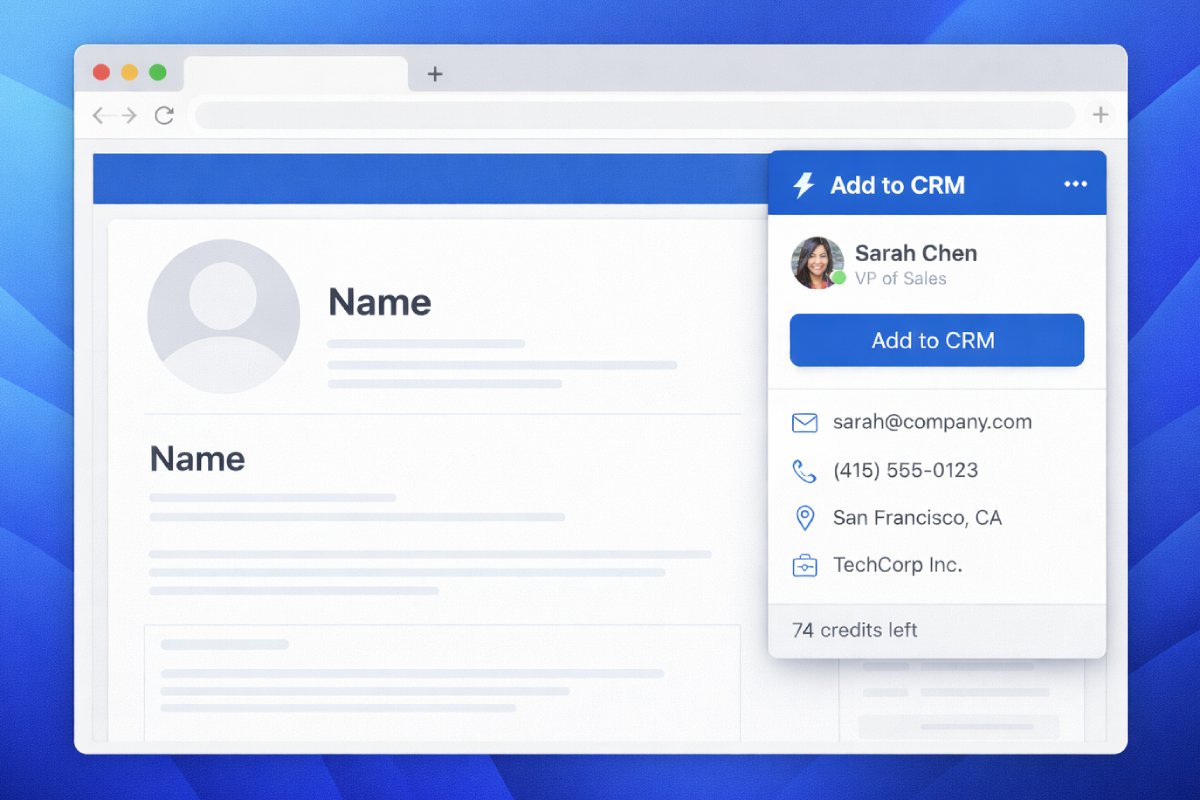
How email finders actually work
Under the hood, almost every serious email finder runs the same three-stage pipeline. Understanding it explains most of the differences you'll see in pricing and accuracy.
1. Identity resolution. The tool works out who you're asking about. On a business-network profile that's easy — the finder reads the name, company, and role of the person on the page you have open. This is also the compliance-friendly part of the category done right: a good finder enriches the single contact you're already viewing from licensed third-party data. It doesn't bulk-collect profiles from the platform itself.
2. The data waterfall. No single provider knows everyone, so good finders query a waterfall of sources in sequence — check provider A, fall through to provider B, then C — until they get a confident match. This is why coverage varies so much between tools: a finder is only as good as the sources behind it and the order it asks them in. Add to CRM, for example, taps sources including Apollo, Lusha, RocketReach, Prospeo, ContactOut, and SalesQL behind the scenes, drawing on 220M+ profiles — we're the workflow layer on top of the databases, not a competing database.
3. Real-time verification. A found email is a hypothesis; a verified email is one that's been checked against the mail server — the domain accepts mail, the mailbox exists, it isn't a known trap, and catch-all domains are flagged. This step is the difference between a reply and a bounce, and it's where tools quietly diverge: some verify at the moment of discovery, others hand you a pattern-matched guess and leave verification to you (sometimes for extra credits).
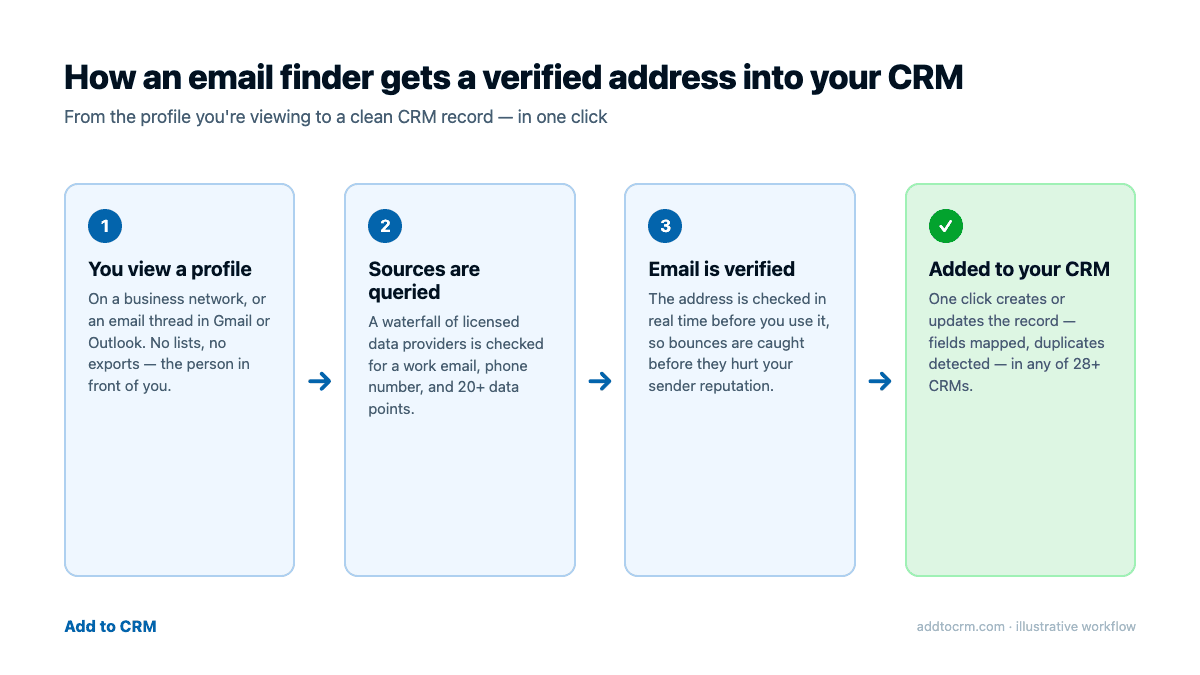
How to use one: the three-step workflow
Here's what person-by-person prospecting looks like with a workflow-style finder — this is the Add to CRM flow, but Surfe and the database extensions follow a similar shape:
Step 1 — open the profile (or the email). Navigate to the person on a business network the way you already do. The same flow works in Gmail and Outlook: open a message and the extension picks up the sender or recipients, which is handy for the prospects already sitting in your inbox.
Step 2 — enrich. One click reveals a verified work email, a phone number where available, and 20+ data points — job title, company, location, company size, and so on. Verification happens in real time before the address reaches you.
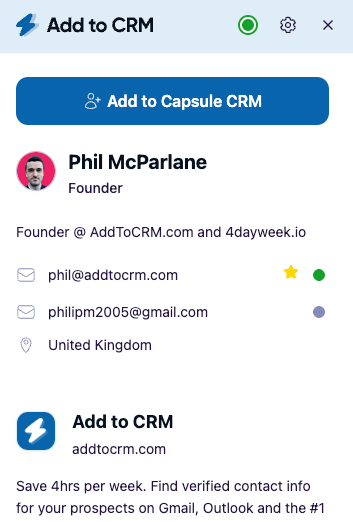
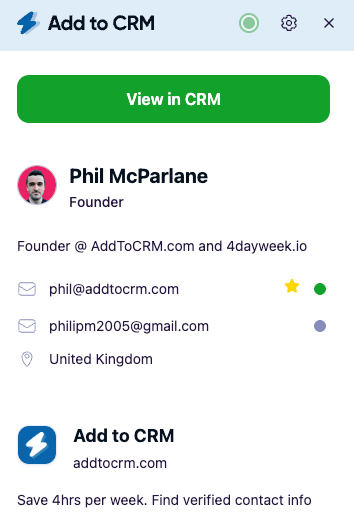
Step 3 — add to your CRM. This is the step most finders skip, and it's where prospects usually die in a spreadsheet. With Add to CRM, one more click creates the contact in any of 29+ CRMs — HubSpot, Pipedrive, Zoho, Capsule, Close, Monday, Attio, Copper, Nutshell, Salesflare, Notion, Airtable, Google Sheets, and more — with every field mapped to the right place and duplicates detected before you create a mess.
If you want the full menu of approaches — including format inference from a company domain and enriching an exported connections list — our step-by-step guide to getting email addresses from a business-network profile covers all four methods.
The 7 major email finders compared (July 2026)
The table below covers the seven tools most people shortlist. All prices are per user per month, as of July 2026 — check each vendor's site, and each cell states its billing basis (a labelled "annual" price is the per-month rate when billed yearly). Currencies are shown as each vendor displayed them.
| Tool | What it is | Entry paid plan | Credits on that plan | Phone reveal cost | Free plan / trial |
|---|---|---|---|---|---|
| Add to CRM | Capture workflow: enrich the profile or email you're viewing, add to 29+ CRMs | ~$29 / £23 / €25 monthly | 250/mo per seat, one pool (Pro: 1,000/mo — see pricing) | Same pool — no multiplier | 7-day free trial; no free plan |
| Apollo | All-in-one sales platform with a huge database, sequences, and dialer | Basic: $65 monthly, or $49/mo billed annually (USD) | 2,500/mo (monthly billing) or 30,000/yr granted upfront (annual) | 8 credits | Free plan available |
| Hunter | Domain-search-first email platform with campaigns and an extension | Starter: £41 monthly, or £28/mo billed yearly (GBP) | 2,000/mo | No phone data (email-focused) | Free plan: 50 credits/mo |
| RocketReach | Large contact database with browser extension | Essentials: £42 monthly (100 lookups/mo), or £20/mo billed annually (£245/yr, email-only, unlimited lookups, 1,200 exports/yr) (GBP) | Lookup-based — capped monthly on monthly billing, export-capped on annual | Phones need the Pro tier (£52/mo billed annually) | Free: 5 lookups |
| Kaspr | Extension-first finder, strongest on EU mobile numbers | Starter: $65 monthly, or $49/mo billed annually (USD) | Unlimited B2B email + 100 phone credits/mo (monthly) or 1,200/yr (annual) | From the separate phone-credit bucket | Free plan: 15 email + 5 phone credits/mo |
| Lusha | Contact database + extension, strong US/UK/Canada phone coverage | Starter: $49.90 monthly, or $32.45/mo billed annually — a limited-time 35% summer-sale price (USD) | 400/mo (monthly billing) or 4,800/yr upfront (annual) | 5 credits (email = 1) | Free plan: 40 credits/mo |
| Surfe | Polished CRM-overlay workflow for HubSpot, Salesforce, and Pipedrive | Essential: €39 monthly, or €29/mo billed yearly (EUR) | 150 email + 50 mobile credits/mo (yearly plans show annual totals, but credits refill monthly) | From the separate mobile-credit bucket | Free plan (20 email + 5 mobile/mo); 14-day trial on paid |
A few honest notes to read alongside the table:
- Apollo is the most platform of the seven — a 200M+-scale database plus sequences, AI research, and a dialer. If you need list-building and outbound automation in one place, it's a genuinely strong choice, and its free tier is real. The trade-off is complexity and a credit ladder where a phone number costs 8 credits. Full breakdown in our Apollo email finder review.
- Hunter is the specialist for company-wide discovery: give it a domain and it shows the addresses and the pattern, with transparent sourcing and cheap verification (0.5 credit). It's less profile-centric than the rest. See our Hunter email finder review.
- RocketReach has one of the largest databases in the category, and its annual email-only tier is notably cheap for unlimited lookups. Watch the structural quirk: annual plans give unlimited lookups with capped exports, monthly plans cap lookups. Details in our RocketReach email finder review.
- Kaspr (owned by Cognism) has best-in-class EU mobile data — for European calling teams, that alone can justify the seat — and unlimited B2B email credits on paid plans is genuinely generous. The cost model runs on separate credit buckets, with phone credits pooled annually on annual billing. Numbers in our Kaspr pricing breakdown.
- Lusha pairs a mature, recognizable product with strong US/UK/Canada direct-dial coverage. A full contact costs 6 credits (1 email + 5 phone), so budget accordingly. Current annual prices are a limited-time sale. See our Lusha pricing guide.
- Surfe is the closest tool to Add to CRM in philosophy — a workflow overlay, not a database — and its integration depth on HubSpot, Salesforce, and Pipedrive (field mapping, deals, message logging) is genuinely polished. It covers a handful of CRMs deeply and one surface; we cover 29+ CRMs across business networks, Gmail, and Outlook. Full assessment in our Surfe review.
Other finders exist — Skrapp, Snov.io, GetProspect, and a long tail of lookalikes — but the seven above are where most buyers land. If you specifically want the extension-by-extension view of what each tool does on the page, our roundup of the best email finder Chrome extensions goes deeper on that angle.

Turn LinkedIn® profiles into CRM contacts
Add to CRM finds verified emails, phone numbers, and job titles on LinkedIn® — then adds them to your CRM in one click.
Start Free Trial


 Trusted by 2,500+ users4.7
Accuracy: claimed vs delivered
Every vendor claims high accuracy. Treat the claims as marketing until you understand three things:
"Found" is not "verified." A tool can report a 95% find rate while handing you addresses it never checked against a mail server. What matters for your sender reputation is verification: does the mailbox actually accept mail? Add to CRM verifies at the moment of discovery and holds 95%+ email verification accuracy on the addresses it returns; when you evaluate any tool, ask whether its headline number describes finding or verifying.
Real-world deliverability lags claimed accuracy — for everyone. Apollo, for example, claims very high accuracy, while reviewers report real-world deliverability that's meaningfully lower. That gap isn't unique to Apollo; it's the nature of B2B data. People change jobs constantly, so a fraction of any database is stale on the day you query it. The defence is real-time verification plus re-verifying anything that's been sitting in a list for months.
Catch-all domains flatter everyone's numbers. Some company domains accept mail to any address, so an unverifiable guess still "validates." Good tools flag catch-alls instead of counting them as wins; deliverability specialists generally advise keeping hard bounces under roughly 2%, and unflagged catch-alls are the fastest way to blow through that.
The practical test beats any spec sheet: run 20 real prospects from your market through a trial and count how many verified emails come back. Coverage is uneven across regions and industries, and the tool that's best for US enterprise tech may not be best for EU mid-market manufacturing.
Is it allowed?
Short version: using a reputable email finder for legitimate B2B outreach is generally fine; bulk-scraping a platform is not. The distinction that matters is where the data comes from. Platform terms of service prohibit automated bulk collection of member data — that's the line "scraper" tools cross. Compliant enrichment tools instead look up the person you're viewing in licensed third-party databases, which is a different activity with a different risk profile. On the legal side, GDPR and PECR permit B2B outreach on a legitimate-interest basis when it's done properly — relevant targeting, an easy opt-out, and data you can account for. We've written a full, plain-English explainer on what's allowed when getting emails from a business network; none of this is legal advice, but the rules are less scary than they sound.
29+ CRMs supported. Try free for 7 days
Add to CRM finds verified emails, phone numbers, and job titles on LinkedIn® — then adds them to your CRM in one click.
Start Free TrialTrusted by 2,500+ users4.7Database or workflow: how to choose
If you take one thing from this guide, make it this framing — most "which email finder?" confusion dissolves once you name the job:
- Choose a database (Apollo, RocketReach, Lusha, Kaspr, Hunter) when you need to discover contacts at volume: building lists by title and territory, running sequences, feeding an SDR team. You'll pay for the platform, and you should — the database is the product.
- Choose a workflow tool (Add to CRM, Surfe) when you already find prospects yourself — on business networks, in your inbox, on the web — and the bottleneck is capture: getting each verified contact into your CRM before it evaporates. You want fewer tabs, one credit pool, and field mapping that just works.
- Use both when it's honest to. Plenty of teams run a database for top-of-funnel list-building and a capture workflow for the person-by-person prospecting the database never sees. Since Add to CRM taps sources like Apollo, Lusha, and RocketReach behind the scenes, the pairing is complementary, not redundant — they're the databases; we're the last mile into your CRM.
Frequently asked questions
What is the best email finder for business networks?
Honestly: it depends on the job. If you need a searchable database and outbound sequences, Apollo or RocketReach fit best. If you need EU mobile numbers, Kaspr; for US/UK/Canada phones, Lusha; for domain-wide discovery, Hunter. If your bottleneck is capturing the people you're already viewing into your CRM, a workflow tool like Add to CRM or Surfe fits better — Add to CRM if you want 29+ CRMs and Gmail/Outlook coverage, Surfe if you live deep inside HubSpot, Salesforce, or Pipedrive. There is no single best tool, whatever the ads say.
Can I find an email from a profile for free?
In small volumes, yes. Apollo, Hunter, Lusha, Kaspr, and Surfe all offer free plans with modest monthly allowances (as of July 2026 — check each site), and RocketReach gives 5 free lookups. Add to CRM has no free plan, but the 7-day free trial includes enrichment and CRM adds, so you can test it on real prospects. For ongoing prospecting, free tiers run out fast — that's by design.
How accurate are email finders really?
Headline claims cluster around 90–98%, and real-world results are usually lower because B2B data decays as people change roles. The number that matters is verification accuracy — whether the address was checked against the mail server before you got it. Add to CRM's verified emails run at 95%+ verification accuracy. Whatever tool you use, test it on a sample from your own market before committing.
Do email finders work in Gmail and Outlook too?
Some do. Most database extensions focus on business-network profiles and their own web apps. Add to CRM works across business networks, Gmail, and Outlook, so you can enrich a sender mid-thread and add them to your CRM without leaving the message — useful, since some of your warmest prospects are already in your inbox.
Why do phone numbers cost more than emails?
Mobile numbers are scarcer, decay faster, and are costlier to source, so most vendors meter them separately: 8 credits at Apollo, 5 at Lusha, and dedicated phone-credit buckets at Kaspr and Surfe (as of July 2026). Add to CRM draws phone reveals from the same single credit pool as everything else — no separate bucket, no multiplier.
Is using an email finder legal?
Using licensed B2B data to enrich a contact for legitimate business outreach is generally lawful, including under GDPR on a legitimate-interest basis — bulk-scraping platforms is what breaches terms of service. Our compliance guide walks through the details; it's not legal advice, but it covers what the rules actually say.
Want the found email to become a CRM contact, not a sticky note? Add to CRM reveals verified emails on business-network profiles, Gmail, and Outlook, and adds each contact to any of 29+ CRMs in one click — fields mapped, duplicates caught. Try it free for 7 days, or see plans and pricing.
Start saving time and closing more deals.
Find verified contact info for your prospects on LinkedIn®, Gmail and Outlook — and add them to your CRM with 1-click.

 Loading...Trusted by 2,500+ founders, SDRs & more