Which CRMs Integrate With Business Networks Natively? Checked, With Sources (October 2026)
We read each CRM's own documentation for native business-network integrations, lead-form connectors and capture extensions. Every claim is dated and linked.
Of the 26 CRMs we checked on 11 October 2026, only three appear on LinkedIn®'s own pages as a Sales Navigator integration: HubSpot, Freshworks CRM and Zoho CRM, and LinkedIn says that integration is only available to Sales Navigator Advanced Plus users. Another 11 CRMs have something their own maker built, usually a Lead Gen Forms connector or a capture extension, and the other 12 have third-party apps only, hiring tools only, or nothing in their own documentation.
Every claim below was checked against the CRM's own documentation or LinkedIn's help pages on 11 October 2026, and carries a link and a date. Software changes, so confirm anything you are about to pay for.
What counts as a native integration
We counted an integration as native when the CRM's own maker built it, or when LinkedIn names the CRM on its own pages. A connector built or run by another company does not count, however it is worded. Zapier, LeadsBridge and marketplace apps made by someone else are all third-party in this guide.
Vendors use the word loosely. Close's marketplace describes a third-party app as "the native LeadCRM + Close integration". folk's help article says "Folk does not have a native integration with LinkedIn for automatic syncing", while folk's marketing article says "folk stands out for its native LinkedIn and Sales Navigator integration". We went by who built it.
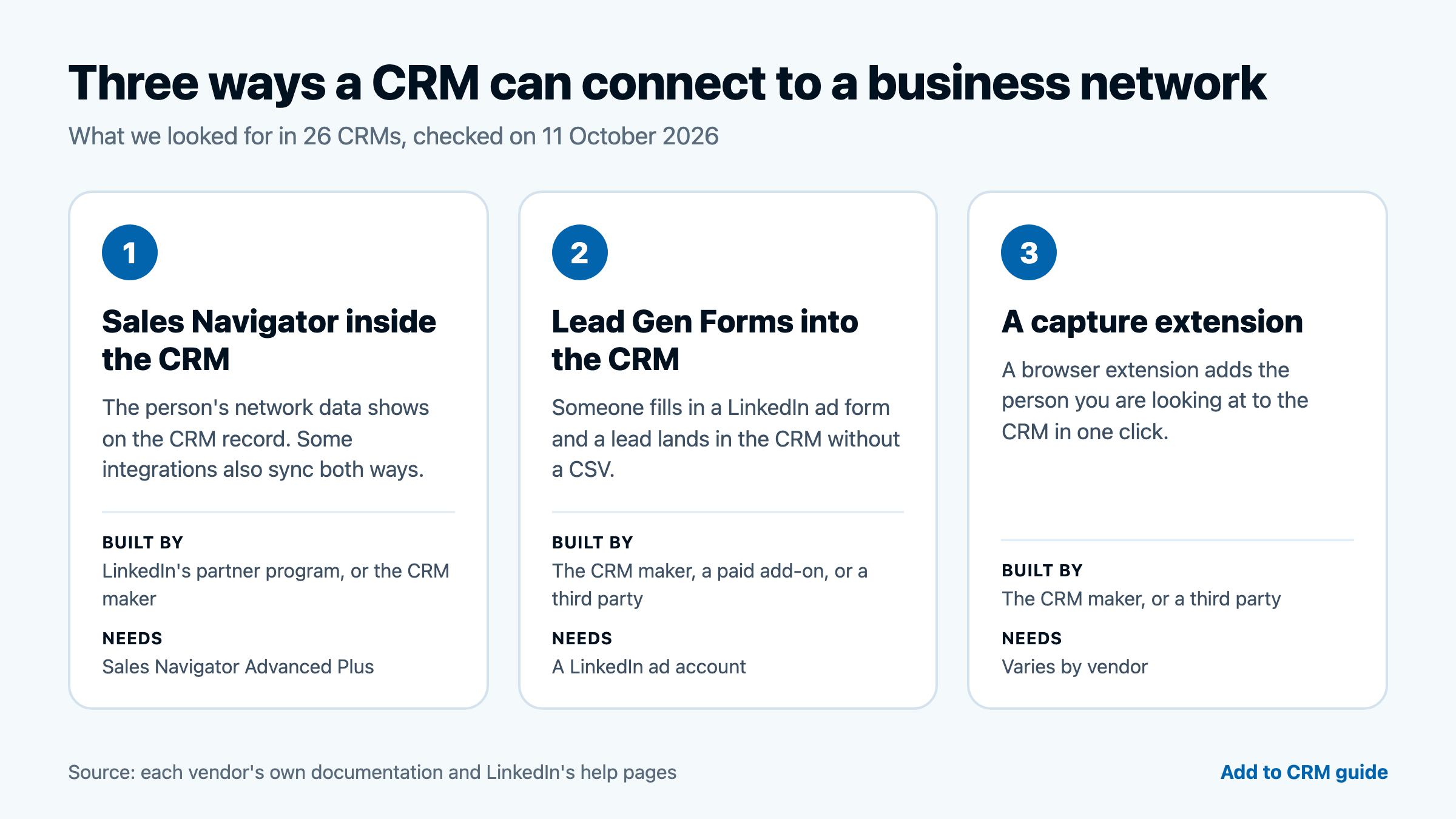
We looked for three kinds of integration, separately, because they do different jobs:
- Sales Navigator inside the CRM. Sales Navigator data appears on the CRM record, and in some integrations data also syncs back. LinkedIn runs this through its Sales Navigator Application Platform (SNAP) partner program.
- Lead Gen Forms into the CRM. People who fill in a LinkedIn ad form become leads in the CRM. These are people who responded to your ad, not prospects you went looking for.
- A capture extension. A browser extension that adds the person you are looking at to the CRM.
A plain field that stores a LinkedIn profile URL is not an integration, and we did not count it. This guide covers 26 CRMs and leaves out spreadsheets and databases (Airtable, Excel, Google Sheets, Notion). LinkedIn's own help article also names Microsoft Dynamics, Oracle Sales and Salesforce among the CRMs with a Sales Navigator integration. We have not covered them here.
The result: 26 CRMs, five different answers
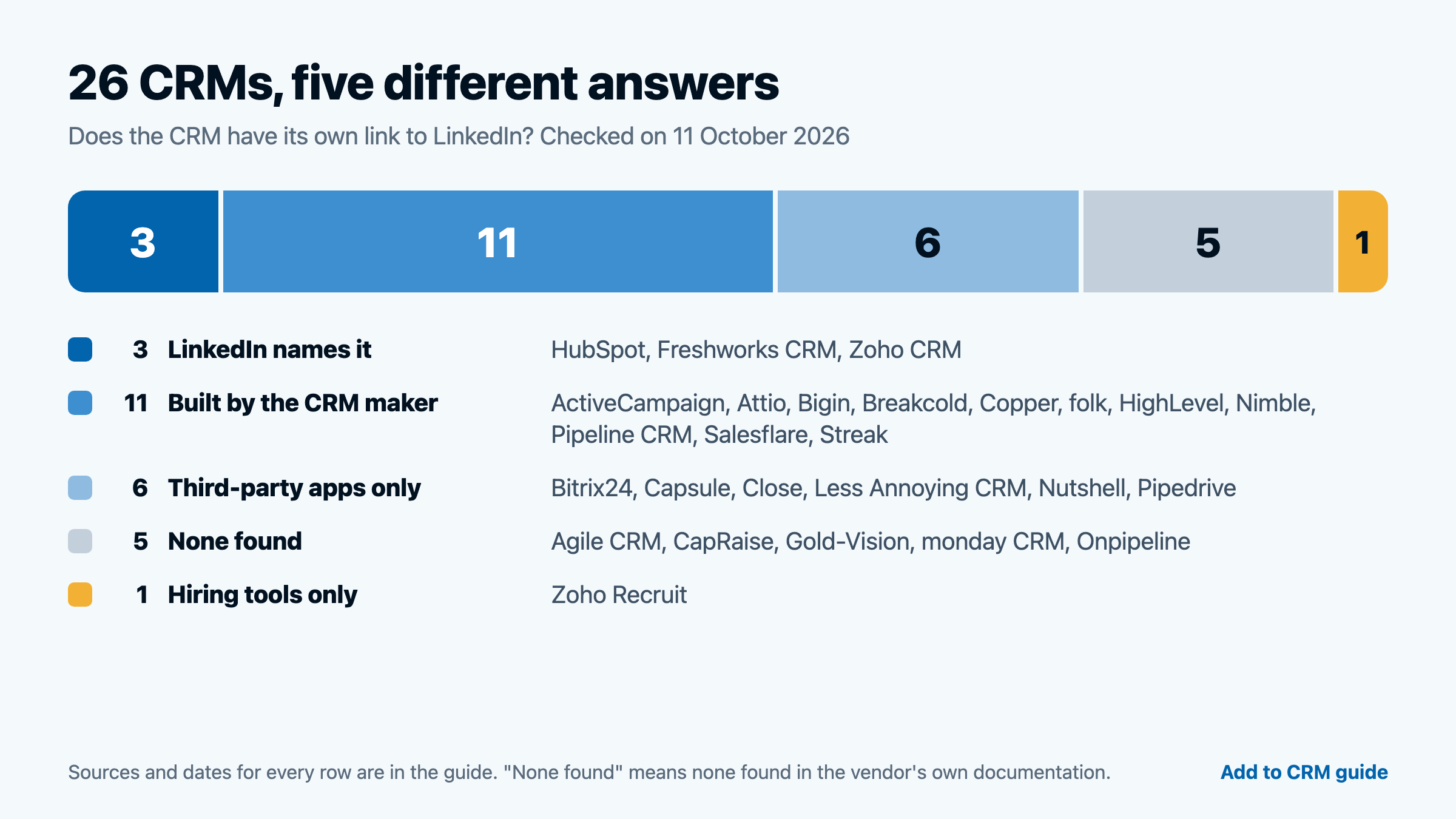
| CRM | Group | Sales Navigator | Lead Gen Forms | Also documented by the vendor |
|---|---|---|---|---|
| HubSpot | LinkedIn names it | LinkedIn names it (view app and CRM Sync) | Built in (ads tool) | LinkedIn Ads connection |
| Freshworks CRM | LinkedIn names it | LinkedIn names it (embedded app) | Built in (Admin Settings) | Manual LinkedIn tasks, CSV import |
| Zoho CRM | LinkedIn names it | Zoho's own extension | LeadChain (a Zoho product with its own pricing) | Conversions sent back to LinkedIn Ads |
| ActiveCampaign | Built by the CRM maker | None found | Built in (Plus and above) | Matched Audiences retargeting |
| Attio | Built by the CRM maker | Own extension (2024 changelog) | Third-party only | Own extension on profiles |
| Bigin | Built by the CRM maker | None found | LeadChain (a Zoho product) | Conversions sent back to LinkedIn Ads |
| Breakcold | Built by the CRM maker | Own extension | Could not confirm | LinkedIn inbox sync |
| Copper | Built by the CRM maker | Third-party only | Third-party only | Own extension on profiles |
| folk | Built by the CRM maker | Own extension (folkX) | None found | Logs LinkedIn message threads |
| HighLevel | Built by the CRM maker | None found | Built in | Ad Manager, posting |
| Nimble | Built by the CRM maker | None found | Could not confirm | Prospector extension |
| Pipeline CRM | Built by the CRM maker | None found | Paid managed add-on (Pipeline Connect) | Third-party extension only |
| Salesflare | Built by the CRM maker | Own extension | Third-party only (Zapier) | Sidebar in LinkedIn messages |
| Streak | Built by the CRM maker | None found | Third-party only | "Send to Streak" button on profiles |
| Bitrix24 | Third-party apps only | None found | None found | Third-party app |
| Capsule | Third-party apps only | Third-party only | Third-party only | Posting to LinkedIn via Transpond |
| Close | Third-party apps only | Third-party only | Third-party only | Third-party extensions |
| Less Annoying CRM | Third-party apps only | None found | Third-party only | Third-party extension |
| Nutshell | Third-party apps only | None found | Third-party only (Zapier) | Third-party extension |
| Pipedrive | Third-party apps only | Third-party only | Third-party only | Third-party apps |
| Agile CRM | None found | None found | None found | Could not confirm (partial check) |
| CapRaise | None found | None found | None found | Third-party only |
| Gold-Vision | None found | None found | None found | None found |
| monday CRM | None found | None found | None found | Posting to LinkedIn |
| Onpipeline | None found | None found | None found | None found |
| Zoho Recruit | Hiring tools only | None found | None found | LinkedIn Recruiter System Connect |
None found means we found nothing in the vendor's own documentation and on LinkedIn's pages. It does not mean the integration cannot exist. Could not confirm means a page that would settle it could not be opened.
Group 1: LinkedIn names the CRM (3)
These three CRMs appear on LinkedIn's own pages as having a Sales Navigator integration. All three need a Sales Navigator Advanced Plus licence.
HubSpot
LinkedIn's Sales Navigator help article lists HubSpot, Microsoft Dynamics, Oracle Sales and Salesforce as CRMs that support CRM Sync, Embedded Profiles and Embedded Experiences. HubSpot documents two separate apps.
- The Sales Navigator app shows LinkedIn insights and Sales Navigator activity on HubSpot records. HubSpot's article (last updated 31 August 2026) says it needs a Sales Hub Professional or Enterprise seat and a Sales Navigator Advanced Plus account, and that "It is not possible to import contacts from LinkedIn using the integration."
- CRM Sync is a second app. HubSpot's article (last updated 21 June 2026) says it can create and update HubSpot contacts from Sales Navigator and log Sales Navigator activities to HubSpot, with the same seat and Advanced Plus requirements.
- Lead Gen Forms need no extra app. HubSpot's ads tool pulls submissions in as contacts, and the article (last updated 7 October 2026) is marked as available on all products and plans. It also says to "ensure the Email field is included and marked required so HubSpot can create contacts."
HubSpot can also connect a LinkedIn Ads account to manage and analyse LinkedIn ads in its ads tool (last updated 12 June 2026).
Freshworks CRM
LinkedIn's help article lists Freshworks under the CRMs that support only Embedded Profiles or Embedded Experiences, not CRM Sync, and LinkedIn's partner page lists Freshsales.
Freshworks' own article (modified 20 November 2024) says users need a Sales Navigator Advanced Plus licence and that only Freshsales users with Admin rights can install the app. The app lets you send InMails and connection requests from Freshsales, and the article is tagged for all Freshsales and Freshsales Suite plans.
For Lead Gen Forms, Freshworks has a connector in Admin Settings (modified 17 September 2024): "Integrating with LinkedIn forms enables you to bring high-quality leads from LinkedIn into Freshsales." It needs a LinkedIn Ads account. That article is more than a year old and we did not test it.
Freshworks also documents LinkedIn tasks in sales sequences. It is manual: the task opens the contact's LinkedIn profile and you mark it complete yourself. We do not count it as an integration.
Zoho CRM
Zoho built its own LinkedIn Sales Navigator extension for Zoho CRM. Zoho's listing says it "allows you to view your prospect's LinkedIn information right inside Zoho CRM" and that "The extension works only in the Advanced Plus version of LinkedIn Sales Navigator." Zoho's current pages do not say which Zoho CRM edition it needs.
LinkedIn's partner page lists Zoho CRM, but the Sales Navigator help table does not, so LinkedIn's own pages are not fully consistent. We counted Zoho CRM here because LinkedIn's partner page and Zoho's own listing agree.
Lead Gen Forms go through LeadChain, a separate Zoho product for Zoho CRM. Zoho says "Leveraging our integration with LinkedIn, LeadChain enables synchronization with LinkedIn Lead Gen Forms, Matched Audience, and Offline Conversion." Zoho's LeadChain page has its own Pricing link and a Free Edition, so check what it costs on top of your Zoho CRM plan.
What the Advanced Plus requirement means
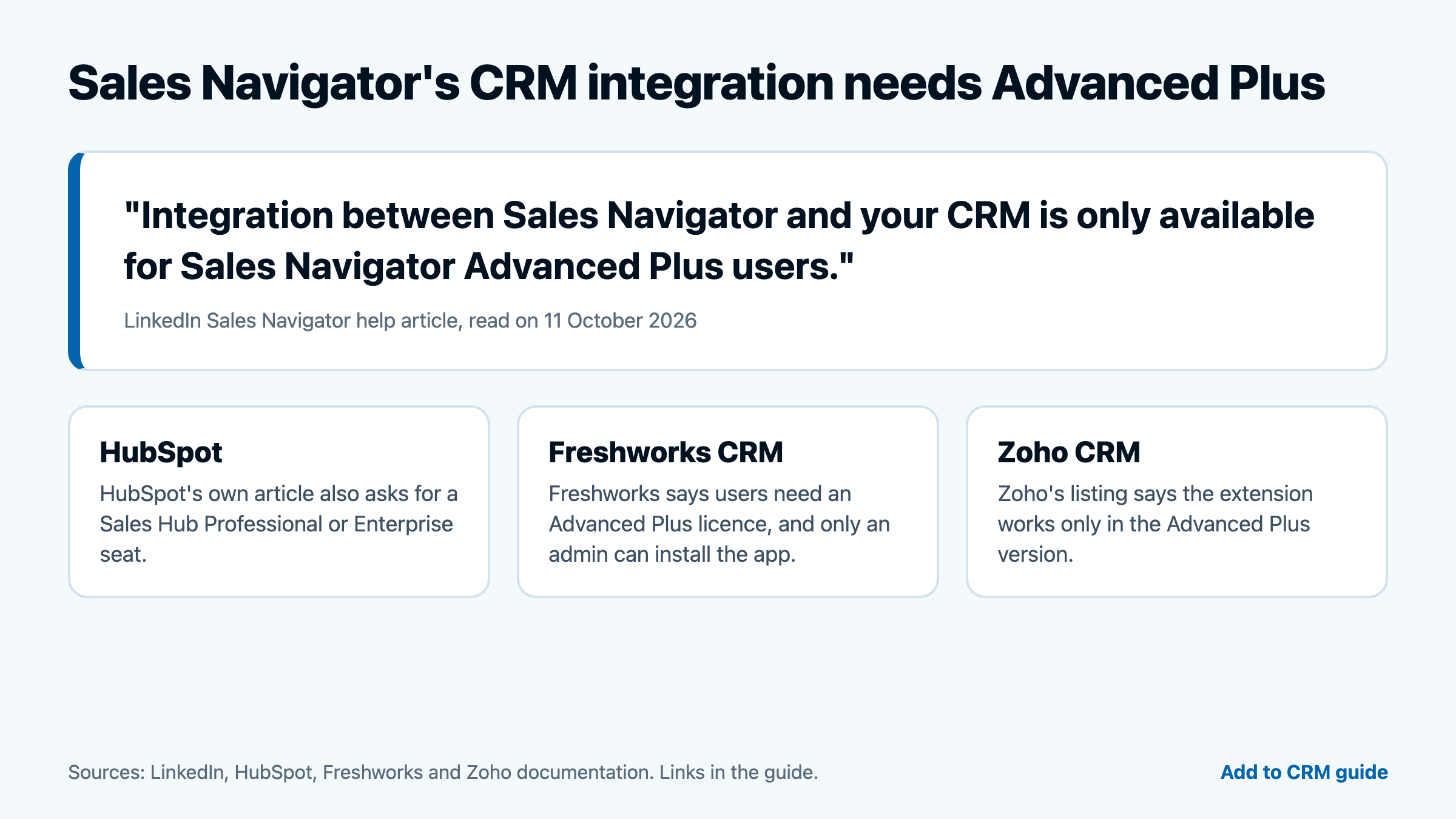
LinkedIn's help article says: "Integration between Sales Navigator and your CRM is only available for Sales Navigator Advanced Plus users." HubSpot, Freshworks and Zoho each repeat that requirement on their own pages. HubSpot adds a second one, a Sales Hub Professional or Enterprise seat. So a native Sales Navigator integration means paying for two products, not one.
That requirement is about the CRM integration. It is not a requirement for a browser extension that works on Sales Navigator pages, which is what several CRMs in group 2 offer.
Group 2: Built by the CRM maker, not named by LinkedIn (11)
These CRMs have something their own maker built: a Lead Gen Forms connector, a capture extension, or both. LinkedIn's Sales Navigator help article and partner page do not name any of them.
ActiveCampaign
ActiveCampaign is a marketing-automation platform with a built-in CRM. Its LinkedIn Ads app syncs Lead Gen Forms submissions into ActiveCampaign and adds Matched Audiences retargeting from automations. The page says "LinkedIn Ads is available on all plans Plus and above."
We found no Sales Navigator integration in ActiveCampaign's app directory, its help centre, or on LinkedIn's lists. ActiveCampaign's help-centre article about the app blocks automated readers, so this row cites the apps page only.
Attio
Attio's own Chrome extension has a Sales Navigator integration. Attio's changelog (25 September 2024) says: "With our new Sales Navigator and X integrations, you can now leverage the power of Attio across even more platforms where you engage with customers." A 2023 entry says the extension turns LinkedIn profiles into data-enriched records with a single click.
This is a browser extension, not LinkedIn's CRM Sync. Both entries are dated, and Attio's current help page for the extension does not mention LinkedIn, so confirm the feature is still offered before you rely on it. Attio documents no Lead Gen Forms connector.
Bigin
Bigin has no Lead Gen Forms connector of its own. It uses LeadChain, the Zoho-built product described under Zoho CRM. Bigin's FAQ (last updated 21 August 2026, as shown on the page) says "LeadChain covers Facebook, Instagram, LinkedIn, TikTok, and WhatsApp Lead Ads."
Bigin's FAQ says "LeadChain requires a paid edition", while Zoho's LeadChain page lists its own pricing and a Free Edition. The cost of the Lead Gen Forms sync is not clear from either page, so check before you buy. The Sales Navigator extension on Zoho Marketplace is built for Zoho CRM, and we found nothing for Bigin.
Breakcold
Breakcold's help centre says its own extension works on Sales Navigator: "You can use it on LinkedIn profiles, LinkedIn Sales Navigator, and LinkedIn search results." It is Breakcold's extension, not LinkedIn's CRM Sync, and Breakcold says on its site that it is not affiliated with LinkedIn.
Breakcold can also sync LinkedIn messages into its inbox, and has a Resync button for it. Breakcold's integrations directory lists a "LinkedIn Ads" app, but the entry has no setup guide and never mentions Lead Gen Forms, so we could not confirm a Lead Gen Forms connector.
Copper
Copper built its own Chrome extension for LinkedIn profiles. Copper's help article (13 January 2026) describes a Quick Add button that adds a LinkedIn profile to Copper as a Lead or Person, an Email Finder, enrichment of existing records, and duplicate matching on LinkedIn pages.
For Sales Navigator, Copper's own FAQ says you can capture contacts from LinkedIn "and soon, LinkedIn Sales Navigator". The Sales Navigator listings in Copper's directory, LeadCRM and Surfe, are third-party apps. The Lead Gen Forms listing, LeadSync, is third-party too.
folk
folkX is folk's own Chrome extension. folk's help article (2 September 2026) says: "folkX extension is supported on LinkedIn, Sales Navigator, Twitter (X), Instagram, TikTok, Facebook (coming soon), WhatsApp (coming soon)." It works one profile or search page at a time, and folkX can also log a LinkedIn message thread into a folk contact.
folk's two pages disagree about the word "native", as described above. Both describe the same mechanism, a Chrome extension you click, with no automatic background sync. We found no Lead Gen Forms connector.
HighLevel
HighLevel's workflow trigger (modified 10 November 2025) "enrolls a Contact into a workflow immediately after they submit a LinkedIn Lead Gen form connected to your HighLevel account." The article states no plan.
HighLevel's Ad Manager (22 October 2025) creates and manages LinkedIn ad campaigns from inside HighLevel. We found no Sales Navigator integration on the pages we could read. HighLevel's marketplace is rendered by JavaScript, so a third-party app there cannot be ruled out.
Nimble
Nimble's own Prospector browser extension pulls up enriched contact profiles, communication history and AI-generated outreach directly on LinkedIn, and Nimble's help article (10 March 2026) says it "adds AI message generation on LinkedIn". Nimble is also clear about the limits. Its help centre says "we currently do not offer full integration with most social sites such as Facebook and LinkedIn" (help article, 24 July 2025).
We could not confirm a Lead Gen Forms connector, because Nimble's marketplace page blocked automated readers. We found no Sales Navigator integration.
Pipeline CRM
Pipeline's Lead Gen Forms connector is a paid, managed add-on called Pipeline Connect: "When a prospect submits one of your LinkedIn Lead Gen Forms, the lead lands in Pipeline CRM the moment it comes in." Pipeline sets it up for you, and you still need a Pipeline CRM subscription. Pipeline describes Pipeline Connect as a managed CRM integration service.
We found no Sales Navigator integration. Pipeline's marketplace lists a Chrome extension for LinkedIn profiles, which Pipeline's own page says is built by Add to CRM. See the note on conflicts of interest below.
Salesflare
Salesflare built its own Chrome extension, a sidebar that works on LinkedIn and Sales Navigator pages. Salesflare's integrations directory says "Download the Google Chrome plugin and work in Salesflare from LinkedIn and LinkedIn Sales Navigator." A later blog post (updated 29 August 2026) adds the same sidebar to LinkedIn messages.
Salesflare is careful about what this is. Its own blog says: "A browser extension that adds contacts from a profile is different from an official Sales Navigator integration that syncs CRM records and sales activity." Lead Gen Forms are third-party only: Salesflare's directory lists a Zapier connector.
Streak
Streak's LinkedIn feature adds a "Send to Streak" button on LinkedIn profile and company pages that creates contacts, organizations or boxes and flags duplicates. Streak's pricing page lists it as included in Pro, Pro+ and Enterprise.
It does not cover Sales Navigator. Streak's support article (26 August 2025) says: "Adding contacts from the LinkedIn Sales Navigator interface is currently not available." For Lead Gen Forms, a third-party company, LeadsBridge, documents a connection.
Group 3: Third-party apps only (6)
These CRMs have no Sales Navigator, Lead Gen Forms or capture integration built by their own maker. Each has third-party apps, some of them listed in the CRM's own marketplace.
Bitrix24
Bitrix24's marketplace lists Linked24.io, built by the partner Bit24, S.L., which shows LinkedIn profile and company data inside CRM records. We found no Sales Navigator or Lead Gen Forms integration from Bitrix24 itself. One Bitrix24 use-case page says its social CRM integrates LinkedIn among other networks, with no setup or feature description, and the Contact Center channel list has no LinkedIn channel, so we did not count it.
Capsule
Capsule has no built-in LinkedIn integration. Capsule's own blog (22 January 2026) says: "While it doesn't come with a built-in LinkedIn API". Its marketplace lists two LinkedIn apps: Magical, which works with Sales Navigator searches, and "LinkedIn (via Add to CRM)".
An August 2025 Capsule blog post listed "CRM integration (Capsule CRM, HubSpot)" among Sales Navigator Advanced features, but LinkedIn's help table does not name Capsule, and Capsule's later post says it has no built-in LinkedIn API. We went with the later post. Lead Gen Forms need LeadsBridge, a third party. Capsule's own LinkedIn feature is posting: Social Campaigns in Transpond publishes to LinkedIn, X and Instagram.
Close
Close's directory lists LeadCRM for Sales Navigator, LinkMatch for LinkedIn profiles and Driftrock for lead sources, each built by another company. Close's marketplace page for LeadCRM calls it "the native LeadCRM + Close integration", but the page says it is built by LeadCRM, so we count it as third-party. We found no first-party LinkedIn integration from Close.
Less Annoying CRM
Less Annoying CRM lists a third-party Chrome extension for LinkedIn profiles, and LeadsBridge documents a Lead Gen Forms connection. We found no Sales Navigator feature on its site, and no first-party LinkedIn integration. The extension it lists is Add to CRM, covered in the note below.
Nutshell
Nutshell lists a Lead Gen Forms item on its marketplace, described as a way to create "a new Nutshell lead from new leads received in LinkedIn". Nutshell's marketplace category page labels these items "Powered by Zapier. Managed and paid for by Nutshell", so we count it as third-party. If you count a connector a vendor sets up and pays for as native, Nutshell moves to group 2. Nutshell's extension listing for LinkedIn profiles is Add to CRM, described by Nutshell as "a third-party Chrome extension with its own pricing model (separate from Nutshell)".
Pipedrive
Pipedrive has no LinkedIn connector built by its own team. Its marketplace lists Surfe and other apps for Sales Navigator and profile capture, and a Lead Gen Forms Sync app "by Outfunnel".
This one is worth re-checking. On 5 August 2026 Pipedrive announced it had acquired Outfunnel and said it "plans to rebuild the platform's core capabilities natively over the coming months." The announcement does not mention LinkedIn. On 11 October 2026 the listing still says the sync is provided by Outfunnel, with its own sign-in and trial, so we count it as third-party today.

Find verified contact data on LinkedIn®
Add to CRM finds verified emails, phone numbers, and job titles on LinkedIn® — then adds them to your CRM in one click.
Start Free Trial


 Trusted by 2,500+ users4.7
Group 4: None found (5)
For these five, we found no Sales Navigator, Lead Gen Forms or capture integration in the vendor's own documentation.
Agile CRM
agilecrm.com blocks automated readers and Agile's help desk is behind a login, so this is a partial check. The Agile pages that mention LinkedIn that we could open are undated or old, and we found no Sales Navigator or Lead Gen Forms integration on them. Agile may still offer a LinkedIn feature that we could not read.
CapRaise
CapRaise is a Zoho vertical solution made by Mav Consulting Group. We found no Sales Navigator or Lead Gen Forms integration in its listing, vendor page or user guide. Whether Zoho CRM's own Sales Navigator extension or LeadChain work inside a CapRaise org is not documented, so confirm with Mav Consulting Group. The vendor page also promotes a "LinkCap" extension whose button goes to Add to CRM's own CapRaise page, so we did not count it as evidence of anything native.
Gold-Vision
We found no LinkedIn Sales Navigator or Lead Gen Forms connector on Gold-Vision's integrations pages, in its help centre or in its release-note index. A custom connection could still be built through its integration tools, but none is documented.
monday CRM
monday's help centre documents no LinkedIn Lead Gen Forms or Sales Navigator connector, and LinkedIn's help table does not name monday. monday's help article covers one LinkedIn feature: posting from board items.
monday's marketing blog goes further. It says "Facebook and LinkedIn lead ads integrate directly with CRM systems like monday CRM" (blog). We scored that as unverified marketing, because the help centre documents no such connector.
Onpipeline
Onpipeline's integrations page lists Facebook Lead Ads and Google Ads connectors, and no LinkedIn Ads or Lead Gen Forms connector. Its only LinkedIn mention is an example of a custom Action Menu link that launches a LinkedIn search, which is a URL shortcut and not an integration. One Onpipeline blog post says to "integrate your LinkedIn Ads account with Onpipeline CRM", but it reads as general advice with no setup path, so we did not count it.
Group 5: Hiring tools only (1)
Zoho Recruit
Zoho Recruit is an applicant tracking system, so its LinkedIn integrations are on the hiring side. Zoho's LinkedIn Recruiter System Connect page describes a sync of candidates, jobs and applications between LinkedIn Recruiter and Zoho Recruit, and says "Zoho Recruit and LinkedIn Recruiter System Connect. Real-time candidate data, without switching platforms." It needs a LinkedIn Recruiter licence. We found no Sales Navigator or Lead Gen Forms integration for Zoho Recruit. Zoho CRM's Sales Navigator extension and LeadChain are separate products for Zoho CRM.
How we checked
For each CRM we read the vendor's own documentation (its help centre, marketplace, changelog and product pages) and LinkedIn's help and partner pages. We did not use review sites, forums or search snippets as evidence. A connector run by another company was recorded as third-party, however the vendor described it.
We then re-fetched every page cited in this guide and confirmed that each quotation, plan statement and date appears on it. Where a page could only be read in a browser, we read it there. Three limits apply:
- We did not log in to any product, so a feature that is documented only inside the app would be missed.
- Some vendors' sites block automated readers or load their marketplaces with JavaScript. Those are marked in the entries above.
- We did not search LinkedIn's Marketing Partner Directory, which is a JavaScript application, so a Lead Gen Forms partner listed only there would be missed.
A note on conflicts of interest
Add to CRM publishes this guide, and we sell a Chrome extension that adds contacts to every CRM in it. That is a conflict of interest. Four things we did about it:
- Our own listings are never evidence. Add to CRM is listed on the marketplaces of Attio, Capsule, Less Annoying CRM, Nutshell and Pipeline CRM. We treated each as a third-party app and never used it to say a CRM has a native integration.
- CapRaise. The vendor page for CapRaise promotes a "LinkCap" extension, and its button goes to our CapRaise page. We did not count it.
- Every claim is linked, so you can check it without taking our word.
- Where a vendor's pages disagreed, we said so (folk, Capsule, monday, Onpipeline, Bigin, Nutshell).
Add to CRM is not affiliated with, or endorsed by, LinkedIn®, Gmail, Outlook, or any CRM. All trademarks remain property of their respective owners.
Works with 29+ CRMs
Add to CRM finds verified emails, phone numbers, and job titles on LinkedIn® — then adds them to your CRM in one click.
Start Free TrialTrusted by 2,500+ users4.7Where Add to CRM fits
Add to CRM is a Chrome extension that finds verified contact details for people you view on professional networks, Gmail and Outlook, and adds them to your CRM in one click. It works with every CRM in this guide, including those in groups 3 and 4 where the CRM maker has no connector of its own.
Sales Navigator support is on the Pro plan. Standard is $29 a month ($300 a year) and Pro is $99 a month ($996 a year), with every new account starting on a 7-day free trial. Current prices are on the pricing page.
Which route fits which team
- You already pay for Sales Navigator Advanced Plus and use HubSpot, Freshworks CRM or Zoho CRM. Use the integration your CRM maker documents. Check the seat and plan requirements first: HubSpot also needs a Sales Hub Professional or Enterprise seat.
- You run LinkedIn ad campaigns. Look at the Lead Gen Forms column. Seven of the 26 CRMs have a connector their own maker provides, though Zoho CRM and Bigin use a Zoho product with its own pricing and Pipeline CRM charges for a managed add-on. For the rest it is a third-party connector with its own subscription.
- You want to capture prospects you found yourself. A Lead Gen Forms connector will not do that, because it only receives people who responded to your ad. You need a capture extension, from your CRM's maker (Attio, Breakcold, Copper, folk, Nimble, Salesflare and Streak each have one) or from a third party.
- Your CRM is in group 3 or 4. There is no connector built by the CRM maker to compare, so the choice is between third-party apps and the vendor's CSV import. Check what each app costs separately from your CRM subscription.
Frequently asked questions
Does LinkedIn Sales Navigator integrate with my CRM?
If your CRM is HubSpot, Microsoft Dynamics, Oracle Sales or Salesforce, LinkedIn's help article lists it as supporting CRM Sync, Embedded Profiles and Embedded Experiences. Freshworks and Zoho CRM also appear on LinkedIn's pages. For the CRMs covered here, see the table above. Every Sales Navigator and CRM integration needs Advanced Plus, according to LinkedIn.
Is a Lead Gen Forms connector the same as importing LinkedIn contacts?
No. A Lead Gen Forms connector sends people who filled in your LinkedIn ad form into the CRM. It does not import prospects you searched for. HubSpot's own article says "It is not possible to import contacts from LinkedIn using the integration" about its view-only Sales Navigator app.
What is the difference between a native integration and a browser extension?
A native integration is built by the CRM maker, or named by LinkedIn, and lives inside the CRM. A browser extension runs in your browser on the page you are viewing and sends data to the CRM. Salesflare's own blog draws the same line between an extension and an official Sales Navigator integration.
Why does this guide say "none found" and not "no"?
We checked vendor documentation and LinkedIn's pages. We did not log in to each product, and some vendors' help centres block automated readers or load by JavaScript. "None found" is a statement about what we could read on 11 October 2026.
Are the facts in this guide current?
Every row was checked on 11 October 2026. Vendors change plans and features, and we have flagged where a page is old: Freshworks' articles date from 2024 and Attio's Sales Navigator entry from 2024. Pipedrive's Outfunnel acquisition may change its row. Confirm on the vendor's page before you buy.
Is Add to CRM affiliated with LinkedIn?
No. Add to CRM is not affiliated with, or endorsed by, LinkedIn®, Gmail, Outlook, or any CRM.
Start saving time and closing more deals.
Find verified contact info for your prospects on LinkedIn®, Gmail and Outlook — and add them to your CRM with 1-click.

 Loading...Trusted by 2,500+ founders, SDRs & more