Sales Navigator Integrations: Getting Leads into HubSpot, Salesforce & Pipedrive
Does Sales Navigator integrate with HubSpot, Salesforce, or Pipedrive? What syncs natively vs. how to add any lead to 29+ CRMs in one click.
LinkedIn Sales Navigator does not natively push new leads into HubSpot or Pipedrive, and its only built-in CRM sync — on the Advanced Plus tier — covers Salesforce and Microsoft Dynamics for validating existing records, not one-click adding a lead. To get a Sales Navigator prospect into any CRM as a new contact, you need a separate tool.
TL;DR: Sales Navigator has no native one-click "add to CRM" for HubSpot, Pipedrive, or the 25+ other CRMs most teams use; its native CRM Sync is Advanced-Plus-only and limited to Salesforce and Microsoft Dynamics. Add to CRM Pro connects your own LinkedIn account and adds any Sales Navigator profile to HubSpot, Pipedrive, and 29+ CRMs in one click — with a verified email, phone, and 20+ data points.

Does Sales Navigator integrate with HubSpot, Salesforce, and Pipedrive?
Here is the direct answer for the three CRMs people ask about most (as of mid-2026):
- Does Sales Navigator integrate with HubSpot? Not for adding leads. There is no native HubSpot "CRM Sync" that pushes a Sales Navigator prospect into HubSpot. To move a lead from Sales Navigator into HubSpot you either copy the details across by hand or use a separate one-click tool like Add to CRM.
- Does Sales Navigator integrate with Salesforce? Partly. Sales Navigator's Advanced Plus tier includes a native "CRM Sync" for Salesforce, but it is built to validate and refresh records that already exist in Salesforce — not to one-click add a brand-new lead you just found.
- Does Sales Navigator integrate with Pipedrive? No. There is no native Sales Navigator-to-Pipedrive sync at any tier. Getting a Sales Navigator lead into Pipedrive means a manual copy-paste or a separate tool.
The pattern is consistent: "integration" in the Sales Navigator world means data validation for a couple of enterprise CRMs, not the one-click "found a prospect, now it is a contact" flow most salespeople actually want.
What CRM integrations does Sales Navigator have natively?
LinkedIn sells Sales Navigator in tiers — Core, Advanced, and Advanced Plus. The native CRM functionality lives entirely in Advanced Plus, the top enterprise tier (priced through LinkedIn's sales team on an annual contract — check LinkedIn's site for current pricing). It has two main pieces:
- CRM Sync / data validation: Sales Navigator reads the contacts and accounts already in your CRM and flags when someone has changed jobs, so your existing records stay current.
- Write-back / activity sync: certain actions and insights can be written back to the CRM.
Both are supported for Salesforce and Microsoft Dynamics 365 only. That is the whole native CRM integration story, and three things follow from it:
- It is not lead capture. CRM Sync keeps existing records fresh; it does not take a new person you just discovered in a Sales Navigator search and create them as a contact.
- It is two CRMs, not yours — unless you happen to run Salesforce or Dynamics. HubSpot, Pipedrive, Zoho, Close, monday, and every other CRM have no native hook at all.
- It is gated behind the most expensive tier. Even Salesforce and Dynamics users on Core or Advanced do not get it.
So if your day-to-day job is "I found a good prospect in Sales Navigator, get them into the CRM with their contact details" — the native feature set does not cover it, regardless of which CRM you run.
Why "Sales Navigator integration" almost always means a separate tool
Because the native options are so narrow, the phrase "Sales Navigator integration" almost always refers to a third-party tool that bridges the gap. This is where you have to be careful.
A lot of tools promise to "export Sales Navigator leads" by scraping — running bots against LinkedIn to harvest profiles in bulk. Bulk-scraping Sales Navigator violates LinkedIn's Terms of Service and puts your LinkedIn account at real risk of restriction or a ban. For a profile you have invested years in, that is a steep price to pay for a spreadsheet.
There are two compliant ways to get a Sales Navigator lead into a CRM:
- The manual way. Open the profile, copy the name, title, and company, source an email, and paste everything into your CRM by hand. Compliant, but slow — a few minutes per lead, and you still have to find and verify the contact details yourself.
- Through your own connected account. Add to CRM's Pro tier connects your LinkedIn account with a secure, one-time connection, so it can resolve the profiles you are already working with in Sales Navigator. You are not deploying a bot against LinkedIn; you are acting through the account you already log in with, on the prospects you genuinely have in front of you. That is the compliant version of "one click to CRM."
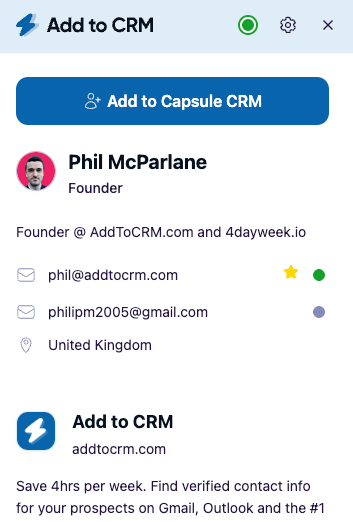
How to get a Sales Navigator lead into HubSpot or Pipedrive in one click
HubSpot and Pipedrive are both live integrations in Add to CRM today, so they make the clearest walkthrough. The flow is the same for either one:
- Install the extension. Add to CRM is a Chrome extension — install it from the Chrome Web Store listing and sign in.
- Connect your CRM. Link HubSpot or Pipedrive once. Credentials are handled server-side, so you are not pasting API keys into the browser.
- Connect your LinkedIn account (Pro). This is the step that unlocks Sales Navigator, and connecting your own account is what keeps the workflow compliant.
- Open a Sales Navigator profile or search. The Add to CRM panel appears alongside it.
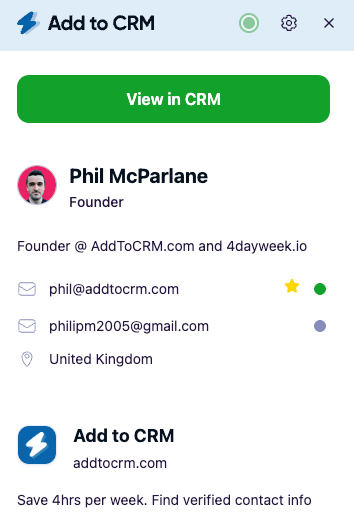
- Click "Add to CRM." The extension enriches the prospect — a verified email and phone plus 20+ data points such as job title, seniority, company, company size, industry, location, and social profiles — and creates the contact in HubSpot or Pipedrive in one click.
No copy-paste, no CSV, no bot. If you would rather work through a saved lead list than one profile at a time, the guide to exporting a Sales Navigator list walks through the same compliant, own-account approach at list scale.

About that enrichment: a Sales Navigator profile rarely shows a direct email or a mobile number. Add to CRM finds and verifies them — the email verification runs at 96% verification accuracy — so the contact lands in your CRM ready to work, not as a half-empty record you have to chase down later. That is the real difference between "a name in a spreadsheet" and "a lead you can email today."

Turn LinkedIn® profiles into CRM contacts
Add to CRM finds verified emails, phone numbers, and job titles on LinkedIn® — then adds them to your CRM in one click.
Start Free Trial


 Trusted by 2,500+ users4.7
What about Salesforce?

Salesforce deserves its own honest answer, because two separate things are going on.
1. Sales Navigator's own native sync. If you are on Advanced Plus, LinkedIn's CRM Sync works with Salesforce to validate and update records you already have. It is genuinely useful for keeping a large Salesforce database current — but, again, it is about existing records, not one-click adding a fresh lead, and it requires that top-tier subscription.
2. Add to CRM's Salesforce support. The Salesforce integration is built and tested, but as of mid-2026 it is not yet available for self-serve connection — that final step is pending on Salesforce's side. So today, the concrete one-click walkthroughs above are for HubSpot and Pipedrive, which are live. Salesforce support is on the way; if Salesforce is your CRM, the honest advice is to check the Add to CRM site for current status rather than assuming you can connect it this minute.
We would rather tell you that plainly now than have you sign up expecting a Salesforce connection that is not self-serve yet.
Does Sales Navigator integrate with your CRM? Native vs. Add to CRM
| CRM | Native Sales Navigator integration | With Add to CRM (Pro) |
|---|---|---|
| HubSpot | No native lead sync | One-click add — live |
| Pipedrive | No native sync at any tier | One-click add — live |
| Salesforce | CRM Sync on Advanced Plus (validate existing records, not lead-add) | Built; self-serve connection on the way |
| Microsoft Dynamics 365 | CRM Sync on Advanced Plus (validate existing records) | Not on the current list |
| Zoho | No native sync | One-click add — live |
| Close | No native sync | One-click add — live |
| monday | No native sync | One-click add — live |
| 20+ other CRMs | No native sync | One-click add — live |
Native columns reflect LinkedIn's documented CRM Sync as of mid-2026; tiers and pricing change, so confirm current details on LinkedIn's site.
How much does the native integration cost?
Short version: the only native CRM integration is bundled into Advanced Plus, Sales Navigator's top tier, which LinkedIn prices through its sales team (typically an annual, per-seat enterprise contract — check LinkedIn's site for current pricing). Core and Advanced, the tiers most individuals and small teams actually buy, include no CRM sync at all. Our breakdown of Sales Navigator pricing walks through the tiers in detail.
That is the economic catch. To get the limited native sync — Salesforce or Dynamics only — you have to be on the most expensive Sales Navigator plan. For everyone on HubSpot, Pipedrive, or another CRM, no amount of Sales Navigator spend adds native lead capture. A dedicated tool covers far more CRMs (29+ versus two) and is not tied to Sales Navigator's top tier at all. Add to CRM runs on a 7-day free trial, then credit-based plans (check the site for current pricing).
29+ CRMs supported. Try free for 7 days
Add to CRM finds verified emails, phone numbers, and job titles on LinkedIn® — then adds them to your CRM in one click.
Start Free TrialTrusted by 2,500+ users4.7Frequently asked questions
Does HubSpot integrate with LinkedIn Sales Navigator? Not for adding leads. HubSpot has no native Sales Navigator "CRM Sync," so there is no built-in way to push a Sales Navigator prospect into HubSpot as a new contact. The practical route is a separate tool — Add to CRM adds any Sales Navigator profile to HubSpot in one click, with a verified email and phone.
Does Sales Navigator have a Salesforce integration? Yes, but a narrow one. Sales Navigator's Advanced Plus tier includes a native CRM Sync for Salesforce that validates and updates records you already have — it is not designed to one-click add a new lead. Add to CRM's Salesforce integration is built but not yet available for self-serve connection as of mid-2026.
Does Sales Navigator integrate with Pipedrive? No. There is no native Sales Navigator-to-Pipedrive integration at any subscription tier. To get a Sales Navigator lead into Pipedrive, you copy the details manually or use a one-click tool like Add to CRM, which supports Pipedrive today.
Is exporting leads from Sales Navigator against LinkedIn's rules? Bulk-scraping Sales Navigator with bots violates LinkedIn's Terms of Service and can get your account restricted or banned. Using your own connected account to add a profile you are already viewing — the way Add to CRM Pro works — is the compliant approach, as is copying details by hand.
Which CRMs can Add to CRM send Sales Navigator leads to? 29+ CRMs, including HubSpot, Pipedrive, Zoho, Close, monday, Copper, Freshworks, and more. Salesforce is built and coming soon for self-serve connection. See the full, current list on the Add to CRM site.
Do I need Sales Navigator to use Add to CRM? No. Add to CRM works on regular business-network profiles, Gmail, Outlook, and company websites too. Sales Navigator support is part of the Pro tier, which connects your own LinkedIn account to resolve Sales Navigator profiles and searches.
The one-click payoff
Sales Navigator is excellent at finding the right people. It is just not built to file them in your CRM — its native sync is a data-hygiene feature for Salesforce and Dynamics on the top tier, not a lead-capture button for the CRM you actually use. That gap is exactly what a dedicated tool closes.
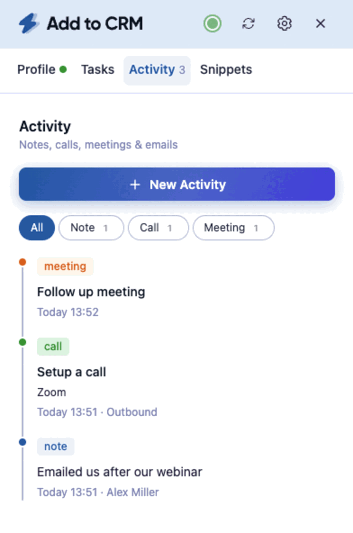
With Add to CRM Pro, the workflow is simple: find a prospect in Sales Navigator, click once, and they are in HubSpot or Pipedrive with a verified email, phone, and 20+ data points — added compliantly through your own connected account, with no scraping and no spreadsheet in between. It is live for 29+ CRMs today, with Salesforce on the way.
You can try it on a 7-day free trial and watch a Sales Navigator lead land in your CRM in a single click.
Start saving time and closing more deals.
Find verified contact info for your prospects on LinkedIn®, Gmail and Outlook — and add them to your CRM with 1-click.

 Loading...Trusted by 2,500+ founders, SDRs & more