Sales Navigator vs ZoomInfo: Which Fits Your Team?
Sales Navigator vs ZoomInfo compared: pricing, exportable data, and which fits your team by budget and use case, plus how to get leads into any CRM.
Sales Navigator and ZoomInfo aren't substitutes. LinkedIn Sales Navigator ($99–$160 per seat/month) is a prospecting layer inside LinkedIn for finding and engaging decision-makers, with no exportable emails or phones. ZoomInfo is a standalone B2B database with exportable verified emails, direct-dial phones, and buyer intent, but it's enterprise-priced, commonly $30k–$60k a year. Pick by budget, data needs, and how you sell.
TL;DR: In the Sales Navigator vs ZoomInfo decision, choose Sales Navigator for affordable, relationship-led selling on LinkedIn, and ZoomInfo for bulk exportable data plus intent if you have an enterprise budget. Whichever you pick, Add to CRM gets the leads into your CRM in one click.
People type "sales navigator vs zoominfo" into Google expecting a fight between two versions of the same thing. It isn't. These are two different tools that solve two different jobs, and the right answer depends far more on how your team sells and what you can spend than on any feature checklist. This guide breaks down what each one actually is, what they cost, and how to pick, honestly. Prices move, so treat every figure below as a mid-2026 snapshot and check each vendor's site for current pricing.
What is LinkedIn Sales Navigator?
LinkedIn Sales Navigator is a premium prospecting and search layer that sits on top of LinkedIn's network of roughly 1 billion-plus members. Instead of basic LinkedIn search, you get advanced filters such as seniority, job title, company headcount, industry, geography, years in role, and recent job changes, plus saved lead lists, search alerts, InMail credits, and relationship signals that show who on your team already knows a prospect.
Its core job is finding and engaging the right decision-makers where they already spend their time. You search live against real profiles that people keep up to date themselves, so the data stays fresh in a way a static database rarely does. For social selling, warm intros, commenting, InMail, and following an account before you reach out, nothing quite matches it.
The catch is what it does not do: Sales Navigator does not give you exportable emails or phone numbers. You can view a prospect and message them inside LinkedIn, but there is no "export to CSV" button that hands you a verified work email and a direct dial. That is deliberate, because LinkedIn wants the engagement to stay on-platform.
It is also worth being clear about the rules. Bulk-scraping Sales Navigator to pull contacts out of it violates LinkedIn's Terms of Service and can get your account restricted or banned. The compliant ways to move a Sales Navigator lead into your CRM are to copy it manually, or to use a tool that works through your own connected LinkedIn account rather than scraping the platform.
Pricing is refreshingly transparent (more on that below): as of mid-2026, Core runs about $119.99/month and Advanced about $159.99/month per seat, self-serve, monthly or annual.
What is ZoomInfo?
ZoomInfo is a standalone B2B data platform, not a layer on top of a social network but a database you query directly. As of mid-2026 it holds north of 260 million contact profiles (its own marketing cites 500 million-plus), and unlike Sales Navigator, the entire point is that you can export what you find.
A ZoomInfo record typically includes a verified work email, direct-dial and mobile phone numbers, firmographics, org charts, and technographics (the tools a company uses). On top of the raw data, ZoomInfo layers buyer intent, signals that an account is actively researching a topic, plus "scoops" (early news like funding rounds or leadership changes), automated workflows, and deep native integrations with Salesforce, HubSpot, and the major sales-engagement tools.
It is built for high-volume outbound teams that need to build large, targeted lists fast and route them straight into a sales engine. If your motion is "pull 500 contacts matching an ICP, load them into a sequence, and dial the direct lines," ZoomInfo is designed for exactly that.
The trade-off is cost and commitment. ZoomInfo uses sales-only pricing with no public rates. Reported figures put Professional around $14,995/year, Advanced around $24,995/year, and Elite around $39,995 or more, with a median contract near $31,875/year. Once you add seats, credits, and add-ons, reviewers report real all-in costs commonly landing between $30,000 and $60,000 a year, on annual (often multi-year) contracts. Per-credit export costs are reported in the $0.50–$1.50 range. Always check ZoomInfo's site or a sales rep for a current quote.
Sales Navigator vs ZoomInfo: the key differences
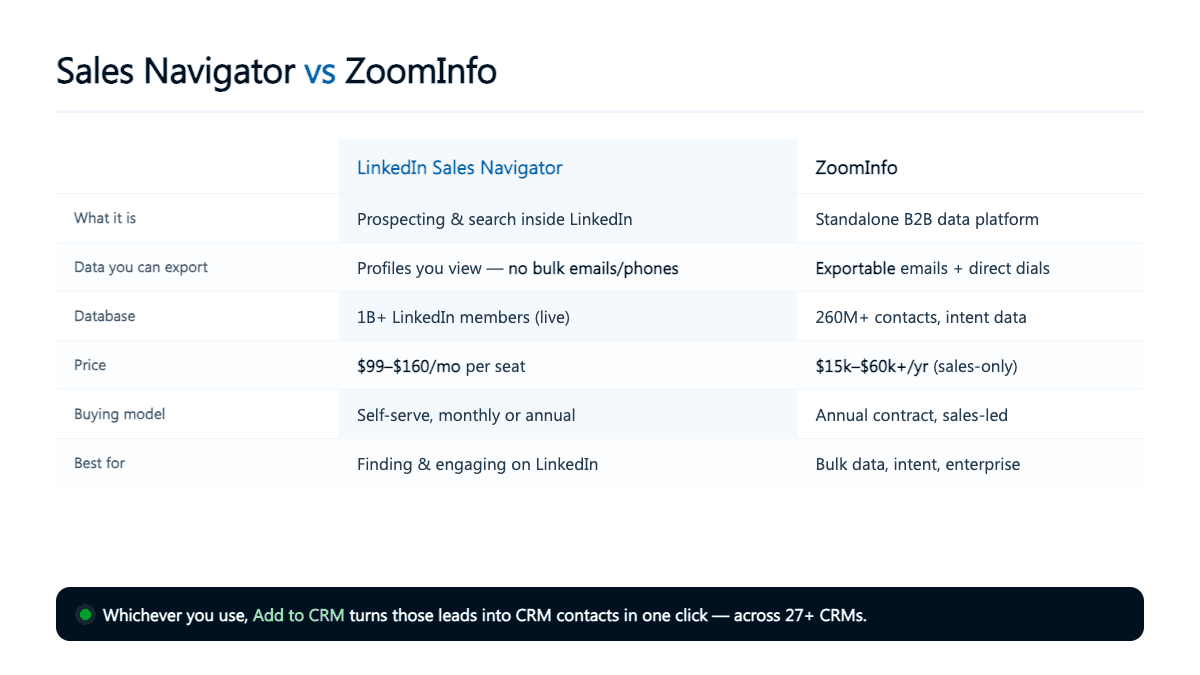
At a glance, here is how the two stack up as of mid-2026. Prices change, so treat the numbers as directional and check each vendor's site for current pricing.
| Dimension | LinkedIn Sales Navigator | ZoomInfo |
|---|---|---|
| What it is | Prospecting and search layer inside LinkedIn | Standalone B2B data platform |
| Core job | Find and engage decision-makers on LinkedIn | Build and export contact lists at volume |
| Data pool | ~1B+ LinkedIn members, searched live | 260M+ contacts (marketing cites 500M+) |
| Exportable emails/phones | No — view and message in-app only | Yes — verified emails plus direct dials |
| Buyer intent data | No | Yes |
| CRM integration | Limited; needs a tool to push contacts out | Deep native integrations |
| Pricing model | Self-serve, per seat | Sales-only quote, annual contract |
| Typical cost | $99–$160 per seat/month (Core $119.99, Advanced $159.99) | No public rates; commonly $30k–$60k/yr all-in (median ~$31,875) |
| Contract | Monthly or annual | Annual, often multi-year |
| Best for | Relationship-led selling; founders and SMB | High-volume outbound; enterprise budgets |
The single most important row is "exportable emails/phones." That one difference explains almost everything else about how the two tools are priced and who they are for.

Turn LinkedIn® profiles into CRM contacts
Add to CRM finds verified emails, phone numbers, and job titles on LinkedIn® — then adds them to your CRM in one click.
Start Free Trial


 Trusted by 2,500+ users4.7
How much do Sales Navigator and ZoomInfo cost?
This is where the two products live in different universes. Sales Navigator is self-serve and transparent: Core is about $119.99/month and Advanced about $159.99/month per seat, with the range across plans landing roughly between $99 and $160 per seat/month. You can buy it with a credit card today and cancel later.
ZoomInfo is the opposite, quote-based, negotiated, and committed. There is no public price, but reported tiers start around $14,995/year (Professional) and climb past $39,995/year (Elite), with a median contract near $31,875. Add seats, phone credits, intent topics, and integrations, and the all-in number reviewers report commonly sits between $30,000 and $60,000 a year.
Put a team of five on Sales Navigator Advanced and you are at roughly $800/month, about $9,600/year. The same five reps on ZoomInfo could easily run three to six times that. But you are not buying the same thing: ZoomInfo's price includes exportable data, phone numbers, and intent that Sales Navigator simply does not provide. The question is not which is cheaper, it is which set of capabilities your team actually needs. Prices change, so check the vendor's site for current pricing.
Which one is right for your team?
Founders and solopreneurs. Start with Sales Navigator. At around $100–$160/month it is affordable, and early-stage selling is relationship-led. You are the brand, and warm, personalized outreach beats spray-and-pray volume. ZoomInfo's floor price alone would eat a young company's entire tooling budget.
SDR and outbound teams. If your day is sequences and dials, you need exportable emails and direct lines, which points toward ZoomInfo, provided the budget is there and the volume justifies it. Intent data also helps you prioritize accounts already in-market. Many teams, though, find ZoomInfo's contract hard to justify and instead pair Sales Navigator (to find the right people) with a lighter enrichment tool (to get the email and phone).
Sales managers and mid-market. It comes down to motion. LinkedIn-led selling favors Sales Navigator plus enrichment; high-volume, multi-channel outbound favors ZoomInfo. Some teams run both, Sales Navigator for engagement and ZoomInfo for list-building, if the numbers work.
Budget-conscious buyers. A Sales Navigator seat plus a per-lead enrichment tool very often beats ZoomInfo's annual floor, especially at lower volumes. If ZoomInfo's price is the sticking point, it is worth comparing ZoomInfo alternatives and the best Sales Navigator alternatives before you sign a contract.
The honest take: many teams do not actually have to choose. They use Sales Navigator to find the right people, then a lightweight enrichment-and-CRM tool to get those people, with a verified email and phone, into the CRM, without ZoomInfo's price tag.
The real catch: getting leads into your CRM
Neither tool finishes the job on its own. A prospect only becomes pipeline once they are a clean record in your CRM, and both products leave a gap there. Sales Navigator keeps data on-platform by design. ZoomInfo exports well if you are all-in on its stack, but that assumes you are paying for it in the first place.
For Sales Navigator specifically, remember there is no compliant bulk export. The legitimate paths are manual copy-paste, which is accurate but slow, or a tool that works through your own connected LinkedIn account.
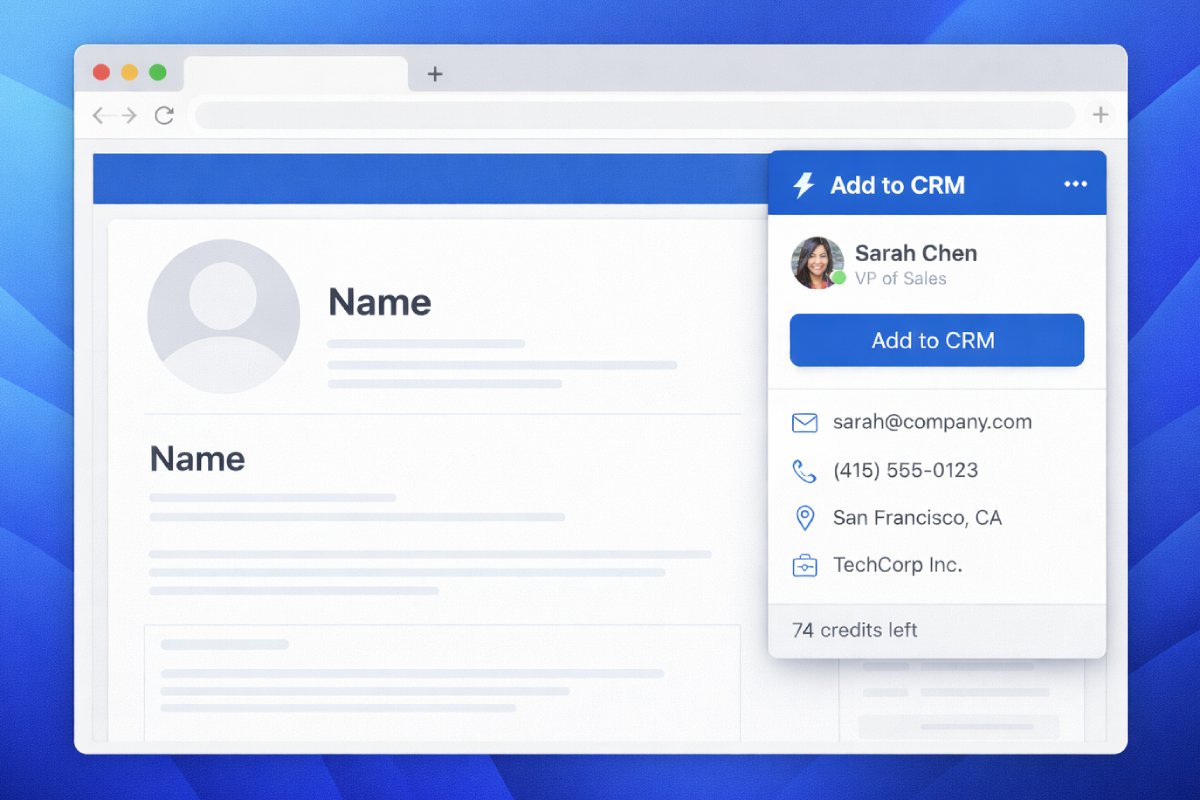
That is the gap Add to CRM fills. It is a Chrome extension that enriches a LinkedIn, Sales Navigator, Gmail, Outlook, or website contact with a verified email, a phone number, and 20+ data points (at 96% email verification accuracy), then adds them to 29+ CRMs in one click. Its Pro tier connects your own LinkedIn account (via Unipile) to resolve Sales Navigator profiles and searches, the compliant way, using your account rather than scraping the platform. You can browse the full list of supported CRM Chrome extensions to find yours.
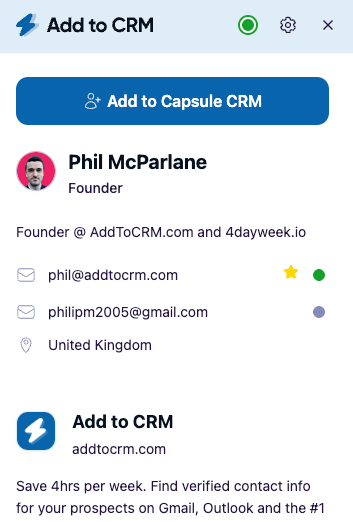
To be clear about what it is and is not: Add to CRM is not a replacement for ZoomInfo's database or its intent data. It is the bridge from "I found the right person" to "there is a clean, enriched record in my CRM," and for turning Sales Navigator prospects into CRM contacts, it is the affordable option, priced per credit rather than tens of thousands a year.
29+ CRMs supported. Try free for 7 days
Add to CRM finds verified emails, phone numbers, and job titles on LinkedIn® — then adds them to your CRM in one click.
Start Free TrialTrusted by 2,500+ users4.7Frequently asked questions
Is ZoomInfo better than Sales Navigator? Neither is "better," because they do different jobs. Sales Navigator is a prospecting and engagement layer inside LinkedIn; ZoomInfo is a standalone database you export from. If you sell through relationships on LinkedIn, Sales Navigator wins. If you run high-volume outbound and need exportable data plus intent, ZoomInfo wins, at a much higher price.
Does Sales Navigator give you email addresses? No. Sales Navigator lets you view and message prospects inside LinkedIn, but it does not provide exportable work emails or phone numbers. To get a verified email and phone for a Sales Navigator lead, you need a separate enrichment tool that works compliantly through your own account.
Can you export contacts from Sales Navigator? Not in bulk. Bulk-scraping Sales Navigator violates LinkedIn's Terms of Service and can get your account banned. The compliant options are to copy a lead manually, or to use a tool like Add to CRM Pro that resolves and adds contacts through your own connected LinkedIn account, one at a time.
How much does ZoomInfo really cost? ZoomInfo does not publish prices. Reported tiers run from about $14,995/year (Professional) to $39,995+/year (Elite), with a median contract near $31,875 and real all-in costs commonly between $30,000 and $60,000 a year once seats and add-ons are included. Check ZoomInfo's site for a current quote.
What is a cheaper alternative to ZoomInfo? Many teams pair Sales Navigator with a per-lead enrichment tool instead of paying ZoomInfo's annual floor. That combination finds the right people and gets their verified contact details into your CRM at a fraction of the cost. Our roundup of ZoomInfo alternatives walks through the options.
Can you use Sales Navigator and ZoomInfo together? Yes, and plenty of teams do: Sales Navigator for finding and engaging accounts, ZoomInfo for building and exporting lists. The main reason not to is budget. If you cannot justify both, most SMB and mid-market teams keep Sales Navigator and swap ZoomInfo for a lighter enrichment tool.
Getting Sales Navigator and ZoomInfo leads into your CRM
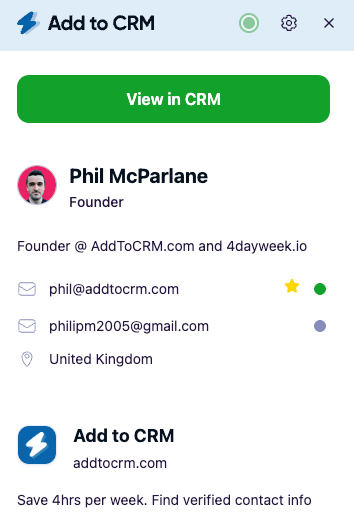
Whichever side of the Sales Navigator vs ZoomInfo decision you land on, the leads still have to reach your CRM, and that last step is where a lot of good prospecting quietly leaks away. Add to CRM closes it: one click to enrich a contact with a verified email, phone, and 20+ data points and drop them into any of 29+ CRMs, with a Pro tier that resolves Sales Navigator profiles through your own connected account, compliantly. It is the affordable, one-click way to turn prospects into CRM contacts. Start with a 7-day free trial and browse the supported CRM Chrome extensions to find yours.
Start saving time and closing more deals.
Find verified contact info for your prospects on LinkedIn®, Gmail and Outlook — and add them to your CRM with 1-click.

 Loading...Trusted by 2,500+ founders, SDRs & more