Wiza Review (2026): Pricing, the Sales Nav Requirement & Alternatives
An honest Wiza review: 2026 pricing, the Sales Navigator requirement, and how Add to CRM compares as a one-click, no-seat alternative across 29+ CRMs.
Wiza is a Chrome extension that turns a Sales Navigator search into an enriched contact list — and, unlike many tools in its class, it pulls verified emails and phone numbers, then layers on extra enrichment. It's built for SDRs and outbound teams who already work inside Sales Navigator and want to lift a whole list out at once rather than copying prospects one at a time. The single sharpest fact to know before you buy: Wiza only works if you already pay for a Sales Navigator seat, so the number on its pricing page is never the number you actually pay.
Pricing is a July 2026 snapshot — check Wiza's site for current numbers.
TL;DR: Pick Wiza if you already pay for Sales Navigator and want to bulk-export a search into an enriched list with verified emails and phone numbers. Pick Add to CRM if you'd rather enrich a contact and push it straight into any of 29+ CRMs in one click — with no Sales Navigator seat required, and on business networks, Gmail, and Outlook alike.

What is Wiza?
Wiza is an export-and-enrichment tool that lives on top of Sales Navigator. You run a search, and Wiza extracts the matching people into a clean, enriched list — verified work emails, phone numbers, and additional data points — without you copying anything by hand. The data is pulled from your Sales Navigator searches live rather than served from a static file, which is why the output reflects whoever your filters caught that day.
Its genuine strength is worth stating plainly: bundling verified emails with phone numbers in a single bulk export is not something every competitor does well, and reviewers consistently rate Wiza's phone data as one of its better features. If your team already lives in Sales Navigator and your motion is "build a targeted search, then work the whole list on the phones and by email," Wiza does that job directly.
Wiza also sits at the fuller, pricier end of the export market, and it's oriented around the list — a batch of people leaving Sales Navigator together — not the single contact you spotted while browsing.
Wiza pricing & credits
Here's Wiza's published pricing (as of July 2026 — check their site for current numbers, because these move):
- Free — a small allowance to try it, around 20 email and 5 phone credits.
- Starter — about $49/month.
- Email — about $99/month (roughly $83/month billed annually), positioned as unlimited email lookups.
- Email + Phone — about $199/month (roughly $166/month billed annually), adding phone reveals on top.
- Team — this one is ambiguous. Wiza lists it as custom, and some third-party sources cite a figure around $449 billed annually. Treat that number as unconfirmed and get a quote directly rather than budgeting on it.
- Pay-as-you-go — roughly $0.35 per email and $1.50 per phone if you'd rather buy credits than commit to a plan.
Now the part that reframes all of the above. Wiza requires an active Sales Navigator subscription to function, and Sales Navigator runs about $79–149/month on its own (as of July 2026 — check the current rate). So the sticker price is only half the story. A solo user on the Email + Phone plan isn't paying $199/month; they're paying $199 plus their Sales Navigator seat. Reviewers who add it up put the true all-in cost for one person around $265–315/month once the seat is included.
Why it matters: if you're comparing Wiza against a tool that doesn't need Sales Navigator, you have to compare the full stack, not the plan alone. The Sales Navigator dependency also means Wiza's world is bounded by Sales Navigator — the export flow starts and ends there. That's fine if Sales Navigator is already your home base. It's an expensive detour if it isn't.
Where Wiza is strong — and where it's limited
Reviewers tend to agree on Wiza's strengths. The bulk Sales Navigator export is fast, the email verification is solid, and the phone data is a genuine differentiator — many enrichment tools skimp on mobile numbers, and Wiza doesn't. For teams whose whole day is prospecting off Sales Navigator searches, that's real value.
The limitations reviewers report are mostly about shape, not quality. First, the Sales Navigator requirement is non-negotiable, which bakes an extra $79–149/month into the true cost and ties you to one platform. Second, Wiza is export-flow oriented: the natural unit is a list you pull out of a search, not a single verified contact dropped into your CRM the moment you find them while browsing. Third, phone data — the standout feature — sits behind the higher-priced Email + Phone plan or per-credit charges, so the strength you're buying Wiza for is also the part that costs the most.
Wiza is also often confused with Evaboot. Evaboot is the cheaper, email-only, CSV-bulk-export option — it keeps things lean and skips phone numbers. Wiza is the fuller, pricier sibling: it adds phone data and more enrichment, which is exactly why it costs more. Neither escapes the Sales Navigator requirement, so the real choice is "do I need phones and more enrichment (Wiza), or just clean emails at the lowest price (Evaboot)?"

Turn LinkedIn® profiles into CRM contacts
Add to CRM finds verified emails, phone numbers, and job titles on LinkedIn® — then adds them to your CRM in one click.
Start Free Trial


 Trusted by 2,500+ users4.7
The alternative: Add to CRM
If the Sales Navigator seat and the export-then-import round trip are what's giving you pause, that's the exact gap Add to CRM is built for. It's a Chrome extension that enriches a contact you're looking at — on business networks (LinkedIn), Gmail, or Outlook — with a verified email, a phone number, and 20+ data points, then adds them to any of 29+ CRMs in one click. Emails are verified in real time to cut bounces, at a stated 96% email verification accuracy.
The difference in shape is the point. Wiza is a list-export flow that starts inside Sales Navigator. Add to CRM is a last-mile flow: you find one right person, and one click later there's a clean, enriched record sitting in Capsule, Pipedrive, Zoho, HubSpot, Monday, or whichever of the 29+ CRMs you use — no CSV, no re-import, no seat. Credits are a single monthly pool — 250/month on Standard (around £23/€25/$29) or 1,000/month on Pro — and, unlike the per-reveal phone pricing you see elsewhere, phone reveals aren't charged at a 10× multiplier; they come out of the same pool.
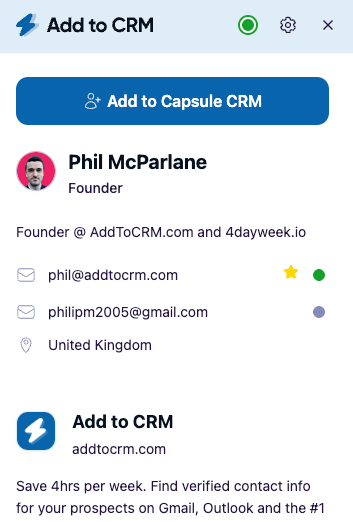
To be clear about what Add to CRM is and isn't: it's not a database you buy and manage. It doesn't sell you a static list of contacts to query. It's the capture-and-enrich workflow that gets a verified person into your CRM — the bridge from "I found the right contact" to "there's a clean record in my CRM," across far more CRMs and surfaces than a Sales Navigator exporter touches.
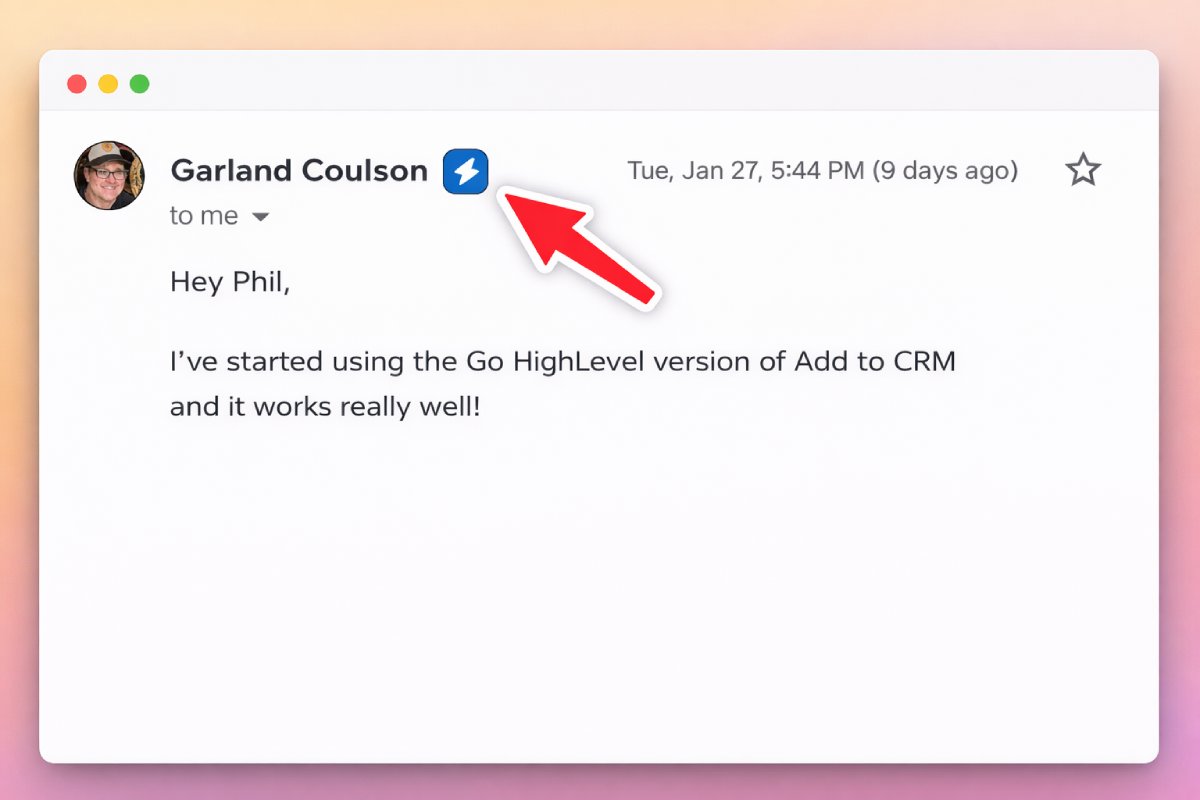
One note for Sales Navigator users: Add to CRM's Pro tier supports Sales Navigator through your own connected account (the compliant route, not scraping) — so you can have that support if you want it, without it being a hard requirement the way it is for Wiza.
Wiza vs Add to CRM at a glance
Prices are a July 2026 snapshot — check each vendor's site for current numbers.
| Dimension | Wiza | Add to CRM |
|---|---|---|
| What it is | Sales Navigator list-export + enrichment tool (verified email + phone) | Capture-and-enrich extension that adds a contact to your CRM in one click |
| CRMs supported | Export-first; the flow centres on lifting a Sales Navigator search into an enriched list | 29+ CRMs on one subscription |
| Credit model | Per-plan email/phone volume; PAYG ~$0.35/email and ~$1.50/phone; higher tiers billed annually | 250 credits/month (Standard) or 1,000/month (Pro) — one monthly pool |
| Typical monthly cost | Free tier, then ~$49 Starter, ~$99 Email, ~$199 Email+Phone — plus a required Sales Navigator seat at $79–149/mo | ~£23/€25/$29 Standard; Pro higher (see pricing) |
| Surfaces | Sales Navigator (paid seat required) | Business networks (LinkedIn), Gmail, and Outlook |
| Phone credits | Yes — a core strength; on the phone-enabled plan or per phone credit | Included in the monthly pool; not charged at a 10× multiplier |
| Free trial / plan | Free tier (~20 email / 5 phone) | 7-day free trial, then paid — no free plan |
Who should choose which
Choose Wiza if you already pay for Sales Navigator and your core motion is bulk-exporting whole searches into enriched lists with verified emails and phone numbers. For an SDR team dialling and emailing large Sales Navigator lists, Wiza's phone data and batch export are a strong, purpose-built fit — and honestly a better match than a one-contact-at-a-time tool.
Choose Evaboot instead of Wiza if you only need clean, verified emails out of Sales Navigator at the lowest price and don't need phone numbers — that's Evaboot's cheaper, email-only, CSV lane.
Choose Add to CRM if you don't want to pay for (or depend on) a Sales Navigator seat, you work across many or niche CRMs, or you capture contacts one at a time as you browse — on business networks, in Gmail, or in Outlook. It's also the better fit when the goal is a clean record inside your CRM rather than a spreadsheet you still have to import. You can read our full Wiza alternative rundown for the side-by-side.
Run both if the budget supports it: some teams keep Wiza for heavy Sales Navigator list-building and use Add to CRM for everyday one-click capture across the rest of their stack and inbox.
29+ CRMs supported. Try free for 7 days
Add to CRM finds verified emails, phone numbers, and job titles on LinkedIn® — then adds them to your CRM in one click.
Start Free TrialTrusted by 2,500+ users4.7Frequently asked questions
Does Wiza require a Sales Navigator subscription? Yes. Wiza works by exporting and enriching Sales Navigator searches, so you need an active Sales Navigator seat (about $79–149/month, as of July 2026 — check the current rate) for it to function. That's why its true cost is higher than the plan price alone: reviewers put the all-in figure for a solo user around $265–315/month once the seat is included.
How much does Wiza cost in 2026? As of July 2026 (check their site, as pricing changes), Wiza offers a free tier (20 email / 5 phone credits), a Starter plan around $49/month, an Email plan around $99/month ($83 annual, positioned as unlimited email), and an Email + Phone plan around $199/month (~$166 annual). There's a Team plan Wiza lists as custom — some sources cite roughly $449 billed annually, but that's unconfirmed, so get a direct quote. Pay-as-you-go runs about $0.35 per email and $1.50 per phone. Remember to add a Sales Navigator seat on top.
How is Wiza different from Evaboot? Both export Sales Navigator searches and both require a Sales Navigator seat. The difference is scope and price: Evaboot is the cheaper, email-only option that outputs a clean CSV, while Wiza is fuller and pricier — it adds phone numbers and more enrichment. Pick Evaboot for lowest-cost verified emails; pick Wiza when you need phone data and richer records.
Is there a Wiza alternative that doesn't need Sales Navigator? Yes — Add to CRM doesn't require a Sales Navigator seat on any plan. It's a Chrome extension that enriches a contact with a verified email, phone, and 20+ data points and adds them to 29+ CRMs in one click, working on business networks, Gmail, and Outlook. It replaces the export-then-import round trip with a single click into your CRM.
Does Add to CRM work with Sales Navigator? It can, on the Pro tier, using your own connected account — the compliant route rather than scraping. But unlike Wiza, Sales Navigator isn't a requirement: on any plan you can capture and enrich contacts on business networks, Gmail, and Outlook without a Sales Navigator subscription at all.
Get contacts into your CRM without the Sales Navigator seat
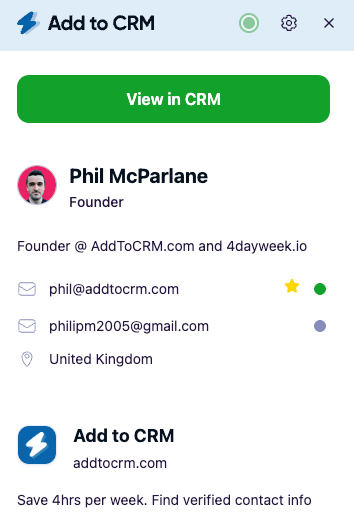
Wiza is a capable Sales Navigator exporter, and its phone data earns its reputation — but only if you're already paying for the seat and living in the list-export flow. If you'd rather skip the seat and the CSV round trip, Add to CRM enriches a contact with a verified email, phone, and 20+ data points and drops them into any of 29+ CRMs in one click, on business networks, Gmail, and Outlook, with phone reveals coming out of the same monthly pool (no 10× penalty). Start with a 7-day free trial, browse the supported CRM Chrome extensions to find yours, and see the plans on pricing.
Start saving time and closing more deals.
Find verified contact info for your prospects on LinkedIn®, Gmail and Outlook — and add them to your CRM with 1-click.

 Loading...Trusted by 2,500+ founders, SDRs & more