LeadCRM Review (2026): Pricing, CRM Coverage & the Alternative
LeadCRM review (2026): pricing, the 8 CRMs it syncs bi-directionally, and how Add to CRM compares with one-click capture into 29+ CRMs.
LeadCRM is a browser extension that syncs a business-network profile — including Sales Navigator leads — bi-directionally into your CRM, and bundles a lead finder for pulling verified emails and phone numbers. It is built for founders and sales reps who spend their day on a professional network and want profiles landing in the CRM without copy-paste. The single sharpest fact to know before you buy: LeadCRM syncs into 8 CRMs. That is genuinely useful if your stack is one of them — and the whole story if it isn't.
This LeadCRM review covers what it does well, what its pricing and credits actually get you, and where an alternative might serve you better. Pricing is a July 2026 snapshot — check LeadCRM's site for current numbers, as plans in this category change often.
TL;DR: Pick LeadCRM if your CRM is one of the eight it supports (HubSpot, Salesforce, Zoho, Google Sheets, Copper, GoHighLevel, Close, or Pipedrive) and you want mature two-way sync from a profile view. Pick Add to CRM if you need broader coverage — 29+ CRMs, including the long tail LeadCRM skips — plus contact capture from Gmail and Outlook, all on one monthly subscription.
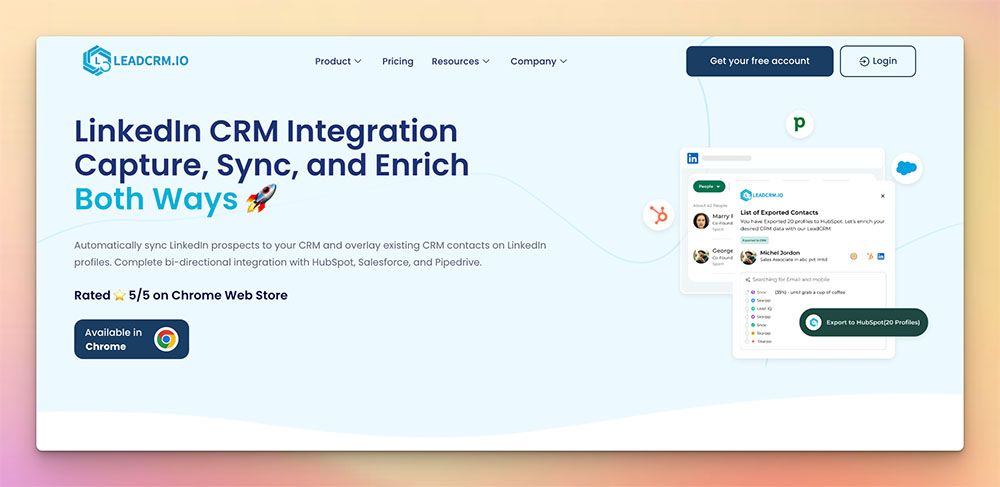
What is LeadCRM?
LeadCRM positions itself as an all-in-one bridge between a professional network and your CRM. You install the extension, open a profile or a Sales Navigator lead, and push it into your CRM with the fields mapped. Its headline feature is bi-directional sync: instead of a one-time import, changes are meant to flow both ways between the profile view and the CRM record, so the two stay in step. On top of that it ships a Lead Finder for revealing verified emails and phone numbers, plus notes and conversation logging so activity lands against the right contact.
This is a legitimate and well-built thesis, and it deserves credit. Two-way sync is meaningfully harder to engineer than a one-directional push, and for the CRMs LeadCRM supports it is a real convenience — update a record on either side and it is designed to reconcile rather than drift. If your team lives inside HubSpot, Salesforce, Zoho, Google Sheets, Copper, GoHighLevel, Close, or Pipedrive, LeadCRM is one of the closest structural competitors to a general multi-CRM capture tool, and it earns its place on the shortlist. It is not a thin wrapper; it is a focused product doing a specific job for a specific set of stacks.
LeadCRM pricing & credits
Here is what LeadCRM charges (as of July 2026 — check their site for current pricing, because numbers in this space shift regularly):
- Free — around 10 Lead-Finder credits a month, enough to trial the Lead Finder and see the sync in action.
- Professional — about $29.95/month (~150 credits: 150 emails or 50 phone numbers).
- Grow — about $49.95/month (~400 Lead-Finder credits for steadier prospecting).
- Ultimate — about $69.95/month (~1,200 credits).
Annual billing runs roughly 20% cheaper — about $23.96 / $39.96 / $55.96 a month effective.
The model to understand is the Lead-Finder credit. Every email or phone reveal draws from a monthly allowance that is capped per tier. The free plan's ~10 credits is a taster, not a working allocation, and even the mid-tiers give you a fixed monthly ceiling on how many contacts you can enrich. If you prospect at any real volume, that ceiling is the number to watch — not the headline price.
But for most buyers the credit cap is the second question. The first is coverage. LeadCRM connects to 8 CRMs. That is a deliberately curated list of popular tools, and if yours is on it, great. If it isn't — if you run Capsule, Less Annoying CRM, Nutshell, Attio, Monday, Salesflare, Bigin, folk, Streak, or any of the dozens of other CRMs teams actually use — then the pricing is moot, because the integration simply isn't there. That is the core trade-off with LeadCRM: it goes reasonably deep on eight CRMs rather than wide across the market.
Where LeadCRM is strong — and where it's limited
On the strengths, reviewers tend to highlight the same things. The bi-directional sync is the standout — being able to edit on either side and keep the record consistent is a genuine time-saver, and it is the feature LeadCRM leans on hardest. Users on the supported stacks also report that field mapping and the Sales Navigator capture work smoothly, and that the Lead Finder returns usable, verified contact data. For a founder or a small sales team already committed to one of the eight CRMs, that combination is a coherent, dependable workflow.
The limits reviewers point to are mostly about reach rather than quality. The 8-CRM ceiling is the recurring one: LeadCRM is a strong fit if you are inside its supported list, and a non-starter if you are not, with no obvious path to follow you if you switch or add a CRM later. The per-tier credit caps are the other: heavier prospectors can bump the monthly Lead-Finder allowance and have to weigh an upgrade. And because LeadCRM is oriented around capturing profiles from a professional network, teams whose pipeline also flows through the inbox will find that surface less of a focus. None of these are defects — they are the natural edges of a tightly scoped tool — but they are the reasons buyers look at alternatives.

Turn LinkedIn® profiles into CRM contacts
Add to CRM finds verified emails, phone numbers, and job titles on LinkedIn® — then adds them to your CRM in one click.
Start Free Trial


 Trusted by 2,500+ users4.7
The alternative: Add to CRM
Add to CRM approaches the same job from the last mile. It is a Chrome extension that enriches whoever you are looking at — a verified email, a phone number, and 20+ data points — and adds them to your CRM in one click. The difference is breadth. One subscription connects 29+ CRMs, and capture works not only on business networks but in Gmail and Outlook too, so a prospect who emails you can go into the CRM as easily as a profile you are viewing.
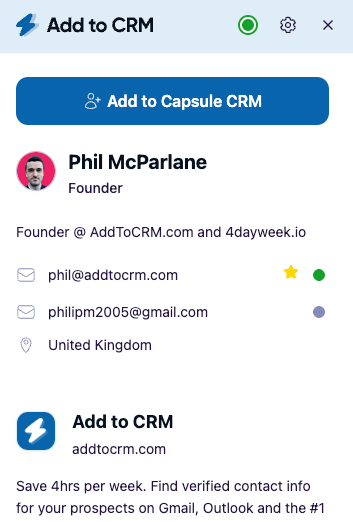
To be clear about what we are and aren't: Add to CRM is not a database. We do not sell you a static pile of contacts to search and export. We are the capture-and-enrich workflow that takes the specific person in front of you and gets them into your CRM — verified and complete. Emails are checked in real time to cut bounces (96% verification accuracy), phone reveals are included in your monthly credits rather than charged at a 10× multiplier, and everything is GDPR-compliant. Credits are a simple monthly pool: 250/month on Standard (about £23/€25/$29), or 1,000/month on Pro.
Where LeadCRM stops at eight integrations, Add to CRM covers the long tail it doesn't. Both tools handle the big names — HubSpot, Zoho, Pipedrive, Close, Copper, Google Sheets — but Add to CRM then adds the ones LeadCRM leaves out: Capsule, Less Annoying CRM, Nutshell, Attio, Monday, Salesflare, Bigin, folk, Streak, and many more. If you are on Pro, you also get Sales Navigator support and automatic DM sync through your own connected account — the compliant route, not scraping.
LeadCRM vs Add to CRM at a glance
| LeadCRM | Add to CRM | |
|---|---|---|
| What it is | Browser extension with bi-directional profile ↔ CRM sync + a lead finder | Chrome extension that enriches a contact and adds it to your CRM in one click |
| CRMs supported | 8 (HubSpot, Salesforce, Zoho, Google Sheets, Copper, GoHighLevel, Close, Pipedrive) | 29+ |
| Credit model | Lead-Finder credits, capped per tier | 250 credits/month (Standard) or 1,000/month (Pro) — monthly pool |
| Typical monthly cost | Free; Professional $29.95; Grow ~$49.95; Ultimate ~$69.95 (20% less annually; as of July 2026 — check their site) | Standard ~£23/€25/$29; Pro for higher volume |
| Surfaces | Business networks incl. Sales Navigator | Business networks, Gmail, and Outlook |
| Phone credits | Drawn from the tier-capped Lead-Finder pool (check their site) | Included in monthly credits — no 10× phone multiplier |
| Free trial/plan | Free plan (~10 credits) + paid tiers | 7-day free trial, then paid — no free plan |
29+ CRMs supported. Try free for 7 days
Add to CRM finds verified emails, phone numbers, and job titles on LinkedIn® — then adds them to your CRM in one click.
Start Free TrialTrusted by 2,500+ users4.7Who should choose which
Choose LeadCRM if your CRM is one of its eight and two-way sync is the feature you care about most. If you run HubSpot, Salesforce, Zoho, Google Sheets, Copper, GoHighLevel, Close, or Pipedrive and you want a profile and its CRM record to stay reconciled as you edit either one, LeadCRM is a well-fitting, purpose-built choice. For a single-CRM team that lives in one of those tools, it may genuinely be the better tool for the job.
Choose Add to CRM if breadth or the inbox matters to you. That covers three common situations: your CRM isn't on LeadCRM's list (Capsule, Less Annoying CRM, Nutshell, Attio, Monday, Salesflare, Bigin, folk, Streak, and others); you use — or might switch to — more than one CRM and don't want to be locked to a fixed eight; or your pipeline runs through Gmail and Outlook as much as a professional network. One monthly subscription, one credit pool, 29+ CRMs, and enrichment across every surface.
The two aren't mutually exclusive in spirit — both are capture tools that respect the same workflow — but the deciding question is simple: is your CRM one of LeadCRM's eight, and is a business-network-only surface enough? If yes, LeadCRM is a strong pick. If you need to reach further, that is where Add to CRM fits.
FAQ
Is LeadCRM free?
LeadCRM has a free plan with roughly 10 credits, which is enough to trial the Lead Finder and see the sync, but not to prospect at volume. Paid tiers run Professional at about $29.95/month (150 credits), Grow at about $49.95/month (400 credits), and Ultimate at about $69.95/month (~1,200 credits), roughly 20% less on annual billing (as of July 2026 — check their site for current pricing). Add to CRM takes a different route: a 7-day free trial, then paid, with no ongoing free plan.
How many CRMs does LeadCRM support?
Eight: HubSpot, Salesforce, Zoho, Google Sheets, Copper, GoHighLevel, Close, and Pipedrive. If your CRM is on that list, LeadCRM's integration is a real strength. If it isn't, there's no workaround — which is the main reason teams on other stacks compare it against a broader tool like Add to CRM, which connects to 29+ CRMs.
What's the main difference between LeadCRM and Add to CRM?
Coverage and surfaces. LeadCRM offers polished bi-directional sync across eight CRMs, captured mainly from a professional network. Add to CRM offers one-click capture and enrichment — verified email, phone, and 20+ data points — into 29+ CRMs, and works in Gmail and Outlook as well as on business networks. LeadCRM's two-way sync is a genuine advantage for its eight; Add to CRM's advantage is reach.
Does Add to CRM have a free plan?
No. Add to CRM runs on a 7-day free trial and then a paid subscription — 250 credits a month on Standard (about £23/€25/$29) or 1,000 on Pro. There is no permanent free tier. LeadCRM, by contrast, does keep a free plan with about 10 credits, so if a no-cost starting point is essential, that is a point in its favour.
Does LeadCRM work in Gmail or Outlook?
LeadCRM is built around capturing profiles from a professional network, including Sales Navigator — check their site for any inbox coverage, as that is not its headline surface. Add to CRM captures contacts directly from Gmail and Outlook as well, so a prospect who lands in your inbox can be enriched and added to your CRM the same way a profile can.
Add to CRM gives you a 7-day free trial and one-click capture into 29+ CRMs — a verified email, phone, and 20+ data points on every contact, straight from a business network, Gmail, or Outlook, with no 10× phone penalty and no database subscription to manage. Try the Add to CRM Chrome extension free for seven days, check pricing for plans, and if you're weighing the two head-to-head, our LeadCRM alternative page lays out the full comparison.
Start saving time and closing more deals.
Find verified contact info for your prospects on LinkedIn®, Gmail and Outlook — and add them to your CRM with 1-click.

 Loading...Trusted by 2,500+ founders, SDRs & more