Hublead Review (2026): Pricing, the HubSpot-Only Limit & Alternatives
An honest Hublead review — 2026 pricing, the HubSpot-only limit, and how Add to CRM compares as a multi-CRM alternative across 29+ CRMs.
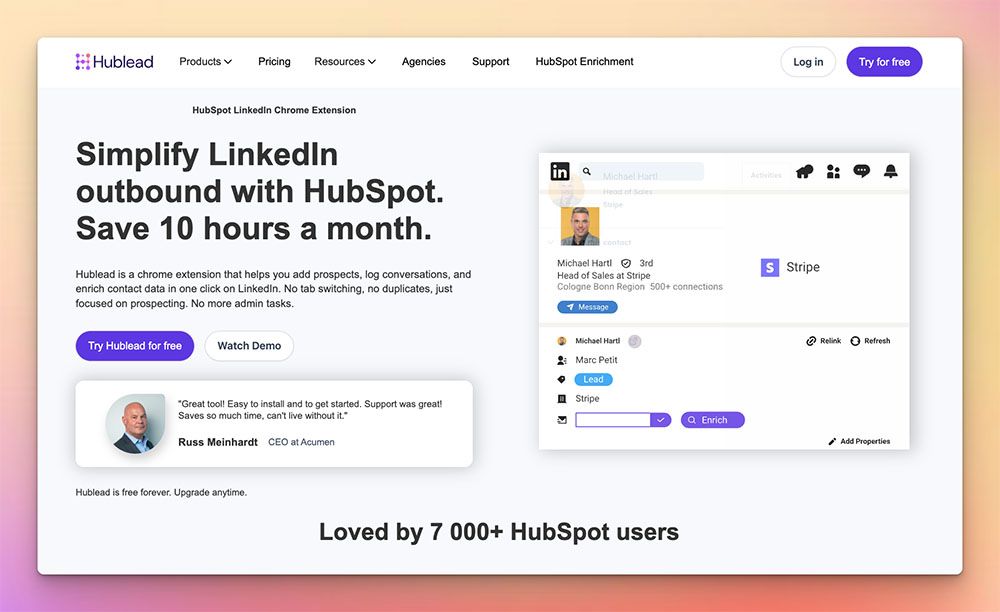
Hublead is a Chrome extension that bridges the gap between a business-network profile and HubSpot. Open someone's LinkedIn profile, click once, and Hublead imports the contact into HubSpot, logs the conversation, and enriches the record with a work email. It works with any LinkedIn plan and any HubSpot tier, including the free HubSpot CRM, which makes it an easy first tool for a HubSpot-native sales team.
The single sharpest fact about Hublead is also the thing you have to plan around: it connects to HubSpot and nothing else. There's no Salesforce, no Pipedrive, no Zoho, and none of the roughly two dozen other CRMs sales teams actually run on. That's the trade this review digs into. If you are, and will stay, all-in on HubSpot, that focus is a feature. If there's any chance your stack changes, it's a ceiling.
Pricing is a July 2026 snapshot — check Hublead's site for current numbers.
TL;DR: Pick Hublead if your team lives entirely inside HubSpot and wants deep, native HubSpot logging — conversation capture and HubSpot-specific workflows — from your business network. Pick Add to CRM if you use (or might one day switch to) any of 29+ CRMs, want the same one-click capture from Gmail and Outlook as well as LinkedIn, and would rather not tie your enrichment subscription to a single platform.
What is Hublead?
Hublead is a purpose-built connector between LinkedIn and HubSpot. Its core job is to remove the copy-paste step that HubSpot users hit dozens of times a day: you find a prospect on a business network, and instead of retyping their name, title, and company into HubSpot, Hublead pushes the record across in one click. From there it can log LinkedIn conversations against the HubSpot contact and enrich the record with a work email so your reps aren't chasing missing addresses.
The reason Hublead feels tight is that it does one thing. Because it only has to speak HubSpot's data model, its field mapping, its conversation logging, and its sync into HubSpot workflows can be more specialized than a general-purpose capture tool. It supports any HubSpot tier — free CRM included — so a small team can adopt it without a HubSpot upgrade, and it doesn't care which LinkedIn plan you're on. For a company that has genuinely standardized on HubSpot as its system of record, that depth is a real strength, and it would be dishonest to pretend otherwise.
The flip side is baked into the same design decision. Hublead's whole value proposition assumes HubSpot is your CRM. The moment that assumption stops being true — a merger, a new RevOps lead who prefers Pipedrive, a move to a lighter CRM like Capsule or Close — Hublead has nothing to sync into. That's the tension every buyer should weigh before committing seats.
Hublead pricing & credits
Here's Hublead's published pricing (as of July 2026 — check their site for current pricing):
- Free — basic contact import into HubSpot at no cost.
- Professional — $32 per seat/mo — adds email enrichment credits, roughly 50 to 600 email credits depending on the plan configuration.
- Business — $64 per seat/mo — adds auto-sync and a larger credit pool, roughly 500 to 6,000 email credits.
- Scale — $112 per seat/mo — the top tier for larger teams.
On its own, that ladder is reasonable for a HubSpot tool. A free entry point lowers the barrier, $32 a seat is competitive for a team that just wants clean contact capture, and the Business tier's auto-sync is the feature most growing teams actually want. The credit model is email-focused — you're paying for email enrichment reveals, and the number of reveals scales with the tier.
The wedge isn't the sticker price; it's what each dollar is committed to. Every seat you buy on Hublead is a seat that only works with HubSpot. If you run HubSpot in one region and Salesforce in another, or your agency serves clients on Pipedrive and Zoho, Hublead can't touch those systems — you'd need a second tool. And if you ever migrate off HubSpot, the entire Hublead subscription stops delivering value overnight, because there's no other CRM for it to sync into.
Compare that to Add to CRM's pricing: one Standard subscription is roughly £23/€25/$29 a month for 250 credits, and those credits work across 29+ CRMs — HubSpot among them. You're not buying a HubSpot connector; you're buying a capture-and-enrich workflow that follows you to whichever CRM you use next. For a team that's certain it will never leave HubSpot, that portability doesn't matter. For everyone else, it's the difference between an investment and a lock-in.
Where Hublead is strong — and where it's limited
Reviewers who use Hublead inside a HubSpot-first workflow tend to praise the same things: the import is fast, the conversation logging lands where they expect it in HubSpot, and the enrichment saves them the email hunt. Because Hublead is narrow by design, it can lean into HubSpot-native behaviour — associating contacts with the right HubSpot objects, respecting HubSpot properties — in ways a broader tool has to generalize. If HubSpot is your world, that specialization is worth taking seriously.
The limits reported are the mirror image of that focus. First, it's HubSpot-only, so any team with a mixed or changing CRM stack immediately needs something else alongside it. Second, its enrichment is oriented around email — the credit model is built on email reveals — so if your reps also need verified mobile numbers as a first-class part of the workflow, that's not the core promise. Third, Hublead is built around the business network; it isn't a general inbox tool, so contacts that first appear in Gmail or Outlook aren't the use case it's designed for.
None of these are defects — they're the natural boundaries of a single-CRM connector. The honest way to read them is as a fit question: the narrower your world matches Hublead's, the better it serves you; the wider your world, the more its edges show.

Turn LinkedIn® profiles into CRM contacts
Add to CRM finds verified emails, phone numbers, and job titles on LinkedIn® — then adds them to your CRM in one click.
Start Free Trial


 Trusted by 2,500+ users4.7
The alternative: Add to CRM
Add to CRM solves the same last-mile problem — get a real, enriched contact out of a profile and into your CRM without retyping — but without betting on a single platform. It's a Chrome extension: open a contact on a business network, in Gmail, or in Outlook, and one click enriches them with a verified email, a phone number, and 20+ data points, then adds them to your CRM.
The "one subscription, many CRMs" model is the core difference. Add to CRM connects to 29+ CRMs — HubSpot, Salesforce, Pipedrive, Zoho, Capsule, Close, Monday, Attio, Nutshell, Salesflare, Copper, and a long tail of others — under one plan. So if your team is on HubSpot today and Pipedrive next year, the tool follows you; you don't re-buy anything. Emails are verified in real time to cut bounces, with 96% email verification accuracy, and phone reveals aren't charged at a punishing 10× multiplier the way some data tools price them.
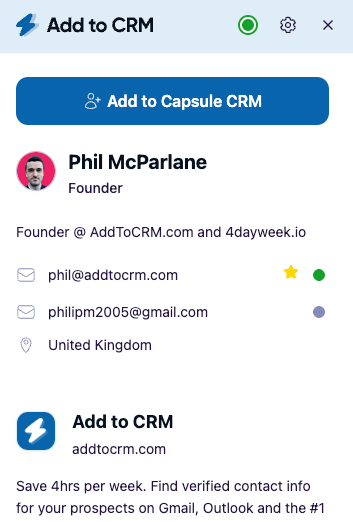
One important honesty point: Add to CRM is not a database you buy and manage. It's the capture-and-enrich workflow that gets a verified contact into your CRM in a click. We're the last mile, not a replacement for a contact database — and for a HubSpot-committed team that specifically wants HubSpot conversation logging and HubSpot-native workflows, Hublead's specialized depth may still suit them better. Add to CRM's edge is breadth: the same motion works across 29+ CRMs and across the inbox, not just one platform.
Hublead vs Add to CRM at a glance
| Hublead | Add to CRM | |
|---|---|---|
| What it is | Chrome extension bridging a business network and HubSpot | Chrome extension that enriches a contact and adds it to your CRM |
| CRMs supported | HubSpot only | 29+ CRMs (HubSpot, Salesforce, Pipedrive, Zoho, Capsule, Close, Monday, Attio, and more) |
| Credit model | Monthly email enrichment credits (roughly 50–6,000 by tier) | 250 credits/month (Standard) or 1,000/month (Pro), monthly |
| Typical monthly cost | Free, then $32 / $64 / $112 per seat (as of July 2026 — check their site) | ~£23/€25/$29 (Standard, 250 credits); Pro higher |
| Surfaces | Business network only | Business networks, Gmail, and Outlook |
| Phone credits | Email-focused enrichment | Verified mobile numbers included, no 10× phone penalty |
| Free trial / plan | Free plan plus paid tiers | 7-day free trial, then paid (no free plan) |
The table makes the choice concrete. Hublead wins on HubSpot-native depth and a genuine free tier; Add to CRM wins on CRM breadth, inbox coverage, and a credit model that doesn't inflate the cost of a phone number.
Who should choose which
Choose Hublead if you only use HubSpot — and intend to keep it that way. If HubSpot is your single system of record, you want LinkedIn conversations logged natively against HubSpot contacts, and you value a free entry point, Hublead is a strong, focused fit. Its specialization is exactly what a HubSpot-committed team wants, and pretending otherwise would be unfair. For that buyer, Hublead may genuinely fit better than a general tool.
Choose Add to CRM if your stack isn't a single CRM — or might not stay one. If you run HubSpot alongside another CRM, if you're an agency or consultant serving clients on different systems, or if there's any real chance you'll migrate off HubSpot, a single-CRM connector is a risk you don't need to take. Add to CRM gives you one subscription across 29+ CRMs, so the tool survives a CRM change. It's also the better pick if a lot of your prospects first reach you in Gmail or Outlook rather than on a business network, since Add to CRM captures and enriches from the inbox too — something a business-network-to-HubSpot bridge isn't built for.
Choose Add to CRM if verified phone numbers and 20+ data points matter as much as email. Hublead's enrichment centres on email; if your reps live and die by mobile numbers and richer firmographics, a workflow that treats phone as a first-class reveal — without a 10× credit penalty — will stretch further.
If you're weighing single-CRM connectors more broadly, it's worth reading our LinkMatch review too — it's another business-network-to-CRM extension with a very different (per-CRM) pricing model, and the same "how many CRMs does this actually cover?" question applies.
29+ CRMs supported. Try free for 7 days
Add to CRM finds verified emails, phone numbers, and job titles on LinkedIn® — then adds them to your CRM in one click.
Start Free TrialTrusted by 2,500+ users4.7FAQ
Is Hublead only for HubSpot?
Yes. Hublead is built specifically to bridge a business network and HubSpot, and it doesn't connect to Salesforce, Pipedrive, Zoho, or the other roughly two dozen CRMs teams commonly use. That single-CRM focus is deliberate and gives it deep HubSpot integration, but it means the tool can't follow you if you add or switch to another CRM. If you need multi-CRM coverage, an alternative like Add to CRM supports 29+ CRMs — including HubSpot — under one subscription.
Does Hublead have a free plan?
Yes. Hublead offers a free tier for basic contact import into HubSpot, then paid plans that add enrichment and automation. As of July 2026 the paid tiers are roughly $32 per seat/mo (Professional), $64 (Business, with auto-sync), and $112 (Scale) — check Hublead's site for current pricing. Add to CRM takes a different approach: there's no permanent free plan, but you get a 7-day free trial before deciding.
How much does Hublead cost?
As of July 2026, Hublead is free for basic import, then $32 per seat/mo for Professional (around 50–600 email credits), $64 for Business (auto-sync, around 500–6,000 credits), and $112 for Scale. Prices and credit allowances change, so confirm on Hublead's own site before you buy.
What's a good Hublead alternative if I don't use HubSpot?
Add to CRM is a direct alternative when HubSpot isn't your CRM — or isn't your only CRM. It captures and enriches a contact from a business network, Gmail, or Outlook and adds it to any of 29+ CRMs in one click, with verified email, phone, and 20+ data points. Instead of a HubSpot-only connector, you get one workflow that works wherever your CRM happens to be.
Does Add to CRM work with HubSpot too?
Yes. HubSpot is one of the 29+ CRMs Add to CRM supports, so you don't lose HubSpot compatibility by choosing the broader tool — you gain the option to use every other supported CRM under the same subscription. The main difference is that Hublead specializes in HubSpot-native features like conversation logging, while Add to CRM prioritizes breadth across CRMs and surfaces.
Try the multi-CRM alternative
If you want the one-click capture Hublead gives HubSpot users, but across 29+ CRMs and from Gmail and Outlook as well as your business network, start a 7-day free trial of Add to CRM. One subscription enriches a contact with a verified email, phone, and 20+ data points and adds them to your CRM in a single click — HubSpot included, and every other CRM you might move to next. See the plans on our pricing page and pick the tool that follows your stack instead of locking you into one platform.
Start saving time and closing more deals.
Find verified contact info for your prospects on LinkedIn®, Gmail and Outlook — and add them to your CRM with 1-click.

 Loading...Trusted by 2,500+ founders, SDRs & more