How to Find Your API Key in Fireberry
Learn how to easily find your API key in Fireberry. Follow our step-by-step instructions to streamline your development and boost your application's functionality.
Watch this 45 sec video on how to Find Your Fireberry API Key

To integrate Fireberry CRM with external tools, such as a Chrome extension, you’ll need to obtain your Fireberry CRM API token. This token allows secure communication between the extension and your CRM. Here’s a step-by-step guide to find and use your API token.
Steps to Access Your API Token in Fireberry CRM
Log into Your Fireberry CRM Account
Open Fireberry CRM and sign in using your credentials.Navigate to the Settings Menu
Once logged in, go to the top-right corner of the dashboard and click on your profile icon or name. From the dropdown menu, select Settings.Go to API Token Section
In the Settings menu, look for the Integrations and then the API section. Click on Find Your Token to access your personal API token.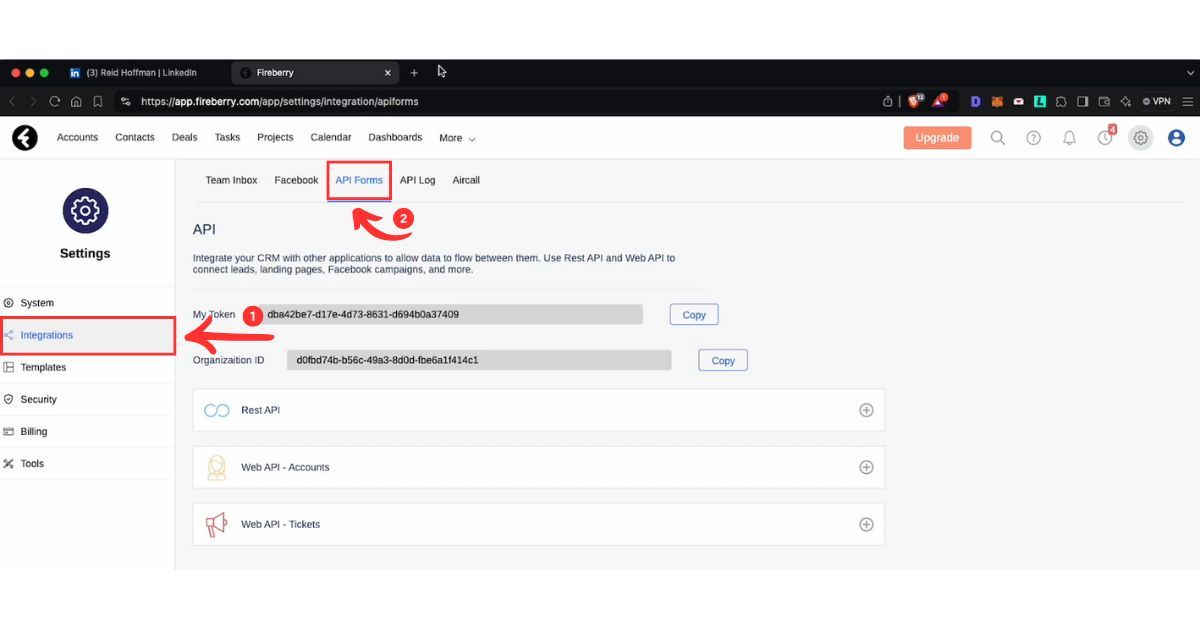
Generate or Copy Your API Token
If an API token doesn’t already exist, click on Generate New Token. Once your token is available, click the Copy button next to it.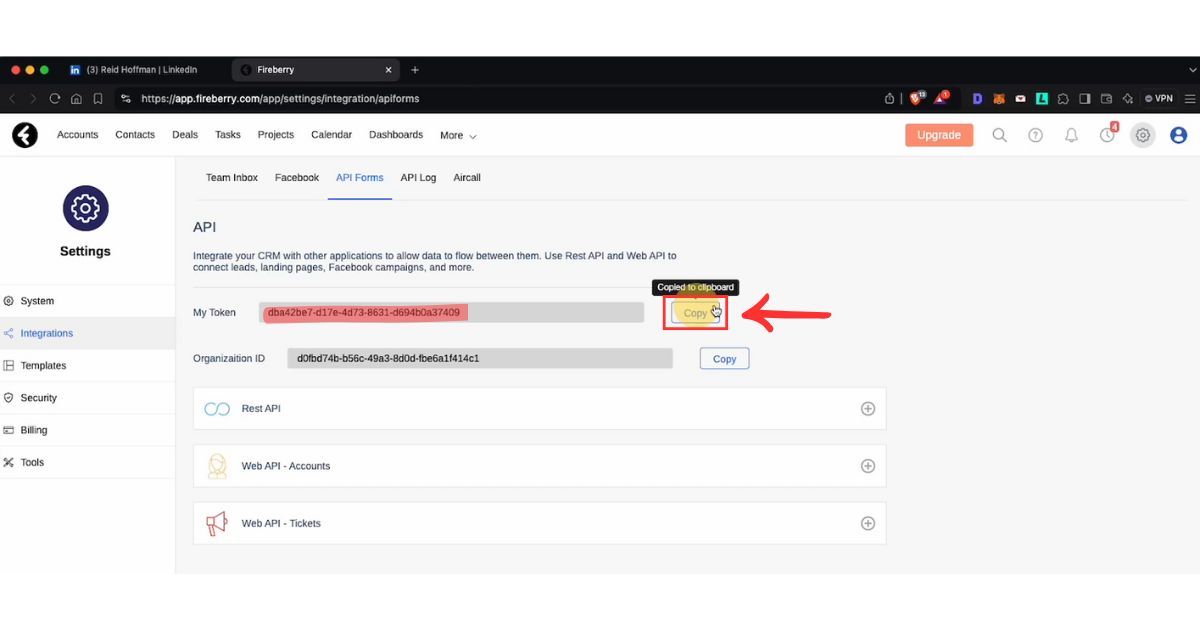
Paste Your API Token into Your Integration
Now that you have copied your API token, navigate to the tool or Chrome extension that you are integrating with Fireberry CRM. Paste the token into the appropriate field when prompted.Pin the Chrome Extension for Easy Access
For quicker access, you can pin the Fireberry Chrome extension to your toolbar by clicking on the puzzle icon in Chrome and selecting Pin next to the extension.
That’s it! You’ve successfully located and copied your API token in Fireberry CRM.
For direct access, you can navigate to your API token settings at: https://app.fireberrycrm.com/settings/api-tokens.
 Fireberry Integration
Add contacts to Fireberry from LinkedIn®
Enrich profiles with verified emails and phone numbers. Sync to Fireberry in one click.
Try Fireberry Extension7-day free trial · Cancel anytime
Save 4+ hrs / week on Fireberry data entry.
Find verified contact info for your prospects on LinkedIn®, Gmail, Outlook & company websites. Add them to your Fireberry with 1-click.
 Loading...


 Trusted by 2,500+ founders, SDRs & more