Add to CRM logo
  • Home
  • Integrations
  • Pricing
  • Contact

logo

Find verified contact info for your prospects on professional networks and add them to your CRM with 1-click.

Save 4hrs / week on CRM data entry.

Integrations

  • 1CRM
  • ActiveCampaign
  • Agile CRM
  • Airtable
  • Attio
  • CapRaise
  • Capsule CRM
  • Close CRM
  • Copper CRM
  • Fireberry
  • Freshworks
  • Gold-Vision
  • Google Sheets
  • HighLevel
  • HubSpot
  • Insightly
  • Keap
  • Less Annoying CRM
  • Monday CRM
  • Nimble CRM
  • Notion
  • Nutshell CRM
  • Ontraport
  • Pipedrive
  • Pipeline CRM
  • Pipeliner
  • Salesflare
  • Salesmate
  • Solve CRM
  • Spotler
  • Zendesk Sell
  • Zoho
  • CRM Chrome Extensions

How to use CRMs

  • How to Use Zoho CRM in 2026: Setup & Contacts Guide
  • How to Use Zendesk Sell in 2026: Setup & Sales Guide
  • Show all

How to Import Contacts

  • How to Import Contacts into Pipeline CRM
  • How to Import Contacts into Monday.com
  • Show all

How to Merge Duplicates

  • How to Merge Duplicates in ActiveCampaign
  • How to Merge Duplicates in 1CRM
  • Show all

How to Export Contacts

  • How to Export Contacts from Zoho
  • How to Export Contacts from Airtable
  • Show all

Alternatives

  • 6 Best Surfe Alternatives in 2026 (Free & Paid)
  • 6 Best LinkMatch Alternatives in 2026 (Free & Paid)
  • Show all

How to Find API Keys

  • How to Find Your API Key in Close.com
  • How to Find and Use Your Zoho API Token
  • Show all

Guides

  • 8 Cold Emailing Examples That Actually Get Replies in 2026
  • Top 10 Sales Prospecting Best Practices for 2026
  • Show all

Tools

  • 12 Best SalesQL Alternatives for Prospecting in 2026
  • 12 Best Data Enrichment Tools in 2026 (Ranked)
  • Show all

Calculators

  • Sales Commission Calculator
  • CRM ROI Calculator
  • Lead Value Calculator
  • Productivity Calculator
  • Sales Pipeline Calculator
  • Show all

Company

  • Affiliate Program
  • Terms and Conditions
  • Privacy Policy
  • Opt Out
  • Legal Notice
  • Cookie policy

Add to CRM is not affiliated by, or endorsed with, LinkedIn®, Gmail, Outlook, or any CRM. All trademarks remain property of their respective owners.

Sellframe Ltd © 2026 All Rights Reserved

  • instagram
  • facebook
  • threads
  • twitter
  • youtube
  • tiktok
  • linkedin

How to Find Your API Key in SalesMate

Learn how to easily find your API key in SalesMate. Follow our detailed instructions to enhance your workflow and streamline your integrations today.

Published on August 13, 2025

arrow

To integrate your SalesMate CRM with third-party tools and extensions, you will need to access your API key. This guide will walk you through the steps to find and copy your API key in SalesMate.

Steps to Access Your API Key in SalesMate

  1. Log into Your SalesMate Account
    Navigate to SalesMate CRM and sign in using your credentials.
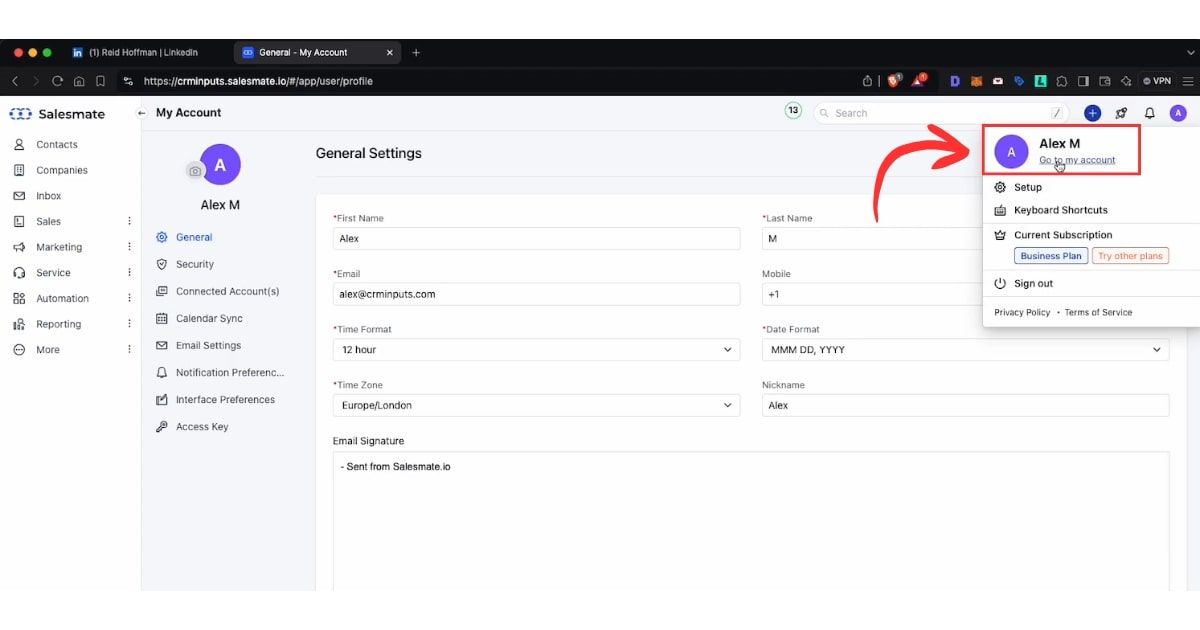
  2. Access the User Menu
    In the top right corner of your SalesMate dashboard, click on your user profile icon.
  3. Go to “My Account”
    From the dropdown menu, select “My Account” to enter your account settings.
    Find API Keys
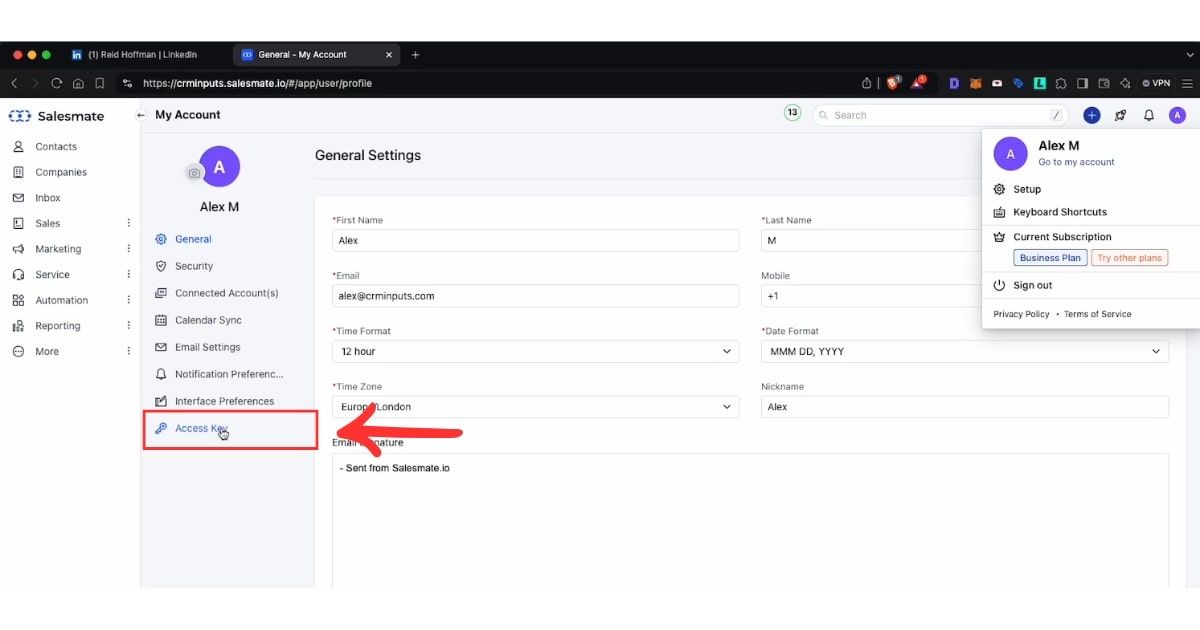
  4. Navigate to the “Access Key” Section
    On the left-hand sidebar, locate and click on “Access Key.” This is where you will find your API keys.
    Find API Keys
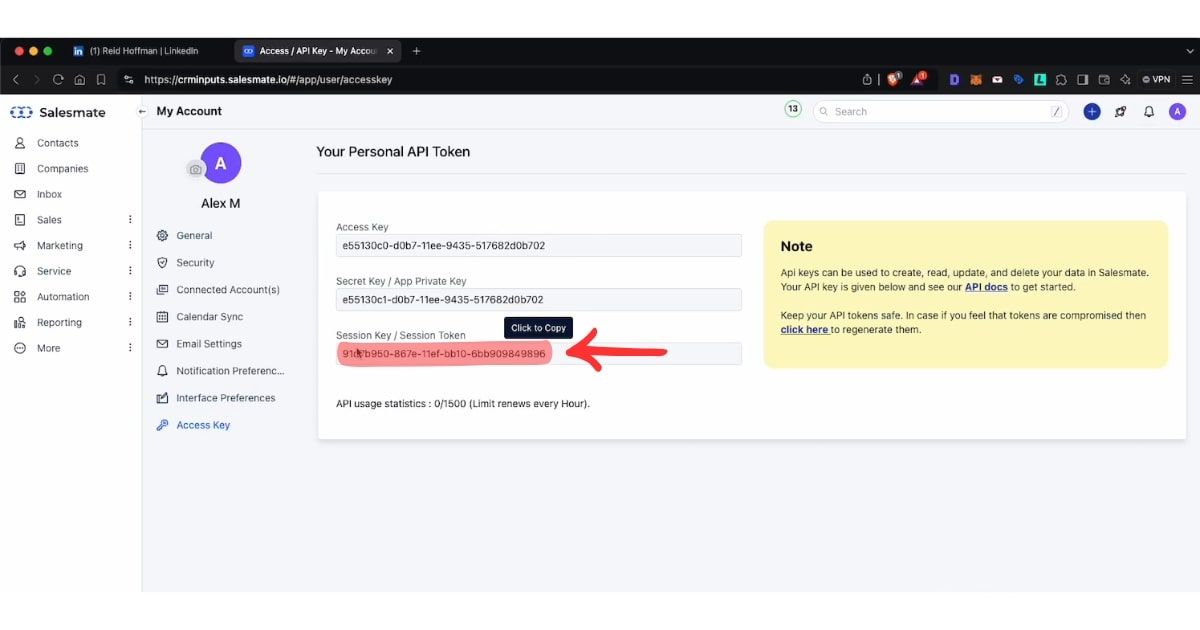
  5. Copy the Session Key
    In the “Access Key” section, find the Session Key. This is the key you need to integrate with external tools. Click on the “Copy” button next to the Session Key to copy it to your clipboard.
    Find API Keys
  6. Use the Key in Your Integration
    Paste the copied session key into the required field of the application or integration you’re setting up.

And that’s it! You’ve now successfully accessed your SalesMate API key.

For more information or to access your API key, you can visit your SalesMate account settings directly at: https://app.salesmate.io/settings/developer/api-keys/

Save 4hrs / week on Salesmate data entry.

Find verified contact info for your prospects on LinkedIn®, Gmail, Outlook & company websites. Add them to your Salesmate with 1-click.

arrow
chrome iconLoading...
arrow

Trusted by 1000s of founders, SDRs & more

starstarstarstarstar




