LeadIQ Pricing (2026): Credits, Rollover & the Alternative
LeadIQ pricing explained — the Pro plan, universal credits, why unused credits don't roll over, and how Add to CRM compares for multi-CRM teams.
LeadIQ is a sales-prospecting platform built for outbound SDR teams. You capture a contact from a business network profile, LeadIQ verifies the email, and it pushes the record into your CRM or sales sequencer — then keeps watching for job changes and champion moves so your reps can re-engage a warm buyer at a new company. It sits on a database the company reports at 749M+ contacts, and it's genuinely good at the high-volume prospecting job it was designed for.
But its pricing has one detail that catches small teams off guard, and it's the single sharpest fact worth knowing before you buy: LeadIQ credits do not roll over. Whatever you don't spend in a billing cycle disappears. This article breaks down what LeadIQ costs in 2026, how its universal-credit model works, and how Add to CRM compares if you want a simpler capture-into-CRM workflow across more CRMs.
Pricing is a July 2026 snapshot — check LeadIQ's site for current numbers.
TL;DR: Pick LeadIQ if you run a high-volume outbound SDR motion, live inside a sales sequencer, and want job-change alerts and deep prospecting on one core CRM. Pick Add to CRM if you want to capture and enrich a verified contact into any of 29+ CRMs (plus Gmail and Outlook), on a simple monthly credit pool, without paying a 10× penalty every time you reveal a phone number.
What is LeadIQ?
LeadIQ is a B2B prospecting and contact-data platform aimed squarely at sales development teams. Its Chrome extension lets a rep open a prospect's business network profile, reveal a verified work email (and, for more credits, a mobile number), and sync that contact directly into a CRM or an outbound sequencer like Outreach or Salesloft. On top of the capture flow, LeadIQ layers the features that outbound teams actually care about: job-change tracking (so you know when a former champion lands somewhere new), buyer-intent signals, and AI-assisted message drafting.
Give LeadIQ full credit here — this is a real strength. For a team whose whole day is booking meetings — building lists, firing sequences, chasing warm signals — LeadIQ's job-change alerts, sequencer integrations, and email accuracy are built for exactly that motion. It's a prospecting engine, not a light browser add-on, and it's priced like one.
The trade-off is that LeadIQ is optimised for that one persona. If your job isn't "run 200 outbound touches a day" — if you're a founder, a consultant, an account manager, or a small team that just wants clean contacts landing in whatever CRM you happen to use — a lot of what you pay for goes unused, and the credit model works against you.
LeadIQ pricing & credits
Here's how LeadIQ's plans break down (all figures as of July 2026 — check LeadIQ's site for current pricing, because they change this):
- Free — a free plan with roughly 50 credits, enough to trial the extension and capture a small number of contacts.
- Pro — approximately $200/mo. This is now the entry paid tier. The older, cheaper "Essential" plan (which used to start around $36/mo) has been discontinued, so the jump from free to paid is a big one.
- Enterprise — custom pricing, negotiated per seat count and data volume.
- Annual billing runs roughly 25% cheaper than paying monthly.
The mechanic that matters most is how LeadIQ counts usage. It runs on universal credits, and the two reveal types are not priced equally: an email costs 1 credit, and a phone number costs 10 credits. So a single contact where you want both an email and a mobile number is effectively 11 credits, and a phone-heavy prospecting week burns your allowance an order of magnitude faster than an email-only one.
Now the wedge — the thing to model carefully before you commit — LeadIQ credits do not roll over. They reset at each billing cycle. If you buy a plan sized for 200 credits and a slow month means you only use 120, the other 80 don't carry forward — they expire, and you start the next month back at zero. Combine that with the 10× phone multiplier and the maths gets unforgiving for anyone with lumpy, seasonal, or lighter-touch prospecting: you either over-buy to cover your busiest week and waste credits in your quiet ones, or you right-size for the average and run dry exactly when a big push lands.
That's the honest value case for a monthly-pool alternative. Add to CRM's Standard plan gives you 250 credits every month for around £23 / €25 / $29 (as of July 2026 — check our pricing page), with Pro at 1,000 credits/month, and — crucially — phone reveals are not charged at a 10× multiplier. A phone number doesn't quietly cost you ten emails' worth of allowance. For a small team, that's a far more predictable line item than a non-rolling universal-credit pool.
Where LeadIQ is strong — and where it's limited
Reviewers consistently praise LeadIQ for the things a dedicated prospecting tool should nail: fast capture straight from a profile, solid email verification, tight integrations with sequencers, and the job-change and intent signals that make outbound feel less like cold guesswork. If your SDRs live in Outreach or Salesloft all day, that native, workflow-deep integration is a genuine reason to choose it.
Where reviewers report friction is mostly the pricing model and its fit outside the core use case. The most common complaints cluster around the non-rolling credits and the sticker jump from the free plan to a ~$200/mo Pro tier now that the cheaper Essential option is gone — which can make LeadIQ feel like overkill for a light or occasional user. Phone-number coverage and the 10× credit cost also draw comment, since a mobile reveal eats into your allowance quickly. And because LeadIQ is tuned for the SDR-sequencer stack, teams whose real need is simply "get this verified contact into my CRM" sometimes find they're paying for a prospecting platform when they wanted a capture tool.
None of that makes LeadIQ a poor product — it makes it a specialised one. The question is whether your workflow matches the persona it was built for.

Turn LinkedIn® profiles into CRM contacts
Add to CRM finds verified emails, phone numbers, and job titles on LinkedIn® — then adds them to your CRM in one click.
Start Free Trial


 Trusted by 2,500+ users4.7
The alternative: Add to CRM
If your core job is capturing a real person you're already looking at — on a business network, or in your Gmail or Outlook inbox — enriching them, and getting them into your CRM cleanly, that's the exact job Add to CRM is built for.
Here's the honest framing, because it matters: Add to CRM is not a database. We don't sell access to a 749M-contact warehouse the way LeadIQ does, and we're not trying to replace one. Add to CRM is the last-mile workflow — the capture-and-enrich step that turns a profile or an email thread into a complete, verified CRM record in one click. Behind the scenes we draw on established enrichment sources to fill in a verified email, a phone number, and 20+ data points, verify the email in real time to cut bounces (we see around 96% email verification accuracy), and write the finished contact straight into your CRM.
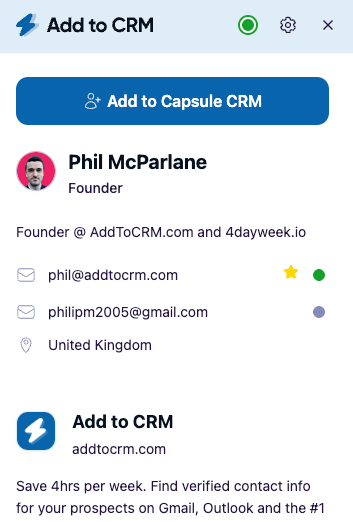
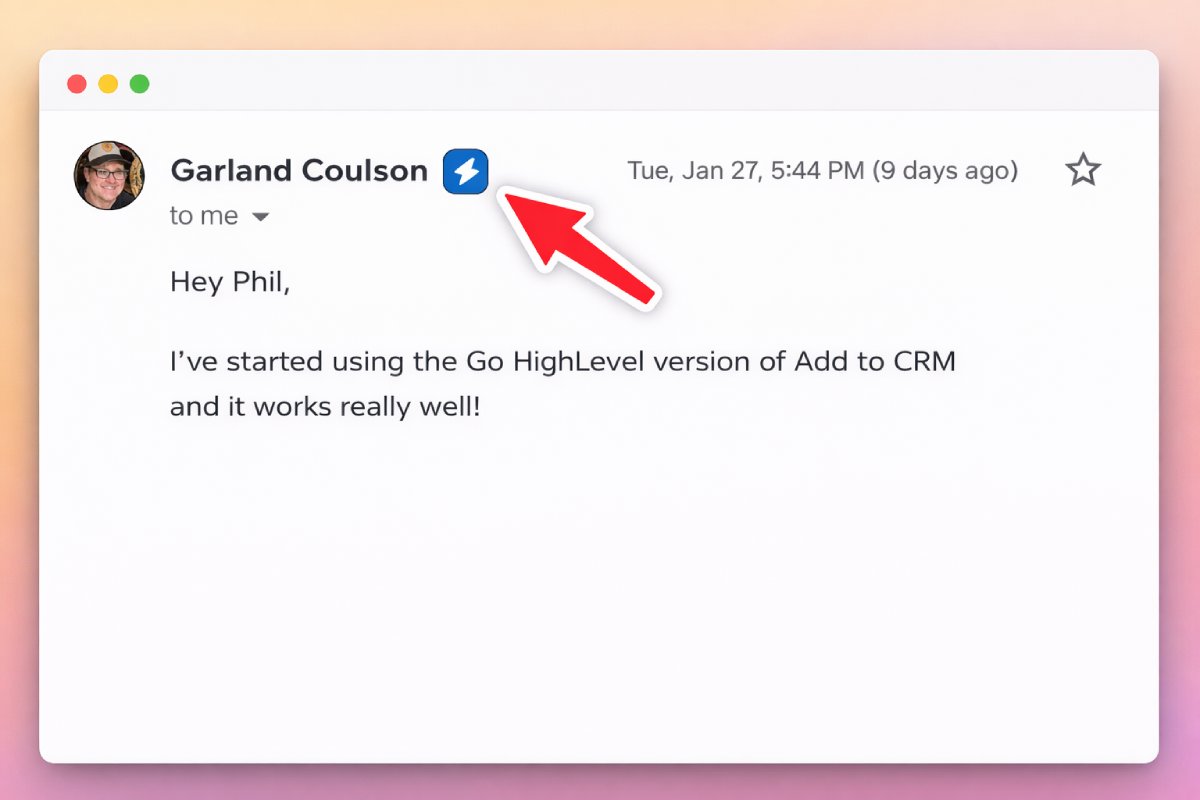
The two structural differences from LeadIQ are breadth and simplicity. Breadth: one Add to CRM subscription covers 29+ CRMs — Capsule, Zoho, Monday, Close, Pipedrive, Nutshell, Salesflare, Copper, HubSpot, Attio, folk, Google Sheets, and many more — plus it works in Gmail and Outlook, not just on a profile page. Simplicity: your credits are a single monthly pool, and phone reveals don't carry a 10× surcharge, so you can actually predict what a month costs.
For teams who do want the LinkedIn-heavy prospecting angle, Add to CRM's Pro plan adds Sales Navigator support and automatic LinkedIn DM sync through the user's own connected account — the compliant route, not scraping. But the heart of the product is the same for everyone: see a contact, enrich it, add it to your CRM.
LeadIQ vs Add to CRM at a glance
| LeadIQ | Add to CRM | |
|---|---|---|
| What it is | SDR prospecting platform + enrichment, on a database of 749M+ contacts | Capture-and-enrich-into-CRM workflow (not a database) |
| CRMs supported | Syncs to major CRMs and sales sequencers (SDR stack) | 29+ CRMs |
| Credit model | Universal credits, no rollover; email = 1, phone = 10 | Monthly credit pool (250 or 1,000/mo); no 10× phone multiplier |
| Typical monthly cost | Free (~50 credits); Pro ≈ $200/mo; Enterprise custom | ~£23 / €25 / $29 (Standard, 250 credits) or Pro (1,000/mo) |
| Surfaces | Business network (LinkedIn) profiles via Chrome extension | Business networks (LinkedIn), Gmail, and Outlook |
| Phone credits | 10 credits per phone reveal | Included; not charged at a 10× rate |
| Free trial / plan | Free plan (~50 credits) | 7-day free trial, then paid — no free plan |
All figures as of July 2026 — check LeadIQ's site for current pricing.
Who should choose which
Choose LeadIQ if you run a dedicated outbound SDR team, live inside a sequencer like Outreach or Salesloft, want job-change and intent signals feeding your list-building, and your prospecting volume is high and steady enough to burn through a large monthly credit block without leaving much on the table. If deep, single-stack prospecting is the job and the ~$200/mo Pro tier fits your budget, LeadIQ is built for you and does that job well.
Choose Add to CRM if you want the capture-and-enrich-into-CRM step to be simple, predictable, and broad. That includes founders and small sales teams who use a CRM outside the usual SDR shortlist, account managers and consultants who work as much from the inbox as from a profile, agencies juggling several clients' CRMs, and anyone whose prospecting is lumpy enough that non-rolling credits would sting. If you need 29+ CRMs, Gmail and Outlook capture, and phone reveals that don't cost 10× an email, that's the wedge — and you can weigh it directly on our LeadIQ alternative page.
One honest caveat: if you specifically want a large standalone contact database to search and build lists from — independent of any CRM — that's LeadIQ's world, not ours. Add to CRM is the workflow that gets a verified contact into your CRM; it isn't a database you query.
29+ CRMs supported. Try free for 7 days
Add to CRM finds verified emails, phone numbers, and job titles on LinkedIn® — then adds them to your CRM in one click.
Start Free TrialTrusted by 2,500+ users4.7FAQ
How much does LeadIQ cost in 2026? LeadIQ offers a free plan with roughly 50 credits, a Pro plan at approximately $200/mo, and custom Enterprise pricing. Annual billing is around 25% cheaper than monthly. The older, lower-cost Essential plan (around $36/mo) has been discontinued, so Pro is now the entry paid tier. These are July 2026 figures — check LeadIQ's site for current pricing.
Do LeadIQ credits roll over? No. LeadIQ's universal credits reset at each billing cycle, and unused credits expire rather than carrying forward. If you buy a plan sized for 200 credits and only use 120 in a slow month, the remaining 80 are lost. This is the detail most worth modelling before you commit, especially if your prospecting volume varies month to month.
How do LeadIQ's phone credits work? LeadIQ uses one universal credit pool, but reveal types aren't priced equally: an email costs 1 credit and a phone number costs 10 credits. A contact where you want both is effectively 11 credits, so phone-heavy prospecting drains your allowance roughly ten times faster than email-only capture. Add to CRM, by contrast, doesn't apply a 10× multiplier to phone reveals.
Is Add to CRM a good LeadIQ alternative? For the capture-and-enrich-into-CRM workflow, yes. Add to CRM writes a verified contact — email, phone, and 20+ data points — into any of 29+ CRMs in one click, works in Gmail and Outlook as well as on business network profiles, and runs on a simple monthly credit pool. The important difference is that Add to CRM is not a standalone prospecting database like LeadIQ's 749M-contact platform; it's the last-mile workflow, not a warehouse you query.
Does Add to CRM have a free plan like LeadIQ? No. LeadIQ offers a free tier; Add to CRM runs on a 7-day free trial and then a paid subscription, with no permanent free plan. The trial lets you test the full capture-and-enrich flow across your CRM before you decide.
Try the multi-CRM alternative
If LeadIQ's non-rolling credits, 10× phone cost, or SDR-sequencer focus don't fit how you actually work, Add to CRM is the simpler last-mile alternative: capture a verified contact — email, phone, and 20+ data points — and add it to any of 29+ CRMs in one click, from a business network profile or straight from Gmail and Outlook, on a predictable monthly credit pool. Start with a 7-day free trial by installing Add to CRM, and see the full plans on our pricing page.
Start saving time and closing more deals.
Find verified contact info for your prospects on LinkedIn®, Gmail and Outlook — and add them to your CRM with 1-click.

 Loading...Trusted by 2,500+ founders, SDRs & more