A Guide to Overcoming CRM Implementation Challenges
Struggling with CRM implementation challenges? Learn to navigate the 5 biggest hurdles, from poor user adoption to bad data, for a successful launch.
You’ve probably heard the horror stories. CRM projects are notorious for going off the rails, with failure rates hovering anywhere between a cringe-worthy 20% and 70%. Most of these grand plans stumble long before they ever have a chance to deliver a return on investment.
Why CRM Projects Fail Before They Even Start
A new Customer Relationship Management (CRM) system is supposed to be the high-performance engine that drives your business forward. But for too many companies, that shiny new engine never even makes it out of the garage. The road to a successful CRM is littered with common, easily underestimated potholes that can derail a project from day one.

Think of it like building a custom race car. The CRM software is your powerful V8 engine. But that engine is completely useless if you try to run it on contaminated fuel (bad data) or if your drivers (your team) have no idea how to work the clutch and stick shift. You’re not going to win any races; you’re just headed for an expensive breakdown.
Understanding The Core Hurdles
Many leaders get tunnel vision, focusing only on the tech itself. They completely miss the human and process elements that are almost always the real culprits behind a failed implementation. The biggest challenges aren't technical glitches; they're strategic fumbles that happen long before anyone clicks "go-live."
The success of a CRM project has far less to do with the software’s feature list and much more to do with the organization’s readiness to actually use it. The tech is just a tool. It's the people and processes that truly determine the outcome.
To get this right, you have to know what you’re up against from the very beginning. Before we dive deep, here’s a quick overview of the five critical hurdles that trip up most CRM projects.
The Top 5 CRM Implementation Hurdles at a Glance
| Challenge | Primary Cause | Biggest Business Impact |
|---|---|---|
| Data Quality | "Garbage in, garbage out" from legacy systems or manual entry. | Misleading reports and poor decision-making. |
| User Adoption | Resistance to change and workflows that feel clunky. | The CRM becomes an expensive, unused database. |
| Customization Scope | Trying to make the CRM do everything for everyone. | Budget overruns and a complex, hard-to-maintain system. |
| Integration | Disconnected systems that don't share data properly. | Inefficient workflows and an incomplete customer view. |
| Governance | No clear rules for data entry or system maintenance. | Data chaos that gets worse over time. |
This guide is your playbook for navigating these challenges. We'll break down each one and give you a clear, step-by-step plan to make sure your CRM investment actually accelerates your business instead of becoming another costly roadblock.
Solving the User Adoption Crisis
You can have the most powerful, feature-rich CRM on the planet, but it’s completely worthless if your team won’t use it. This isn't just a small snag; it’s the single biggest reason multi-million dollar CRM projects crash and burn. The problem isn’t about the technology—it’s about people, habits, and friction in their daily workflow.

Let’s be honest: teams resist tools that feel like a burden. When a sales rep has to spend 15 minutes after every call manually copy-pasting data from one window to another, the CRM stops feeling like an assistant and starts feeling like a micromanager. This friction builds up, day after day, leading to empty dashboards, unreliable data, and a massive, wasted investment.
The reality is stark. Studies show a shocking 20–70% of CRM projects fail outright. The top culprit? Poor user adoption, which accounts for 38% of all cases. Digging deeper into over 400 implementations, you'll find that over 60% of failures are tied directly to 'people' issues like bad change management, while pure tech glitches cause a mere 6% of failures.
Why Teams Resist New CRM Tools
Resistance to a new CRM almost never comes from a bad place. It’s a logical, practical response to a tool that creates more work than it saves. When your team pushes back, it’s usually because they’re hitting real, tangible roadblocks with the system you’ve rolled out.
Here are the most common reasons user adoption stalls:
- Death by a Thousand Clicks: Forcing reps to constantly switch tabs to manually type in contact details, company info, and call notes is a productivity killer. It’s the fastest way to make them hate the very system designed to help them.
- The "What's In It For Me?" Gap: If the main benefit of the CRM is better reporting for management, your front-line users will see it as a surveillance tool, not a sales tool. The value has to be crystal clear for every single person who has to log in.
- A Confusing, Clunky Interface: A cluttered or unintuitive UI creates a massive learning curve. If people can't figure out how to do basic tasks quickly, they'll just go back to their old spreadsheets. Every time.
The Playbook for Enthusiastic Adoption
To get past these roadblocks, you need to shift your mindset from enforcement to empowerment. Your goal is to make the CRM an indispensable ally that simplifies daily tasks, not one that complicates them. This means building a smart adoption plan from day one.
And that involves more than a one-off training session; it requires a real understanding of how to effectively use CRMs to actually drive business value.
A CRM should feel like a secret weapon, not a chore. The moment it saves a user more time than it costs them, you’ve won the adoption battle. The key is to find and eliminate every point of friction in their daily workflow.
Follow these steps to build real momentum and get your team excited to use the new system.
Step 1: Communicate the Personal Value
Before you even start training, talk about the direct benefits for each role. Forget high-level business goals for a minute and get personal.
- For Sales Reps: "This tool will save you an hour of data entry every single day. That’s more time you can spend actually selling and hitting your commission targets."
- For Marketers: "With clean data flowing in automatically, you can build laser-focused segments and run campaigns that actually convert—without spending days cleaning lists first."
- For Customer Support: "You'll have a complete history of every customer interaction in one place. That means you can solve tickets faster and make customers happier."
Step 2: Involve Stakeholders Early and Often
Don't build in a silo. Bring key users from each department into the planning process from the beginning. Ask them about their biggest daily frustrations and let them help you design workflows that solve those specific problems. When people feel a sense of ownership, they become champions for the new system instead of its biggest critics.
Step 3: Eliminate the Friction of Data Entry
The single most powerful thing you can do to drive adoption is to make getting data into the CRM ridiculously easy. Tools that offer one-click data capture from social platforms or email are absolute game-changers here.
This is where a tool like Add to CRM comes in. It lets a user turn a prospect’s profile into a complete, enriched CRM record in an instant. This one simple action delivers a triple win:
- Lowers the Barrier to Entry: It completely removes the tedious copy-paste work that everyone hates, making the CRM feel instantly useful.
- Provides Immediate Time Savings: Users get valuable time back right away, which reinforces the CRM’s role as a productivity booster, not a time sink.
- Ensures Data Quality: By automating data capture, you also slash the risk of human error, leading to cleaner, more reliable information from day one.
By tackling the user adoption crisis with a people-first strategy, you can turn your CRM from an expensive database into the true central nervous system of your entire revenue engine.
1. Winning the Battle for Data Quality
Of all the challenges that can derail a CRM implementation, poor data quality is the most dangerous. It’s like a silent poison, corrupting your system from the inside out until your entire investment is sitting on a foundation of bad information. This is the classic "garbage in, garbage out" problem, and it's where most CRM dreams go to die.
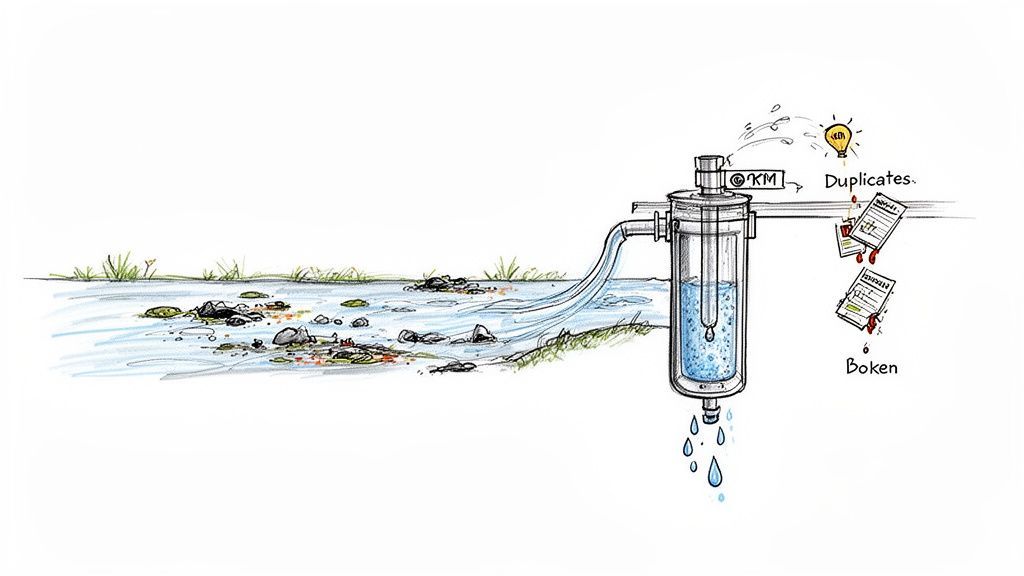
Think of your brand-new CRM as a high-tech water filter. No matter how sophisticated it is, if you pour polluted water into it, you’ll get polluted water out. Bad data is that pollution—it messes up your reports, kills your sales forecasts, and destroys your team's trust in the very tool meant to be their guide.
And this isn’t just a small hiccup. Poor data quality is a major player in the CRM failure game, contributing to 18% of the roughly 70% overall project failure rate. When you learn that 23% of users say manual data entry is their biggest headache and 88% of sales pros believe accurate info is critical to closing deals, the business impact becomes crystal clear. You can dig deeper into these numbers and how they relate to the people-process-technology framework here.
The Common Sources of Data Pollution
Bad data doesn't just materialize out of thin air. It creeps into your CRM from a few predictable places, usually starting as a tiny leak before turning into a full-blown flood. Knowing where it comes from is the first step to stopping it.
Common culprits include:
- Manual Entry Errors: The most common source, by far. Simple typos in an email, a misspelled company name—every time a human manually types something in, there's a chance for error.
- Data Decay: Information gets old, fast. People switch jobs, companies merge, and phone numbers change. Without a plan to keep data fresh, your CRM quickly becomes a museum of outdated facts.
- Inconsistent Formatting: One rep enters "United States," another types "USA," and a third puts "U.S." This tiny difference creates duplicate records and makes it impossible to segment your audience properly.
- Duplicate Records: This happens all the time. Multiple reps add the same contact or company, creating a fractured view of the customer spread across several incomplete profiles.
The Playbook for Pristine Data
To win this fight, you need to stop thinking reactively ("let's clean it up later") and start thinking proactively. The goal is to prevent bad data from ever getting into your CRM in the first place. This means setting up a single source of truth and automating your data hygiene from day one.
Your CRM must be the undisputed, single source of truth for all customer information. The moment your team starts questioning the data's accuracy, they'll stop trusting the system—and user adoption will nosedive. Data integrity isn’t just a tech goal; it's a requirement for trust.
Start by creating a simple but strict data governance plan. This document should outline clear standards for data entry, assign responsibility for data quality, and set a regular schedule for health checks. Once you've got the rules, you can use technology to enforce them.
Implementing Automated Data Hygiene
The single most effective way to maintain clean data is to remove human error from the equation whenever possible. This is where automation tools become non-negotiable, turning a painful manual chore into a seamless background process.
Here’s a look at how the old, manual way of doing things stacks up against a modern, automated approach.
Data Hygiene Playbook: Manual vs. Automated
Manually cleaning CRM data is a never-ending, soul-crushing task that pulls your team away from revenue-generating activities. Automated tools, on the other hand, handle the heavy lifting in the background, ensuring data is clean from the moment it enters the system.
| Data Task | Manual Approach (The Old Way) | Automated Approach (The Smart Way) |
|---|---|---|
| New Lead Entry | Reps copy-paste info from profiles or emails, introducing typos. | One-click tools capture and format data correctly from the source. |
| Data Enrichment | Teams manually search for missing phone numbers or company details. | Systems automatically append verified contact and firmographic data. |
| Duplicate Checking | Relies on reps searching before adding a new contact (they often don't). | The system automatically flags potential duplicates before a new record is created. |
| Data Cleansing | Periodic, painful projects to merge duplicates and fix errors. | Continuous, real-time verification and cleansing happen automatically. |
By automating these tedious tasks, you not only save hundreds of hours but also ensure the data your team relies on is consistently accurate and trustworthy.
Automated solutions like Add to CRM are designed specifically to solve these problems right at the source. It lets reps capture contact info from popular websites with a single click, which slashes manual typos and guarantees data is formatted correctly from the get-go.
Even better, its built-in duplicate checks warn users if a contact already exists, stopping redundant records before they can clutter up your CRM. And once you find those duplicates, having a clear process to combine them is key. You can learn more about that in our guide on how to merge duplicate lists effectively. This preventative strategy ensures your CRM stays a clean, reliable, and powerful tool your whole company can depend on.

Find verified contact data on LinkedIn®
Add to CRM finds verified emails, phone numbers, and job titles on LinkedIn® — then adds them to your CRM in one click.
Start Free Trial


 Trusted by 2,500+ users4.7
Avoiding the Customization Scope Creep Trap
Over-customization is one of the sneakiest yet most destructive CRM implementation challenges out there. It almost always starts from a good place—someone wants to make the CRM a perfect, one-stop shop for every team’s unique needs. But this quickly spirals into scope creep, where an endless parade of requests for new fields, workflows, and features turns a sleek platform into a slow, confusing, and unmaintainable mess.
Think of your CRM like a professional toolkit. A standard kit comes with a hammer, a screwdriver, and a wrench—each tool perfectly designed for its core job. But what happens when you try to weld a saw, a drill, and a level onto that single screwdriver? You end up with an overloaded, clunky gadget that’s terrible at everything. That’s exactly what happens when a CRM gets over-customized; its main purpose gets buried under a pile of bolted-on features.
This mess usually kicks off with fuzzy requirements. Without a rock-solid understanding of what the CRM must do versus what it could do, every new idea sounds like a top priority. Before you know it, your implementation timeline is shot, your budget is blown, and the user experience tanks under the weight of all that complexity.
Defining Your Minimum Viable CRM
The best way to sidestep this trap is to define a Minimum Viable CRM (MVCRM). This isn't about launching a bare-bones system that nobody can use. It's about being ruthless with your priorities and focusing only on the core, revenue-driving processes first. Instead of asking, "What cool things can we add?" the question should be, "What is the simplest version we need to make our sales team more effective right now?"
Your MVCRM should be laser-focused on the absolute essentials:
- Lead Management: A clear, simple process for capturing, qualifying, and assigning new leads.
- Pipeline Tracking: Standardized deal stages that actually reflect how your team sells.
- Contact and Account Management: The basic data foundation of who you're selling to.
- Activity Logging: An easy way to track calls, emails, and meetings without the friction.
Everything else can wait. By launching with a lean, focused system, you deliver value much faster. More importantly, you can make smarter decisions about future enhancements based on real user feedback, not just guesswork in a boardroom.
Adopting a Simplify and Standardize Mindset
Once your MVCRM is up and running, every single request for a new feature or custom field must pass through a strict "simplify and standardize" filter. This mindset forces you to challenge the assumption that more is always better, protecting the CRM's long-term health and usability.
A well-designed CRM should guide users through a standardized process, not present them with an infinite menu of options. Customization should only be used to remove friction from a core workflow, never to add complexity for an edge case.
Before you greenlight any change, ask these hard questions:
- Is this a 'need' or a 'want'? Will this change directly move the needle on revenue or a core business metric?
- Does this benefit the many or the few? Avoid building complicated features that only one or two people will ever touch.
- Can we solve this with a better process instead of more tech? Often, a simple training session or a tweak to the workflow is a far better fix than adding another custom field.
- Is there a specialized tool for this? This is the big one. Your CRM should not be your prospecting tool, your e-signature platform, or your project management software.
Using Specialized Tools to Reduce Complexity
Trying to shoehorn every business function into your CRM is a recipe for brittle, expensive customizations that are a nightmare to maintain. A much smarter play is to integrate best-in-class tools for specific jobs. This keeps your CRM clean and focused on what it does best: managing customer relationships.
Prospecting, for instance, is a highly specialized task that demands up-to-date contact info and a lightning-fast workflow. Building a clunky, internal prospecting feature inside your CRM is just inefficient.
Instead, a dedicated tool like Add to CRM completely eliminates the need for that kind of customization. It lets your team find and capture accurate prospect data right from where they work—like a social network or their inbox—and pop it into the CRM with a single click. This approach not only keeps your CRM lean but also boosts data quality and user adoption by making a critical daily task for your sales team ridiculously simple.
Navigating the Technical Integration Maze
Your CRM is supposed to be the single source of truth for customer data, but it can't do that job alone. It has to talk to all the other tools your business relies on every day—your marketing automation platform, your email client, your customer support desk, you name it. This is where things get tricky, and where one of the biggest CRM implementation challenges pops up: technical integration.
Think of your tech stack like a city's transit system. Your CRM is the central station, the hub where everything connects. If the train lines (your integrations) leading out to the suburbs (your other apps) are broken or don't sync up, you get chaos. You have bottlenecks, stranded passengers, and a system that just doesn’t work.
In the business world, those stranded passengers are pockets of customer data, trapped in silos and unable to get where they’re needed most.
This fragmentation isn’t just an IT headache; it kills business. When your marketing platform and CRM aren't in sync, your sales team is flying blind, completely unaware of which leads are actually engaging with your campaigns. When support tickets aren't tied to a customer's CRM profile, your reps have no idea what that person's history is before they even pick up the phone. The result? A disjointed, frustrating customer experience and a total failure to achieve that 360-degree view everyone talks about.
The Pitfalls of Poor Integration
Integration failures are frustratingly common and expensive. They usually boil down to mismatched data fields, flaky API connections, or fragile custom-built connectors that break if you look at them wrong. These problems create a constant stream of issues that undermine the very reason you bought a CRM in the first place.
Here’s what that looks like in the real world:
- Broken Data Syncs: Information from one system fails to update in another, creating conflicting records. A sales rep sees a customer as "active," while the support system knows their subscription was canceled last week.
- Data Duplication: A lead from a webinar gets zapped into the CRM as a new record, even though an account for that person already exists. Now you have two contacts, creating confusion and wasting everyone’s time.
- Incomplete Information Flow: Only a few basic data fields make it from one system to another, leaving crucial context behind. A lead's detailed marketing engagement history—which emails they opened, which pages they visited—never makes it to the sales rep, crippling their ability to have a relevant conversation.
Your Playbook for Seamless Connectivity
To avoid this tangled mess, you need an integration strategy from day one. That means prioritizing simple, reliable connections over complex, custom-coded contraptions that are destined to fail. The goal is to build a solid, flexible network where data flows freely and accurately between your tools.
Think of your integration strategy as laying down the tracks before the trains start running. If you don't map out where data needs to go and ensure the connections are solid from the start, you're setting yourself up for a derailment. An API-first mindset isn't a luxury; it's a necessity.
Follow these steps to build a solid integration foundation:
- Prioritize Native Integrations: Whenever possible, choose tools that offer pre-built, officially supported integrations with your CRM. These are almost always more stable, easier to set up, and maintained by the vendors themselves, which will save you countless headaches down the road.
- Map Your Data Flow First: Before you connect a single thing, draw it out. Create a visual map of your customer data's entire journey. Pinpoint which system is the "source of truth" for what data (e.g., your marketing platform owns the lead source, your CRM owns the deal stage) and document exactly how information is supposed to move.
- Adopt an API-First Strategy: When you're looking at new software, make sure it has a well-documented and robust API (Application Programming Interface). This gives you the flexibility to build reliable connections later, even if there's no native integration available right now.
To make this process even smoother, it's wise to explore comprehensive guides that detail the best approaches. You can learn more about how to choose the right tools in our complete guide to CRM integration software.
Ultimately, the simplest integrations are often the most powerful. Instead of trying to build complex bridges between every single app, look for tools that act as a universal connector for your team. For example, tools that work directly from a browser or email client can sidestep many traditional integration hurdles, making it dead simple to get critical data into your CRM from the places your team already works.
Works with 29+ CRMs
Add to CRM finds verified emails, phone numbers, and job titles on LinkedIn® — then adds them to your CRM in one click.
Start Free TrialTrusted by 2,500+ users4.7Your CRM Implementation Readiness Checklist
Getting ahead of the common CRM implementation challenges comes down to having a structured, proactive game plan. This readiness checklist pulls together the biggest lessons learned from each potential pitfall and turns them into a practical guide for project leaders.
Use it to make sure your project is built for long-term success right from the start. By working through each area methodically, you’ll turn insights into action and build a rock-solid foundation for your new system.
Strategy and Planning
This is where you set your direction and get everyone rowing the same way. Without a clear "why," any project will eventually lose focus and momentum.
- Define Clear Business Goals: What, specifically, will this CRM fix? You need measurable outcomes, like "increase lead conversion by 15%" or "cut down sales admin time by five hours a week."
- Secure Executive Buy-In: Make sure leadership isn't just signing off on the project, but actively championing it. They need to be the ones communicating its strategic importance across the entire company.
- Identify Key Stakeholders: Get representatives from sales, marketing, and service in the room from day one. This is the only way to ensure the CRM actually meets the real-world needs of its end-users.
Data Preparation and Migration
A CRM is only as good as the data you put in it. This phase is all about laying a clean, reliable data foundation.
A successful data migration isn't just a technical task; it's a strategic imperative. Treat your data with the same care as your financial assets, because in many ways, it's even more valuable for future growth.
- Conduct a Data Audit: Get brutally honest about the quality of your existing data. Hunt down duplicates, incomplete records, and information that's gone stale.
- Establish Data Governance Rules: Create and document clear standards for how data should be entered and maintained before anyone logs into the new system.
- Plan a Phased Migration: Don't try to boil the ocean by moving everything at once. Start with a small, clean dataset to test the process, validate your field mappings, and work out the kinks.
This flow shows how data should move from its original source into your new CRM.
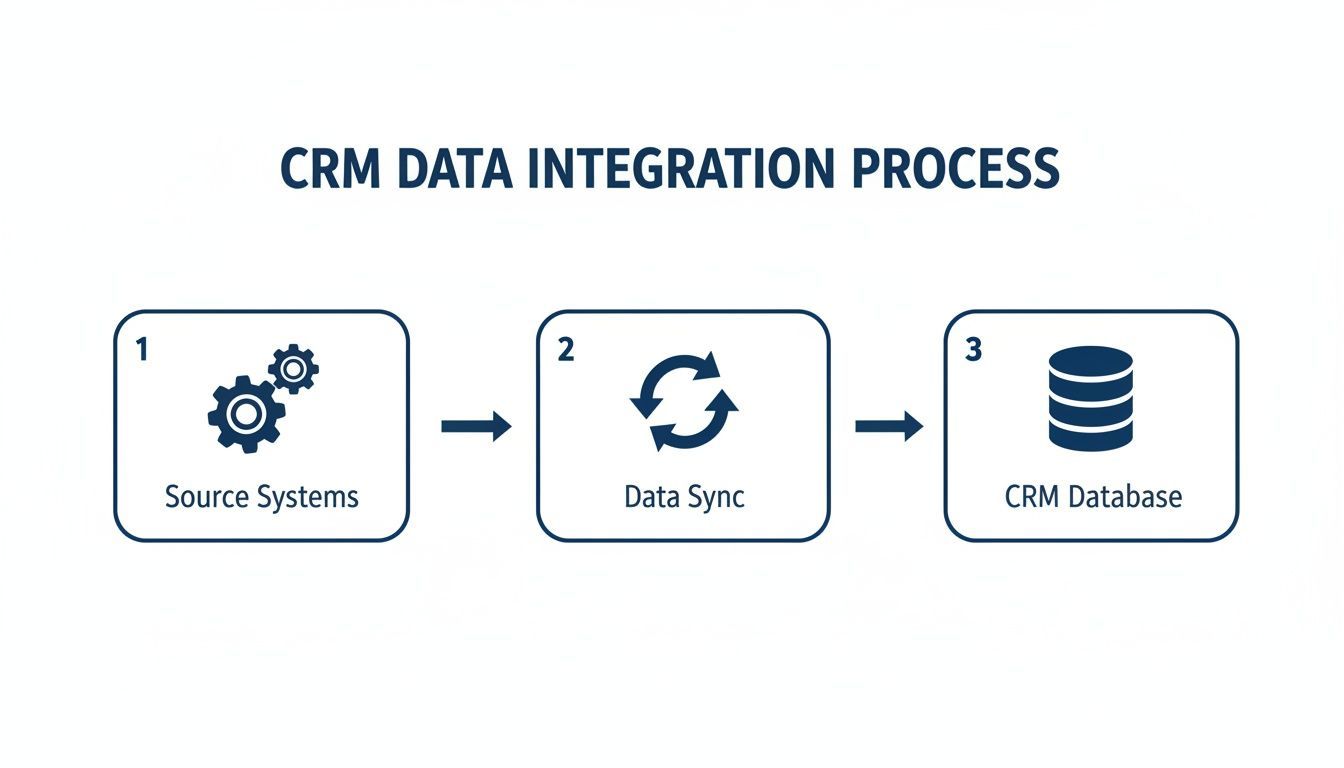
That middle "sync" step is critical. It's where data is standardized and cleaned before it hits the central database, which is your best defense against future data quality headaches.
Training and Launch Readiness
A smooth launch comes down to one thing: your team’s confidence and competence with the new tool.
- Develop Role-Specific Training: Ditch the one-size-fits-all approach. Create tailored training that shows each user exactly how the CRM makes their specific, day-to-day job easier.
- Communicate the "What's In It For Me": Adoption is driven by self-interest. Focus on the personal wins—less manual entry, easier reporting, more time selling—to get people excited.
- Establish a Support System: You need a clear plan for day one and beyond. Designate a few internal "superusers" who can act as the first line of defense and create an obvious channel for asking questions or reporting issues.
Your CRM Implementation Questions, Answered
When you're staring down the barrel of a new CRM rollout, questions are inevitable. Let's tackle some of the most common ones that pop up for leaders navigating these tricky waters.
What Is The Biggest Cause Of CRM Implementation Failure?
It's not the tech. While bugs and glitches can be a headache, the undisputed, number-one reason CRM projects fail is poor user adoption.
If your sales team isn't logging in, updating deals, and living in the system every single day, you'll get zero return on your investment. It’s that simple. That's why your energy is better spent on change management, practical training, and choosing tools that make life easier for your reps—not harder. A perfect CRM that nobody uses is just an expensive, dusty shelf.
How Long Should A CRM Implementation Take For A Small Business?
For a small business, think phases, not a massive "big bang" launch. You can get a "quick start" version focused on core sales pipeline management up and running in just 2-4 weeks.
A more complete rollout, with all your historical data migrated and a few key integrations, will likely take closer to 2-3 months. The goal is to avoid months of building in a silo. Get the basics live, let the team start using it, and listen to their feedback.
Don't chase a perfect, all-at-once launch. Focus on delivering real value quickly with a core set of features. This approach builds momentum and lets you make smarter, user-informed adjustments down the road, stopping most implementation challenges before they even start.
How Do I Justify The Cost Of Add-On Tools For Our CRM?
It comes down to two things: the cost of wasted time and the cost of bad data.
Think about it. If a simple tool saves each of your reps a few hours a week on mindless data entry, that's time they can spend on actual selling. Then, factor in the cost of bad data—wasted marketing dollars, bounced emails, and reps calling disconnected numbers. A tool that prevents duplicates and enriches records pays for itself by plugging those leaks.
The small monthly cost is a drop in the bucket compared to the huge gains in team productivity and data you can actually trust.
Ready to kill the manual data entry that tanks user adoption and poisons your pipeline? See how Add to CRM helps your team grab leads from anywhere online in a single click. Learn more about Add to CRM.
Start saving time and closing more deals.
Find verified contact info for your prospects on LinkedIn®, Gmail and Outlook — and add them to your CRM with 1-click.

 Loading...Trusted by 2,500+ founders, SDRs & more