Finding Business Emails: Proven Workflows to Scale Outreach
finding business emails: Discover proven workflows, smart tools, and compliant tactics to scale outreach and grow your pipeline.
Published on December 26, 2025
Sourcing business emails is a classic sales grind, but let's be honest—it’s often a huge time-sink plagued by bad data. The real secret isn't just working harder; it's shifting from manual, hit-or-miss prospecting to a smart, scalable system that finds and verifies contact info on the fly. This simple change doesn't just save you a few minutes; it directly fuels your outreach, pipeline, and ultimately, your revenue.
Why Finding Accurate Business Emails Is Harder Than Ever
We're swimming in a sea of digital noise, yet connecting with the right person feels tougher than ever. Old-school prospecting methods are completely breaking down, leaving sales teams to burn precious hours on manual data entry and detective work. This isn't just a minor headache. It's a direct drain on your resources and a massive hurdle to hitting quota.
The challenge isn’t just finding an email address. It's about finding the right one—the verified one that actually lands in a decision-maker's inbox.
The High Cost of Dirty Data
Dirty CRM data is the silent killer of sales productivity. Every bounced email, outdated contact, and duplicate record compounds, sending ripples of inefficiency across your entire sales floor.
- Wasted Sales Hours: How much time does your team spend digging for contact info online? That's time they could be spending engaging prospects and actually closing deals. This manual slog is not only painfully slow but also incredibly prone to human error.
- Low Deliverability: Sending campaigns to unverified lists guarantees high bounce rates. This torpedoes your sender reputation, making it even harder for your future emails to avoid the spam folder.
- Inaccurate Reporting: When your CRM is a mess, your sales forecasts and pipeline reports are pure fiction. This leads to flawed strategies and bad business decisions.
The bottom line is simple: Inefficient prospecting doesn't just slow your team down. It actively sabotages your sales and marketing by polluting your most valuable asset—your customer data.
Cutting through the digital clutter is nearly impossible without the right tools. The numbers are staggering: experts project we'll see over 376 billion emails sent daily worldwide in 2025, a figure set to climb to 408 billion by 2027. Amid this flood, inbox placement for platforms like Google Workspace dropped by 10% in early 2025, which is exactly why verified emails are non-negotiable for any serious outreach. You can dig deeper into email marketing stats over at Hostinger.
The image below perfectly captures the frustration so many sales pros feel trying to untangle messy, inaccurate contact data.

This is the reality of manual data handling—it’s messy, exhausting, and completely unsustainable for any team that's serious about growth. It’s also precisely why shifting to smarter, automated workflows isn't a luxury anymore. It’s a necessity.
To put this into perspective, let's look at the trade-offs between the old way and the new way.
Manual Prospecting vs Automated Workflows
This table breaks down the time and accuracy costs of sticking with manual methods versus adopting a dedicated tool.
| Metric | Manual Methods (e.g., Google, Social Media) | Automated Tools (e.g., Add to CRM) |
|---|---|---|
| Time per Contact | 5-10 minutes (or more) | 5-10 seconds |
| Email Accuracy | Low to moderate; prone to typos and outdated info | High (e.g., 96% verified accuracy) |
| Scalability | Extremely limited; linear effort per contact | Highly scalable; can process hundreds of contacts quickly |
| CRM Integration | Manual copy-paste; high risk of duplicates | Automated, one-click import with duplicate detection |
| Data Richness | Often just an email and name | Enriched with phone numbers, job titles, company data |
The contrast is pretty stark. While manual methods might feel "free," the hidden cost in wasted hours and bad data is enormous. Automated tools pay for themselves almost immediately by giving that time back to your reps to focus on what they do best: selling.
Mastering Manual Email Discovery Techniques
Before you even think about automated tools, you need to get your hands dirty with manual discovery. These are the foundational skills that separate the great prospectors from the good ones. They give you the resourcefulness to dig up contacts when the shiny tools come up empty. Think of it as becoming a digital detective—knowing where to look and what clues to follow.
This isn't just a backup plan; it's a way to sharpen your critical thinking. It forces you to understand a company’s structure, spot common email patterns, and really think about who you're trying to reach. Mastering these tricks will make you more effective, period.
Unlocking Emails with Advanced Search Operators
Google is your best friend here, but most people are barely scratching the surface of what it can do. Advanced search operators—simple commands you tack onto your query—cut through the noise and pinpoint publicly available contact info with surprising accuracy.
Think of these operators as a secret language that tells Google exactly what you’re looking for. Instead of a vague search, you can build a precise query to find email addresses tied to a specific person and company.
Here are a few of the most powerful operators for finding emails:
- Quotation Marks (""): Use these to search for an exact phrase.
"John Doe" emailis way more effective thanJohn Doe email. - Site Operator (site:): This narrows your search to a single website. For example,
site:company.com "john.doe@company.com"looks for that specific email only on the company's official site. - Wildcard (*): The asterisk is your placeholder. A search like
"john*@company.com"can uncover variations likejohn.d@company.comorjohndoe@company.com.
Here’s a real-world example of how you can combine operators to find specific file types, which often contain lists of contact information.
This shows how combining operators like filetype: with exact phrases can dramatically narrow your results to find precisely what you need.
Intelligently Guessing Email Formats
Most companies use a standardized pattern for their email addresses. If you can crack the code for one person, you can usually guess the email of anyone in that organization. It’s a simple but incredibly effective technique for finding business emails at scale.
Start by looking for any known email address from the company—check a press release, the "Contact Us" page, or a blog post author bio. If you come up empty, you can start testing the most common formats.
The goal isn't to guess blindly. It's about making an educated hypothesis based on common corporate structures. A little logic goes a long way here.
Let's say you're trying to reach Jane Smith at Acme Corp. (acme.com). Here are the most likely formats to try:
- First Name:
jane@acme.com - First Initial, Last Name:
jsmith@acme.com - First Name, Last Name:
janesmith@acme.com - First Name.Last Name:
jane.smith@acme.com
Once you have a list of potential emails, you must verify them. There are plenty of free online tools that can ping a server to see if an email address is valid without actually sending a message. This is a crucial final step to make sure your outreach doesn't just bounce.
But this manual process brings us to a major bottleneck. The average office worker already gets 121 business emails every single day and spends hours just managing their inbox. You can dig into more of these email engagement stats at Hostinger. When you pile on manual prospecting and data entry, productivity tanks—teams can easily lose over four hours a week on these tasks alone. This is where the trade-off between manual effort and automated efficiency becomes crystal clear.





Turn LinkedIn® profiles into CRM contacts
AddToCRM finds verified emails, phone numbers, and job titles on LinkedIn® — then adds them to your CRM in one click.
Get 5 Free LookupsHow to Automate Email Finding and Verification
Look, manual discovery techniques have their place. But let's be real—they don't scale. When you need to build a prospect list with hundreds of contacts, not just a dozen, manual searching becomes a massive bottleneck. This is where automation completely changes the game, turning a tedious, multi-hour task into a workflow that takes minutes.
The secret is using tools that plug directly into your daily routine. Instead of flipping between a dozen tabs, you can find, verify, and capture contact data right where you're already working—like on a professional networking site or a company's "About Us" page.
The Power of Browser Extensions
Browser extensions are the workhorses of modern prospecting. These little tools overlay contact data and capture functions directly onto web pages, killing the need for endless copy-pasting and manual data entry.
For a sales development representative (SDR), this is a lifesaver. Picture yourself browsing a prospect's profile on a professional network. With a single click, an extension can pull their name, title, company, and—most importantly—find and verify their business email in real time.
Manual methods follow a simple, three-step logic, which automation tools crush into a single action.
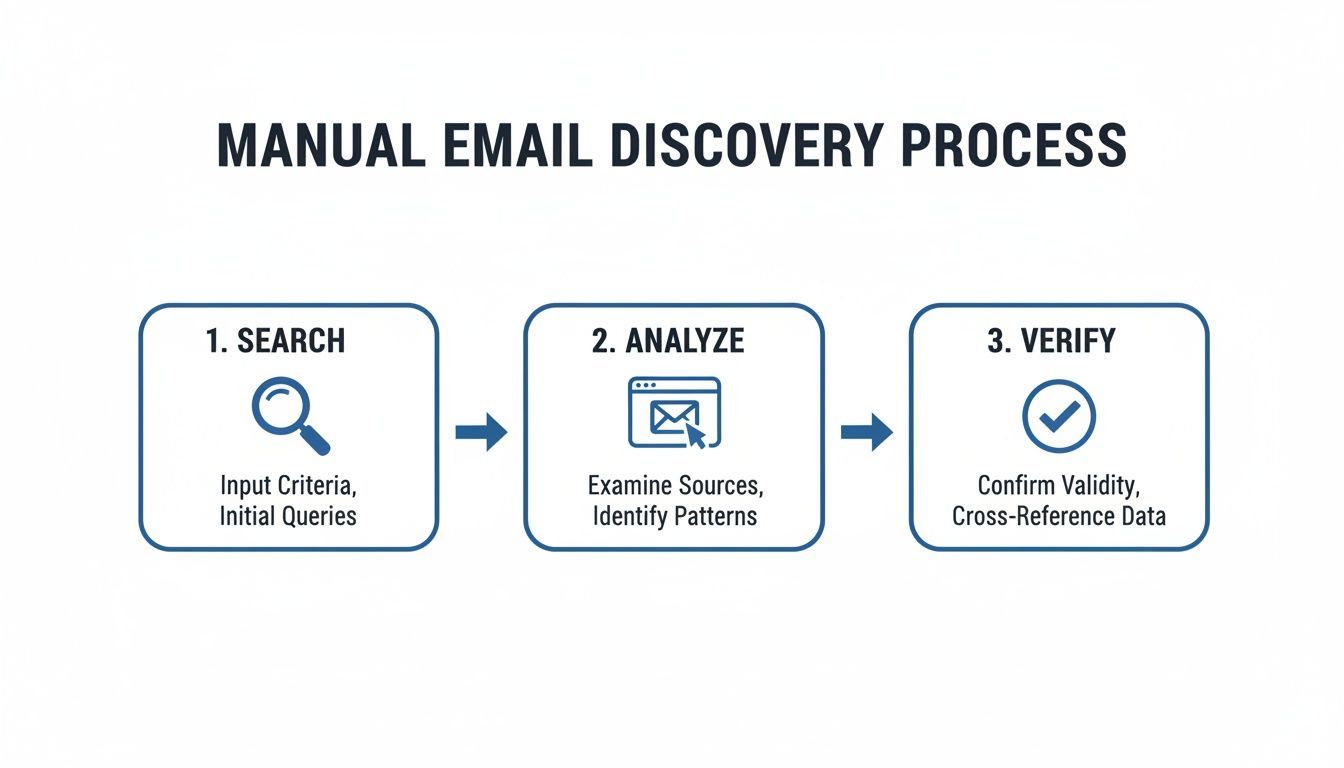
Automation takes this often frustrating process and executes it in seconds. This gives you back valuable time to actually focus on outreach, not digging for data.
The best tools don’t just find an email; they enrich the entire contact record. They can pull in extra data like company size, industry, and even direct-dial phone numbers, giving you a much richer profile to work with.
Why Real-Time Verification Is Non-Negotiable
Finding an email is only half the battle. Firing off a message to an unverified address is a surefire way to wreck your sender reputation. High bounce rates are a massive red flag for email providers like Google and Microsoft, signaling that you might be a spammer. That’s how your future campaigns end up in the junk folder.
Real-time verification is the crucial step that protects your deliverability. When a tool verifies an email, it’s essentially pinging the mail server to confirm the address is active and can receive mail—without actually sending anything.
This process is your first line of defense against dirty data. A verified email is a deliverable email, which means your message actually has a fighting chance of being seen by the right person.
This is where the right tools make a huge difference. For instance, B2B marketers consistently report email as their most critical channel, with 78% integrating it into multichannel strategies. Tools like Add to CRM provide real-time verification with 96% accuracy across 220 million professionals, slashing bounce rates and protecting your domain.
To get into the nuts and bolts of this process, check out our full guide on how to verify email addresses and keep your sender score healthy.
A Real-World Automation Scenario
Let's walk through a practical example. An SDR needs to build a list of 50 VPs of Sales at SaaS companies with 100-500 employees.
The Manual Way:
- Spend hours hunting through professional networks and Google.
- Jump between dozens of company websites to guess email patterns.
- Use a separate tool to verify each guessed email, one by one.
- Manually copy and paste the contact's name, title, company, and verified email into a spreadsheet or CRM.
This whole process could easily burn an entire afternoon, with zero guarantee of accuracy.
The Automated Way with Add to CRM:
- The SDR runs a filtered search on a professional networking site.
- As they scroll through the results, the Add to CRM extension identifies each person.
- With one click on a prospect's profile, the tool finds and verifies their email, enriches the profile with company data, and checks for duplicates in the CRM.
- Another click saves the complete, verified record directly to Salesforce or HubSpot.
What took hours is now done in under 30 minutes. This isn't just a small efficiency boost; it’s a fundamental shift that lets sales teams spend their time selling, not searching. That massive leap in productivity translates directly to more conversations, more demos, and a much healthier pipeline.
You found a verified business email. That's a huge win, but it's only half the battle.
The real challenge—and where most sales teams get bogged down—is getting that data into your CRM without turning it into a time-sucking, error-prone mess. The old routine of manually copy-pasting names, titles, and emails isn't just tedious; it’s a recipe for bad data and a massive drain on productivity.
Modern prospecting workflows kill this painful step. Instead of treating data discovery and data entry as two separate tasks, the right tools merge them into a single, seamless action. This turns what used to be a multi-minute chore into a one-click process, saving your team countless hours.
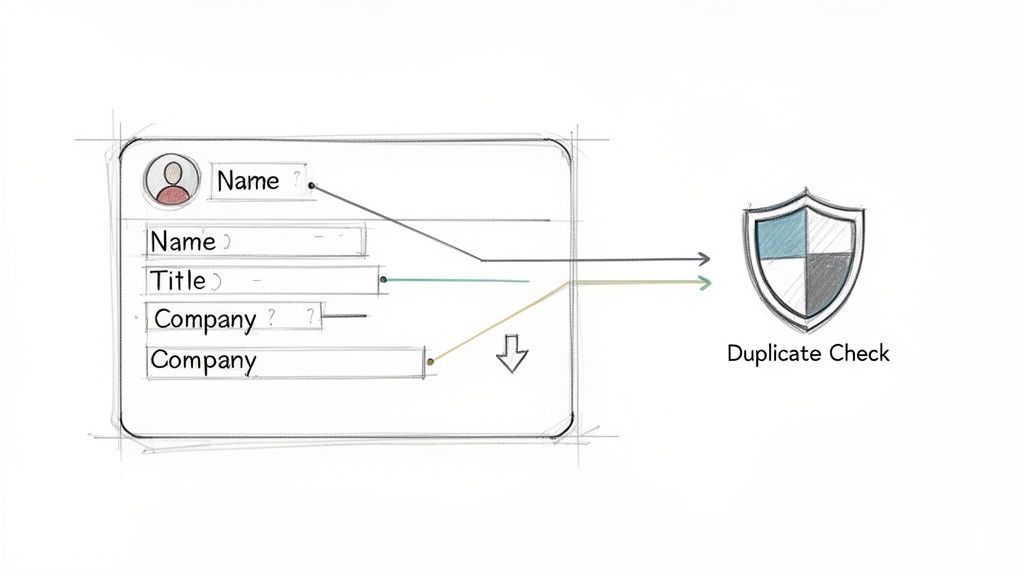
Preventing Data Clutter with Automatic Duplicate Checks
A clean CRM is a powerful CRM. But every time a rep manually adds a new contact, you're rolling the dice on creating a duplicate record. Over time, these dupes pile up, polluting your database, skewing reports, and causing embarrassing mix-ups where multiple reps are unknowingly chasing the same person.
This is why automatic duplicate detection is a non-negotiable feature. When you use an integrated tool to add a new prospect, it should instantly scan your existing CRM records—whether that’s HubSpot, Salesforce, or another platform.
A smart system checks for matches based on a few key identifiers:
- Email Address: The most reliable unique ID for any contact.
- Name and Company: Cross-references the prospect's full name with their current organization.
- Profile URL: Uses the source URL from a professional network or other websites to spot existing records.
If a match pops up, the tool alerts you immediately. This simple safeguard prevents data clutter before it even starts, preserving the integrity of your database and ensuring your team works from a single source of truth.
Maintaining a clean database isn't just about good housekeeping. It's about empowering your sales team with reliable data they can trust, which directly translates to more effective and personalized outreach.
Ensuring Data Accuracy with Custom Field Mapping
Getting the basic contact info into your CRM is great, but what about all the other critical data points? Details like company size, industry, specific job titles, and lead source are essential for segmentation, lead routing, and accurate reporting. Manually typing this stuff in is where mistakes happen and crucial context gets lost.
This is where custom field mapping becomes a RevOps manager's best friend. It lets you create a direct bridge between the data you find online and the specific fields in your CRM.
For instance, you can set up rules to make sure that:
- A prospect’s industry automatically populates the "Industry" field in Salesforce.
- The number of employees from their company profile fills the "Company Size" field in HubSpot.
- The lead source is automatically tagged as "Prospecting" or another custom value.
This level of control ensures every new record is complete and correctly categorized from the get-go. By standardizing data entry, you eliminate guesswork for your reps and give your entire organization richer, more structured data to work with. For teams looking to organize their data systematically, our guide on how to import contacts lists provides a structured approach to building a clean and usable database from the start.
Ultimately, seamless CRM integration does more than just save time. It transforms your prospecting from a scattered, manual process into a structured, scalable system—one that turns verified emails into real sales opportunities. This disciplined approach is the foundation for predictable pipeline growth.
Keeping Your Data Clean and Compliant
Finding a business email is just the first step. The real challenge? Keeping that data useful. In B2B sales, the way you source and manage your contacts is every bit as important as the contacts themselves. If you want to build a prospecting engine that lasts, you have to nail both data quality and privacy.
The biggest enemy of a healthy CRM is data decay. It happens faster than you think. People switch jobs, companies restructure, and email addresses go dark. Firing off emails to a stale list doesn't just waste time—every bounce chips away at your sender reputation. Continuous verification isn't just a nice-to-have; it's a fundamental part of modern outreach.
Staying on the Right Side of GDPR
Privacy rules like the General Data Protection Regulation (GDPR) can sound scary, but they don't outlaw B2B prospecting. The key concept to understand is legitimate interest.
This principle allows you to process personal data (like a work email) as long as you have a genuine business reason that doesn't override the individual's own rights. For sales, this usually means your outreach needs to be relevant and potentially beneficial to the person you’re contacting in their professional role.
One of the biggest myths about GDPR is that you need explicit consent for every B2B email. Under legitimate interest, you can proactively reach out, provided your message is relevant to their job and you give them a clear way to opt out.
To stay compliant, your entire process for finding and using emails should be built on transparency and respect.
- Source Responsibly: Stick to publicly available business information or use data providers who are themselves compliant.
- Be Transparent: In your first email, be crystal clear about who you are and why you're getting in touch. No mystery meat emails.
- Offer an Easy Opt-Out: Every single message must include a simple, one-click way for people to unsubscribe.
This approach not only minimizes risk but also builds trust from the very first touchpoint. For anyone in Revenue Operations, keeping the CRM clean is a constant battle, involving meticulous duplicate checks and ongoing data enrichment. It’s a huge deal, especially when 77% of consumers expect to hear from brands via email and 31% of B2B marketers see email as their top channel for growth. For a closer look at the numbers, Omnisend has a great breakdown of email marketing stats.
Upholding Data Quality for the Long Haul
Your database is your most valuable sales asset. When it’s clean, your team works with accurate info, leading to sharper personalization, better deliverability, and conversations that actually go somewhere. But keeping it clean requires a proactive game plan.
The best strategy is to stop bad data from getting into your system in the first place. Use tools that verify emails in real-time and automatically flag duplicates as you prospect. It’s way easier to block a bad record at the door than to hunt it down and clean it up later.
Of course, some duplicates will inevitably slip through. That’s why having a clear cleanup process is so important. We've put together a guide with some effective strategies on how to merge duplicates in your contact list.
By combining ethical sourcing with disciplined data hygiene, you’re not just finding emails—you’re building a prospecting engine that runs with integrity. This protects your brand, builds rapport with potential customers, and makes sure your hard work actually pays off.
23 CRMs supported. Free to start
AddToCRM finds verified emails, phone numbers, and job titles on LinkedIn® — then adds them to your CRM in one click.
Get 5 Free LookupsCommon Questions About Finding Business Emails
Even with the best game plan, you'll run into questions out in the wild. Let's tackle the most common ones we hear from sales reps, founders, and marketers trying to build their lists.
Is Sending Cold Emails to Prospects Actually Legal?
This is the big one, and for good reason. The short answer? Yes, B2B cold emailing is generally legal in most places, including the U.S., but you absolutely have to follow the rules.
In the United States, the key piece of legislation is the CAN-SPAM Act. The law doesn't demand you get prior consent for B2B outreach, but it does lay down some clear, non-negotiable rules for any commercial message.
Every single email you send must have:
- Honest Header Info: Your "From" and "Reply-To" fields have to be accurate and identify you or your company. No funny business.
- A Clear Subject Line: The subject can't be misleading. It needs to reflect what's actually in the email.
- Identification as an Ad: You have to clearly and conspicuously state that the message is an advertisement.
- Your Physical Address: A real, valid postal address for your business has to be in there.
- A Simple Way to Opt-Out: You must give recipients a straightforward way to unsubscribe from all future emails from you.
Don't take this lightly. Violating the CAN-SPAM Act can get incredibly expensive, with penalties hitting over $53,000 per email. The law applies to all commercial messages, B2B included. Following the rules isn't just about dodging fines; it’s about building trust and looking professional right from the first touchpoint.
How Accurate Are Email Finder Tools, Really?
The accuracy of email finder tools is all over the map, but the good ones are incredibly reliable. Top-tier platforms consistently hit verification accuracy in the 95-98% range. That level of precision is critical for protecting your sender reputation and making sure your emails actually land.
So, what separates a great tool from a mediocre one? It all comes down to the verification process.
The most dependable tools don't just guess an email format. They run a real-time check to confirm the address is active and ready to receive mail. This usually involves a few steps behind the scenes:
- Pattern Analysis: The tool figures out the common email structures for a company's domain (like {first}.{last}@company.com).
- Server Ping: It sends a quick signal to the company's mail server to check if the address exists, all without sending an actual email.
- Data Cross-Referencing: It compares the email it found against a massive database of known professional contacts to add another layer of confidence.
While no tool on earth can promise 100% accuracy—people change jobs, and data gets old—using a reputable service with a high verification rate is the single smartest thing you can do to get your outreach into the right inbox.
What’s the Best Way to Find Emails for a Startup?
When you're running a startup, budgets are tight and every single lead feels precious. The best strategy is a mix of hustle and smart automation. You don't have to choose between manual and automated methods—use both.
Start by getting your hands dirty with the manual techniques we covered earlier. Master advanced Google searches and get good at educated guessing to land your first few high-value contacts. It costs nothing but your time and builds fantastic prospecting habits.
Once you start seeing some revenue, it's time to invest in an affordable, scalable email finder tool. Look for platforms that offer a free tier or a low-cost entry plan. This lets you put the process on autopilot as you grow, freeing up your small team to focus on what really matters: running demos and closing deals. Many tools even give you a handful of free credits every month, which is perfect for a startup just getting its outreach off the ground.
Can I Find Bulk Emails for an Entire Company List?
Absolutely. Many advanced email finders are built for this exact purpose. They let you upload a list of names and company domains—usually as a CSV file—and the tool will automatically hunt down and verify all the corresponding business emails.
This is a game-changer for scaling your outreach campaigns fast. Instead of hunting down contacts one by one, you can process hundreds or even thousands of records in just a few minutes.
But here's a word of caution: with great power comes great responsibility. Blasting a generic message to a massive list is a surefire way to get ignored and marked as spam. Always segment your bulk lists and personalize your outreach. The goal isn't just to send more email; it's to send more relevant email.
This is more important than ever when you think about the sheer volume of noise out there. Projections show there will be 4.6 billion global email users by 2025, with daily traffic soaring to 376 billion messages. If you want to stand out, you need to be relevant. Dig into the numbers yourself by checking out these key email marketing statistics on Omnisend.
Ready to stop wasting hours on manual prospecting and start building your pipeline faster? Add to CRM turns any online profile into a clean, verified contact in your CRM with just one click. Save time, eliminate bad data, and give your sales team the power to focus on what they do best—selling.
Start saving time and closing more deals.
Find contact info for your prospects on the #1 business social network and add them to your CRM with 1-click.

 Loading...
Trusted by 1000s of founders, SDRs & more
